
Overview
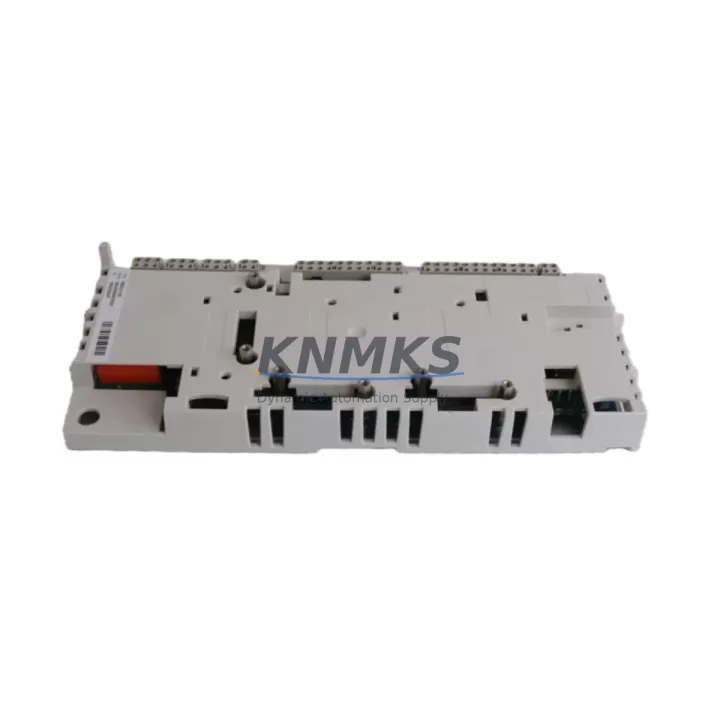
ABB RDCU-12 3AUA0000036521 Migration-Ready Drive Control Unit: Legacy ACS800 System Retrofit & Upgrade
The ABB RDCU-12 (part number 3AUA0000036521) is a migration-ready drive control unit engineered for direct replacement and compatibility upgrade within the ABB ACS800 variable frequency drive platform. As industrial facilities face the end-of-life cycle of legacy ACS800 drives and their associated control boards, the RDCU-12 provides a validated, drop-in solution that preserves existing wiring infrastructure, retains program logic compatibility, and minimizes unplanned downtime during the transition. Whether you are managing a planned retrofit of a petrochemical pump station, upgrading a manufacturing conveyor line, or restoring a critical infrastructure drive after an unexpected failure, the RDCU-12 is a proven replacement that engineering teams can deploy with confidence.
The RDCU-12 serves as the central intelligence of the ACS800 drive, handling speed reference processing, motor control algorithms, fieldbus communication, and I/O coordination. When the original RDCU-02 or RDCU-04 control boards reach end-of-support or suffer hardware failure, the RDCU-12 is the recommended upgrade path. It supports the same DDCS fiber-optic communication links used in multi-drive configurations, ensuring that existing drive-to-drive and drive-to-controller topologies remain intact without rewiring the control cabinet.
Before initiating a replacement, engineers should verify several key parameters to ensure a seamless migration. Power supply compatibility within the ACS800 chassis must be confirmed — the RDCU-12 draws its operating voltage from the drive’s internal APOW power supply board, and the existing APOW-01 or compatible variant must be in serviceable condition. Terminal block wiring on the RDCU-12 follows the standard ACS800 I/O mapping, but technicians should cross-reference the existing wiring diagram against the RDCU-12 terminal layout to confirm analog input scaling, digital input assignments, and relay output configurations before powering up.
Backplane interface alignment is critical. The RDCU-12 connects to the ACS800 main circuit board via the standard JCU connector interface. Confirm that the drive chassis backplane is free of corrosion or mechanical damage before seating the new control unit. Module addressing, particularly in multi-drive or master-follower configurations using the DDCS protocol, must be re-entered after replacement since the RDCU-12 ships with factory-default node addresses. Fieldbus adapter modules such as the RFBA-01 (for PROFIBUS-DP) or RCAN-01 (for CANopen) mounted on the RDCU-12 option slots must be re-parameterized to match the original network configuration, including baud rate, station address, and process data mapping.
Program compatibility is a primary concern during any control board migration. The RDCU-12 runs ABB’s standard ACS800 firmware, and application macros previously stored on the original control board must be re-uploaded via the DriveWindow Light or DriveWindow 2 PC tool using the standard serial or USB-to-DDCS programming cable. If the original parameter set was backed up to a control panel such as the CDP312R or ACS-CP-C, the parameter restore function can be used to reload all drive parameters in a single operation, significantly reducing commissioning time. Engineers should verify firmware version compatibility between the saved parameter file and the RDCU-12 firmware revision before restoring to avoid parameter mapping conflicts.
HMI panel integration should be validated after replacement. The CDP312R control panel or ACS-CP-C assistant panel connects to the RDCU-12 via the standard panel bus port. Panel display screens, custom parameter views, and fault history logs will reset upon replacement, so documenting the original panel configuration before removal is recommended. In SCADA-integrated systems, the communication link between the RDCU-12 and the upstream PLC or DCS — whether via PROFIBUS, Modbus RTU, or DDCS — must be re-established and tested under live process conditions before returning the drive to automatic control.
Installation space confirmation is straightforward for direct RDCU-12 replacements within existing ACS800 frames (R2 through R8), as the control unit occupies the same mounting position as all previous RDCU variants. No mechanical modifications to the control cabinet are required. Firmware version selection should match the motor control mode in use — DTC (Direct Torque Control) or scalar — and the correct firmware package should be confirmed with the drive’s nameplate data and existing parameter set before flashing.
All RDCU-12 units supplied by KNMKS undergo pre-shipment functional testing, including power-on verification, communication port integrity check, and I/O continuity validation. Each unit is shipped with full ESD protective packaging and is covered by a support terms confirmed by quotation against manufacturing defects. Stock is maintained for immediate dispatch to support emergency replacement scenarios where drive downtime directly impacts production output.
Migration Compatibility Table
| Parameter | RDCU-02 / RDCU-04 (Legacy) | RDCU-12 3AUA0000036521 (Replacement) |
|---|---|---|
| Compatible Drive Platform | ACS800 Series | ACS800 Series (direct replacement) |
| Backplane Interface | JCU Connector | JCU Connector (identical) |
| Fieldbus Option Slots | 2 × option slots | 2 × option slots (RFBA-01, RCAN-01 compatible) |
| Communication Protocol | DDCS Fiber-Optic, PROFIBUS, CANopen | DDCS Fiber-Optic, PROFIBUS, CANopen (full compatibility) |
| Panel Bus Port | CDP312R / ACS-CP-C compatible | CDP312R / ACS-CP-C compatible |
| Programming Interface | DriveWindow Light / DriveWindow 2 | DriveWindow Light / DriveWindow 2 |
| Power Supply Requirement | APOW-01 internal supply | APOW-01 internal supply (no change) |
| Frame Size Compatibility | R2–R8 | R2–R8 (no mechanical modification required) |
| Motor Control Mode | DTC / Scalar | DTC / Scalar (firmware selectable) |
| Support terms | — | support terms confirmed by quotation (KNMKS) |
| Pre-Shipment Testing | — | Power-on, comms port, I/O continuity verified |
| Retrofit Recommendation | End-of-life / discontinued | Recommended upgrade path |
Retrofit Planning for Existing Automation Systems
A successful RDCU-12 retrofit begins well before the unit arrives on site. Maintenance engineers should compile the existing ACS800 parameter backup file, the original wiring diagram, and the fieldbus network topology map as the three foundational documents for the migration plan. In multi-drive systems where the ACS800 operates as a follower in a master-follower chain via DDCS fiber-optic links, the DDCS node address of the failed unit must be documented and re-entered into the RDCU-12 after installation to restore the drive chain without reconfiguring the master controller.
For drives integrated into PROFIBUS-DP networks, the RFBA-01 PROFIBUS adapter mounted in the RDCU-12 option slot must be configured with the correct GSD file, station address, and process data word mapping to match the upstream Siemens S7 or ABB AC500 PLC’s hardware configuration. In CANopen-networked systems, the RCAN-01 adapter requires node ID and baud rate settings that align with the existing network master. These fieldbus parameters are independent of the drive’s main parameter set and must be set manually after the RDCU-12 is installed and powered.
I/O wiring adaptation is typically straightforward for direct RDCU-12 replacements, as the terminal block layout mirrors the legacy RDCU variants. However, engineers should pay particular attention to analog input channel scaling — if the original control board had custom scaling applied to the AI1 or AI2 channels for process feedback signals (such as pressure transmitter or flow meter inputs), these scaling parameters must be re-entered from the parameter backup. Digital input assignments for start/stop, fault reset, and speed reference selection should be verified against the original wiring diagram before the first test run.
In control cabinets where the ACS800 drive shares a panel with an ABB ACS600 or legacy ACS400 drive, the RDCU-12 replacement does not affect the neighboring drives’ operation, but the cabinet’s overall power distribution should be reviewed to confirm that the APOW supply board is not shared across multiple drive units. Signal isolators installed between the RDCU-12 analog outputs and downstream instrumentation should be checked for input impedance compatibility with the RDCU-12’s analog output specifications.
Downtime Control During System Migration
Minimizing production downtime during an RDCU-12 replacement requires a structured pre-outage preparation protocol. The most effective approach is to complete all parameter backup, wiring documentation, and fieldbus configuration preparation during normal operation, so that the physical replacement and recommissioning can be executed within a single planned maintenance window — typically two to four hours for an experienced drive technician.
Before de-energizing the ACS800 drive, confirm that the upstream process can be safely held in a controlled state — either by switching to manual bypass, holding the process at a stable setpoint, or coordinating with the DCS operator to place the control loop in manual mode. This protects the original program logic in the PLC or DCS from generating fault alarms during the drive outage. The CDP312R or ACS-CP-C panel should be used to perform a full parameter upload to the panel memory immediately before shutdown, providing a local backup independent of the PC-based DriveWindow backup.
After installing the RDCU-12 and restoring power, the recommended commissioning sequence is: (1) restore parameters from panel or DriveWindow backup, (2) verify motor nameplate data entries, (3) confirm fieldbus adapter node addresses and communication status, (4) perform a no-load motor identification run if the motor control mode is DTC, and (5) execute a controlled test run at reduced speed before returning to full automatic operation. This sequence ensures that each layer of the control system — from motor control to fieldbus communication to HMI display — is verified before the drive is returned to production service, reducing the risk of a second unplanned outage caused by a configuration error.
For critical applications where even a two-hour outage is unacceptable, KNMKS recommends maintaining a pre-configured spare RDCU-12 with the site’s standard parameter set pre-loaded, enabling a hot-swap replacement in under 30 minutes. Stock availability is maintained for immediate dispatch, and the support terms confirmed by quotation cover the replacement unit from the date of shipment.
Retrofit Support FAQ
Q: Is the RDCU-12 (3AUA0000036521) a direct drop-in replacement for the RDCU-02 and RDCU-04?
A: Yes. The RDCU-12 is mechanically and electrically compatible with all ACS800 frame sizes (R2–R8) that previously used the RDCU-02 or RDCU-04 control boards. The JCU backplane connector, terminal block layout, and option slot positions are identical. No mechanical modifications to the drive chassis or control cabinet are required.
Q: Do I need to re-enter all drive parameters after replacing the RDCU-12?
A: Yes, the RDCU-12 ships with factory-default parameters. If a parameter backup was saved to the CDP312R or ACS-CP-C control panel, parameters can be restored in a single operation via the panel’s parameter download function. Alternatively, DriveWindow Light or DriveWindow 2 can be used to restore a previously saved parameter file via the programming cable connection.
Q: What pre-shipment testing is performed on each RDCU-12 unit?
A: Every RDCU-12 unit supplied by KNMKS undergoes power-on functional verification, communication port integrity testing (DDCS fiber-optic and panel bus), and I/O terminal continuity checks before dispatch. Units are shipped in ESD-protective packaging with a support terms confirmed by quotation covering manufacturing defects from the date of shipment.
Q: How long does it typically take to complete an RDCU-12 replacement and recommission the drive?
A: For a technician familiar with the ACS800 platform, a planned replacement with a pre-prepared parameter backup typically requires two to four hours from drive shutdown to return-to-service. Emergency replacements using a pre-configured spare unit can be completed in under 30 minutes. KNMKS maintains stock for immediate dispatch to support both planned and emergency replacement scenarios.
© 2026 KNMKS. All rights reserved.
Original Source: https://knmks.com
Contact: admin@knmks.com | +86 18359268345
Product Identification
- Brand / Ecosystem
-
ABB
ABB - Model / Series
-
RDCU-12-3AUA0000036521
S800 Series - Product Family
- Variable Frequency Drives
- Availability Status
- Available on request after model and quantity confirmation
- Inquiry Type
- B2B RFQ, replacement inquiry and project spare-part request
- Pre-Quote Check
- Exact SKU, brand, series, quantity, nameplate photos and destination country are checked before quotation
System Path
Where this product fits in the KNMKS automation structure.
Specification & Inquiry Focus
- Drive range
- AC drives, VFDs and accessories
- Common needs
- Voltage, kW/HP and load type
- Project support
- Motor control, energy saving and spares
Buyer Confirmation
Information KNMKS checks before replying.
- Exact model
- RDCU-12-3AUA0000036521
- Brand / ecosystem
- ABB
- Product family
- Variable Frequency Drives
- Application note
- Replacement, maintenance, project build or spare-part list
- Useful photos
- Nameplate, installed unit, cabinet layout or connector side
- Delivery details
- Quantity, destination country and target schedule
Document Support
Files and notes can be confirmed during quotation.
- Product photos or nameplate confirmation when available
- Packing and delivery notes before quotation confirmation
- Support scope and delivery terms confirmed per inquiry
- Export document coordination for qualified B2B requests
Inquiry Support
- Input/output voltage and kW/HP confirmation
- Energy-saving motor control inquiry
- Accessory and spare-unit support
What to Send Us
- Brand and exact model number: ABB RDCU-12-3AUA0000036521
- Quantity and required delivery time
- Application, replacement requirement or nameplate photo
- Destination country and shipping preference
RFQ Preparation
This is a product inquiry page built for RFQ communication.
Fast Model Check
Send this model to KNMKS for confirmation.
Include quantity, destination country and photos if this is a maintenance replacement. The inquiry will be saved with a reference number after submission.
Brand & Compatibility Note
KNMKS displays automation product information for well-known industrial brand ecosystems and compatible replacement references. Brand names are used for product identification and compatibility reference only; final availability and commercial terms are confirmed per quotation.
 Manufacturing
 Machine Tools
 Packaging
 Energy & Power
 PLCs & Controllers
 HMI & Displays
 Servo Systems
 Sensors