
Overview
ABB RDCO-02C Maintenance-Ready Spare for ACS800 Automation
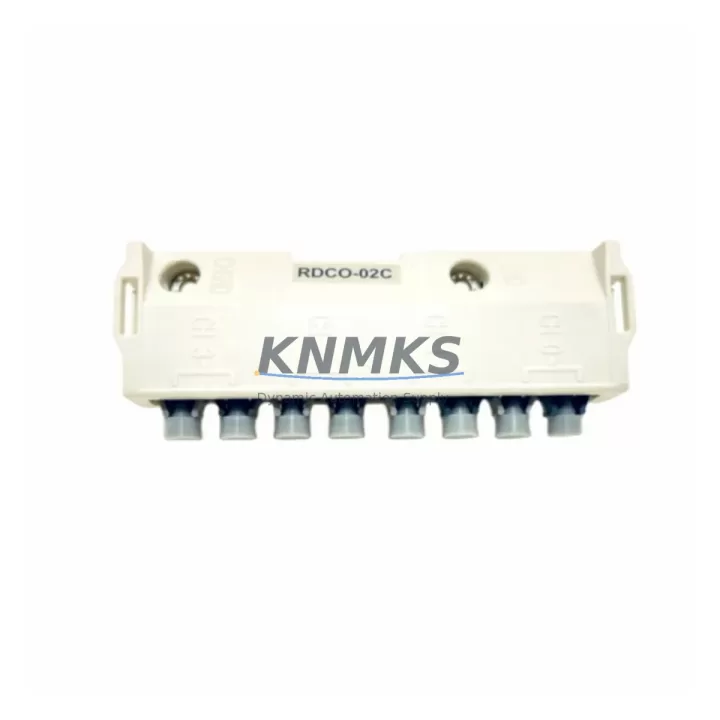
The ABB RDCO-02C is a DDCS (Distributed Drives Communication System) fiber optic option board designed for the ACS800 series variable frequency drives. As a critical communication interface between the drive and the master controller — typically an ABB AC800M DCS, a PROFIBUS master, or a DriveWindow PC tool — the RDCO-02C enables high-speed, noise-immune data exchange across the fiber optic ring. In industrial environments where electromagnetic interference from motors, welding equipment, and high-voltage switchgear is a constant challenge, the fiber optic link provided by the RDCO-02C is not a luxury — it is a reliability requirement.
For maintenance engineers managing ACS800 drive fleets in paper mills, steel plants, cement production lines, marine propulsion systems, and chemical processing facilities, having a verified RDCO-02C spare on the shelf is a fundamental part of any responsible uptime strategy. Drive communication faults caused by a failed RDCO-02C can halt an entire production line within seconds. With a replacement unit pre-staged and tested, recovery time can be reduced from days to under two hours.
Spare Maintenance Table
| Part Number | RDCO-02C |
| Brand | ABB |
| Series Compatibility | ACS800 Single Drive, ACS800 Multi-Drive, ACS800-04, ACS800-07, ACS800-11, ACS800-17 |
| Function | DDCS Fiber Optic Communication Option Board |
| Communication Protocol | DDCS (Distributed Drives Communication System) via fiber optic ring |
| Fiber Optic Channels | CH0 (Master link), CH1, CH2, CH3 (Follower / I/O extension links) |
| Connector Type | HFBR-type plastic fiber optic connectors |
| Installation Slot | Option slot on ACS800 control board (RMIO) |
| Power Supply | Supplied by host drive control board |
| Operating Temperature | 0°C to +55°C (storage: -40°C to +70°C) |
| Origin | Finland |
| Application Environment | Industrial automation, process control, multi-drive systems, crane & hoist, marine |
| Maintenance Recommendation | Inspect fiber connectors for contamination every 12 months; replace if BER errors increase |
| Support terms | 12 Months — tested before dispatch, full functional verification |
Maintenance Planning for Continuous Operation
When an RDCO-02C fault is diagnosed — typically surfaced as a DDCS communication error, a CH0 link fault, or a drive-to-master timeout alarm — the root cause is rarely the board alone. A thorough site investigation should include the following components before and after replacement:
Begin with the RMIO control board (the main control board of the ACS800), which hosts the RDCO-02C in its option slot. If the RMIO has suffered a power surge or moisture ingress, replacing only the RDCO-02C may not restore communication. Inspect the RMIO’s 24 VDC auxiliary power input and verify that the APBU-44C or APBU-12C pulse encoder interface unit — if installed — is also functioning correctly, as these share the same fiber ring topology.
Check the fiber optic cables connecting the RDCO-02C to the master controller or to adjacent drives in the ring. Plastic optical fiber degrades over time, especially in high-UV or high-temperature cable trays. Dirty or cracked HFBR connectors are a leading cause of intermittent DDCS faults that are often misdiagnosed as board failures. Clean connectors with an appropriate fiber optic cleaning kit before condemning the RDCO-02C.
Verify the 24 VDC control power supply feeding the ACS800 control section. Voltage dips below 20 VDC during motor start sequences can cause the RDCO-02C to drop its fiber link momentarily, generating nuisance faults. An ABB SPBU21 or equivalent redundant 24 VDC power supply module in the control cabinet can eliminate this failure mode.
In multi-drive systems, also inspect the NDBU-95C or NDBU-85C branching unit, which distributes the DDCS fiber ring to multiple drives. A failing branching unit can cause cascading communication faults across all drives on the ring, making it appear that multiple RDCO-02C boards have failed simultaneously. Replacing the branching unit first — before swapping individual drive option boards — can save significant time and cost.
For sites running DriveWindow Light or DriveWindow 2 PC tools for drive parameterization and monitoring, confirm that the USB-to-DDCS adapter (RUSB-02) is also in good condition. A faulty RUSB-02 can prevent successful parameter upload after RDCO-02C replacement, delaying commissioning even after the hardware swap is complete.
Finally, review the ACS800 fuse and circuit breaker protection on the input power side. Overcurrent events that triggered the original communication fault may have also stressed the drive’s internal power supply, which feeds the control board and option modules. A full insulation resistance test and thermal imaging scan of the drive cabinet is recommended as part of any RDCO-02C replacement event.
Site Replacement Workflow
Step 1 — Fault Confirmation: Record the active fault code from the ACS800 panel (e.g., DDCS LINK, CH0 ERR). Download the fault logger via DriveWindow if accessible. Confirm the fault is persistent and not intermittent before proceeding with board replacement.
Step 2 — Safe Isolation: Follow site LOTO (Lockout/Tagout) procedures. Isolate the ACS800 from mains supply and wait for the DC bus to discharge (minimum 5 minutes after power-off, verify with a calibrated DC voltmeter). The RDCO-02C can only be safely removed after full DC bus discharge.
Step 3 — Fiber Optic Disconnection: Label and photograph all fiber optic connections on the RDCO-02C before removal. CH0 is the master link — incorrect reconnection will prevent the drive from joining the DDCS ring. Use a fiber optic cleaning pen on all connectors before reinstalling.
Step 4 — Board Swap: Remove the faulty RDCO-02C from the option slot on the RMIO board. Install the replacement RDCO-02C, ensuring the board is fully seated and the retaining clip is engaged. Reconnect fiber optic cables in the correct channel order.
Step 5 — Parameter Restore: Power up the drive and restore parameters from backup (via DriveWindow or the ACS800 panel). Verify that the DDCS node address and baud rate settings match the original configuration. Confirm CH0 link status shows ONLINE on the drive panel.
Step 6 — Functional Test: Run the drive in local control mode at low speed to confirm communication stability before returning to remote/automatic control. Monitor the DDCS link status for a minimum of 15 minutes under load before signing off the replacement.
Spare Parts Support FAQ
Q1: Is the RDCO-02C compatible with all ACS800 variants?
The RDCO-02C is compatible with the full ACS800 single-drive and multi-drive family, including ACS800-01, ACS800-04, ACS800-07, ACS800-11, and ACS800-17 variants. It installs in the designated option slot on the RMIO control board. Always verify the RMIO firmware version supports the RDCO-02C — firmware versions prior to certain releases may require an update before the board is recognized. Contact our technical team with your drive serial number for compatibility confirmation.
Q2: How is the RDCO-02C tested before shipment?
Every RDCO-02C unit is bench-tested for fiber optic transmitter/receiver integrity, DDCS protocol handshake, and option slot interface continuity before dispatch. Units that fail any test parameter are quarantined and not shipped. A test report is available upon request. All units are shipped with support terms confirmed by quotation coverage from the date of invoice.
Q3: Can you supply RDCO-02C for long-term maintenance contracts or annual MRO stock programs?
Yes. We support long-term supply agreements for maintenance teams managing large ACS800 drive fleets. Blanket orders, consignment stock arrangements, and scheduled delivery programs are available. Contact admin@knmks.com to discuss volume pricing and lead time commitments tailored to your annual maintenance calendar.
Q4: What if my ACS800 system has been discontinued and I cannot source RDCO-02C through standard channels?
The ACS800 series has reached end-of-active-production, but installed base support remains a priority for industrial sites with long asset lifecycles. We maintain dedicated stock of RDCO-02C and related ACS800 option boards to support legacy system life extension programs. If you are planning a 5–10 year life extension for your ACS800 installation, we recommend establishing a minimum spare holding of two RDCO-02C units per drive ring to cover both emergency replacement and scheduled maintenance cycles.
© 2026 KNMKS. All rights reserved.
Original Source: https://knmks.com
Contact: admin@knmks.com | +86 18359268345
Product Identification
- Brand / Ecosystem
-
ABB
ABB - Model / Series
-
RDCO-02C
S800 Series - Product Family
- Variable Frequency Drives
- Availability Status
- Available on request after model and quantity confirmation
- Inquiry Type
- B2B RFQ, replacement inquiry and project spare-part request
- Pre-Quote Check
- Exact SKU, brand, series, quantity, nameplate photos and destination country are checked before quotation
System Path
Where this product fits in the KNMKS automation structure.
Specification & Inquiry Focus
- Drive range
- AC drives, VFDs and accessories
- Common needs
- Voltage, kW/HP and load type
- Project support
- Motor control, energy saving and spares
Buyer Confirmation
Information KNMKS checks before replying.
- Exact model
- RDCO-02C
- Brand / ecosystem
- ABB
- Product family
- Variable Frequency Drives
- Application note
- Replacement, maintenance, project build or spare-part list
- Useful photos
- Nameplate, installed unit, cabinet layout or connector side
- Delivery details
- Quantity, destination country and target schedule
Document Support
Files and notes can be confirmed during quotation.
- Product photos or nameplate confirmation when available
- Packing and delivery notes before quotation confirmation
- Support scope and delivery terms confirmed per inquiry
- Export document coordination for qualified B2B requests
Inquiry Support
- Input/output voltage and kW/HP confirmation
- Energy-saving motor control inquiry
- Accessory and spare-unit support
What to Send Us
- Brand and exact model number: ABB RDCO-02C
- Quantity and required delivery time
- Application, replacement requirement or nameplate photo
- Destination country and shipping preference
RFQ Preparation
This is a product inquiry page built for RFQ communication.
Fast Model Check
Send this model to KNMKS for confirmation.
Include quantity, destination country and photos if this is a maintenance replacement. The inquiry will be saved with a reference number after submission.
Brand & Compatibility Note
KNMKS displays automation product information for well-known industrial brand ecosystems and compatible replacement references. Brand names are used for product identification and compatibility reference only; final availability and commercial terms are confirmed per quotation.
 Manufacturing
 Machine Tools
 Packaging
 Energy & Power
 PLCs & Controllers
 HMI & Displays
 Servo Systems
 Sensors