
Overview
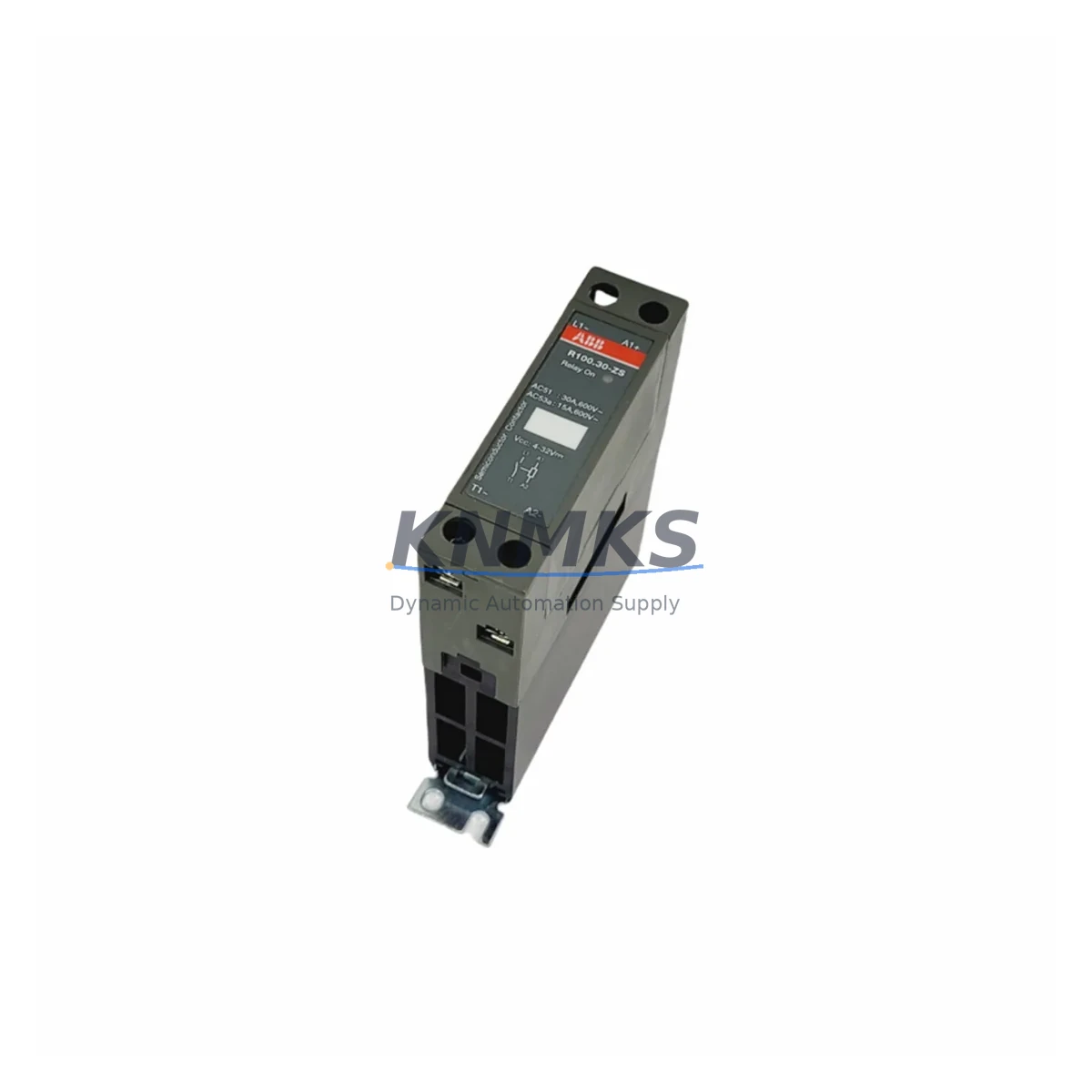
ABB R100.30-ZS Maintenance-Proven Spare Part for Factory Uptime
The ABB R100.30-ZS is an original relay input module engineered for continuous-duty industrial automation environments. Designed for integration within the ABB R100 Series control architecture, this module serves as a critical interface between field-level relay signals and the control system’s logic layer. For maintenance engineers managing aging automation infrastructure, the R100.30-ZS represents a direct, drop-in replacement that restores system integrity without requiring firmware reconfiguration or hardware adaptation. Its DIN rail mounting profile and standardized terminal layout ensure rapid installation during both planned outages and emergency recovery scenarios.
Procurement engineers sourcing replacement modules for legacy ABB R100 systems will find the R100.30-ZS fully stocked and available for immediate dispatch. Each unit undergoes pre-shipment functional testing to verify relay switching performance, input signal thresholds, and terminal continuity — eliminating the risk of receiving a defective module during a critical maintenance window. A support terms confirmed by quotation is included with every unit, covering manufacturing defects and functional failures under normal operating conditions.
Spare Maintenance Table
| Parameter | Specification |
|---|---|
| SKU / Part Number | R100.30-ZS |
| Brand | ABB |
| Series | R100 Series |
| Module Type | Relay Input Module |
| Mounting | DIN Rail (35 mm) |
| Input Type | Relay / Dry Contact Signal |
| Operating Voltage | 24 VDC (nominal) |
| Operating Temperature | 0°C to +55°C |
| Protection Class | IP20 |
| Country of Origin | Germany |
| Weight | 2,120 g |
| Compatibility | ABB R100 Series control systems; verified drop-in replacement |
| Installation | DIN rail snap-fit; screw-terminal field wiring |
| Pre-Shipment Testing | Yes — relay switching, input thresholds, terminal continuity |
| Support terms | 12 Months from date of dispatch |
| Availability | availability confirmed by RFQ; multi-region dispatch supported |
Maintenance Planning for Continuous Operation
When scheduling replacement of the R100.30-ZS during a planned outage or responding to an unplanned fault, maintenance teams should treat the relay input module as part of a broader inspection scope. The R100 Series control cabinet typically houses several interdependent components whose condition directly affects the reliability of the replaced module.
Begin by inspecting the 24 VDC power supply rail feeding the R100 backplane. A degraded or undersized power supply can cause intermittent relay dropout that mimics module failure — replacing the R100.30-ZS without verifying supply voltage stability risks repeat faults within weeks. Alongside the power supply, check the R100 backplane bus connector for oxidation, bent pins, or mechanical stress fractures, particularly in high-vibration environments such as compressor stations or press lines.
Field wiring connected to the relay input terminals should be inspected for insulation degradation, loose ferrules, and incorrect torque on screw terminals. In systems where the R100.30-ZS interfaces with external relay coils or dry-contact sensors, verify that the interposing relay modules in the same cabinet are within their rated switching cycle life. Worn relay contacts upstream of the input module are a common source of false input signals that accelerate module wear.
For systems using ABB R100 communication modules on the same backplane — such as PROFIBUS DP or Modbus RTU interface cards — confirm that the communication bus remains stable after module replacement. A brief bus scan using the engineering workstation will confirm that the new R100.30-ZS is correctly enumerated and that no address conflicts exist. If the control system includes an ABB CP600 or CP400 Series HMI panel, verify that relay status tags mapped to the replaced module are updating correctly after restart.
Additionally, inspect the fuse protection on the 24 VDC input circuit. Blown or weakened fuses are frequently overlooked during emergency replacements and can cause the new module to fail immediately upon energization. Terminal blocks adjacent to the R100.30-ZS — particularly Phoenix Contact or Weidmüller-style feed-through terminals — should be checked for discoloration or heat damage that may indicate prior overcurrent events. Signal isolators or galvanic isolation barriers in the relay input circuit should also be tested to confirm they are not introducing signal attenuation that would affect input recognition thresholds.
Site Replacement Workflow
Replacing the ABB R100.30-ZS on-site follows a structured sequence designed to minimize control system downtime and eliminate configuration errors. Before beginning, confirm that a compatible replacement unit is on hand and that the module’s firmware revision (if applicable) matches the system’s existing configuration baseline.
Step 1 — Isolate and de-energize: Follow site LOTO (Lockout/Tagout) procedures. Isolate the 24 VDC supply to the R100 backplane segment containing the faulty module. Do not remove the module under live power.
Step 2 — Document field wiring: Photograph or record all terminal connections on the R100.30-ZS before disconnecting. Label each wire if not already marked. This step is critical in older installations where as-built drawings may not reflect field modifications.
Step 3 — Remove the faulty module: Release the DIN rail locking tab and slide the module free. Inspect the backplane connector for damage before inserting the replacement unit.
Step 4 — Install the R100.30-ZS replacement: Snap the new module onto the DIN rail and confirm full engagement with the backplane bus connector. Reconnect field wiring per the documented terminal layout, applying correct torque to all screw terminals.
Step 5 — Re-energize and verify: Restore 24 VDC supply. Confirm module power LED status. From the engineering workstation or HMI, verify that all relay input channels are reading correctly and that no fault codes are active on the R100 system bus.
Step 6 — Update maintenance records: Log the replacement date, module serial number, and any observations about the failed unit. Retain the faulty module for root-cause analysis if recurrent failures are suspected.
This workflow supports a target replacement time of under 45 minutes for experienced maintenance technicians, minimizing production line downtime and supporting rapid return-to-service objectives.
Spare Parts Support FAQ
Q1: Is the R100.30-ZS a direct drop-in replacement for the original ABB module?
Yes. The R100.30-ZS is an original ABB relay input module manufactured to the same specification as the unit it replaces. No firmware changes, parameter reconfiguration, or hardware adaptation are required for standard R100 Series installations. Compatibility is verified prior to dispatch.
Q2: What does the support terms confirmed by quotation cover?
The support terms confirmed by quotation cover manufacturing defects and functional failures under normal operating conditions from the date of dispatch. It does not cover damage resulting from incorrect installation, overvoltage events, or physical mishandling. Support requests are processed with priority turnaround to minimize site downtime.
Q3: How is the module tested before shipment?
Every R100.30-ZS unit undergoes pre-shipment functional testing covering relay switching performance, input signal threshold verification, and terminal continuity checks. Test records are available upon request for quality-critical procurement processes.
Q4: Can you support long-term or blanket purchase orders for ongoing maintenance programs?
Yes. Long-term supply agreements and scheduled delivery programs are available for maintenance teams managing multi-site ABB R100 installations. Contact our sales team to discuss volume pricing, reserved stock arrangements, and priority dispatch commitments aligned to your planned maintenance calendar.
© 2026 KNMKS. All rights reserved.
Original Source: https://knmks.com
Contact: admin@knmks.com | +86 18359268345
Product Identification
- Brand / Ecosystem
-
ABB
ABB - Model / Series
- R100.30-ZS
- Product Family
- PLCs & Controllers
- Availability Status
- Available on request after model and quantity confirmation
- Inquiry Type
- B2B RFQ, replacement inquiry and project spare-part request
- Pre-Quote Check
- Exact SKU, brand, series, quantity, nameplate photos and destination country are checked before quotation
System Path
Where this product fits in the KNMKS automation structure.
Specification & Inquiry Focus
- Control platform
- PLC, PAC and modular controllers
- Common needs
- CPU, rack, power and I/O expansion
- Project support
- Replacement, cabinet build and maintenance
Buyer Confirmation
Information KNMKS checks before replying.
- Exact model
- R100.30-ZS
- Brand / ecosystem
- ABB
- Product family
- PLCs & Controllers
- Application note
- Replacement, maintenance, project build or spare-part list
- Useful photos
- Nameplate, installed unit, cabinet layout or connector side
- Delivery details
- Quantity, destination country and target schedule
Document Support
Files and notes can be confirmed during quotation.
- Product photos or nameplate confirmation when available
- Packing and delivery notes before quotation confirmation
- Support scope and delivery terms confirmed per inquiry
- Export document coordination for qualified B2B requests
Inquiry Support
- Model cross-checking before quotation
- CPU, power, rack and expansion module matching
- Support for replacement and project inquiry
What to Send Us
- Brand and exact model number: ABB R100.30-ZS
- Quantity and required delivery time
- Application, replacement requirement or nameplate photo
- Destination country and shipping preference
RFQ Preparation
This is a product inquiry page built for RFQ communication.
Fast Model Check
Send this model to KNMKS for confirmation.
Include quantity, destination country and photos if this is a maintenance replacement. The inquiry will be saved with a reference number after submission.
Brand & Compatibility Note
KNMKS displays automation product information for well-known industrial brand ecosystems and compatible replacement references. Brand names are used for product identification and compatibility reference only; final availability and commercial terms are confirmed per quotation.
 Manufacturing
 Machine Tools
 Packaging
 Energy & Power



 HMI & Displays
 Servo Systems
 Variable Frequency Drives
 Sensors