
Overview
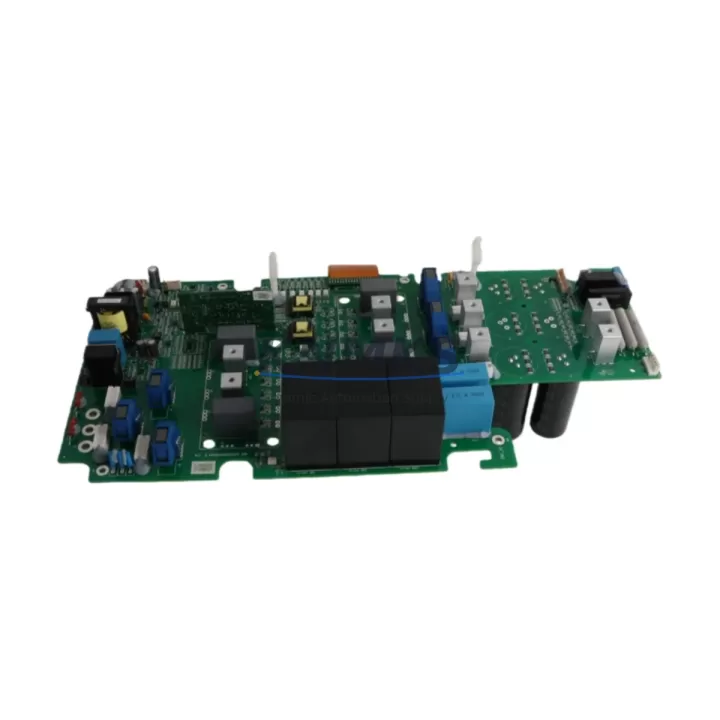
ABB QPWR-5611 Maintenance-Proven Spare Part for Factory Uptime
The ABB QPWR-5611 is an original power supply module engineered for the ABB AC500 PLC platform — one of the most widely deployed programmable automation controllers in energy, manufacturing, petrochemical, and infrastructure sectors. Sourced directly from authorized supply channels and tested prior to shipment, this spare part is designed to support rapid field replacement, minimize unplanned downtime, and sustain continuous production operations.
For maintenance engineers managing aging AC500 control cabinets, the QPWR-5611 represents a critical line item in any preventive maintenance (PM) schedule. Power supply failures are among the leading causes of PLC system shutdowns. Stocking a verified replacement unit eliminates the lead-time risk that can extend a single-shift outage into a multi-day production loss event. Procurement engineers sourcing for MRO inventories will find the QPWR-5611 a reliable, long-term supply commitment with consistent availability and support terms confirmed by quotation coverage from date of shipment.
This listing is fulfilled by KNMKS, a specialist industrial spare parts supplier serving global automation maintenance teams. Every unit undergoes pre-shipment functional verification before dispatch.
Spare Maintenance Table
| Parameter | Specification |
|---|---|
| Part Number / SKU | QPWR-5611 |
| Brand | ABB |
| Series | AC500 |
| Module Type | Power Supply Module |
| Origin | Germany (DE) |
| Compatibility | ABB AC500 PLC Series (PM5xx, PM5xx-ETH CPU families) |
| Mounting | DIN Rail / AC500 Backplane |
| Application Environment | Industrial control cabinets, automation panels, process control systems |
| Operating Temperature | -25°C to +70°C (typical AC500 range) |
| Maintenance Recommendation | Inspect every 12–24 months; replace proactively at first sign of output voltage drift or thermal anomaly |
| Pre-Shipment Testing | Yes — functional verification before dispatch |
| Support terms | 12 Months from shipment date |
| Condition | New / Original |
Maintenance Planning for Continuous Operation
When replacing the QPWR-5611 in an AC500 control cabinet, a thorough maintenance engineer will treat the power supply swap as an opportunity for a broader cabinet health check. Power supply degradation rarely occurs in isolation — it is often accompanied by stress on adjacent components that share the same electrical circuit.
Begin by inspecting the AC500 CPU module (such as the PM564 or PM573) for any fault codes logged prior to the power supply failure. A failing QPWR-5611 can cause intermittent CPU resets or communication dropouts that may have been misdiagnosed as software faults. Next, verify the condition of the AC500 digital and analog I/O modules (e.g., DC532, AX522) — sustained undervoltage from a degrading power supply can corrupt I/O module firmware or damage input protection circuits.
Check all terminal blocks and wiring connections on the backplane bus. Loose or corroded terminals are a common secondary cause of power instability and should be re-torqued to specification during any power supply replacement. If the cabinet includes signal isolators or loop-powered transmitters, verify their 24 VDC supply rail integrity after the new QPWR-5611 is installed.
For cabinets with communication modules such as the CM572-DP (PROFIBUS) or CM589-PNIO (PROFINET), confirm that the fieldbus network recovers cleanly after power restoration — some communication modules require a cold restart to re-establish master-slave relationships. If the system includes an ABB CP600 or CP400 HMI panel, verify that the HMI communication link to the CPU is restored and that no alarm history was lost during the outage.
Finally, inspect any miniature circuit breakers (MCBs) or fuses protecting the 24 VDC distribution rail. A power supply failure caused by a downstream short circuit may have stressed or partially tripped protective devices that appear visually intact but have reduced breaking capacity. Replacing suspect fuses and MCBs as part of the same maintenance event prevents repeat failures within the confirmed support period.
Site Replacement Workflow
Step 1 — Isolation: Follow site LOTO (Lockout/Tagout) procedures. De-energize the AC500 rack and confirm zero voltage on the backplane bus before removing the QPWR-5611.
Step 2 — Documentation: Photograph the existing wiring, terminal assignments, and DIP switch settings on the outgoing module before removal. This is especially important in legacy AC500 installations where as-built drawings may not reflect field modifications.
Step 3 — Module Swap: Remove the failed QPWR-5611 by releasing the DIN rail latch and disconnecting the power input terminals. Install the replacement unit, ensuring the backplane connector seats fully. Reconnect input wiring per the documented terminal assignments.
Step 4 — Verification: Energize the rack and confirm output voltage is within specification using a calibrated multimeter before allowing the CPU to boot. Check the AC500 system log for any residual fault codes. Confirm all I/O modules, communication modules, and HMI panels return to normal operation.
Step 5 — Documentation Close-Out: Record the replacement in the site maintenance log, including the new module serial number, installation date, and technician sign-off. Update the spare parts inventory to trigger a reorder for the consumed QPWR-5611 unit.
This workflow supports a target return-to-service time of under 60 minutes for a prepared maintenance team with the spare unit on-site — compared to 3–10 business days if the replacement must be sourced reactively after a failure event.
Spare Parts Support FAQ
Q1: Is the QPWR-5611 a direct drop-in replacement for all AC500 rack configurations?
The QPWR-5611 is designed for the ABB AC500 platform and is compatible with standard AC500 backplane configurations. Before installation, confirm the input voltage range and output current rating match your specific rack and load requirements. If you are replacing a unit from an older AC500 generation, contact our technical team at admin@knmks.com to verify cross-compatibility.
Q2: What pre-shipment testing is performed on each QPWR-5611 unit?
Every QPWR-5611 dispatched by KNMKS undergoes functional output voltage verification and visual inspection for physical damage before shipment. Units that do not meet specification are quarantined and not dispatched. A test record is available upon request for quality-critical procurement processes.
Q3: What does the support terms confirmed by quotation cover, and how is a support terms claim processed?
The support terms confirmed by quotation cover manufacturing defects and functional failures under normal operating conditions from the date of shipment. It does not cover damage caused by incorrect installation, overvoltage events, or physical mishandling. To initiate a support terms claim, contact admin@knmks.com with your order reference and a description of the fault. KNMKS will arrange return logistics and dispatch a replacement unit upon fault confirmation.
Q4: Can KNMKS support long-term or blanket purchase orders for the QPWR-5611?
Yes. KNMKS supports long-term supply agreements and blanket PO arrangements for MRO and spare parts programs. For facilities operating multiple AC500 systems or managing multi-site maintenance contracts, we recommend establishing a standing order to ensure guaranteed availability and priority allocation. Contact our procurement team at admin@knmks.com or +86 18359268345 to discuss volume pricing and delivery scheduling.
© 2026 KNMKS. All rights reserved.
Original Source: https://knmks.com
Contact: admin@knmks.com | +86 18359268345
Product Identification
- Brand / Ecosystem
-
ABB
ABB - Model / Series
-
QPWR-5611
AC500 Series - Product Family
- PLCs & Controllers
- Availability Status
- Available on request after model and quantity confirmation
- Inquiry Type
- B2B RFQ, replacement inquiry and project spare-part request
- Pre-Quote Check
- Exact SKU, brand, series, quantity, nameplate photos and destination country are checked before quotation
System Path
Where this product fits in the KNMKS automation structure.
Specification & Inquiry Focus
- Control platform
- PLC, PAC and modular controllers
- Common needs
- CPU, rack, power and I/O expansion
- Project support
- Replacement, cabinet build and maintenance
Buyer Confirmation
Information KNMKS checks before replying.
- Exact model
- QPWR-5611
- Brand / ecosystem
- ABB
- Product family
- PLCs & Controllers
- Application note
- Replacement, maintenance, project build or spare-part list
- Useful photos
- Nameplate, installed unit, cabinet layout or connector side
- Delivery details
- Quantity, destination country and target schedule
Document Support
Files and notes can be confirmed during quotation.
- Product photos or nameplate confirmation when available
- Packing and delivery notes before quotation confirmation
- Support scope and delivery terms confirmed per inquiry
- Export document coordination for qualified B2B requests
Inquiry Support
- Model cross-checking before quotation
- CPU, power, rack and expansion module matching
- Support for replacement and project inquiry
What to Send Us
- Brand and exact model number: ABB QPWR-5611
- Quantity and required delivery time
- Application, replacement requirement or nameplate photo
- Destination country and shipping preference
RFQ Preparation
This is a product inquiry page built for RFQ communication.
Fast Model Check
Send this model to KNMKS for confirmation.
Include quantity, destination country and photos if this is a maintenance replacement. The inquiry will be saved with a reference number after submission.
Brand & Compatibility Note
KNMKS displays automation product information for well-known industrial brand ecosystems and compatible replacement references. Brand names are used for product identification and compatibility reference only; final availability and commercial terms are confirmed per quotation.
 Manufacturing
 Machine Tools
 Packaging
 Energy & Power



 HMI & Displays
 Servo Systems
 Variable Frequency Drives
 Sensors