
Overview
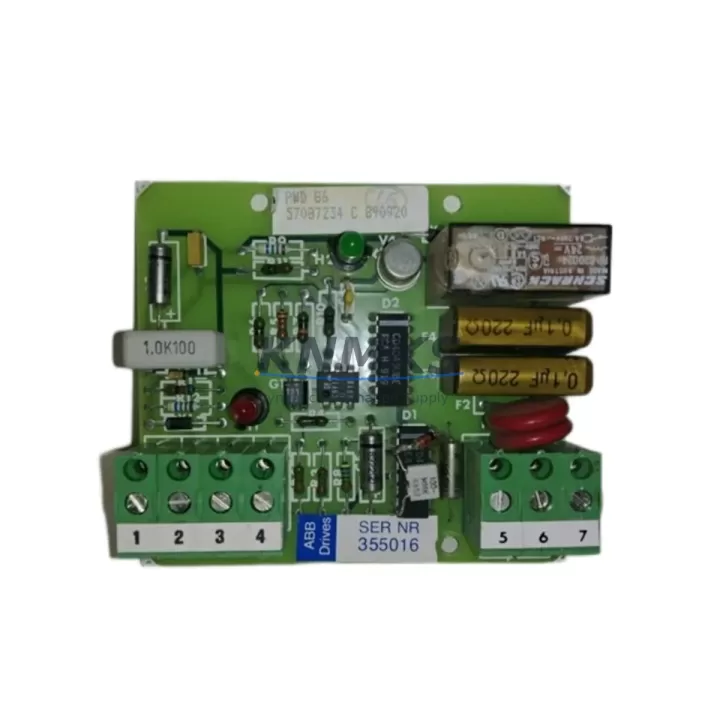
ABB PWD86 57087234 Migration-Ready Watchdog Timer for Legacy Control Systems
The ABB PWD86 57087234 is a watchdog timer module engineered for the AC500 programmable logic controller platform, one of ABB’s most widely deployed control architectures in industrial automation. As legacy AC500 installations age and original watchdog timer modules approach end-of-life, the PWD86 57087234 serves as a verified drop-in replacement that preserves existing program logic, backplane addressing, and field wiring without requiring a full controller overhaul. For plant engineers managing aging control cabinets, this module represents a cost-effective path to extend system service life while maintaining operational continuity.
The PWD86 57087234 monitors CPU execution cycles and triggers a controlled system shutdown or safe-state output if the processor fails to reset the watchdog within the configured time window. This behavior is critical in legacy retrofit scenarios where the original safety interlocks and program scan cycles must be preserved exactly. When replacing a failed or end-of-life watchdog timer in an existing AC500 rack, engineers must confirm that the replacement module’s timeout parameters match the original configuration stored in the PLC program — mismatched watchdog intervals are a common source of nuisance trips during commissioning after a module swap.
Before installation, verify the backplane slot assignment and module address against the original hardware configuration file. The AC500 platform uses a rack-based I/O architecture where each slot carries a fixed logical address; inserting the PWD86 57087234 into an incorrect slot will cause address conflicts that prevent the CPU module — such as the PM573 or PM591 — from recognizing the watchdog function. Always cross-reference the existing rack layout drawing and the PLC project file before powering down the cabinet for the swap.
Migration Compatibility Table
| Parameter | Detail |
|---|---|
| Compatible Platform | ABB AC500 PLC Series |
| Module Function | Watchdog Timer / CPU Supervision |
| Backplane Interface | AC500 Standard Backplane Bus |
| Installation Type | Rack-mounted, DIN Rail compatible chassis |
| Communication Compatibility | Compatible with PROFIBUS, Modbus, CANopen AC500 configurations |
| Replacement Recommendation | Direct replacement for legacy PWD86 watchdog timer modules in AC500 racks |
| Commissioning Key Points | Verify slot address, watchdog timeout value, CPU scan cycle match |
| Firmware Compatibility | Confirm AC500 CPU firmware version supports PWD86 module revision |
| Country of Origin | Germany |
| Support terms | support terms confirmed by quotation — covers manufacturing defects and functional failure |
Retrofit Planning for Existing Automation Systems
A successful retrofit involving the PWD86 57087234 requires a structured pre-outage audit of the existing control cabinet. Begin by documenting the current rack layout, including the positions of the CPU module, power supply module (such as the ABB PS501 or PS560), and all I/O modules occupying adjacent slots. The watchdog timer’s position relative to the CPU is particularly important — some AC500 configurations require the watchdog module to occupy a specific slot range to be recognized during the boot sequence.
Terminal wiring on the PWD86 57087234 should be mapped against the original as-built drawings before any disconnection. In legacy installations, field wiring may have been modified over years of maintenance without corresponding drawing updates, so a physical point-to-point check is strongly recommended. If the cabinet also includes communication modules such as the CM572-DP for PROFIBUS or the CM589-PNIO for PROFINET, confirm that the watchdog timeout is set conservatively enough to accommodate the communication cycle time of those modules — a watchdog interval that is too tight will cause false trips when the network experiences normal latency spikes.
For systems that include analog or digital I/O expansion modules connected via the TB521 or TB541 terminal base units, verify that the I/O module addresses are not affected by the watchdog module replacement. In some AC500 rack configurations, removing and reinserting a module in the same slot can reset the module’s internal configuration if the CPU does not perform a hardware re-scan correctly. Uploading the existing PLC project from the CPU before the swap and redownloading it after the replacement is a recommended safeguard. If the system includes an HMI panel connected via serial or Ethernet, confirm that the HMI communication link remains active during the module swap sequence to avoid operator screen blackouts that could be misinterpreted as a process fault.
Signal isolators installed between the watchdog output and downstream safety relays should also be inspected during the retrofit. Aging signal isolators can introduce response delays that interact unpredictably with a new watchdog module’s output timing. Replacing worn isolators alongside the PWD86 57087234 reduces the risk of intermittent faults after commissioning.
Downtime Control During System Migration
Minimizing unplanned downtime during a watchdog timer replacement requires preparation that begins well before the maintenance window. The most effective approach is to pre-stage the PWD86 57087234 alongside a complete set of spare terminal blocks, DIN rail fasteners, and any required firmware update files for the AC500 CPU. Having all materials on-site before the outage begins eliminates the most common cause of extended downtime: waiting for parts during the maintenance window.
Before powering down the cabinet, perform a full online backup of the PLC program, including all data blocks, retain variables, and hardware configuration files. Store this backup on at least two separate media — a local USB drive and a network-accessible location. If the AC500 CPU supports online program upload, verify that the uploaded program matches the currently running version by comparing checksums or revision timestamps in the programming software.
During the physical swap, work systematically: label all field wiring before disconnection, photograph the terminal layout, and use a torque screwdriver to ensure terminal screws are tightened to the manufacturer’s specification on reassembly. Loose terminals are a leading cause of intermittent faults that appear only after the cabinet is returned to service under thermal cycling conditions. After reinserting the PWD86 57087234 and restoring power, allow the CPU to complete its full boot sequence before downloading the program — forcing a download during the boot sequence can corrupt the module configuration table.
Conduct a staged commissioning test: first verify that the CPU recognizes the watchdog module and reports no hardware faults in the diagnostic buffer, then run the system in manual mode to confirm all I/O channels respond correctly before returning to automatic control. Document the as-found and as-left conditions for the maintenance record, including the watchdog timeout value, firmware versions, and any wiring changes made during the retrofit. This documentation supports future maintenance cycles and reduces commissioning time for subsequent replacements.
Retrofit Support FAQ
Q1: Is the ABB PWD86 57087234 a direct replacement for the original watchdog timer in my AC500 rack?
Yes. The PWD86 57087234 is designed as a compatible replacement for legacy watchdog timer modules in the AC500 platform. Before installation, confirm the slot position, backplane connector condition, and watchdog timeout parameter in your PLC project to ensure a seamless swap without program modification.
Q2: What commissioning steps are required after installing the PWD86 57087234?
After physical installation, power up the rack and verify that the AC500 CPU diagnostic buffer shows no module fault for the watchdog slot. Confirm the watchdog timeout value matches the original configuration. Run the system in manual mode and observe at least one full scan cycle before switching to automatic. Check all communication links — including any PROFIBUS or Modbus connections — to confirm they remain stable under the new module.
Q3: How do I verify firmware compatibility between the PWD86 57087234 and my existing AC500 CPU?
Check the firmware version of your AC500 CPU module (e.g., PM573, PM591) using the ABB Automation Builder or PS501 Control Builder programming software. Cross-reference the CPU firmware version against the PWD86 module’s hardware revision in the ABB compatibility matrix. If the CPU firmware is significantly older than the module revision, a firmware update may be required before the module is recognized correctly. We recommend confirming firmware compatibility before the maintenance window to avoid delays.
Q4: What support terms and pre-shipment testing does the PWD86 57087234 include?
Every ABB PWD86 57087234 unit supplied by KNMKS is covered by a support terms confirmed by quotation against manufacturing defects and functional failure. Prior to shipment, each module undergoes functional verification testing to confirm watchdog output response, backplane communication integrity, and power consumption within specification. Units are packaged in anti-static protective packaging with inspection documentation included. For urgent retrofit requirements, expedited shipping is available — contact our team to confirm lead time and stock availability.
© 2026 KNMKS. All rights reserved.
Original Source: https://knmks.com
Contact: admin@knmks.com | +86 18359268345
Product Identification
- Brand / Ecosystem
-
ABB
ABB - Model / Series
-
PWD86 57087234
AC500 Series - Product Family
- PLCs & Controllers
- Availability Status
- Available on request after model and quantity confirmation
- Inquiry Type
- B2B RFQ, replacement inquiry and project spare-part request
- Pre-Quote Check
- Exact SKU, brand, series, quantity, nameplate photos and destination country are checked before quotation
System Path
Where this product fits in the KNMKS automation structure.
Specification & Inquiry Focus
- Control platform
- PLC, PAC and modular controllers
- Common needs
- CPU, rack, power and I/O expansion
- Project support
- Replacement, cabinet build and maintenance
Buyer Confirmation
Information KNMKS checks before replying.
- Exact model
- PWD86 57087234
- Brand / ecosystem
- ABB
- Product family
- PLCs & Controllers
- Application note
- Replacement, maintenance, project build or spare-part list
- Useful photos
- Nameplate, installed unit, cabinet layout or connector side
- Delivery details
- Quantity, destination country and target schedule
Document Support
Files and notes can be confirmed during quotation.
- Product photos or nameplate confirmation when available
- Packing and delivery notes before quotation confirmation
- Support scope and delivery terms confirmed per inquiry
- Export document coordination for qualified B2B requests
Inquiry Support
- Model cross-checking before quotation
- CPU, power, rack and expansion module matching
- Support for replacement and project inquiry
What to Send Us
- Brand and exact model number: ABB PWD86 57087234
- Quantity and required delivery time
- Application, replacement requirement or nameplate photo
- Destination country and shipping preference
RFQ Preparation
This is a product inquiry page built for RFQ communication.
Fast Model Check
Send this model to KNMKS for confirmation.
Include quantity, destination country and photos if this is a maintenance replacement. The inquiry will be saved with a reference number after submission.
Brand & Compatibility Note
KNMKS displays automation product information for well-known industrial brand ecosystems and compatible replacement references. Brand names are used for product identification and compatibility reference only; final availability and commercial terms are confirmed per quotation.
 Manufacturing
 Machine Tools
 Packaging
 Energy & Power



 HMI & Displays
 Servo Systems
 Variable Frequency Drives
 Sensors