
Overview
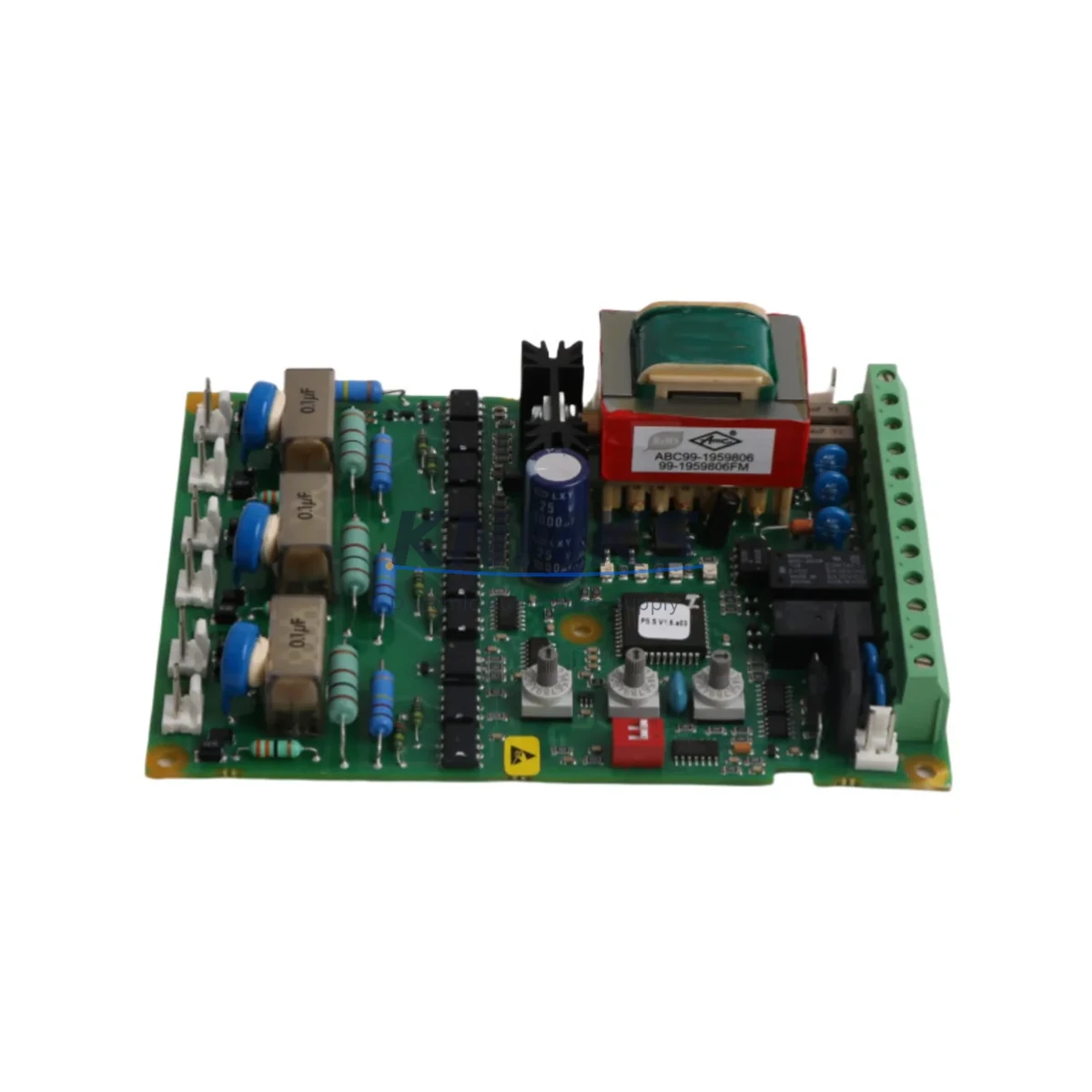
ABB PSPCB-500C/S Migration-Ready Control Board for Legacy Soft Starters
The ABB PSPCB-500C/S (part number 1SFA899020R2500) is a migration-ready control board engineered as a direct replacement for the PSS-500 series soft starter platform. As ABB progressively phases out legacy PSS-500 components, plant engineers and maintenance teams face increasing pressure to source compatible control boards that preserve existing wiring infrastructure, retain PROFIBUS DP communication links, and avoid costly full-drive replacements. The PSPCB-500C/S addresses this challenge by offering a verified drop-in upgrade path that maintains backward compatibility with the PSS-500 chassis, terminal layout, and control logic architecture.
This control board is specifically designed for industrial environments where downtime is measured in production losses and where retrofit decisions must be validated against existing panel space, power budgets, and fieldbus topology. Whether you are managing a conveyor drive system, a pump station, a compressor startup circuit, or a fan control panel, the PSPCB-500C/S delivers the signal integrity and firmware stability required for reliable soft-start sequencing in legacy automation environments.
Migration Compatibility Table
| Parameter | Legacy PSS-500 Control Board | PSPCB-500C/S Replacement | Migration Note |
|---|---|---|---|
| Form Factor | PSS-500 plug-in board | Direct plug-in replacement | No chassis modification required |
| Terminal Wiring | Original PSS-500 terminal block | Compatible — same pinout | Verify control voltage wiring before insertion |
| Communication Protocol | PROFIBUS DP | PROFIBUS DP compatible | Retain existing DP address; re-verify GSD file version |
| Backplane Interface | PSS-500 backplane connector | Matched connector footprint | Inspect backplane pins for corrosion before swap |
| Module Address | DIP switch / software-set | Configurable via DIP or parameter tool | Record original address before removal |
| Firmware Compatibility | PSS-500 firmware baseline | Compatible; verify revision level | Download latest firmware from ABB support portal if needed |
| Installation Space | Standard PSS-500 slot | Same physical dimensions | No panel re-engineering required |
| HMI Screen Mapping | Existing HMI parameter screens | Parameter set retained | Validate HMI tag mapping after board swap |
| Pre-Shipment Testing | — | Function-tested before dispatch | Test report available on request |
| Support terms | — | support terms confirmed by quotation | Covers manufacturing defects; DOA replacement supported |
Retrofit Planning for Existing Automation Systems
Successful integration of the PSPCB-500C/S into a legacy control panel begins well before the physical board swap. Retrofit planning must account for the full control architecture surrounding the PSS-500 soft starter, including upstream power distribution, downstream I/O wiring, and the fieldbus segment connecting the drive to the PLC or DCS.
Start by auditing the 24 VDC control power supply feeding the PSS-500 control circuit. Many aging panels rely on a shared ABB CP-E 24/2.5 or equivalent DIN-rail power supply that may be operating near capacity. Confirm that the supply can sustain the PSPCB-500C/S inrush during initialization without causing voltage sag on adjacent modules. If the panel also houses an ABB CI854 PROFIBUS communication interface module or a legacy S800 I/O cluster, ensure that the fieldbus segment load budget is recalculated after the board replacement.
For panels where the PSS-500 is integrated with an ABB AC500 PLC or a third-party Siemens S7-300 controller via PROFIBUS DP, the GSD file associated with the original control board must be compared against the replacement board’s device description. In some retrofit scenarios, the GSD file version differs between production batches, requiring a brief offline update to the PLC hardware configuration before the new board is recognized on the network. This step is critical and is frequently overlooked during rushed maintenance windows.
Terminal wiring adaptation is another key checkpoint. If the existing panel uses ferrule-terminated control cables routed to the PSS-500 terminal block, inspect each conductor for insulation fatigue, especially in high-vibration environments such as compressor rooms or pump stations. Re-terminate any suspect conductors before inserting the PSPCB-500C/S. Where the panel includes an ABB IOEC4 remote I/O module or a dedicated signal isolator for analog feedback channels, verify that the signal reference ground is common across all modules to prevent ground loop interference after the swap.
HMI screen validation is the final pre-commissioning step. If the plant uses an ABB CP600 operator panel or a third-party SCADA system with soft starter parameter screens, confirm that all parameter tags — motor current limit, ramp time, kick-start torque, and fault history — are correctly mapped to the new board’s register addresses. A brief offline simulation using the ABB Soft Starter Builder tool or equivalent parameter editor will confirm tag alignment before live commissioning.
Downtime Control During System Migration
Minimizing production downtime during a PSS-500 control board replacement requires a structured swap protocol that protects the original program logic, preserves fieldbus continuity, and reduces the risk of commissioning errors under time pressure.
Before initiating the swap, export the full parameter set from the existing PSS-500 using the ABB parameter backup utility or a direct serial connection via the programming cable. Store the backup on a local engineering laptop and a secondary USB drive. This ensures that if the replacement board requires parameter re-entry, the original values are immediately available without relying on paper records or memory.
During the physical swap, isolate the soft starter from the main power circuit using the upstream isolation switch or motor circuit breaker. Do not rely solely on the control circuit isolation — the power section of the PSS-500 must be de-energized before the control board is removed. After inserting the PSPCB-500C/S, restore control power only and verify that the board initializes correctly and appears on the PROFIBUS segment before restoring main power.
For critical production lines where even a brief interruption is unacceptable, consider pre-configuring the replacement board offline using a bench test setup with a 24 VDC supply and a PROFIBUS DP master simulator. This approach allows the new board to be fully parameterized, address-set, and firmware-verified before it enters the panel, reducing live commissioning time to under 15 minutes in most cases. Pair this with a pre-written commissioning checklist covering power-up sequence, fault code verification, motor ramp test, and HMI screen validation to ensure no step is missed under field conditions.
Retrofit Support FAQ
Q1: Is the PSPCB-500C/S a direct drop-in replacement for all PSS-500 control board variants?
The PSPCB-500C/S is designed as a direct replacement for the standard PSS-500 control board slot. However, if your existing installation uses a variant with an extended I/O option or a non-standard communication adapter, confirm the exact part number of the board being replaced before ordering. Our technical team can cross-reference your existing part number against the PSPCB-500C/S specification to confirm compatibility.
Q2: What commissioning steps are required after installing the PSPCB-500C/S?
After physical installation, restore control power and verify that the board appears on the PROFIBUS DP segment with the correct node address. Re-enter or restore the motor parameter set (current limit, ramp time, kick-start settings). Perform a no-load motor ramp test to confirm soft-start sequencing. Validate HMI parameter screens and fault history display. Restore main power and perform a loaded start test under supervision.
Q3: How do I verify firmware compatibility before installation?
Check the firmware revision label on the existing PSS-500 control board before removal. Compare this against the firmware version shipped with the PSPCB-500C/S. If the versions differ, download the matching firmware from the ABB support portal and apply it via the programming cable before installation. Do not install a board with a significantly older firmware revision in a system running a newer PLC program, as parameter register mapping may differ between major firmware versions.
Q4: What does the support terms confirmed by quotation cover, and what is the stock availability?
The PSPCB-500C/S carries a support terms confirmed by quotation covering manufacturing defects and functional failures under normal operating conditions. DOA (dead-on-arrival) units are replaced without charge. Stock is maintained in our warehouse for immediate dispatch, with typical lead time of 1–3 business days for standard orders. For bulk retrofit projects requiring multiple units, contact our sales team to confirm allocation and arrange consolidated shipment.
© 2026 KNMKS. All rights reserved.
Original Source: https://knmks.com
Contact: admin@knmks.com | +86 18359268345
Product Identification
- Brand / Ecosystem
-
ABB
ABB - Model / Series
- PSPCB-500C/S
- Product Family
- Other Components
- Availability Status
- Available on request after model and quantity confirmation
- Inquiry Type
- B2B RFQ, replacement inquiry and project spare-part request
- Pre-Quote Check
- Exact SKU, brand, series, quantity, nameplate photos and destination country are checked before quotation
System Path
Where this product fits in the KNMKS automation structure.
Specification & Inquiry Focus
- Component range
- Breakers, terminals and cabinet accessories
- Common needs
- Model, photo and installation requirement
- Project support
- Maintenance and mixed spare-part inquiry
Buyer Confirmation
Information KNMKS checks before replying.
- Exact model
- PSPCB-500C/S
- Brand / ecosystem
- ABB
- Product family
- Other Components
- Application note
- Replacement, maintenance, project build or spare-part list
- Useful photos
- Nameplate, installed unit, cabinet layout or connector side
- Delivery details
- Quantity, destination country and target schedule
Document Support
Files and notes can be confirmed during quotation.
- Product photos or nameplate confirmation when available
- Packing and delivery notes before quotation confirmation
- Support scope and delivery terms confirmed per inquiry
- Export document coordination for qualified B2B requests
Inquiry Support
- Mixed automation spare parts inquiry
- Cabinet component and accessory support
- Model identification from photos or labels
What to Send Us
- Brand and exact model number: ABB PSPCB-500C/S
- Quantity and required delivery time
- Application, replacement requirement or nameplate photo
- Destination country and shipping preference
RFQ Preparation
This is a product inquiry page built for RFQ communication.
Fast Model Check
Send this model to KNMKS for confirmation.
Include quantity, destination country and photos if this is a maintenance replacement. The inquiry will be saved with a reference number after submission.
Brand & Compatibility Note
KNMKS displays automation product information for well-known industrial brand ecosystems and compatible replacement references. Brand names are used for product identification and compatibility reference only; final availability and commercial terms are confirmed per quotation.
 Manufacturing
 Machine Tools
 Packaging
 Energy & Power

 PLCs & Controllers
 HMI & Displays
 Servo Systems
 Variable Frequency Drives