
Overview
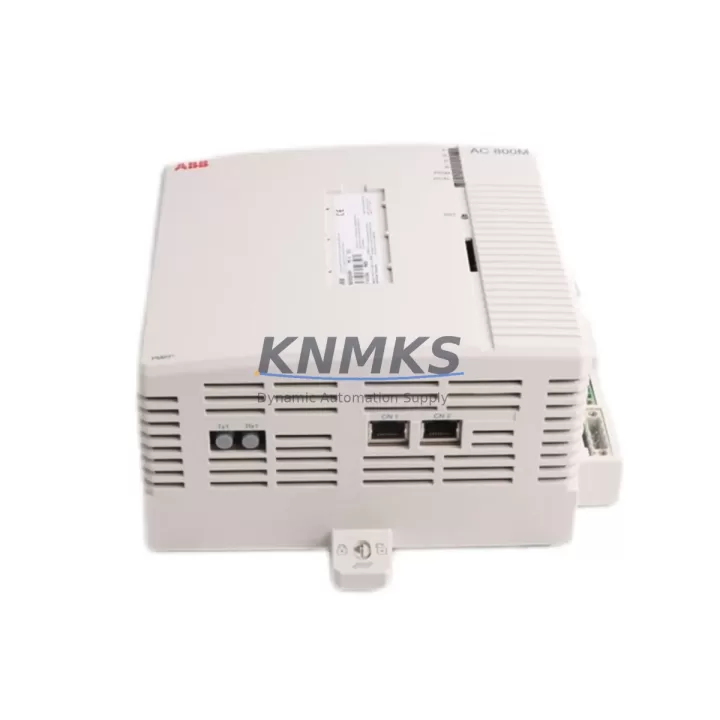
ABB PM891K01 3BSE053241R1 Migration-Ready CPU for Legacy AC500 Systems
The ABB PM891K01 (3BSE053241R1) is a high-performance CPU module designed for the AC500 programmable logic controller platform. As legacy AC500 installations age and original CPU modules approach end-of-life, the PM891K01 serves as a direct migration-ready replacement — preserving existing program logic, communication links, and I/O configurations while delivering improved processing capacity and extended service life. Whether you are managing a planned retrofit, responding to an unplanned failure, or building a strategic spare parts inventory for a multi-site facility, the PM891K01 provides a reliable, tested, and immediately deployable solution.
The PM891K01 operates within the standard AC500 backplane architecture, accepting the same terminal base and I/O expansion modules used in earlier AC500 generations. Engineers migrating from discontinued CPU variants such as the PM864AK01 or PM865K01 will find that the PM891K01 retains full compatibility with the AC500 rack system, eliminating the need for cabinet redesign or backplane replacement. The module supports both PROFIBUS-DP and Modbus RTU/TCP communication protocols natively, ensuring that existing HMI panels, SCADA systems, and field device networks remain operational without protocol conversion hardware.
Before initiating a swap, engineers should verify the following parameters against the existing installation: supply voltage tolerance on the PM-E power supply module, terminal wiring assignments on the active I/O modules (including DC532 digital input and DA501 analog output modules), backplane slot addressing, and the firmware version currently loaded on the replacement unit. ABB’s Automation Builder programming environment supports direct project upload from the PM891K01, allowing technicians to validate program integrity before committing to live operation.
For installations that include CP600 series HMI panels, screen tag bindings and communication driver settings should be reviewed prior to cutover. In most cases, the existing project file transfers without modification, but communication port parameters — particularly baud rate and station address on PROFIBUS segments — must be confirmed to match the legacy configuration. Where the original system used a CM572-DP PROFIBUS master module, the PM891K01 integrates seamlessly within the same rack without requiring additional configuration steps beyond address verification.
Facilities operating mixed-generation AC500 racks — combining older SM500 series I/O with newer SM560 expansion modules — will find that the PM891K01 manages both generations within a single project tree. This backward compatibility is a critical advantage during phased retrofits, where not all I/O modules are replaced simultaneously. The CPU’s extended memory capacity also accommodates larger program structures that may have been constrained on earlier PM8xx variants, providing headroom for future logic additions without requiring another CPU upgrade cycle.
All PM891K01 units supplied by KNMKS are sourced from verified channels, subjected to pre-shipment functional testing, and covered by a support terms confirmed by quotation from the date of delivery. Stock is maintained to support both immediate emergency replacement and scheduled maintenance procurement. Global shipping is available with standard lead times of 3–7 business days for in-stock units.
Migration Compatibility Table
| Parameter | PM891K01 (3BSE053241R1) | Legacy Reference (PM864AK01) | Migration Notes |
|---|---|---|---|
| Platform | AC500 | AC500 | Same backplane — no rack replacement required |
| Communication Protocols | PROFIBUS-DP, Modbus RTU/TCP, Ethernet | PROFIBUS-DP, Modbus RTU | Verify baud rate and station address settings |
| Backplane Interface | Standard AC500 backplane connector | Standard AC500 backplane connector | Direct slot-for-slot replacement |
| Programming Environment | ABB Automation Builder (IEC 61131-3) | ABB Automation Builder / PS501 | Project migration supported; firmware version check required |
| I/O Module Compatibility | SM500 and SM560 series | SM500 series | Backward compatible; phased I/O upgrade supported |
| HMI Compatibility | CP600 series, third-party via Modbus/Ethernet | CP600 series | Review tag bindings and communication driver settings |
| Installation Space | Standard AC500 CPU slot (1 slot width) | Standard AC500 CPU slot | No cabinet modification required |
| Firmware | Pre-loaded; field-upgradeable via Automation Builder | Field-upgradeable | Confirm firmware version compatibility with existing project |
| Support terms | support terms confirmed by quotation from date of delivery — all units pre-shipment tested | ||
Retrofit Planning for Existing Automation Systems
A successful AC500 retrofit begins with a thorough audit of the existing control cabinet. Technicians should document the current slot layout, including the position of the PM-E power supply module, all active I/O modules, and any installed communication modules such as the CM572-DP for PROFIBUS or CM589-PNIO for PROFINET. Photographing terminal wiring before disconnection is strongly recommended, particularly for analog signal modules where channel-to-terminal mapping is critical.
For systems that include signal conditioning between field devices and the PLC rack — such as Phoenix Contact MINI MCR or equivalent signal isolators — verify that the isolator output ranges remain within the input specifications of the replacement I/O modules. Where the original system used a TK501 programming cable for direct CPU connection, the same cable is compatible with the PM891K01, simplifying the initial firmware verification and project upload process.
Power budget confirmation is essential before finalizing the retrofit plan. The PM891K01 draws current from the backplane bus; when combined with the I/O module load, the total draw must remain within the rated output of the installed power supply. If the existing PS501 power supply is operating near its rated capacity, this is an appropriate point to evaluate a power supply upgrade alongside the CPU replacement.
For multi-rack installations connected via the AC500’s internal bus extension, address the master rack CPU replacement first, then verify communication integrity with each expansion rack before returning the system to automatic mode. This sequenced approach minimizes the risk of address conflicts and ensures that the program scan cycle resumes correctly across all connected I/O.
Downtime Control During System Migration
Minimizing production downtime during a CPU replacement requires preparation that begins well before the scheduled maintenance window. The existing program should be backed up from the original CPU using Automation Builder and stored on a local engineering workstation — not solely on removable media. A second backup copy should be archived to a network location as a precaution against workstation failure during the cutover.
Where the process allows, a cold-standby PM891K01 should be pre-loaded with the verified program and configured to the correct communication parameters before the maintenance window opens. This reduces the in-window task to a physical swap, a communication link verification, and a controlled restart — typically achievable within 30 to 60 minutes for a single-rack system.
For processes where even brief interruptions carry significant risk, consider staging the PM891K01 in a parallel test rack alongside the live system. This allows full program validation, HMI screen verification, and communication link testing under realistic conditions before the live cutover. The parallel test approach is particularly valuable in applications where the original program has been modified incrementally over many years and documentation may not fully reflect the current logic state.
After cutover, monitor the first full production cycle carefully, paying particular attention to analog input scaling, PID loop behavior, and any timed sequences that depend on the CPU’s internal clock. These are the areas most likely to surface subtle differences between CPU generations, and early detection allows correction before the issue affects output quality or safety interlocks.
Retrofit Support FAQ
Q1: Is the PM891K01 a direct drop-in replacement for the PM864AK01 and PM865K01?
Yes. The PM891K01 uses the same AC500 backplane interface and occupies the same CPU slot. The existing program can be uploaded directly via Automation Builder. Communication parameters — including PROFIBUS station address and Modbus settings — must be re-entered to match the original configuration. No cabinet modification or backplane replacement is required.
Q2: How do I verify wiring compatibility before replacing the CPU?
The CPU module itself does not have direct field wiring — all I/O connections are made at the terminal base of each I/O module. Wiring compatibility is therefore determined by the I/O modules in the rack, not the CPU. Confirm that all existing I/O modules (digital, analog, and communication) are retained in their original slots and that terminal assignments are documented before the swap.
Q3: What pre-shipment testing is performed on PM891K01 units?
All PM891K01 units supplied by KNMKS undergo functional power-on testing and communication port verification before dispatch. Units are inspected for physical condition, firmware integrity, and backplane connector condition. A support terms confirmed by quotation is provided from the date of delivery, covering manufacturing defects and functional failures under normal operating conditions.
Q4: What is the typical lead time and are units available from stock?
KNMKS maintains in-stock inventory of the PM891K01 to support both emergency replacement and planned maintenance procurement. Standard lead time for in-stock units is 3–7 business days with global shipping available. For large-quantity orders or long-term supply agreements covering 12–36 months of planned consumption, contact the sales team directly to discuss pricing and reservation terms.
© 2026 KNMKS. All rights reserved.
Original Source: https://knmks.com
Contact: admin@knmks.com | +86 18359268345
Product Identification
- Brand / Ecosystem
-
ABB
ABB - Model / Series
-
PM891K01 3BSE053241R1
AC500 Series - Product Family
- PLCs & Controllers
- Availability Status
- Available on request after model and quantity confirmation
- Inquiry Type
- B2B RFQ, replacement inquiry and project spare-part request
- Pre-Quote Check
- Exact SKU, brand, series, quantity, nameplate photos and destination country are checked before quotation
System Path
Where this product fits in the KNMKS automation structure.
Specification & Inquiry Focus
- Control platform
- PLC, PAC and modular controllers
- Common needs
- CPU, rack, power and I/O expansion
- Project support
- Replacement, cabinet build and maintenance
Buyer Confirmation
Information KNMKS checks before replying.
- Exact model
- PM891K01 3BSE053241R1
- Brand / ecosystem
- ABB
- Product family
- PLCs & Controllers
- Application note
- Replacement, maintenance, project build or spare-part list
- Useful photos
- Nameplate, installed unit, cabinet layout or connector side
- Delivery details
- Quantity, destination country and target schedule
Document Support
Files and notes can be confirmed during quotation.
- Product photos or nameplate confirmation when available
- Packing and delivery notes before quotation confirmation
- Support scope and delivery terms confirmed per inquiry
- Export document coordination for qualified B2B requests
Inquiry Support
- Model cross-checking before quotation
- CPU, power, rack and expansion module matching
- Support for replacement and project inquiry
What to Send Us
- Brand and exact model number: ABB PM891K01 3BSE053241R1
- Quantity and required delivery time
- Application, replacement requirement or nameplate photo
- Destination country and shipping preference
RFQ Preparation
This is a product inquiry page built for RFQ communication.
Fast Model Check
Send this model to KNMKS for confirmation.
Include quantity, destination country and photos if this is a maintenance replacement. The inquiry will be saved with a reference number after submission.
Brand & Compatibility Note
KNMKS displays automation product information for well-known industrial brand ecosystems and compatible replacement references. Brand names are used for product identification and compatibility reference only; final availability and commercial terms are confirmed per quotation.
 Manufacturing
 Machine Tools
 Packaging
 Energy & Power



 HMI & Displays
 Servo Systems
 Variable Frequency Drives
 Sensors