
Overview
ABB PM864AK02 Migration-Ready CPU for AC500 Control Systems
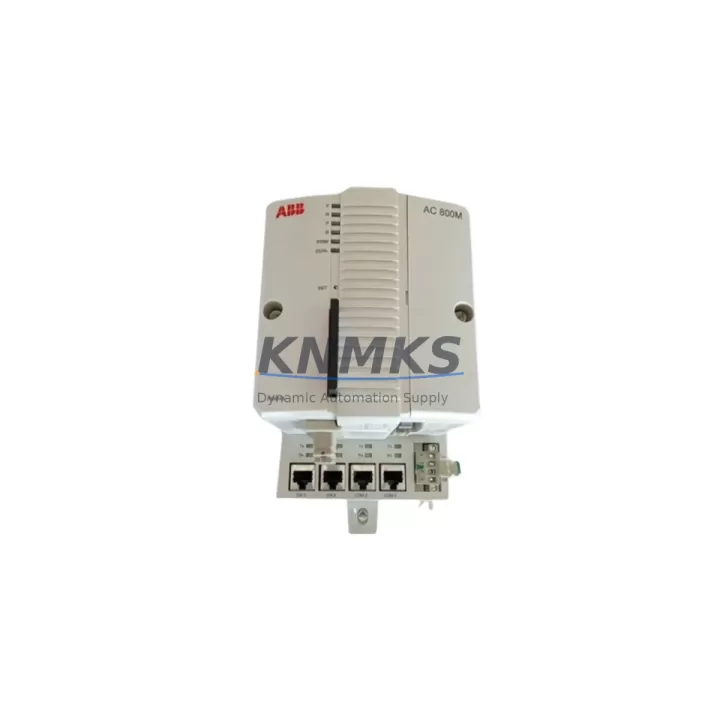
The ABB PM864AK02 is a high-performance central processing unit designed for the AC500 programmable logic controller platform. As legacy AC500 installations age and original PM864A units reach end-of-life, the PM864AK02 serves as the verified drop-in replacement — preserving existing rack geometry, terminal wiring, and program logic while delivering improved processing throughput and extended firmware support. This module is stocked, pre-shipment tested, and backed by a support terms confirmed by quotation, making it the preferred choice for maintenance engineers managing long-cycle spare parts inventories and unplanned downtime events.
For facilities running AC500 control cabinets built around the TB511, TB521, or TB541 terminal base units, the PM864AK02 slots directly into the existing S500 I/O backplane without mechanical modification. Engineers should confirm the installed firmware version on the replacement unit matches or exceeds the project’s Control Builder Plus revision to avoid program upload conflicts. Where the original installation used PM864A with SD memory card-based program storage, the PM864AK02 retains full SD card compatibility, allowing direct program transfer without re-compilation in most configurations.
Retrofit projects involving the PM864AK02 frequently intersect with communication infrastructure upgrades. Sites migrating from legacy serial PROFIBUS DP networks to Ethernet-based Modbus TCP or PROFINET architectures can leverage the PM864AK02’s dual-port Ethernet interface alongside existing CM572-DP PROFIBUS master modules installed in adjacent rack slots. This hybrid communication approach allows phased migration — maintaining PROFIBUS connectivity to legacy field devices while simultaneously commissioning new Ethernet I/O segments — without requiring a full cutover during a single maintenance window.
Power budget verification is a critical pre-installation step. The PM864AK02 draws from the rack’s internal 24 VDC bus supplied by the PS501 or PS560 power supply modules. When adding the PM864AK02 to an existing rack that also hosts DC532, DA501, or AX521 I/O modules, engineers must recalculate total rack current consumption to confirm the installed power supply remains within its rated output. Undersized power supplies are a common root cause of intermittent CPU faults during high-load scan cycles and should be addressed before commissioning the replacement module.
HMI screen compatibility is another consideration during CPU migration. Panel View or CP600 operator panels communicating with the original PM864A via Modbus TCP will typically reconnect to the PM864AK02 without HMI project modification, provided the IP address and Modbus register map are preserved. Where HMI projects reference CPU-specific diagnostic function blocks, a brief review of the HMI project in Panel Builder 600 is recommended to confirm no deprecated function block calls exist that could generate runtime alarms post-migration.
Installation space within the control cabinet should be confirmed before ordering. The PM864AK02 occupies a single slot on the AC500 rack and shares the same physical footprint as the PM864A, PM856A, and PM865A processors. In cabinets where rack space is constrained, engineers planning simultaneous I/O expansion using CI501-PNIO PROFINET coupler modules or additional SM560 safety modules should map slot assignments in advance to avoid reconfiguration delays during the maintenance window.
Pre-shipment testing is performed on every PM864AK02 unit prior to dispatch. Each module is powered, firmware-verified, and communication-port validated before packaging. Units are shipped with original ABB documentation and are traceable to batch-level quality records. Stock is maintained for immediate dispatch to support both planned retrofit schedules and emergency breakdown replacements.
Migration Compatibility Table
| Parameter | PM864A (Legacy) | PM864AK02 (Replacement) | Notes |
|---|---|---|---|
| Platform | AC500 | AC500 | Direct platform match |
| Rack / Backplane | S500 I/O Backplane | S500 I/O Backplane | No mechanical modification required |
| Terminal Base | TB511 / TB521 / TB541 | TB511 / TB521 / TB541 | Full compatibility confirmed |
| Communication Ports | 1× Ethernet, 1× Serial | 2× Ethernet (RJ45) | Verify HMI IP config post-swap |
| PROFIBUS Support | Via CM572-DP | Via CM572-DP | Existing coupler module retained |
| Modbus TCP | Supported | Supported | Register map preserved |
| Program Storage | SD Card | SD Card | Direct transfer, no recompile in most cases |
| Firmware Tool | Control Builder Plus | Control Builder Plus | Match firmware revision before upload |
| Power Supply | PS501 / PS560 | PS501 / PS560 | Recalculate rack current budget |
| Slot Footprint | 1 slot | 1 slot | Same as PM856A, PM865A |
| Support terms | — | 12 Months | Pre-shipment tested, batch traceable |
Retrofit Planning for Existing Automation Systems
A structured retrofit plan reduces risk and compresses the commissioning window. Begin by auditing the existing rack configuration: document each occupied slot, the installed I/O module type (DC532, DA501, AX521, or SM560 safety modules), and the current power draw from the PS501 or PS560 supply. Cross-reference this against the PM864AK02 power specification to confirm headroom. If the audit reveals the existing power supply is operating above 85% of rated capacity, plan a concurrent PS560 replacement to prevent nuisance trips after the CPU swap.
Communication wiring should be mapped before the maintenance window opens. For sites using CM572-DP PROFIBUS master modules, record the DP slave addresses and baud rate settings. These parameters are stored in the Control Builder Plus project file and will be re-downloaded to the PM864AK02 after installation — but having a printed record on-site eliminates recovery delays if the project file requires re-import. For Ethernet segments, document the IP address scheme and confirm the PM864AK02’s default IP settings before powering the rack.
Where the control cabinet also houses CI501-PNIO PROFINET coupler modules or third-party signal isolators on the I/O bus, verify that the coupler firmware is compatible with the PM864AK02’s PROFINET stack version. Mismatched coupler firmware is a known source of I/O timeout alarms during initial commissioning and can typically be resolved with a coupler firmware update performed before the CPU swap.
For sites with CP600 or similar operator panels, export and archive the current HMI project before beginning the retrofit. Confirm that all Modbus TCP data blocks referenced in the HMI project align with the register map in the Control Builder Plus program. This cross-check takes less than 30 minutes and eliminates the most common source of post-migration HMI alarm floods.
Downtime Control During System Migration
Minimizing production downtime during a CPU migration requires preparation that begins days before the physical swap. The most effective approach is to pre-stage the PM864AK02 with the correct firmware version and a verified copy of the Control Builder Plus project loaded onto the SD card. When the maintenance window opens, the physical swap — removing the PM864A and seating the PM864AK02 — takes under five minutes. The majority of the window is then available for communication verification, HMI reconnection, and a controlled I/O scan test before returning the line to production.
Where the process cannot tolerate a full shutdown, a parallel commissioning approach is possible in some AC500 architectures. A second rack with the PM864AK02 can be configured offline, with I/O modules mirroring the live rack’s DA501 analog outputs and DC532 digital inputs. Once the offline rack is verified, the cutover is reduced to a wiring transfer rather than a full system restart. This approach is particularly effective in continuous process environments where even brief I/O interruptions trigger downstream alarms.
Program logic protection is non-negotiable. Before any physical work begins, create a timestamped backup of the Control Builder Plus project, the HMI project, and any PROFIBUS GSD configuration files. Store these backups on a local engineering laptop and a network share simultaneously. If the migration encounters an unexpected compatibility issue, a clean rollback to the PM864A can be completed within the same maintenance window using the archived project files.
Post-swap, perform a structured commissioning checklist: confirm CPU status LED, verify Ethernet link on both ports, check PROFIBUS DP slave status via the CM572-DP diagnostic screen, confirm HMI data refresh, and execute a manual I/O force test on representative DC532 and DA501 channels before releasing the system to automatic mode. Document the commissioning result and retain it with the unit’s support terms confirmed by quotation record.
Retrofit Support FAQ
Q1: Is the PM864AK02 a direct replacement for the PM864A without program modification?
In the majority of AC500 installations, yes. The PM864AK02 uses the same Control Builder Plus programming environment and retains SD card program storage compatibility. Engineers should verify the firmware revision on the replacement unit matches the project’s target configuration. Minor function block library updates may be required if the original project was compiled against an older firmware baseline.
Q2: What wiring changes are required during installation?
No terminal wiring changes are required. The PM864AK02 installs into the existing TB511, TB521, or TB541 terminal base without rewiring. Communication cables (Ethernet RJ45 and any serial connections) should be reconnected to the corresponding ports on the PM864AK02 and IP settings confirmed before powering the rack.
Q3: How is the unit tested before shipment?
Every PM864AK02 is powered, firmware-verified, and communication-port validated prior to dispatch. Units are batch-traceable and shipped with original ABB documentation. The support terms confirmed by quotation period begins from the date of shipment and covers manufacturing defects under normal operating conditions.
Q4: What is the typical lead time and stock availability?
Stock is maintained for immediate dispatch. Standard orders are processed and shipped within 1–3 business days. For large-quantity orders or long-term supply agreements covering 12–36 months of planned consumption, contact the sales team to discuss reserved inventory arrangements and volume pricing.
© 2026 KNMKS. All rights reserved.
Original Source: https://knmks.com
Contact: admin@knmks.com | +86 18359268345
Product Identification
- Brand / Ecosystem
-
ABB
ABB - Model / Series
-
PM864AK02
AC500 Series - Product Family
- PLCs & Controllers
- Availability Status
- Available on request after model and quantity confirmation
- Inquiry Type
- B2B RFQ, replacement inquiry and project spare-part request
- Pre-Quote Check
- Exact SKU, brand, series, quantity, nameplate photos and destination country are checked before quotation
System Path
Where this product fits in the KNMKS automation structure.
Specification & Inquiry Focus
- Control platform
- PLC, PAC and modular controllers
- Common needs
- CPU, rack, power and I/O expansion
- Project support
- Replacement, cabinet build and maintenance
Buyer Confirmation
Information KNMKS checks before replying.
- Exact model
- PM864AK02
- Brand / ecosystem
- ABB
- Product family
- PLCs & Controllers
- Application note
- Replacement, maintenance, project build or spare-part list
- Useful photos
- Nameplate, installed unit, cabinet layout or connector side
- Delivery details
- Quantity, destination country and target schedule
Document Support
Files and notes can be confirmed during quotation.
- Product photos or nameplate confirmation when available
- Packing and delivery notes before quotation confirmation
- Support scope and delivery terms confirmed per inquiry
- Export document coordination for qualified B2B requests
Inquiry Support
- Model cross-checking before quotation
- CPU, power, rack and expansion module matching
- Support for replacement and project inquiry
What to Send Us
- Brand and exact model number: ABB PM864AK02
- Quantity and required delivery time
- Application, replacement requirement or nameplate photo
- Destination country and shipping preference
RFQ Preparation
This is a product inquiry page built for RFQ communication.
Fast Model Check
Send this model to KNMKS for confirmation.
Include quantity, destination country and photos if this is a maintenance replacement. The inquiry will be saved with a reference number after submission.
Brand & Compatibility Note
KNMKS displays automation product information for well-known industrial brand ecosystems and compatible replacement references. Brand names are used for product identification and compatibility reference only; final availability and commercial terms are confirmed per quotation.
 Manufacturing
 Machine Tools
 Packaging
 Energy & Power



 HMI & Displays
 Servo Systems
 Variable Frequency Drives
 Sensors