
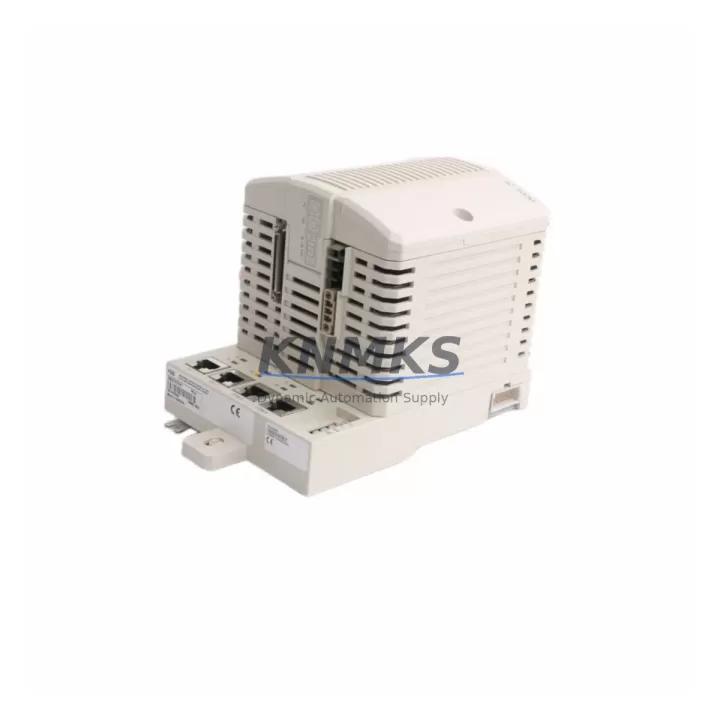
Overview
ABB PM861AK01 3BSE018157R1 Spare Part for Factory Uptime
The ABB PM861AK01 (part number 3BSE018157R1) is a high-performance CPU module from ABB’s AC500 PLC series, widely deployed across process automation, discrete manufacturing, energy management, and utility control systems. As a maintenance-proven spare part, the PM861AK01 is a critical component for facilities that depend on continuous production uptime and cannot afford extended downtime caused by CPU failure or degraded processing performance.
At KNMKS, every PM861AK01 unit is sourced as an original ABB spare, individually inspected, and shipped with full documentation. Our inventory is maintained specifically to support maintenance engineers and procurement teams who require fast, reliable access to verified AC500 CPU modules — whether for emergency replacement, scheduled overhaul, or strategic spare parts stocking.
Spare Maintenance Table
| Parameter | Specification |
|---|---|
| Part Number | PM861AK01 |
| ABB Reference | 3BSE018157R1 |
| Series | AC500 |
| Module Type | PLC CPU Module |
| Manufacturer | ABB (Germany) |
| Supply Voltage | 24 VDC (via backplane) |
| Communication Ports | Ethernet, RS-232, RS-485 (series-dependent) |
| Memory | Onboard program and data memory, SD card slot |
| I/O Expansion | Compatible with AC500 I/O modules via S500 backplane |
| Operating Temperature | 0°C to +60°C |
| Protection Class | IP20 |
| Mounting | DIN rail via AC500 backplane (TB511, TB521, TB541 series) |
| Compatibility | AC500 V2 system; compatible with PM860, PM865 series backplanes |
| Condition | Original, tested before shipment |
| Support terms | 12 Months |
| Lead Time | availability confirmed by RFQ — ships within 1–3 business days |
Maintenance Planning for Continuous Operation
When replacing the PM861AK01 in an AC500 control cabinet, a thorough maintenance inspection of the surrounding system is essential to prevent repeat failures and ensure stable recommissioning. Maintenance engineers should treat a CPU replacement as an opportunity to audit the full control loop.
Begin with the AC500 backplane — typically a TB511-ETH, TB521 or TB541 — checking for oxidized bus connectors, cracked mounting rails, or loose module seating. A degraded backplane can cause intermittent CPU faults even after a new PM861AK01 is installed. Next, inspect the 24 VDC power supply module (such as the ABB CP502 or CP504 series) for output voltage stability, ripple, and thermal performance; an undersized or aging power supply is a common root cause of CPU resets and memory corruption.
Review all AC500 I/O modules connected to the backplane — digital input/output cards and analog signal modules should be checked for blown channels, loose field wiring, and correct addressing. Pay particular attention to communication modules such as the CM572-DP (PROFIBUS) or CM589-PNIO (PROFINET) if the system integrates fieldbus devices; firmware compatibility with the replacement CPU must be confirmed before restart.
Inspect terminal blocks and field wiring at the cabinet base for loose connections, insulation degradation, and correct labeling. Faulty terminations are a frequent source of I/O errors that are misdiagnosed as CPU faults. If the cabinet includes signal isolators or relay output modules, verify their operating status and isolation integrity — particularly in environments with high electrical noise or mixed AC/DC circuits.
Finally, check cabinet fusing and circuit protection: individual fuse holders for I/O supply rails, the main 24 VDC distribution fuse, and any surge protection devices on incoming power lines. Replacing the PM861AK01 without addressing upstream protection gaps leaves the new CPU exposed to the same fault conditions that damaged the original unit.
Site Replacement Workflow
The PM861AK01 is designed as a direct drop-in replacement within the ABB AC500 V2 platform. Before removing the existing CPU, export and back up the current PLC program using ABB Automation Builder or the legacy Control Builder Plus software. Record all IP addresses, node IDs, and communication parameters configured on the outgoing module.
Power down the control cabinet following your site LOTO (Lockout/Tagout) procedure. Remove the PM861AK01 by releasing the module latch and sliding it clear of the backplane bus connector. Inspect the bus connector pins on both the module and the backplane for damage or contamination before installing the replacement unit.
Insert the new PM861AK01 firmly until the latch engages. Restore power and confirm the CPU boots to RUN mode without fault LEDs. Reload the backed-up program, verify all I/O channel assignments, and perform a functional test of critical outputs before returning the system to production. Document the replacement in your maintenance log with the date, replaced part number, and technician ID.
For facilities managing legacy AC500 V1 installations, the PM861AK01 supports backward-compatible program migration with minor configuration adjustments in Automation Builder. KNMKS technical support can assist with compatibility verification prior to shipment to eliminate on-site surprises.
Spare Parts Support FAQ
Q1: Is the PM861AK01 compatible with older AC500 backplanes and I/O modules?
The PM861AK01 is fully compatible with the AC500 V2 backplane family (TB511, TB521, TB541) and all standard S500 I/O modules. For V1 legacy systems, compatibility depends on firmware revision. KNMKS recommends sharing your existing system configuration before ordering so we can confirm compatibility and advise on any firmware update requirements.
Q2: How is each unit tested before shipment?
Every PM861AK01 in our inventory undergoes a pre-shipment functional check including power-on verification, communication port testing, and visual inspection of bus connectors and housing. Units are shipped in anti-static packaging with original or equivalent protective inserts. A test report is available upon request.
Q3: What is the support terms coverage and what does it include?
All PM861AK01 units supplied by KNMKS carry a support terms confirmed by quotation from the date of shipment. The support terms covers manufacturing defects and functional failures under normal operating conditions. It does not cover damage caused by incorrect installation, overvoltage, or unauthorized modification. Support requests are processed within 5 business days of receiving the returned unit.
Q4: Can KNMKS support long-term or recurring supply of PM861AK01 for multi-site maintenance programs?
Yes. KNMKS maintains standing inventory of PM861AK01 and other AC500 series CPU modules to support scheduled maintenance programs, annual overhaul kits, and multi-site procurement contracts. Contact our sales team at admin@knmks.com or +86 18359268345 to discuss volume pricing, reserved stock arrangements, and lead time commitments.
© 2026 KNMKS. All rights reserved.
Original Source: https://knmks.com
Contact: admin@knmks.com | +86 18359268345
Product Identification
- Brand / Ecosystem
-
ABB
ABB - Model / Series
-
PM861AK01 3BSE018157R1
AC500 Series - Product Family
- PLCs & Controllers
- Availability Status
- Available on request after model and quantity confirmation
- Inquiry Type
- B2B RFQ, replacement inquiry and project spare-part request
- Pre-Quote Check
- Exact SKU, brand, series, quantity, nameplate photos and destination country are checked before quotation
System Path
Where this product fits in the KNMKS automation structure.
Specification & Inquiry Focus
- Control platform
- PLC, PAC and modular controllers
- Common needs
- CPU, rack, power and I/O expansion
- Project support
- Replacement, cabinet build and maintenance
Buyer Confirmation
Information KNMKS checks before replying.
- Exact model
- PM861AK01 3BSE018157R1
- Brand / ecosystem
- ABB
- Product family
- PLCs & Controllers
- Application note
- Replacement, maintenance, project build or spare-part list
- Useful photos
- Nameplate, installed unit, cabinet layout or connector side
- Delivery details
- Quantity, destination country and target schedule
Document Support
Files and notes can be confirmed during quotation.
- Product photos or nameplate confirmation when available
- Packing and delivery notes before quotation confirmation
- Support scope and delivery terms confirmed per inquiry
- Export document coordination for qualified B2B requests
Inquiry Support
- Model cross-checking before quotation
- CPU, power, rack and expansion module matching
- Support for replacement and project inquiry
What to Send Us
- Brand and exact model number: ABB PM861AK01 3BSE018157R1
- Quantity and required delivery time
- Application, replacement requirement or nameplate photo
- Destination country and shipping preference
RFQ Preparation
This is a product inquiry page built for RFQ communication.
Fast Model Check
Send this model to KNMKS for confirmation.
Include quantity, destination country and photos if this is a maintenance replacement. The inquiry will be saved with a reference number after submission.
Brand & Compatibility Note
KNMKS displays automation product information for well-known industrial brand ecosystems and compatible replacement references. Brand names are used for product identification and compatibility reference only; final availability and commercial terms are confirmed per quotation.
 Manufacturing
 Machine Tools
 Packaging
 Energy & Power



 HMI & Displays
 Servo Systems
 Variable Frequency Drives
 Sensors