
Overview
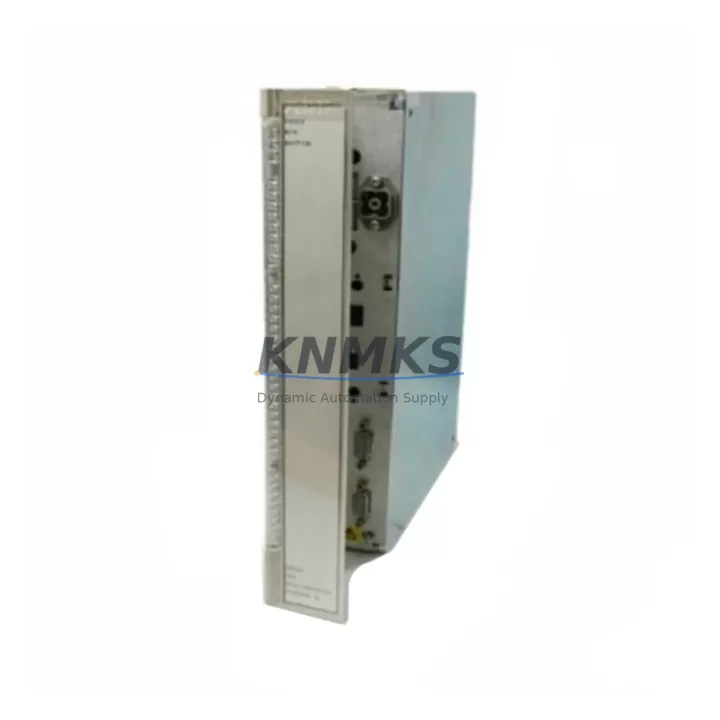
ABB PM630 3BSE000434R1 Migration-Ready CPU for Legacy AC500 Control Systems
The ABB PM630 (3BSE000434R1) is a high-performance CPU module designed for the ABB AC500 PLC platform, widely deployed in industrial automation, process control, and power distribution applications. As legacy AC500 installations approach end-of-life or require capacity upgrades, the PM630 serves as a proven migration-ready replacement for earlier AC500 CPU variants including the PM554, PM556, PM564, and PM581 series. Whether you are modernizing a legacy control cabinet, extending the service life of an existing automation line, or recovering from an unplanned CPU failure, the PM630 provides a reliable, field-validated upgrade path with minimal disruption to existing program logic and I/O architecture.
Before initiating any retrofit or replacement project involving the PM630, engineers must systematically verify several critical parameters to ensure a smooth transition. Power supply capacity is the first checkpoint: confirm that the existing PS501 or PS502 power supply module can sustain the PM630’s current draw alongside all connected I/O modules and communication cards. Insufficient headroom on the backplane power bus is a common cause of post-retrofit instability. Next, review terminal wiring compatibility — the PM630 uses the same standard AC500 backplane connector layout, but any field wiring connected to local I/O modules such as the DI524 digital input or DO524 digital output must be re-verified against the updated I/O map if module slot assignments change during the retrofit.
Backplane interface and module addressing require careful attention when the PM630 replaces an older CPU in an existing rack. The AC500 system uses a slot-based addressing scheme, and any change in CPU generation may require re-mapping of distributed I/O addresses, particularly when the system includes remote I/O stations connected via PROFIBUS-DP or Modbus RTU. If the legacy system relied on a CI502-PNIO or CI504-PNIO communication interface module for PROFINET connectivity, verify that the PM630 firmware version supports the same GSD file revision used in the PROFINET controller configuration. Firmware mismatches between the CPU and communication modules are a leading cause of commissioning delays in AC500 retrofit projects.
Program compatibility is typically preserved when migrating within the AC500 family, as ABB’s Automation Builder engineering environment maintains backward compatibility for IEC 61131-3 structured text and function block programs. However, engineers should export and archive the original program from the legacy CPU before removal, and perform a full compile and simulation in Automation Builder against the PM630 hardware profile before downloading to the replacement unit. Any use of CPU-specific system function blocks (SFBs) or hardware-dependent library calls must be reviewed for compatibility with the PM630’s firmware baseline.
HMI screen and communication link continuity must also be validated. If the existing installation uses a CP600 operator panel or a third-party HMI communicating via Ethernet TCP/IP or serial RS-232, confirm that the PM630’s onboard Ethernet port IP address and communication parameters are configured to match the legacy CPU settings before power-up. Failure to replicate the IP configuration will interrupt HMI communication and may trigger process alarms during the cutover window.
Installation space and mechanical fit are straightforward for the PM630, as it occupies a standard AC500 CPU slot and is mechanically interchangeable with other AC500 CPU modules. No rack modification or additional mounting hardware is required. Confirm available slot positions in the TB511 or TB521 terminal base before ordering, particularly in compact cabinet installations where space is constrained.
Migration Compatibility Table
| Parameter | Detail |
|---|---|
| Compatible Platform | ABB AC500 PLC Family |
| Replaces / Upgrades From | PM554, PM556, PM564, PM581 (AC500 CPU series) |
| Backplane Interface | Standard AC500 backplane connector — no rack modification required |
| Communication Protocols | PROFIBUS-DP, PROFINET (via CI504-PNIO), Modbus RTU/TCP, Ethernet TCP/IP |
| Programming Environment | ABB Automation Builder (IEC 61131-3 compatible) |
| I/O Compatibility | Compatible with AC500 local and distributed I/O modules (DI524, DO524, AI523, AO523 series) |
| HMI Compatibility | CP600 series operator panels; third-party HMI via Ethernet or serial |
| Firmware Verification | Required — match firmware to CI module GSD file revision before commissioning |
| Installation Requirement | TB511 or TB521 terminal base; standard AC500 CPU slot |
| Retrofit Commissioning | Program archive, compile/simulate in Automation Builder, IP configuration replication, I/O address verification |
| Support terms | support terms confirmed by quotation — covers hardware defects under normal operating conditions |
| Stock Status | availability confirmed by RFQ — global shipping available |
Retrofit Planning for Existing Automation Systems
A successful PM630 retrofit begins with a comprehensive audit of the existing control cabinet. In most AC500 installations, the CPU shares a rack with a mix of local I/O modules and one or more communication interface cards. Common configurations include the CI502-PNIO PROFINET interface module for plant network integration, the AI523 analog input module for process variable acquisition, and the AO523 analog output module for control signal generation. Each of these modules must be individually verified for firmware compatibility with the PM630 before the retrofit proceeds.
Power distribution within the cabinet is managed by the PS501 or PS502 power supply module, which feeds the AC500 backplane. During retrofit planning, calculate the total current demand of all installed modules — including the PM630 itself — and confirm that the power supply’s rated output is not exceeded. If the existing power supply is operating near its rated capacity, consider upgrading to a higher-rated unit as part of the retrofit scope to provide adequate headroom for future I/O expansion.
For systems that include remote I/O stations connected via PROFIBUS-DP, the CI501-PNIO or CI504-PNIO communication module must be reconfigured to recognize the PM630 as the new master controller. Update the PROFIBUS configuration in Automation Builder, re-assign station addresses if necessary, and perform a full network scan after power-up to confirm that all remote I/O nodes are correctly recognized. In installations where a TK501 programming cable or USB-to-serial adapter is used for local CPU access, verify that the cable driver is compatible with the engineering workstation’s operating system before beginning the firmware download procedure.
Where the legacy system includes a CP635 or CP651 HMI panel communicating with the CPU over Ethernet, the HMI project must be reviewed to confirm that all tag addresses and communication driver settings reference the correct CPU IP address and port configuration. In some installations, the HMI project may contain hardcoded references to the legacy CPU’s MAC address or device name — these must be updated before the HMI is reconnected to the PM630.
Signal isolation requirements should also be reviewed during retrofit planning. In applications where the AC500 system interfaces with high-voltage field devices or long cable runs, signal isolators or surge protection modules installed on the I/O terminal bases may need to be inspected and replaced if they show signs of degradation. Addressing signal integrity issues during the planned retrofit window avoids unplanned downtime after the new CPU is commissioned.
Downtime Control During System Migration
Minimizing production downtime is the primary operational constraint in any AC500 CPU retrofit. The recommended approach is to complete all preparatory work — program archiving, Automation Builder project update, firmware verification, and IP configuration documentation — before the physical cutover begins. This preparation phase can typically be completed without interrupting the running system, reducing the actual cutover window to the time required for physical module swap, firmware download, and functional verification.
During the cutover, follow a structured sequence: power down the cabinet in a controlled manner using the established shutdown procedure, remove the legacy CPU module, install the PM630 in the same slot, restore power, download the verified program, and perform a systematic I/O check before returning the system to automatic mode. In installations where the AC500 controls a continuous process, coordinate the cutover with the operations team to schedule the work during a planned maintenance window or low-production period.
To protect original program logic, always maintain at least two independent backups of the legacy CPU program — one on the engineering workstation and one on removable media — before beginning the physical swap. If the PM630 is being installed as a replacement for a failed CPU with no available program backup, ABB’s Automation Builder may be able to reconstruct a partial program from the memory card if the original CPU’s SD card is intact and readable.
After commissioning, conduct a full functional test of all I/O points, communication links, and HMI screens before releasing the system to production. Document the as-commissioned configuration, including firmware versions, IP addresses, and I/O address maps, and store this documentation with the cabinet’s maintenance records. This documentation is essential for future troubleshooting and for any subsequent retrofit or expansion work.
Retrofit Support FAQ
Q1: Is the ABB PM630 3BSE000434R1 a direct drop-in replacement for the PM564 or PM581?
The PM630 is mechanically and electrically compatible with the AC500 backplane and can be installed in the same CPU slot as the PM564 or PM581. However, a direct program download and functional verification in ABB Automation Builder is required before returning the system to service. Some SFB calls and hardware-specific library functions may require review for compatibility with the PM630 firmware baseline.
Q2: What commissioning steps are required after installing the PM630?
After physical installation, download the verified program via Automation Builder using a TK501 programming cable or Ethernet connection. Verify firmware version compatibility with all installed communication and I/O modules. Confirm IP address configuration, perform a full I/O scan, and test all HMI communication links before switching to automatic mode. A structured commissioning checklist is recommended to ensure no steps are omitted.
Q3: How is terminal wiring handled during the CPU swap?
Field wiring connected to local I/O modules on the AC500 backplane does not need to be disturbed during a CPU-only swap. The PM630 occupies the CPU slot only; all I/O terminal connections remain on their respective DI, DO, AI, and AO modules. If I/O module slot assignments change as part of the retrofit scope, re-verify all field wiring against the updated I/O address map before power-up.
Q4: What does the support terms confirmed by quotation cover, and what is the stock availability?
All PM630 3BSE000434R1 units supplied by KNMKS are covered by a support terms confirmed by quotation against hardware defects under normal operating conditions. Units are pre-tested before shipment to verify basic functionality. Stock is maintained for immediate dispatch, with global shipping available. Contact admin@knmks.com or +86 18359268345 for lead time confirmation and volume pricing.
© 2026 KNMKS. All rights reserved.
Original Source: https://knmks.com
Contact: admin@knmks.com | +86 18359268345
Product Identification
- Brand / Ecosystem
-
ABB
ABB - Model / Series
-
PM630 3BSE000434R1
AC500 Series - Product Family
- PLCs & Controllers
- Availability Status
- Available on request after model and quantity confirmation
- Inquiry Type
- B2B RFQ, replacement inquiry and project spare-part request
- Pre-Quote Check
- Exact SKU, brand, series, quantity, nameplate photos and destination country are checked before quotation
System Path
Where this product fits in the KNMKS automation structure.
Specification & Inquiry Focus
- Control platform
- PLC, PAC and modular controllers
- Common needs
- CPU, rack, power and I/O expansion
- Project support
- Replacement, cabinet build and maintenance
Buyer Confirmation
Information KNMKS checks before replying.
- Exact model
- PM630 3BSE000434R1
- Brand / ecosystem
- ABB
- Product family
- PLCs & Controllers
- Application note
- Replacement, maintenance, project build or spare-part list
- Useful photos
- Nameplate, installed unit, cabinet layout or connector side
- Delivery details
- Quantity, destination country and target schedule
Document Support
Files and notes can be confirmed during quotation.
- Product photos or nameplate confirmation when available
- Packing and delivery notes before quotation confirmation
- Support scope and delivery terms confirmed per inquiry
- Export document coordination for qualified B2B requests
Inquiry Support
- Model cross-checking before quotation
- CPU, power, rack and expansion module matching
- Support for replacement and project inquiry
What to Send Us
- Brand and exact model number: ABB PM630 3BSE000434R1
- Quantity and required delivery time
- Application, replacement requirement or nameplate photo
- Destination country and shipping preference
RFQ Preparation
This is a product inquiry page built for RFQ communication.
Fast Model Check
Send this model to KNMKS for confirmation.
Include quantity, destination country and photos if this is a maintenance replacement. The inquiry will be saved with a reference number after submission.
Brand & Compatibility Note
KNMKS displays automation product information for well-known industrial brand ecosystems and compatible replacement references. Brand names are used for product identification and compatibility reference only; final availability and commercial terms are confirmed per quotation.
 Manufacturing
 Machine Tools
 Packaging
 Energy & Power



 HMI & Displays
 Servo Systems
 Variable Frequency Drives
 Sensors