
Overview
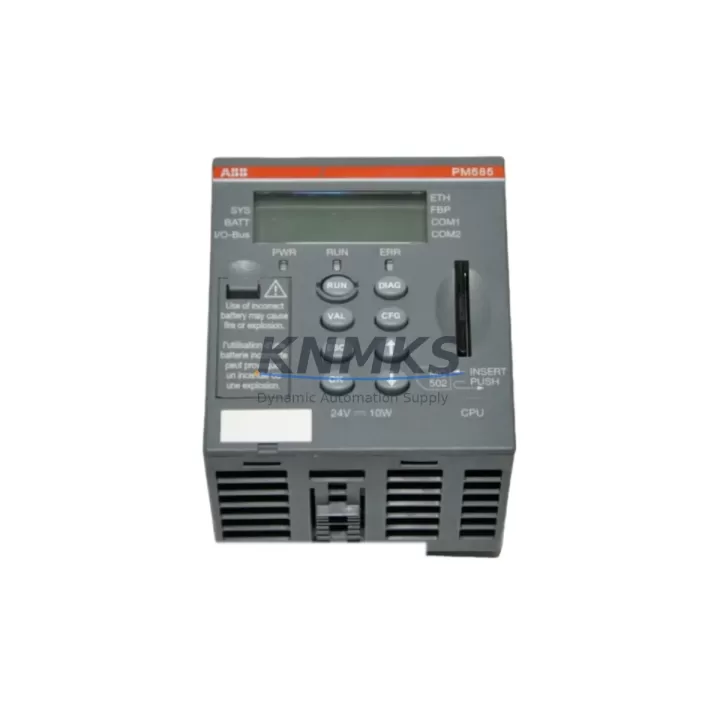
ABB PM585-ETA Migration-Ready CPU for Legacy Control Systems
The ABB PM585-ETA is a high-performance CPU module engineered for the AC500 programmable logic controller platform, and it stands as one of the most reliable migration-ready solutions for engineers tasked with modernizing aging industrial control infrastructure. Whether you are replacing an end-of-life PM564-ETH, decommissioning a PM571-ETH-based cabinet, or upgrading a multi-rack AC500 installation that has outgrown its original processing capacity, the PM585-ETA delivers the computational headroom, communication flexibility, and backward-compatible architecture that retrofit projects demand.
Industrial facilities operating legacy ABB AC500 systems frequently encounter a common set of challenges: discontinued firmware support, unavailable spare parts, degraded cycle times, and communication bottlenecks that prevent integration with modern SCADA, DCS, or IIoT platforms. The PM585-ETA directly addresses these pain points by offering an expanded memory footprint, dual Ethernet ports for redundant network topologies, and full compatibility with the AC500 backplane bus — meaning existing TB521, TB541, or TB561 terminal base assemblies can remain in place during the swap, dramatically reducing rewiring time and the risk of field wiring errors.
Before initiating a PM585-ETA retrofit, engineers should conduct a structured pre-migration audit covering the following critical checkpoints: available power budget on the existing PS501 or PS560 power supply module, backplane slot addressing and module sequencing in the existing rack, Ethernet IP addressing and subnet configuration for both onboard ports, program memory utilization in the outgoing CPU, and the version of Automation Builder or PS501 Control Builder used to compile the original application. Firmware alignment between the PM585-ETA and any co-installed communication modules — such as the CM572-DP PROFIBUS master or the CM589-PNIO PROFINET IO controller — must be verified prior to first power-on to avoid bus initialization faults.
Migration Compatibility Table
| Parameter | PM585-ETA Specification | Retrofit Notes |
|---|---|---|
| Platform | ABB AC500 (V2 / V3 compatible) | Verify Automation Builder version ≥ 2.3 for full feature support |
| Communication Ports | 2× Ethernet (RJ45), 1× RS-232, 1× RS-485 | Dual Ethernet enables ring topology; replaces single-port predecessors |
| Backplane Interface | AC500 standard backplane bus | Compatible with TB521, TB541, TB561 terminal bases — no rewiring required |
| Program Memory | Up to 16 MB user program | Confirm existing program size; PM564/PM571 projects migrate without recompilation in most cases |
| I/O Expansion | Up to 10 expansion modules per rack | Existing DI/DO/AI/AO modules (e.g., DC532, DA501) remain fully addressable |
| Installation Footprint | Standard AC500 CPU slot (1 slot width) | Direct physical replacement; no cabinet modification required |
| Firmware Compatibility | Supports FW ≥ 3.x | Flash update via SD card or Ethernet; verify CM module firmware alignment |
| Replacement Path | PM564-ETH, PM571-ETH, PM572-ETH, PM581-ETH | Program re-download required; hardware I/O mapping preserved |
| Commissioning Tool | ABB Automation Builder / PS501 Control Builder | Online change supported for minor logic edits post-migration |
| Support terms | 12 Months | Covers manufacturing defects; includes pre-shipment functional test report |
Retrofit Planning for Existing Automation Systems
A successful PM585-ETA retrofit begins well before the maintenance window opens. The first step is a full inventory of the existing control cabinet: document every module installed in the AC500 rack, including any DC532 digital combined I/O modules, DA501 analog output modules, and the specific variant of the power supply — whether a PS501-POW or PS560-POW — currently feeding the backplane. Power budget calculations are non-negotiable; the PM585-ETA draws slightly more current than older PM564 or PM571 variants, and an undersized power supply will cause intermittent resets that are difficult to diagnose under load.
Communication architecture deserves equal attention. If the legacy system uses a CM572-DP PROFIBUS DP master to interface with field devices such as variable frequency drives, remote I/O stations, or weighing terminals, the PROFIBUS configuration file (GSD-based) must be re-imported into the new Automation Builder project and the master parameters re-verified. Similarly, if a CM589-PNIO PROFINET IO controller is present, the GSDML device descriptions for all IO devices must be current and the IP address table must be re-confirmed after the CPU swap, since the PM585-ETA’s MAC address will differ from the outgoing module.
For systems that include an HMI panel — such as an ABB CP600 series operator panel or a third-party panel connected via Modbus TCP — the communication driver configuration on the HMI side must be updated to reflect any IP address changes introduced during the migration. HMI screen tag databases should be exported and backed up before the cutover begins. In multi-rack installations where a TB583 or TB585 expansion rack is connected via the internal bus coupler, the rack addressing sequence must be re-confirmed in the Automation Builder hardware configuration to prevent I/O address conflicts after the new CPU initializes.
Signal isolation requirements should also be reviewed during retrofit planning. If the existing installation uses external signal isolators or barriers between the AC500 I/O modules and field transmitters — particularly in hazardous area applications — the isolator datasheets should be cross-referenced against the PM585-ETA’s I/O module input impedance specifications to confirm signal integrity is maintained post-migration.
Downtime Control During System Migration
Minimizing unplanned downtime is the primary operational concern in any live-system CPU replacement. The recommended approach for a PM585-ETA migration is a structured offline swap with a pre-tested replacement unit. Before the maintenance window, the replacement PM585-ETA should be bench-configured with the correct firmware version, loaded with the exported application program, and verified against a hardware simulation or offline I/O test rig if available. This pre-commissioning step eliminates the most common source of extended downtime: firmware mismatches or program download failures discovered only after the original CPU has been removed.
During the physical swap, the original program should be uploaded from the outgoing CPU and saved as a timestamped archive before power is removed — even if a current backup already exists. This provides a last-resort recovery file that reflects the exact runtime state of the machine, including any online changes that may not have been captured in the project repository. After the PM585-ETA is seated and powered, the program download sequence should follow the standard AC500 cold-start procedure: confirm backplane communication, verify I/O module recognition in the diagnostic tree, download the application, and perform a controlled RUN command before releasing the process to automatic mode.
For continuous-process applications where even a brief interruption is costly, a parallel-run strategy can be employed: the PM585-ETA is installed in a shadow rack alongside the live system, synchronized via a shared I/O mirror or OPC UA data bridge, and validated over a defined observation period before the final cutover. This approach is particularly effective in water treatment, chemical dosing, and power generation applications where the AC500 platform is commonly deployed.
Retrofit Support FAQ
Q1: Is the PM585-ETA a direct drop-in replacement for the PM581-ETH or PM572-ETH?
The PM585-ETA is physically and electrically compatible with the AC500 CPU slot occupied by PM581-ETH and PM572-ETH modules. The backplane connector, terminal base interface, and rack mounting dimensions are identical. However, a program re-download is required after the swap, as the CPU serial number embedded in the project license will differ. In most cases, the existing application program compiles and runs without modification; engineers should verify that any CPU-specific system variables or hardware configuration parameters are updated in Automation Builder before downloading.
Q2: What firmware version should be loaded before commissioning?
The PM585-ETA should be updated to the latest stable firmware release compatible with your Automation Builder version prior to installation. Firmware can be loaded via SD card (fastest method for field updates) or via Ethernet using the Automation Builder firmware update wizard. If the system includes CM communication modules such as the CM572-DP or CM589-PNIO, their firmware versions must be aligned with the CPU firmware to avoid bus initialization errors. KNMKS supplies the PM585-ETA with factory-default firmware; customers are advised to confirm the target firmware version with their system integrator before shipment if a specific version is required.
Q3: Does KNMKS provide pre-shipment testing, and what does the support terms confirmed by quotation cover?
Yes. Every PM585-ETA unit shipped by KNMKS undergoes a pre-shipment functional test that verifies power-on initialization, Ethernet port activity, backplane communication readiness, and basic I/O bus response. A test report is available upon request. The support terms confirmed by quotation cover manufacturing defects and component failures under normal operating conditions. It does not cover damage resulting from incorrect installation, overvoltage events, or unauthorized firmware modifications. Support requests are processed via admin@knmks.com with a return merchandise authorization (RMA) number issued within 2 business days.
Q4: What is the typical lead time, and do you maintain stock for urgent retrofit requirements?
KNMKS maintains ready stock of the PM585-ETA to support urgent retrofit and emergency replacement scenarios. Standard orders ship within 1–3 business days. For time-critical plant shutdowns or emergency maintenance windows, expedited shipping options are available — contact admin@knmks.com or call +86 18359268345 to confirm current stock levels and arrange priority dispatch. Blanket order arrangements are available for customers with recurring retrofit programs or multi-site upgrade schedules.
© 2026 KNMKS. All rights reserved.
Original Source: https://knmks.com
Contact: admin@knmks.com | +86 18359268345
Product Identification
- Brand / Ecosystem
-
ABB
ABB - Model / Series
-
PM585-ETA
AC500 Series - Product Family
- PLCs & Controllers
- Availability Status
- Available on request after model and quantity confirmation
- Inquiry Type
- B2B RFQ, replacement inquiry and project spare-part request
- Pre-Quote Check
- Exact SKU, brand, series, quantity, nameplate photos and destination country are checked before quotation
System Path
Where this product fits in the KNMKS automation structure.
Specification & Inquiry Focus
- Control platform
- PLC, PAC and modular controllers
- Common needs
- CPU, rack, power and I/O expansion
- Project support
- Replacement, cabinet build and maintenance
Buyer Confirmation
Information KNMKS checks before replying.
- Exact model
- PM585-ETA
- Brand / ecosystem
- ABB
- Product family
- PLCs & Controllers
- Application note
- Replacement, maintenance, project build or spare-part list
- Useful photos
- Nameplate, installed unit, cabinet layout or connector side
- Delivery details
- Quantity, destination country and target schedule
Document Support
Files and notes can be confirmed during quotation.
- Product photos or nameplate confirmation when available
- Packing and delivery notes before quotation confirmation
- Support scope and delivery terms confirmed per inquiry
- Export document coordination for qualified B2B requests
Inquiry Support
- Model cross-checking before quotation
- CPU, power, rack and expansion module matching
- Support for replacement and project inquiry
What to Send Us
- Brand and exact model number: ABB PM585-ETA
- Quantity and required delivery time
- Application, replacement requirement or nameplate photo
- Destination country and shipping preference
RFQ Preparation
This is a product inquiry page built for RFQ communication.
Fast Model Check
Send this model to KNMKS for confirmation.
Include quantity, destination country and photos if this is a maintenance replacement. The inquiry will be saved with a reference number after submission.
Brand & Compatibility Note
KNMKS displays automation product information for well-known industrial brand ecosystems and compatible replacement references. Brand names are used for product identification and compatibility reference only; final availability and commercial terms are confirmed per quotation.
 Manufacturing
 Machine Tools
 Packaging
 Energy & Power



 HMI & Displays
 Servo Systems
 Variable Frequency Drives
 Sensors