
Overview
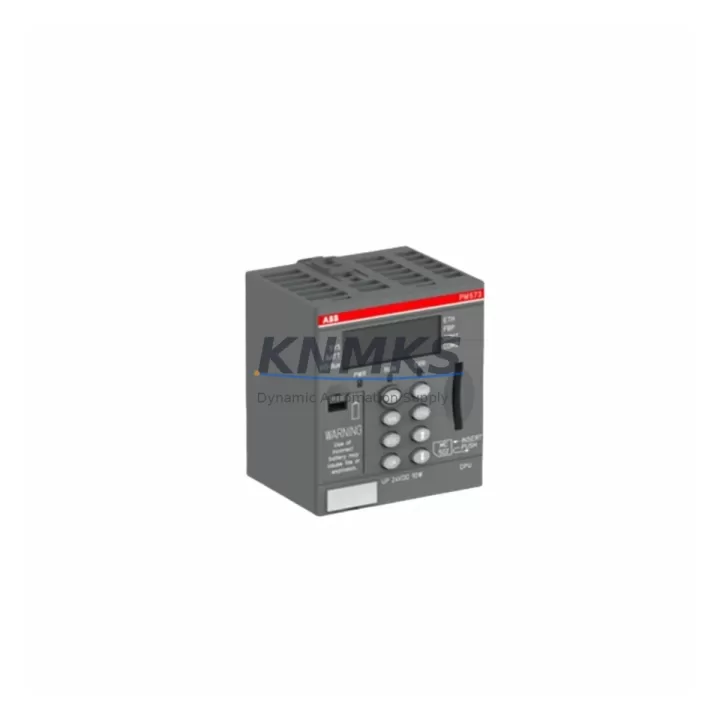
ABB PM573-ETH 1SAP130300R0271 Maintenance-Proven Spare Part for Factory Uptime
The ABB PM573-ETH (order reference 1SAP130300R0271) is a high-performance Ethernet CPU module within the ABB AC500 PLC platform, widely deployed in process automation, machine control, and utility infrastructure. For maintenance engineers managing aging AC500 installations, holding a verified spare of the PM573-ETH is a frontline strategy against unplanned downtime. This unit ships pre-tested, carries a support terms confirmed by quotation, and is sourced from multi-region stock to support both emergency callouts and scheduled annual overhauls.
Spare Maintenance Table
| SKU / Order No. | PM573-ETH / 1SAP130300R0271 |
| Brand | ABB |
| Series | AC500 |
| Module Type | PLC CPU Module with Ethernet |
| Communication Interface | Ethernet (10/100 Mbit/s), RS-232, RS-485 |
| Program Memory | 512 KB (expandable via SD card) |
| Supply Voltage | 24 V DC (via PM5xx power supply) |
| Operating Temperature | -25 °C to +60 °C |
| Protection Rating | IP20 |
| Mounting | DIN rail, AC500 backplane (TB5xx series) |
| Compatibility | AC500 V2 / V3 backplanes; Automation Builder IEC 61131-3 |
| Origin | Germany (DE) |
| Condition | Original, pre-shipment tested |
| Support terms | 12 Months |
| Dispatch | Global, multi-region stock |
Maintenance Planning for Continuous Operation
When the PM573-ETH is flagged during a control cabinet inspection or fault isolation routine, experienced maintenance engineers know that a CPU replacement rarely stands alone. The AC500 architecture distributes I/O, power, and communication across tightly coupled modules — a failure in one area often stresses adjacent components. Before returning the system to service after a PM573-ETH swap, the following components should be inspected or held as co-spares:
- AC500 Power Supply (PS501-PROG or PS560-ME) — Verify output voltage stability under load. A degraded 24 V DC rail is a common root cause of intermittent CPU faults and should be tested before commissioning the replacement CPU.
- TB5xx Backplane / Expansion Backplane — Inspect backplane connectors for oxidation, mechanical damage, or loose seating. A faulty TB511 or TB521 backplane can cause the new CPU to report bus errors immediately after installation.
- Digital I/O Modules (DC532 / DC522) — During the outage window, cycle-test all I/O channels. Latent I/O faults masked by the CPU failure may surface after the CPU is restored.
- Communication Module (CM572-DP or CM577-ETH) — If the system uses PROFIBUS DP or additional Ethernet segments, verify the communication module firmware version is compatible with the replacement PM573-ETH firmware. Mismatched firmware can prevent network re-integration.
- SD Memory Card (MC-SD) — The PM573-ETH supports SD card program storage. Confirm the card is readable and the program version matches the current production baseline before restart.
- Terminal Blocks and Field Wiring — Inspect 24 V DC field wiring, fuse holders, and terminal blocks for signs of thermal stress or loose connections that may have contributed to the original fault.
Procurement engineers should consider stocking the PM573-ETH alongside the TB511 backplane and a compatible power supply module as a matched cabinet spare set. This approach reduces mean time to repair (MTTR) and eliminates the risk of a secondary delay caused by a failed adjacent component discovered only after the CPU is already installed.
Site Replacement Workflow
Replacing the PM573-ETH on a live AC500 system follows a structured sequence to minimize downtime and protect program integrity:
- Step 1 — Backup: Export the current PLC program and configuration from Automation Builder before de-energizing the cabinet. Store the backup on a local engineering laptop and a network share.
- Step 2 — De-energize and isolate: Follow site LOTO (Lockout/Tagout) procedures. Confirm 24 V DC supply is isolated at the cabinet breaker before touching the backplane.
- Step 3 — Module extraction: Release the PM573-ETH from the TB5xx backplane by pressing the release lever. Note the SD card position and remove it for transfer to the replacement unit.
- Step 4 — Replacement installation: Seat the new PM573-ETH firmly onto the backplane. Insert the SD card. Verify all communication cables (Ethernet, RS-485) are reconnected to the correct ports.
- Step 5 — Power-up and verification: Re-energize the cabinet. Confirm the CPU boots to RUN mode, the Ethernet link LED is active, and all I/O modules are recognized on the backplane bus.
- Step 6 — Program validation: Download or verify the program from the SD card. Run a controlled test cycle before returning the line to production.
This workflow is compatible with both AC500 V2 and V3 hardware generations. For systems running legacy firmware, contact your automation engineer to confirm Automation Builder version compatibility before the replacement window.
Spare Parts Support FAQ
Q1: Is the PM573-ETH 1SAP130300R0271 compatible with both AC500 V2 and V3 backplanes?
Yes. The PM573-ETH is designed for the AC500 platform and is mechanically and electrically compatible with TB5xx series backplanes used in both V2 and V3 hardware generations. Always verify firmware version alignment with your Automation Builder project before installation.
Q2: What does the support terms confirmed by quotation cover?
The support terms confirmed by quotation cover manufacturing defects and functional failures under normal operating conditions. Each unit undergoes pre-shipment functional testing. Support requests are supported with direct technical assistance and replacement dispatch from multi-region stock.
Q3: How quickly can the PM573-ETH be dispatched for an emergency breakdown?
Units held in multi-region stock are available for same-day or next-business-day dispatch depending on destination. Contact admin@knmks.com or call +86 18359268345 to confirm real-time stock availability and expedited freight options.
Q4: Can I use this spare to replace an older PM573 (non-ETH) variant?
The PM573-ETH adds an integrated Ethernet port not present on the base PM573. A direct swap is possible if the backplane slot and firmware are compatible, but the Ethernet interface will require network configuration. Consult your site’s automation engineer to validate the substitution before committing to the replacement during a live outage.
© 2026 KNMKS. All rights reserved.
Original Source: https://knmks.com
Contact: admin@knmks.com | +86 18359268345
Product Identification
- Brand / Ecosystem
-
ABB
ABB - Model / Series
-
PM573-ETH 1SAP130300R0271
AC500 Series - Product Family
- PLCs & Controllers
- Availability Status
- Available on request after model and quantity confirmation
- Inquiry Type
- B2B RFQ, replacement inquiry and project spare-part request
- Pre-Quote Check
- Exact SKU, brand, series, quantity, nameplate photos and destination country are checked before quotation
System Path
Where this product fits in the KNMKS automation structure.
Specification & Inquiry Focus
- Control platform
- PLC, PAC and modular controllers
- Common needs
- CPU, rack, power and I/O expansion
- Project support
- Replacement, cabinet build and maintenance
Buyer Confirmation
Information KNMKS checks before replying.
- Exact model
- PM573-ETH 1SAP130300R0271
- Brand / ecosystem
- ABB
- Product family
- PLCs & Controllers
- Application note
- Replacement, maintenance, project build or spare-part list
- Useful photos
- Nameplate, installed unit, cabinet layout or connector side
- Delivery details
- Quantity, destination country and target schedule
Document Support
Files and notes can be confirmed during quotation.
- Product photos or nameplate confirmation when available
- Packing and delivery notes before quotation confirmation
- Support scope and delivery terms confirmed per inquiry
- Export document coordination for qualified B2B requests
Inquiry Support
- Model cross-checking before quotation
- CPU, power, rack and expansion module matching
- Support for replacement and project inquiry
What to Send Us
- Brand and exact model number: ABB PM573-ETH 1SAP130300R0271
- Quantity and required delivery time
- Application, replacement requirement or nameplate photo
- Destination country and shipping preference
RFQ Preparation
This is a product inquiry page built for RFQ communication.
Fast Model Check
Send this model to KNMKS for confirmation.
Include quantity, destination country and photos if this is a maintenance replacement. The inquiry will be saved with a reference number after submission.
Brand & Compatibility Note
KNMKS displays automation product information for well-known industrial brand ecosystems and compatible replacement references. Brand names are used for product identification and compatibility reference only; final availability and commercial terms are confirmed per quotation.
 Manufacturing
 Machine Tools
 Packaging
 Energy & Power



 HMI & Displays
 Servo Systems
 Variable Frequency Drives
 Sensors