
Overview
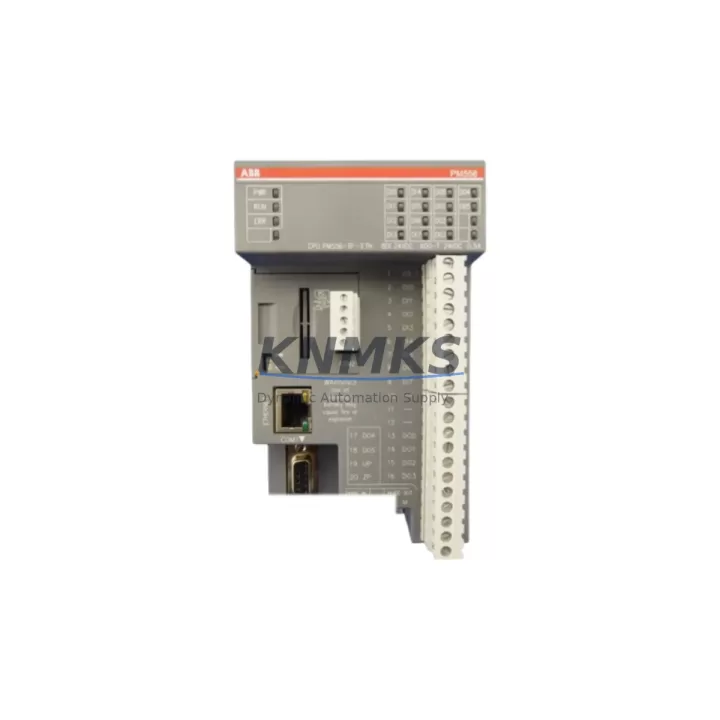
ABB PM556-TP-ETH 1SAP121200R0071 Migration-Ready CPU for Legacy Control Systems
The ABB PM556-TP-ETH (order code 1SAP121200R0071) is a high-performance CPU module designed for the AC500 programmable logic controller platform. As legacy AC500 installations approach end-of-support milestones, the PM556-TP-ETH serves as the primary migration-ready replacement for discontinued predecessors such as the PM554-TP and PM556-TP, offering backward-compatible I/O addressing, retained program logic structures, and an integrated Ethernet port that eliminates the need for a separate CM572-DP or CM577-ETH communication module in many retrofit scenarios.
For maintenance engineers managing aging control cabinets, the PM556-TP-ETH provides a direct upgrade path without requiring a full rack redesign. The module slots into the same TB521 or TB523 terminal base used by earlier AC500 CPUs, preserving existing terminal wiring and reducing field labor during changeover. Before installation, engineers should verify the backplane bus connector alignment, confirm that the installed SD memory card (if any) carries a compatible firmware image, and check that the power supply module — typically a CP502 or CP503 — delivers sufficient current headroom for the new CPU’s Ethernet stack and onboard I/O scan cycle.
Program migration from a PM554-TP to the PM556-TP-ETH is handled through Automation Builder or the legacy PS501 Control Builder environment. Variable tables, function block libraries, and task configurations transfer cleanly in most cases, though engineers should audit any hardware configuration objects referencing the old CPU type and update the device catalog entry before recompiling. HMI screens built on CP600 or CP620 operator panels connected via Modbus TCP or CS31 bus require a communication parameter review to confirm that the new CPU’s Ethernet IP address and port assignments match the existing SCADA or DCS supervisory layer — particularly in installations where a Freelance DCS or System 800xA integration is present.
Migration Compatibility Table
| Parameter | PM556-TP-ETH (1SAP121200R0071) | Legacy Reference (PM554-TP / PM556-TP) |
|---|---|---|
| Terminal Base Compatibility | TB521, TB523 | TB521, TB523 — direct fit |
| Communication Interface | Ethernet (10/100 Mbps), CS31 | CS31 only (no onboard Ethernet on PM554-TP) |
| Program Memory | 512 KB user program | 256 KB (PM554-TP) — expanded capacity |
| SD Card Slot | Yes — firmware & program backup | Not available on PM554-TP |
| I/O Addressing | Compatible with existing SM500 I/O modules | Same addressing scheme — no rewiring required |
| Backplane Interface | AC500 internal bus | AC500 internal bus — fully compatible |
| Power Requirement | 24 VDC via terminal base | 24 VDC — same supply rail |
| Firmware Compatibility | Automation Builder 2.x / PS501 | PS501 Control Builder — project import supported |
| Replacement Recommendation | Direct drop-in for PM554-TP and PM556-TP | Verify SD card firmware version before power-on |
| Commissioning Focus | IP address, task cycle time, HMI link | Re-map Ethernet node if replacing CS31-only CPU |
| Support terms | support terms confirmed by quotation — tested before shipment | |
Retrofit Planning for Existing Automation Systems
A successful PM556-TP-ETH retrofit begins with a thorough audit of the existing control cabinet. In a typical AC500 installation, the CPU shares the rack with SM560-S digital I/O modules, AI523 analog input modules, and — in process-intensive applications — AO523 analog output modules. Each of these SM500-series I/O modules retains its existing wiring and channel configuration when the CPU is swapped, provided the hardware configuration in the programming tool is updated to reflect the PM556-TP-ETH device type.
For installations that previously relied on a CM577-ETH communication module to provide Ethernet connectivity to a SCADA host or historian, the PM556-TP-ETH’s onboard Ethernet port can absorb that function, freeing a rack slot for additional I/O expansion. Engineers should document the existing CM577-ETH IP settings and replicate them on the CPU’s Ethernet interface before decommissioning the communication module. In cabinets where a TA526 expansion unit extends the I/O rack, the internal bus connection and module addressing remain unchanged.
Signal isolation requirements should also be reviewed during retrofit planning. Where 4–20 mA field signals pass through signal isolators or barriers before reaching the AI523 analog input module, the isolator loop power and ground references must be verified against the new CPU’s analog commons. In installations with a CP600 HMI panel, the Modbus TCP or serial RS-485 link to the operator panel should be tested with the new CPU before the system is returned to service, confirming that all tag addresses and alarm setpoints are correctly resolved. Programming cables such as the TK501 USB programming cable remain compatible with the PM556-TP-ETH for local firmware updates and online monitoring.
Downtime Control During System Migration
Minimizing unplanned downtime during a CPU replacement requires a structured pre-outage preparation sequence. Before the scheduled maintenance window, the existing PM554-TP or PM556-TP program should be uploaded and archived from the running controller using Automation Builder or PS501 Control Builder, with the project file stored on both a local engineering workstation and the SD card to be installed in the replacement PM556-TP-ETH. This dual-backup approach ensures that if the SD card image is not recognized on first power-on, the program can be downloaded directly from the engineering tool within minutes.
During the physical swap, the terminal base remains in place and all field wiring stays connected. The old CPU is removed from the TB521 or TB523 base, the new PM556-TP-ETH is seated and locked, and the SD card is inserted before power is applied. On first boot, the CPU reads the SD card and loads the program automatically if the card is formatted correctly. The Ethernet IP address should be pre-configured on the SD card image or entered via the Automation Builder online configuration tool immediately after the CPU comes online.
Once the CPU is running, a systematic I/O force test confirms that all SM560-S digital outputs and AI523 analog inputs are responding correctly before the process is returned to automatic mode. HMI communication to the CP600 or CP620 panel should be verified by cycling through all screen pages and confirming that live process values are updating. The total changeover time for a well-prepared PM556-TP-ETH replacement — from power-off to process restart — typically falls within a 30-to-90-minute window, depending on cabinet complexity and the number of I/O modules in the rack.
Retrofit Support FAQ
Q1: Is the PM556-TP-ETH a direct replacement for the PM554-TP and PM556-TP?
Yes. The PM556-TP-ETH fits the same TB521 and TB523 terminal bases used by the PM554-TP and PM556-TP. Existing terminal wiring, SM500-series I/O modules, and rack mounting hardware are retained without modification. The primary difference is the addition of an onboard Ethernet port and expanded program memory, which enhance connectivity without requiring changes to the field wiring or I/O addressing scheme.
Q2: What commissioning steps are required after installing the PM556-TP-ETH?
After seating the module and applying power, verify that the SD card program loads correctly and that the CPU enters RUN mode. Configure the Ethernet IP address to match the existing network segment. Test communication to the SCADA host or DCS supervisory layer, confirm HMI tag resolution on the CP600 or CP620 panel, and perform an I/O force test on critical digital and analog channels before releasing the system to automatic operation.
Q3: Can the existing PS501 Control Builder project be used with the PM556-TP-ETH?
Yes, with a hardware configuration update. Open the existing project in Automation Builder, replace the CPU device entry with the PM556-TP-ETH catalog item, recompile, and download to the new module. Function block libraries, variable tables, and task configurations are preserved. Review any hardware-specific objects — such as communication module references — and update them if the CM577-ETH is being removed in favor of the CPU’s onboard Ethernet port.
Q4: What support terms and pre-shipment testing does this unit include?
Every PM556-TP-ETH (1SAP121200R0071) supplied by KNMKS is covered by a support terms confirmed by quotation from the date of shipment. Each unit undergoes functional testing prior to dispatch, including power-on verification, Ethernet port connectivity check, and SD card slot validation. In-stock units are available for same-week dispatch. For volume orders or blanket-stock programs supporting long-term maintenance contracts, contact our sales team to discuss allocation and lead-time commitments.
© 2026 KNMKS. All rights reserved.
Original Source: https://knmks.com
Contact: admin@knmks.com | +86 18359268345
Product Identification
- Brand / Ecosystem
-
ABB
ABB - Model / Series
-
1SAP121200R0071
AC500 Series - Product Family
- PLCs & Controllers
- Availability Status
- Available on request after model and quantity confirmation
- Inquiry Type
- B2B RFQ, replacement inquiry and project spare-part request
- Pre-Quote Check
- Exact SKU, brand, series, quantity, nameplate photos and destination country are checked before quotation
System Path
Where this product fits in the KNMKS automation structure.
Specification & Inquiry Focus
- Control platform
- PLC, PAC and modular controllers
- Common needs
- CPU, rack, power and I/O expansion
- Project support
- Replacement, cabinet build and maintenance
Buyer Confirmation
Information KNMKS checks before replying.
- Exact model
- 1SAP121200R0071
- Brand / ecosystem
- ABB
- Product family
- PLCs & Controllers
- Application note
- Replacement, maintenance, project build or spare-part list
- Useful photos
- Nameplate, installed unit, cabinet layout or connector side
- Delivery details
- Quantity, destination country and target schedule
Document Support
Files and notes can be confirmed during quotation.
- Product photos or nameplate confirmation when available
- Packing and delivery notes before quotation confirmation
- Support scope and delivery terms confirmed per inquiry
- Export document coordination for qualified B2B requests
Inquiry Support
- Model cross-checking before quotation
- CPU, power, rack and expansion module matching
- Support for replacement and project inquiry
What to Send Us
- Brand and exact model number: ABB 1SAP121200R0071
- Quantity and required delivery time
- Application, replacement requirement or nameplate photo
- Destination country and shipping preference
RFQ Preparation
This is a product inquiry page built for RFQ communication.
Fast Model Check
Send this model to KNMKS for confirmation.
Include quantity, destination country and photos if this is a maintenance replacement. The inquiry will be saved with a reference number after submission.
Brand & Compatibility Note
KNMKS displays automation product information for well-known industrial brand ecosystems and compatible replacement references. Brand names are used for product identification and compatibility reference only; final availability and commercial terms are confirmed per quotation.
 Manufacturing
 Machine Tools
 Packaging
 Energy & Power



 HMI & Displays
 Servo Systems
 Variable Frequency Drives
 Sensors