
Overview
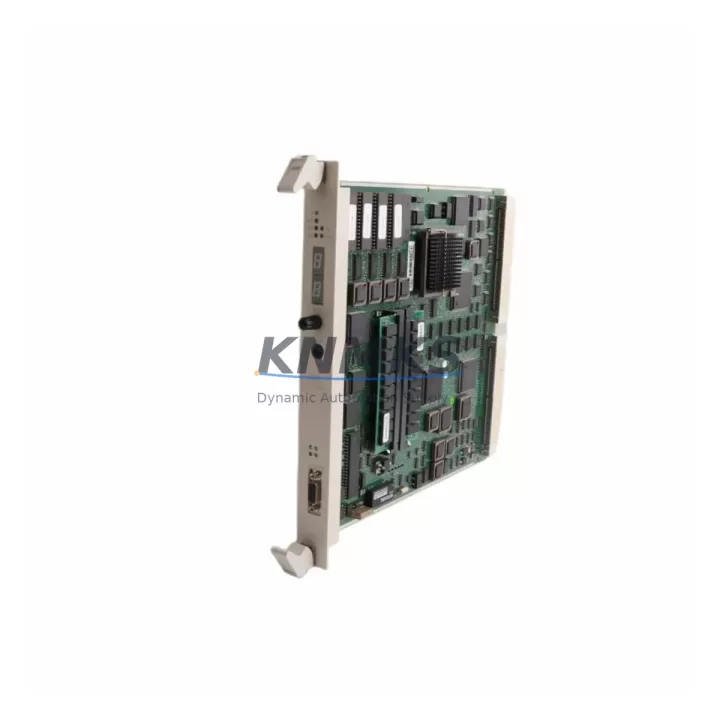
ABB PM510V08 3BSE008373R1 Migration-Ready CPU for AC500: Legacy System Retrofit & Compatibility Upgrade
The ABB PM510V08 (catalog reference 3BSE008373R1) is a programmable logic controller CPU module designed for the ABB AC500 platform — one of the most widely deployed mid-range PLC families in process automation, building infrastructure, and discrete manufacturing. As legacy AC500 installations age and original PM510-series CPUs reach end-of-life or become unavailable through standard distribution channels, the PM510V08 serves as the primary migration-ready replacement for engineers managing brownfield retrofit projects, control cabinet upgrades, and spare-parts lifecycle extension programs.
This module supports the standard AC500 backplane architecture, allowing direct installation into existing TB511, TB521, and TB541 terminal base assemblies without mechanical modification. Engineers replacing a failed or discontinued PM510V04 or PM510V06 unit will find the PM510V08 pin-compatible at the backplane level, though firmware version alignment and program re-validation are required steps before returning the system to production.
Migration Compatibility Table
| Parameter | Detail |
|---|---|
| Replaces / Upgrades From | ABB PM510V04, PM510V06 (AC500 series) |
| Backplane Interface | AC500 standard backplane — TB511, TB521, TB541 compatible |
| Communication Protocols | Modbus RTU, Modbus TCP, PROFIBUS DP (via CM572-DP coupler) |
| Programming Environment | ABB Automation Builder / PS501 Control Builder Plus |
| Installation Space | Standard AC500 CPU slot — no rack modification required |
| Firmware Compatibility | Requires firmware alignment; verify version before program download |
| I/O Expansion | Supports SM500 series I/O modules via local bus |
| Retrofit Recommendation | Direct slot replacement; re-validate program logic and HMI tags post-swap |
| Commissioning Focus | Node address, baud rate, watchdog timer, and analog scaling verification |
| Support terms | support terms confirmed by quotation — covers manufacturing defects and functional failure |
Retrofit Planning for Existing Automation Systems
A successful PM510V08 retrofit begins well before the module arrives on-site. Engineers should audit the existing control cabinet to confirm available slot positions on the AC500 rack, verify that the 24 VDC power supply — typically a CP501 or CP502 power supply module — can support the PM510V08’s current draw alongside connected SM500-series digital and analog I/O modules. Terminal wiring on the TB511 or TB521 base does not need to be disturbed during a CPU swap, which significantly reduces re-commissioning time and the risk of wiring errors.
For systems using PROFIBUS DP fieldbus communication, the CM572-DP communication module must remain in its designated slot and its GSD file configuration should be exported before the CPU is removed. After installing the PM510V08, the PROFIBUS master configuration is re-imported and the DP network is re-scanned to confirm all slave devices — including remote I/O stations, variable-frequency drives, and intelligent field instruments — respond correctly at their assigned node addresses.
Where the legacy system used Modbus RTU over RS-485 to communicate with HMI panels or SCADA gateways, engineers should document the existing baud rate, parity, stop bits, and slave address map before the swap. The PM510V08 retains the same serial port configuration interface, so restoring communication parameters is straightforward. If the site is migrating from a serial HMI connection to Modbus TCP over Ethernet, this CPU swap is an appropriate moment to introduce an Ethernet switch and reconfigure the HMI project to use the PM510V08’s onboard Ethernet port.
Program backup is non-negotiable. The existing application should be uploaded from the running CPU using ABB Automation Builder and archived with version control notation before any hardware is touched. If the original program was developed in the older PS501 Control Builder Plus environment, compatibility with the current Automation Builder version should be verified — minor syntax differences occasionally require manual correction before the project compiles cleanly on the PM510V08.
Downtime Control During System Migration
Minimizing production downtime during a CPU replacement requires a structured pre-outage checklist. Before the planned maintenance window, confirm that all SM500 I/O module addresses are documented, all analog input scaling parameters are recorded, and the HMI tag database is backed up. If the system controls a continuous process, coordinate with operations to schedule the swap during a planned shutdown or low-demand period.
During the swap, the PM510V08 can be pre-configured on a bench using Automation Builder in offline mode — the program is loaded, I/O configuration is set, and communication parameters are entered before the module is installed in the live rack. This approach reduces the in-cabinet commissioning time to firmware verification, program download confirmation, and a structured I/O force-test sequence. Most experienced engineers complete a PM510V08 swap and return the system to automatic mode within a two- to four-hour maintenance window, provided the pre-outage preparation is thorough.
After the CPU is installed and the program is running, verify watchdog timer behavior, confirm that all PROFIBUS or Modbus devices are communicating without fault flags, and check that HMI screens are displaying live process values correctly. Log the firmware version, program checksum, and commissioning date for the site maintenance record.
Retrofit Support FAQ
Q: Is the PM510V08 a direct drop-in replacement for the PM510V04 or PM510V06?
A: At the backplane level, yes — the PM510V08 installs into the same TB511/TB521/TB541 terminal base without mechanical changes. However, a firmware version check and program re-download are required. The existing application logic is fully compatible, but the project must be recompiled and downloaded using ABB Automation Builder to ensure correct operation.
Q: What commissioning steps are required after installation?
A: Verify the CPU firmware version matches the project requirements, download the application program, confirm all SM500 I/O modules are recognized on the local bus, re-establish PROFIBUS or Modbus communication links, and perform a structured I/O force-test before returning the system to automatic mode. HMI tag mapping should also be verified against live process values.
Q: How is the unit tested before shipment?
A: Each PM510V08 unit undergoes functional power-on testing and communication port verification before dispatch. Units are supplied with original or equivalent packaging and include a test record. The support terms confirmed by quotation cover manufacturing defects and functional failure from the date of shipment.
Q: What is the typical lead time and stock availability?
A: The PM510V08 3BSE008373R1 is maintained availability confirmed by RFQ for immediate dispatch. Standard orders ship within 1–3 business days. For urgent breakdown requirements, expedited shipping options are available. Contact our team to confirm current inventory levels and delivery timelines for your region.
© 2026 KNMKS. All rights reserved.
Original Source: https://knmks.com
Contact: admin@knmks.com | +86 18359268345
Product Identification
- Brand / Ecosystem
-
ABB
ABB - Model / Series
-
PM510V08 3BSE008373R1
AC500 Series - Product Family
- PLCs & Controllers
- Availability Status
- Available on request after model and quantity confirmation
- Inquiry Type
- B2B RFQ, replacement inquiry and project spare-part request
- Pre-Quote Check
- Exact SKU, brand, series, quantity, nameplate photos and destination country are checked before quotation
System Path
Where this product fits in the KNMKS automation structure.
Specification & Inquiry Focus
- Control platform
- PLC, PAC and modular controllers
- Common needs
- CPU, rack, power and I/O expansion
- Project support
- Replacement, cabinet build and maintenance
Buyer Confirmation
Information KNMKS checks before replying.
- Exact model
- PM510V08 3BSE008373R1
- Brand / ecosystem
- ABB
- Product family
- PLCs & Controllers
- Application note
- Replacement, maintenance, project build or spare-part list
- Useful photos
- Nameplate, installed unit, cabinet layout or connector side
- Delivery details
- Quantity, destination country and target schedule
Document Support
Files and notes can be confirmed during quotation.
- Product photos or nameplate confirmation when available
- Packing and delivery notes before quotation confirmation
- Support scope and delivery terms confirmed per inquiry
- Export document coordination for qualified B2B requests
Inquiry Support
- Model cross-checking before quotation
- CPU, power, rack and expansion module matching
- Support for replacement and project inquiry
What to Send Us
- Brand and exact model number: ABB PM510V08 3BSE008373R1
- Quantity and required delivery time
- Application, replacement requirement or nameplate photo
- Destination country and shipping preference
RFQ Preparation
This is a product inquiry page built for RFQ communication.
Fast Model Check
Send this model to KNMKS for confirmation.
Include quantity, destination country and photos if this is a maintenance replacement. The inquiry will be saved with a reference number after submission.
Brand & Compatibility Note
KNMKS displays automation product information for well-known industrial brand ecosystems and compatible replacement references. Brand names are used for product identification and compatibility reference only; final availability and commercial terms are confirmed per quotation.
 Manufacturing
 Machine Tools
 Packaging
 Energy & Power



 HMI & Displays
 Servo Systems
 Variable Frequency Drives
 Sensors