
Overview
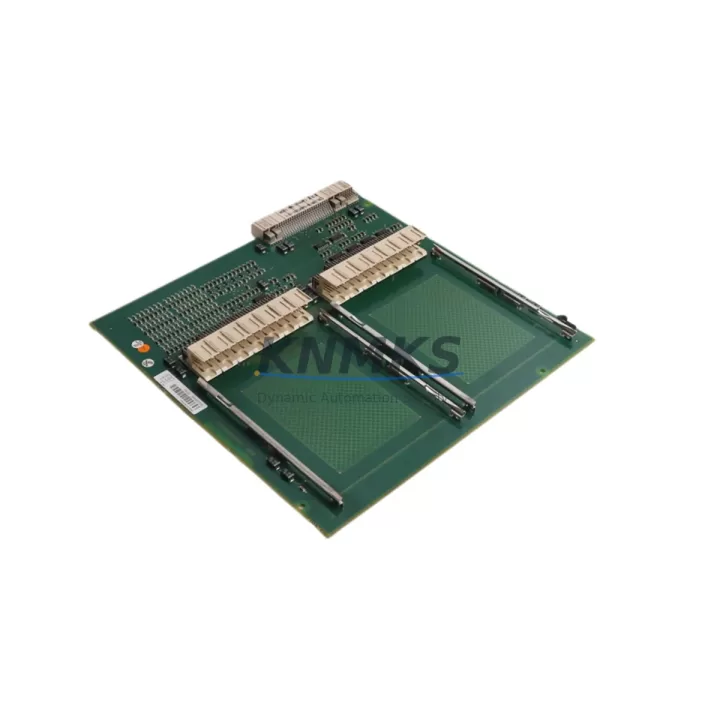
ABB PM154-3BSE003645R1 Migration-Ready CPU for Legacy AC500 Control Systems
The ABB PM154-3BSE003645R1 is a migration-ready central processing unit designed for the AC500 programmable logic controller platform. As legacy AC500 installations approach end-of-support milestones, engineering teams managing brownfield retrofits, control cabinet upgrades, and production line modernization projects increasingly rely on verified drop-in replacements to minimize downtime and protect existing program logic. The PM154-3BSE003645R1 delivers the processing headroom, communication flexibility, and I/O expansion capacity required to sustain critical automation infrastructure through phased migration cycles.
This unit is sourced from authorized supply channels, subjected to pre-shipment functional testing, and backed by a support terms confirmed by quotation — making it a dependable choice for both emergency spare procurement and scheduled outage replacements across process, discrete, and hybrid manufacturing environments.
Migration Compatibility Table
| Parameter | PM154-3BSE003645R1 | Legacy Reference (PM153 / PM152) | Retrofit Notes |
|---|---|---|---|
| Platform | ABB AC500 | ABB AC500 | Same rack and backplane family; direct slot compatibility |
| Backplane Interface | AC500 standard backplane bus | AC500 standard backplane bus | No backplane adapter required; verify TB521/TB541 terminal base seating |
| Communication Protocols | Modbus RTU/TCP, PROFIBUS DP Master | Modbus RTU, PROFIBUS DP | Confirm GSD file version for PROFIBUS network; re-import if firmware differs |
| Power Supply Requirement | 24 VDC (via PS501 or PS502 power supply module) | 24 VDC | Verify PS501/PS502 current budget before installation; add capacity if I/O count increased |
| Programming Environment | Automation Builder (IEC 61131-3) | Automation Builder / Control Builder Plus | Re-compile project in Automation Builder; validate all POU and task cycle times |
| Firmware Compatibility | AC500 V2.x / V3.x firmware | AC500 V1.x / V2.x | Upgrade firmware via SD card or USB; back up existing project before flashing |
| I/O Expansion | Up to 10 I/O modules per local rack | Up to 7–10 I/O modules | Reuse existing DI/DO/AI/AO modules (e.g., DC532, DA501); verify module address mapping |
| HMI Interface | Ethernet, serial (COM1/COM2) | Serial, Ethernet (model-dependent) | Update CP600/CP620 HMI panel driver and communication settings post-swap |
| Installation Footprint | Standard AC500 CPU slot | Standard AC500 CPU slot | No mechanical modification required; confirm DIN rail and cabinet depth clearance |
| Support terms | support terms confirmed by quotation | Pre-shipment tested | Multi-region stock available | ||
Retrofit Planning for Existing AC500 Automation Systems
A successful PM154-3BSE003645R1 retrofit begins well before the maintenance window opens. Engineering teams should audit the existing rack configuration — typically a TB521 or TB541 terminal base paired with a TA521 or TA526 expansion rack — to confirm slot assignments, module addresses, and wiring harness lengths before the replacement unit arrives on site.
Power budget verification is a critical pre-step. The PS501 or PS502 power supply module feeding the AC500 rack must have sufficient current headroom to support the PM154 alongside all installed I/O modules. If the retrofit scope includes adding DC532 digital I/O modules or DA501 analog output modules to expand control coverage, the power supply capacity calculation must account for the full post-retrofit load.
Communication continuity is equally important. Sites running PROFIBUS DP networks should export the current GSD configuration and verify that the PM154-3BSE003645R1 firmware version aligns with the network master settings. For installations using Modbus TCP over Ethernet, confirm IP address assignments and subnet masks are documented before the CPU swap, as these settings are stored in the CPU and will need to be re-entered or restored from a project backup.
HMI panels — particularly CP600 or CP620 series operator panels — may require a driver update or communication parameter adjustment following the CPU replacement. Coordinate with the HMI configuration team to pre-stage updated panel projects so that screen validation can be completed within the maintenance window rather than extending downtime.
For sites with CM572 PROFIBUS communication modules or CM589 PROFINET interface modules installed in the same rack, verify that the module firmware is compatible with the PM154 CPU firmware version. Mismatched firmware between the CPU and communication modules is a common source of post-retrofit communication faults that can extend commissioning time significantly.
Finally, prepare a programming cable and a laptop loaded with the current Automation Builder project before the outage begins. Having the ability to perform a live download and force-test critical I/O points immediately after power-up is the single most effective way to compress commissioning time and confirm system readiness before handing control back to operations.
Downtime Control During AC500 System Migration
Minimizing downtime during a CPU replacement on a live production system requires a structured pre-outage checklist and a clear rollback plan. For the PM154-3BSE003645R1 migration, the following sequence has proven effective across process and discrete manufacturing sites:
Step 1 — Project Backup: Export the full Automation Builder project from the existing CPU via USB or SD card. Store a timestamped copy offline before any hardware is disturbed. This backup is the foundation of the rollback plan if commissioning encounters unexpected faults.
Step 2 — I/O Force Table Documentation: Record all active force values and interlock bypass states in the existing program. These are not preserved in a standard project export and must be manually re-applied after the CPU swap if the system requires a controlled startup sequence.
Step 3 — Physical Swap: Power down the rack via the PS501/PS502 supply. Remove the legacy CPU from the terminal base, seat the PM154-3BSE003645R1, and confirm the backplane connector is fully engaged. Restore power and observe the CPU status LEDs — RUN, ERR, and COM indicators should cycle through their startup sequence within 30 seconds.
Step 4 — Program Download and Verification: Connect via Automation Builder, download the backed-up project, and perform a full online comparison to confirm program integrity. Cycle through critical I/O points using the force table to verify field wiring continuity before releasing the system to automatic mode.
Step 5 — Communication Link Validation: Confirm PROFIBUS DP or Modbus TCP links are active and all remote I/O stations are responding. Check the CP600/CP620 HMI panel for alarm-free status before returning the system to operator control.
With pre-staged hardware, a complete project backup, and a disciplined commissioning sequence, most PM154-3BSE003645R1 replacements can be completed within a two-to-four-hour maintenance window — even on complex multi-rack AC500 installations.
Retrofit Support FAQ
Q1: Is the PM154-3BSE003645R1 a direct drop-in replacement for the PM153 or PM152?
In most AC500 installations, yes. The PM154 uses the same terminal base (TB521/TB541) and backplane bus as the PM153 and PM152, so no mechanical adapter is required. However, the Automation Builder project must be re-compiled and downloaded to the new CPU, and firmware versions should be aligned before going live. Confirm the rack generation (AC500 V1 vs. V2 hardware) before ordering to ensure full compatibility.
Q2: What pre-shipment testing is performed on the PM154-3BSE003645R1?
Each unit undergoes functional power-on testing, firmware version verification, and communication port validation before dispatch. Units are shipped with a test report confirming operational status. The support terms confirmed by quotation cover manufacturing defects and functional failures under normal operating conditions from the date of delivery.
Q3: Can the existing PROFIBUS DP network configuration be reused after the CPU swap?
Yes, provided the GSD files and network master configuration are exported from the legacy CPU before the swap. After installing the PM154-3BSE003645R1, re-import the GSD configuration in Automation Builder and perform a network scan to confirm all slave devices — including any CM572 PROFIBUS modules or third-party field devices — are recognized and communicating correctly.
Q4: What is the lead time and stock availability for the PM154-3BSE003645R1?
Multi-region stock is maintained to support both emergency replacement and scheduled outage procurement. Standard dispatch is available within 2–5 business days for in-stock units. Contact admin@knmks.com or call +86 18359268345 to confirm current inventory levels and regional shipping options before placing an order.
© 2026 KNMKS. All rights reserved.
Original Source: https://knmks.com
Contact: admin@knmks.com | +86 18359268345
Product Identification
- Brand / Ecosystem
-
ABB
ABB - Model / Series
-
PM154-3BSE003645R1
AC500 Series - Product Family
- PLCs & Controllers
- Availability Status
- Available on request after model and quantity confirmation
- Inquiry Type
- B2B RFQ, replacement inquiry and project spare-part request
- Pre-Quote Check
- Exact SKU, brand, series, quantity, nameplate photos and destination country are checked before quotation
System Path
Where this product fits in the KNMKS automation structure.
Specification & Inquiry Focus
- Control platform
- PLC, PAC and modular controllers
- Common needs
- CPU, rack, power and I/O expansion
- Project support
- Replacement, cabinet build and maintenance
Buyer Confirmation
Information KNMKS checks before replying.
- Exact model
- PM154-3BSE003645R1
- Brand / ecosystem
- ABB
- Product family
- PLCs & Controllers
- Application note
- Replacement, maintenance, project build or spare-part list
- Useful photos
- Nameplate, installed unit, cabinet layout or connector side
- Delivery details
- Quantity, destination country and target schedule
Document Support
Files and notes can be confirmed during quotation.
- Product photos or nameplate confirmation when available
- Packing and delivery notes before quotation confirmation
- Support scope and delivery terms confirmed per inquiry
- Export document coordination for qualified B2B requests
Inquiry Support
- Model cross-checking before quotation
- CPU, power, rack and expansion module matching
- Support for replacement and project inquiry
What to Send Us
- Brand and exact model number: ABB PM154-3BSE003645R1
- Quantity and required delivery time
- Application, replacement requirement or nameplate photo
- Destination country and shipping preference
RFQ Preparation
This is a product inquiry page built for RFQ communication.
Fast Model Check
Send this model to KNMKS for confirmation.
Include quantity, destination country and photos if this is a maintenance replacement. The inquiry will be saved with a reference number after submission.
Brand & Compatibility Note
KNMKS displays automation product information for well-known industrial brand ecosystems and compatible replacement references. Brand names are used for product identification and compatibility reference only; final availability and commercial terms are confirmed per quotation.
 Manufacturing
 Machine Tools
 Packaging
 Energy & Power



 HMI & Displays
 Servo Systems
 Variable Frequency Drives
 Sensors