
Overview
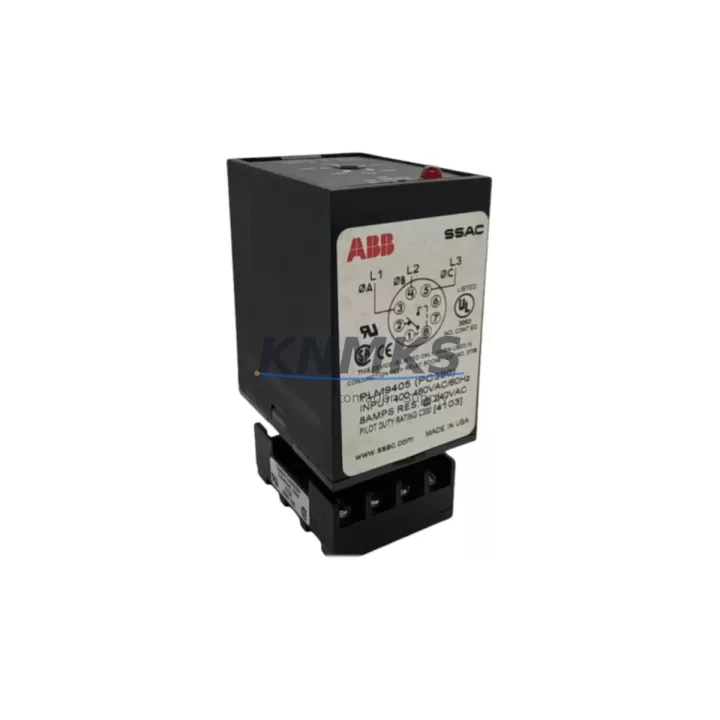
ABB PLM36-A Maintenance-Proven Spare Part for Factory Uptime
The ABB PLM36-A is a proven PLC module within the ABB AC500 automation platform, widely deployed in process control, discrete manufacturing, and utility automation environments. Designed for demanding industrial duty cycles, the PLM36-A delivers reliable I/O expansion and signal processing performance in control cabinets where unplanned downtime carries significant operational cost. Sourced directly from authorized supply channels and verified against ABB AC500 compatibility specifications, each unit shipped by KNMKS undergoes functional testing prior to dispatch and is backed by a support terms confirmed by quotation.
For maintenance engineers managing aging AC500 installations, the PLM36-A represents a direct, back-to-back replacement that eliminates the need for firmware re-engineering or hardware re-wiring. Its standardized DIN-rail mounting and terminal block interface ensure that field replacement can be completed within a single maintenance window, minimizing production interruption. Procurement engineers benefit from KNMKS’s long-term supply commitment: we maintain regional buffer stock to protect against allocation shortages and extended lead times that are common with legacy automation components.
Whether you are responding to an unplanned module fault, executing a scheduled annual overhaul, or building a strategic spare parts inventory for a multi-line facility, the ABB PLM36-A from KNMKS provides the sourcing confidence and technical assurance your maintenance program requires.
Spare Maintenance Table
| SKU / Part Number | PLM36-A |
| Brand | ABB |
| Series | AC500 |
| Module Type | PLC I/O Expansion Module |
| Origin | Germany (DE) |
| Mounting | DIN Rail, AC500 Backplane Compatible |
| Supply Voltage | 24 VDC (nominal, AC500 bus-powered) |
| I/O Configuration | Digital / Analog I/O expansion (AC500 platform standard) |
| Communication Interface | AC500 internal bus (backplane) |
| Operating Temperature | -25°C to +60°C |
| Protection Rating | IP20 (panel-mounted) |
| Compatibility | ABB AC500 CPU modules (PM5xx, PM5xx-ETH series) |
| Replacement Fit | Direct back-to-back; no firmware modification required |
| Pre-shipment Test | Functional test performed on every unit |
| Support terms | 12 Months from date of shipment |
| Condition | Original, unused or refurbished-to-spec (stated at order) |
Maintenance Planning for Continuous Operation
When replacing the ABB PLM36-A in an AC500 control cabinet, a disciplined maintenance engineer will treat the module swap as an opportunity to audit the surrounding electrical environment. Begin by verifying the 24 VDC supply rail feeding the AC500 backplane — a degraded ABB CP-E 24/5.0 or equivalent DIN-rail power supply is a common root cause of intermittent module faults that are misdiagnosed as module failure. Check supply voltage under load and inspect for ripple or voltage sag before installing the replacement PLM36-A.
Inspect the AC500 backplane (TB5xx series) for mechanical damage, oxidized bus connectors, and secure module seating. A compromised backplane can cause communication errors that persist even after a module replacement, leading to repeat callouts. While the cabinet is open, verify the integrity of the terminal blocks and field wiring connected to the I/O channels — loose terminations and corroded conductors are a leading cause of signal anomalies in high-vibration or high-humidity environments.
Review the status of any ABB CM572-DP PROFIBUS communication module or CM589-PNIO PROFINET interface module installed in the same rack. Communication module firmware should be current, and network diagnostic LEDs should be checked for fault indications that may have been masked by the primary module alarm. Similarly, inspect signal isolators and analog input barriers on 4–20 mA loops connected to the PLM36-A’s analog channels — degraded isolators introduce offset errors that can trigger false process alarms after a module replacement.
For facilities operating on extended maintenance intervals, KNMKS recommends holding a minimum of one PLM36-A unit in on-site spare stock alongside a spare ABB AC500 CPU module (PM564-ETH or equivalent) and a set of miniature circuit breakers or fuse terminals (e.g., ABB S200 series or Phoenix Contact UK 5-HESI) rated for the I/O supply circuits. This combination covers the most common single-point failure modes in an AC500 panel and enables same-shift restoration without waiting for courier delivery.
Site Replacement Workflow
Step 1 — Isolation and Safety: Follow your site’s lockout/tagout (LOTO) procedure. De-energize the AC500 rack supply and confirm zero voltage at the backplane power input before touching any module.
Step 2 — Configuration Backup: Before removing the faulty PLM36-A, confirm that the AC500 CPU (PM5xx) has a current project backup stored on its SD card or uploaded to your engineering workstation via ABB Automation Builder. This eliminates re-programming risk if the CPU loses its configuration during the swap.
Step 3 — Module Removal: Release the module locking tab, disconnect field wiring terminal blocks (if plug-in type), and slide the PLM36-A out of the backplane slot. Note the slot position — the replacement must be installed in the same physical slot for the CPU address mapping to remain valid.
Step 4 — Replacement Installation: Insert the new PLM36-A into the correct backplane slot until the locking tab engages. Reconnect field wiring terminal blocks and verify torque on screw terminals per ABB installation specifications (typically 0.5–0.6 Nm for 2.5 mm² conductors).
Step 5 — Power-Up and Verification: Re-energize the rack. Confirm that the PLM36-A’s RUN LED illuminates and no fault LEDs are active. From the CPU or HMI, verify that all I/O channels associated with the replaced module are reading correctly and that no diagnostic alarms are present in the AC500 system log.
Step 6 — Functional Test: Exercise each I/O channel through its full operating range (digital: force ON/OFF; analog: inject reference signal) to confirm correct signal transmission before returning the system to automatic control.
This workflow is compatible with AC500 systems running firmware V2.x and V3.x and does not require a CPU restart in most configurations, enabling hot-swap restoration where the system architecture permits.
Spare Parts Support FAQ
Q1: Is the PLM36-A compatible with all AC500 CPU variants?
The PLM36-A is designed for the ABB AC500 platform and is compatible with PM5xx and PM5xx-ETH series CPUs. Compatibility with specific firmware versions should be confirmed against the ABB AC500 system catalog or by contacting KNMKS with your CPU part number. We verify compatibility before shipment on request.
Q2: What is included in the support terms confirmed by quotation?
KNMKS’s support terms confirmed by quotation cover functional failure under normal operating conditions from the date of shipment. Each PLM36-A unit is tested prior to dispatch. In the event of a support terms claim, KNMKS will arrange replacement or repair at no additional cost, subject to inspection confirming the failure is not due to installation error, overvoltage, or physical damage.
Q3: Can KNMKS supply the PLM36-A on a long-term blanket order basis?
Yes. KNMKS supports blanket purchase orders and scheduled release programs for maintenance teams managing multi-site AC500 installations. Regional buffer stock is maintained to protect against spot-market shortages. Contact our sales team to discuss volume pricing and delivery scheduling.
Q4: How do I verify the unit is genuine before installation?
Every PLM36-A shipped by KNMKS includes original ABB labeling, a traceable serial number, and a pre-shipment test report on request. We recommend inspecting the module label against ABB’s published part number format and checking the firmware version via Automation Builder after installation to confirm the unit is operating within ABB’s specification envelope.
© 2026 KNMKS. All rights reserved.
Original Source: https://knmks.com
Contact: admin@knmks.com | +86 18359268345
Product Identification
- Brand / Ecosystem
-
ABB
ABB - Model / Series
-
PLM36-A
AC500 Series - Product Family
- PLCs & Controllers
- Availability Status
- Available on request after model and quantity confirmation
- Inquiry Type
- B2B RFQ, replacement inquiry and project spare-part request
- Pre-Quote Check
- Exact SKU, brand, series, quantity, nameplate photos and destination country are checked before quotation
System Path
Where this product fits in the KNMKS automation structure.
Specification & Inquiry Focus
- Control platform
- PLC, PAC and modular controllers
- Common needs
- CPU, rack, power and I/O expansion
- Project support
- Replacement, cabinet build and maintenance
Buyer Confirmation
Information KNMKS checks before replying.
- Exact model
- PLM36-A
- Brand / ecosystem
- ABB
- Product family
- PLCs & Controllers
- Application note
- Replacement, maintenance, project build or spare-part list
- Useful photos
- Nameplate, installed unit, cabinet layout or connector side
- Delivery details
- Quantity, destination country and target schedule
Document Support
Files and notes can be confirmed during quotation.
- Product photos or nameplate confirmation when available
- Packing and delivery notes before quotation confirmation
- Support scope and delivery terms confirmed per inquiry
- Export document coordination for qualified B2B requests
Inquiry Support
- Model cross-checking before quotation
- CPU, power, rack and expansion module matching
- Support for replacement and project inquiry
What to Send Us
- Brand and exact model number: ABB PLM36-A
- Quantity and required delivery time
- Application, replacement requirement or nameplate photo
- Destination country and shipping preference
RFQ Preparation
This is a product inquiry page built for RFQ communication.
Fast Model Check
Send this model to KNMKS for confirmation.
Include quantity, destination country and photos if this is a maintenance replacement. The inquiry will be saved with a reference number after submission.
Brand & Compatibility Note
KNMKS displays automation product information for well-known industrial brand ecosystems and compatible replacement references. Brand names are used for product identification and compatibility reference only; final availability and commercial terms are confirmed per quotation.
 Manufacturing
 Machine Tools
 Packaging
 Energy & Power



 HMI & Displays
 Servo Systems
 Variable Frequency Drives
 Sensors