
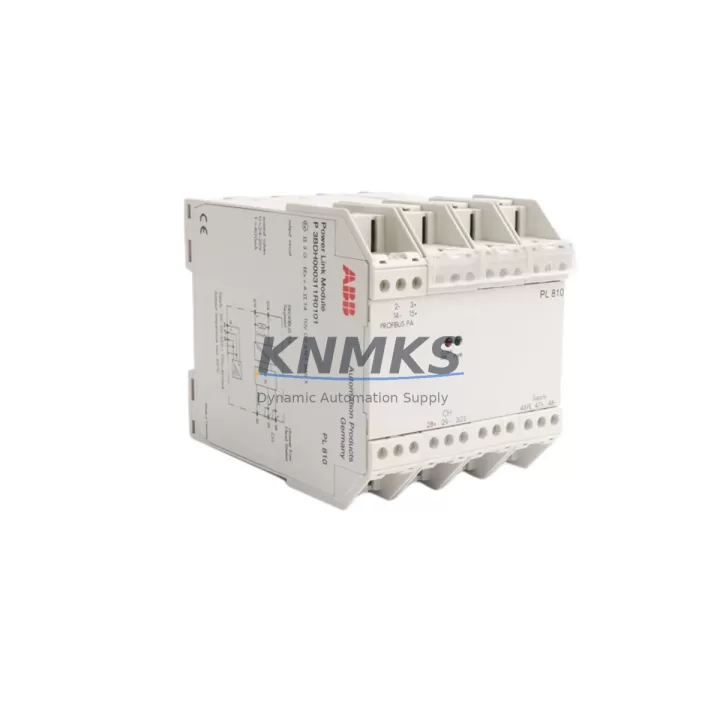
Overview
ABB PL810 Maintenance-Proven Spare Part for Factory Uptime
The ABB PL810 is an original Power Link communication module designed for the ABB AC500 PLC platform — one of the most widely deployed programmable logic controller series in industrial automation, process control, and manufacturing environments worldwide. As a maintenance-proven spare part, the PL810 plays a critical role in sustaining factory uptime, enabling rapid fault isolation, and supporting long-term system continuity for aging control architectures that cannot afford unplanned downtime.
For maintenance engineers managing AC500-based control cabinets, the PL810 is a front-line component in daily inspection routines and emergency replacement scenarios. Its Power Link interface supports high-speed, deterministic communication between the PLC CPU and distributed I/O nodes, making it essential for real-time process control. When this module fails or degrades, the entire communication chain between the controller and field devices can be disrupted — leading to production stoppages, safety interlocks, or loss of process visibility.
Sourcing a verified, original ABB PL810 spare part from a reliable supplier with pre-shipment testing and documented support terms coverage is the most effective way to minimize mean time to repair (MTTR) and protect your facility’s operational continuity.
Spare Maintenance Table
| Parameter | Specification |
|---|---|
| Part Number / SKU | PL810 |
| Brand | ABB |
| Series | AC500 |
| Module Type | Power Link Communication Module |
| Communication Protocol | POWERLINK (IEC 61158) |
| Compatible CPU | AC500 PM5xx / PM5xx-ETH series |
| Installation | DIN rail, AC500 backplane slot |
| Operating Voltage | 24 VDC (via backplane) |
| Operating Temperature | 0°C to +60°C |
| Country of Origin | Germany |
| Support terms | 12 Months |
| Pre-Shipment Testing | Yes — functional verification before dispatch |
| Condition | Original / New or Tested Surplus |
| Application | Industrial automation, process control, discrete manufacturing |
| Maintenance Role | Emergency replacement, annual overhaul, spare inventory |
Maintenance Planning for Continuous Operation
Effective maintenance planning for AC500-based control systems requires more than simply stocking the PL810 module. When a Power Link communication fault is detected — whether through diagnostic LEDs, CPU error logs, or a loss of I/O response — the replacement workflow should include a systematic inspection of all interconnected components to prevent repeat failures and confirm full system restoration.
During a PL810 replacement, maintenance engineers should simultaneously inspect the AC500 CPU module (PM5xx series) for firmware version compatibility and communication parameter alignment. The AC500 backplane (TB5xx series) should be checked for physical damage, oxidized contacts, and correct slot assignment, as backplane integrity directly affects module communication reliability.
Power supply quality is a frequent root cause of communication module degradation. The ABB CP-E 24VDC power supply module feeding the control cabinet should be verified for output voltage stability, ripple, and load capacity. Voltage fluctuations outside the 24 VDC ±10% tolerance range can cause intermittent Power Link faults that mimic module failure.
Field wiring connected to distributed I/O nodes — particularly ABB DC532 or DA501 digital I/O modules — should be inspected for loose terminals, shielding continuity, and correct node addressing. A single misconfigured or electrically noisy I/O node can disrupt the entire Power Link network segment.
For facilities running mixed communication architectures, the ABB CM572-DP PROFIBUS communication module or equivalent fieldbus interface should be checked for address conflicts and cable termination. In older installations, signal isolators and surge protection devices on communication lines are often overlooked during routine maintenance but are critical for protecting the PL810 from transient damage in electrically harsh environments.
Finally, if the control cabinet includes an ABB CP600 or CP400 HMI panel, verify that the HMI communication configuration reflects the restored Power Link topology. Mismatched HMI node configurations after a module swap can cause false alarms or delayed operator feedback during the post-maintenance commissioning phase.
Stocking the PL810 alongside these associated components as part of a structured spare parts inventory strategy significantly reduces the risk of extended downtime during emergency maintenance events.
Site Replacement Workflow
Step 1 — Fault Confirmation: Use the AC500 CPU diagnostic interface or ABB Automation Builder software to confirm a PL810 communication fault. Document the error code, affected node addresses, and last known operational state before proceeding.
Step 2 — Safe Isolation: Follow your site’s lockout/tagout (LOTO) procedure. De-energize the control cabinet and allow capacitors to discharge. Do not attempt hot-swap unless the system architecture explicitly supports it and the CPU is in a safe operating mode.
Step 3 — Module Removal: Release the PL810 from the AC500 backplane by pressing the module release latch. Note the slot position and any DIP switch or rotary address settings on the outgoing module before removal.
Step 4 — Replacement Verification: Confirm the replacement PL810 matches the original part number and firmware revision where applicable. Set node address switches to match the original configuration. Inspect the backplane connector for debris or pin damage before insertion.
Step 5 — Reinstatement and Test: Re-energize the cabinet in a controlled sequence. Monitor the PL810 status LEDs for normal Power Link initialization. Use Automation Builder or the CPU diagnostic display to confirm all nodes are online and communication is restored within expected cycle times.
Step 6 — Documentation: Record the replacement date, module serial number, and post-replacement test results in your maintenance log. Update your spare parts inventory and reorder a replacement PL810 to restore buffer stock levels.
This workflow is compatible with both direct like-for-like replacement of legacy PL810 units and migration scenarios where older AC500 V2 systems are being upgraded to AC500 V3 architecture with updated communication modules.
Spare Parts Support FAQ
Q1: Is the PL810 compatible with all AC500 CPU variants?
The PL810 is designed for the ABB AC500 platform and is primarily compatible with PM5xx series CPUs that support the POWERLINK communication protocol. Compatibility should be verified against your specific CPU firmware version and system configuration using ABB Automation Builder. For older PM5xx-ETH or PM571/PM581 CPUs, confirm the backplane slot assignment and communication module firmware requirements before installation.
Q2: What does pre-shipment testing include?
Each PL810 unit is functionally verified before dispatch. Testing covers power-on initialization, communication interface integrity, and LED status confirmation. Units that do not pass functional verification are not shipped. A test report or certificate of conformity is available upon request for quality-critical procurement processes.
Q3: What is covered under the support terms confirmed by quotation?
The support terms confirmed by quotation cover manufacturing defects and functional failures under normal operating conditions. It does not cover damage resulting from incorrect installation, overvoltage events, physical impact, or use outside the specified environmental parameters. Support requests are processed with return merchandise authorization (RMA) and include replacement or repair at no additional cost.
Q4: Can you support long-term or repeat supply of the PL810?
Yes. We maintain ongoing sourcing relationships for ABB AC500 series components, including the PL810, to support facilities with multi-year maintenance contracts, annual overhaul schedules, and strategic spare parts inventory programs. Contact our sales team to discuss volume pricing, lead times, and consignment stock arrangements for high-criticality sites.
© 2026 KNMKS. All rights reserved.
Original Source: https://knmks.com
Contact: admin@knmks.com | +86 18359268345
Product Identification
- Brand / Ecosystem
-
ABB
ABB - Model / Series
-
PL810
AC500 Series - Product Family
- PLCs & Controllers
- Availability Status
- Available on request after model and quantity confirmation
- Inquiry Type
- B2B RFQ, replacement inquiry and project spare-part request
- Pre-Quote Check
- Exact SKU, brand, series, quantity, nameplate photos and destination country are checked before quotation
System Path
Where this product fits in the KNMKS automation structure.
Specification & Inquiry Focus
- Control platform
- PLC, PAC and modular controllers
- Common needs
- CPU, rack, power and I/O expansion
- Project support
- Replacement, cabinet build and maintenance
Buyer Confirmation
Information KNMKS checks before replying.
- Exact model
- PL810
- Brand / ecosystem
- ABB
- Product family
- PLCs & Controllers
- Application note
- Replacement, maintenance, project build or spare-part list
- Useful photos
- Nameplate, installed unit, cabinet layout or connector side
- Delivery details
- Quantity, destination country and target schedule
Document Support
Files and notes can be confirmed during quotation.
- Product photos or nameplate confirmation when available
- Packing and delivery notes before quotation confirmation
- Support scope and delivery terms confirmed per inquiry
- Export document coordination for qualified B2B requests
Inquiry Support
- Model cross-checking before quotation
- CPU, power, rack and expansion module matching
- Support for replacement and project inquiry
What to Send Us
- Brand and exact model number: ABB PL810
- Quantity and required delivery time
- Application, replacement requirement or nameplate photo
- Destination country and shipping preference
RFQ Preparation
This is a product inquiry page built for RFQ communication.
Fast Model Check
Send this model to KNMKS for confirmation.
Include quantity, destination country and photos if this is a maintenance replacement. The inquiry will be saved with a reference number after submission.
Brand & Compatibility Note
KNMKS displays automation product information for well-known industrial brand ecosystems and compatible replacement references. Brand names are used for product identification and compatibility reference only; final availability and commercial terms are confirmed per quotation.
 Manufacturing
 Machine Tools
 Packaging
 Energy & Power



 HMI & Displays
 Servo Systems
 Variable Frequency Drives
 Sensors