
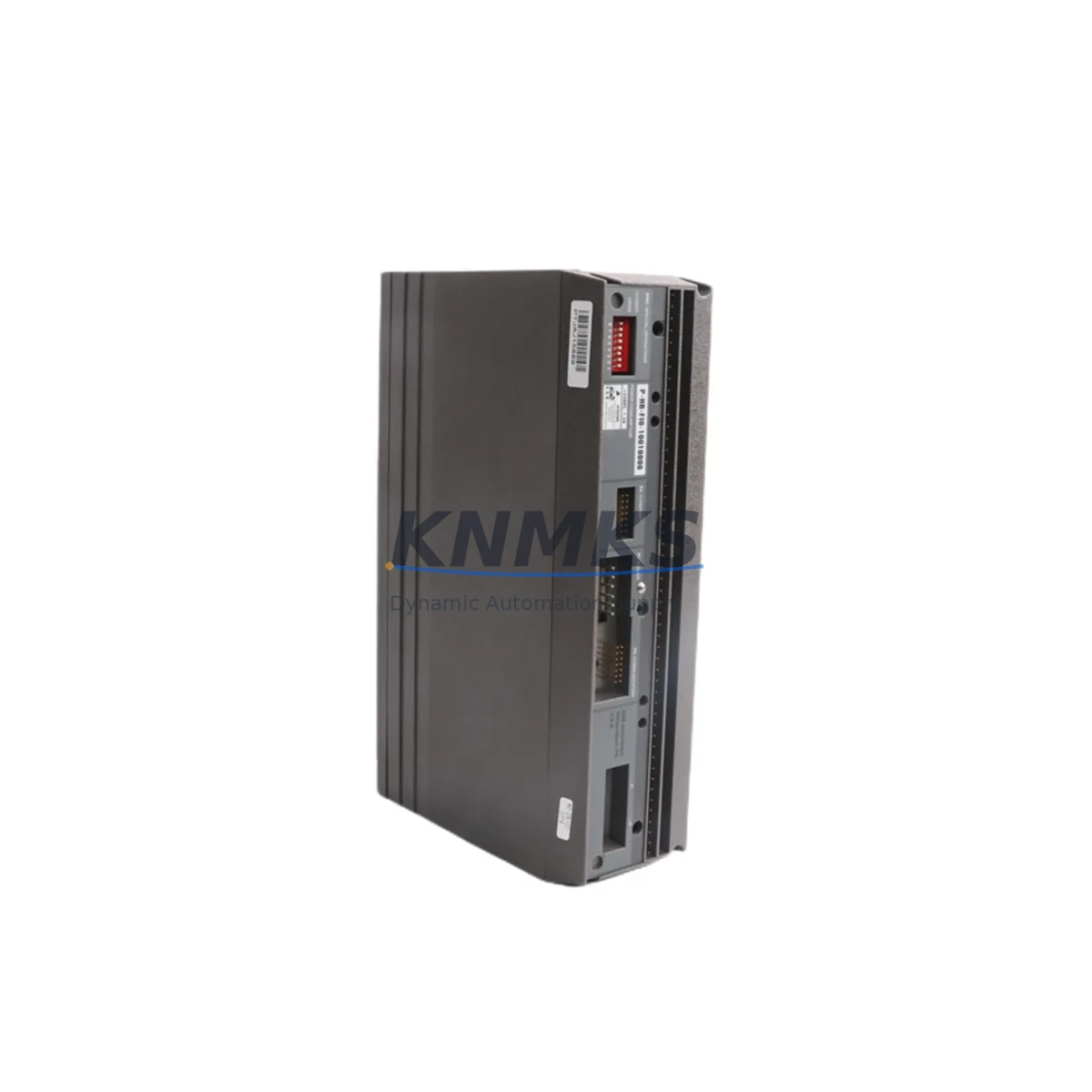
Overview
ABB PHBFIO10010000 Migration-Ready Fieldbus I/O Module: Legacy Control System Retrofit & Upgrade
The ABB PHBFIO10010000 (also referenced as P-HB-FIO-10010000) is a Fieldbus I/O Module engineered for the ABB P-HB Series control platform. For facilities operating aging distributed control systems or programmable logic controllers that rely on discontinued I/O infrastructure, this module represents a verified, drop-in-compatible solution for extending system life, restoring signal integrity, and bridging legacy fieldbus architectures to modern automation standards.
Industrial sites across process manufacturing, power generation, and discrete automation frequently encounter the challenge of sourcing reliable replacements for end-of-life I/O modules. When the original ABB P-HB Series fieldbus I/O hardware reaches obsolescence, unplanned downtime, degraded diagnostics, and communication faults become operational risks. The PHBFIO10010000 addresses this directly — providing a stocked, tested, and support terms-backed alternative that integrates into existing P-HB Series racks without requiring controller reprogramming or backplane modification.
Before proceeding with any retrofit installation, engineers should verify the following parameters against the existing system documentation: available power budget on the P-HB Series backplane, terminal wiring assignments and signal types (digital input, digital output, or analog), fieldbus segment addressing and node configuration, module slot position and rack addressing scheme, firmware revision compatibility with the active P-HB Series CPU or communication controller, HMI tag mapping and faceplate references tied to the original I/O addresses, and physical installation clearance within the control cabinet.
Migration Compatibility Table
| Parameter | Details |
|---|---|
| SKU / Part Number | PHBFIO10010000 / P-HB-FIO-10010000 |
| Brand | ABB |
| Series | P-HB Series |
| Module Type | Fieldbus I/O Module |
| Country of Origin | Germany (DE) |
| Backplane Interface | P-HB Series rack-compatible slot interface |
| Communication Protocol | Fieldbus (P-HB Series native) |
| Replacement Compatibility | Direct replacement for P-HB Series Fieldbus I/O positions; verify slot address and firmware revision before installation |
| Installation Requirement | Confirm cabinet rail space, terminal block wiring, and backplane power capacity prior to swap |
| Commissioning Notes | Validate module address, I/O tag mapping, and HMI screen references post-installation |
| Firmware Compatibility | Match firmware version to active P-HB Series CPU revision; update if required before going live |
| Support terms | support terms confirmed by quotation — covers manufacturing defects and functional failures under normal operating conditions |
| Stock Status | availability confirmed by RFQ — available for immediate dispatch |
Retrofit Planning for Existing Automation Systems
A successful retrofit of the ABB PHBFIO10010000 into an existing control architecture requires systematic pre-installation planning. The P-HB Series platform typically operates alongside a suite of complementary modules, and the I/O replacement process must account for the full system context rather than the module in isolation.
In most P-HB Series installations, the Fieldbus I/O Module communicates with a P-HB Series CPU or communication processor over the internal backplane bus. Engineers replacing a failed or end-of-life I/O module should first document the existing wiring at the terminal block, noting signal type, polarity, shielding, and cable routing. If the control cabinet also houses a P-HB Series power supply module, confirm that the available power margin on the backplane rail is sufficient to support the replacement module without triggering undervoltage faults on adjacent slots.
For systems that include a P-HB Series communication gateway or fieldbus coupler — such as a PROFIBUS DP or PROFINET interface module — the node address assigned to the PHBFIO10010000 must be confirmed against the active network configuration before the module is energized. Address conflicts on the fieldbus segment will prevent the module from being recognized by the controller and may cause cascading faults across other I/O nodes on the same segment.
Where the existing system includes a P-HB Series analog input or analog output module in adjacent slots, verify that the new Fieldbus I/O Module does not introduce ground loops or signal interference through shared terminal commons. Signal isolation requirements should be reviewed against the original system design documentation. In some retrofit scenarios, a signal isolator or barrier may be required between the field device and the module terminal to maintain measurement accuracy and protect the backplane from transient voltages.
If the control system includes an HMI panel linked to P-HB Series I/O tags, the HMI project must be reviewed after the module swap. Tag addresses, data types, and alarm thresholds associated with the replaced I/O module should be verified against the new module’s channel mapping. In cases where the original module used a different channel numbering convention, HMI faceplate updates may be required to maintain accurate operator visibility.
For sites using a programming cable or USB-to-serial adapter to access the P-HB Series CPU for online monitoring or program backup, ensure that the programming software version is compatible with the active firmware on the CPU before performing any online edits during or after the module replacement. Backing up the existing program logic and I/O configuration prior to the swap is a mandatory step in any controlled retrofit procedure.
Downtime Control During System Migration
Minimizing unplanned downtime is the primary operational concern when replacing a Fieldbus I/O Module in a live production environment. For the ABB PHBFIO10010000, the recommended approach is to perform the swap during a scheduled maintenance window with the affected fieldbus segment taken offline in a controlled sequence rather than through an emergency power cut.
Before removing the existing module, export a full backup of the controller program, I/O configuration, and HMI project. Photograph or document the terminal wiring layout to ensure accurate reconnection. If the P-HB Series CPU supports hot-swap or partial rack isolation, use this capability to limit the scope of the outage to the affected I/O segment only, keeping unrelated control loops active throughout the procedure.
After installing the PHBFIO10010000, power up the rack and allow the module to complete its self-diagnostic cycle before bringing the fieldbus segment back online. Confirm that the module address is recognized by the controller and that all I/O channels report expected status in the programming software. Perform a point-by-point I/O check against the field device list before releasing the system to automatic control. This structured commissioning sequence reduces the risk of process upsets caused by incorrect wiring, address conflicts, or firmware mismatches, and ensures that the replacement module is fully validated before production resumes.
For critical processes where even a brief outage is unacceptable, consider staging a pre-configured spare module with the correct address and firmware version in advance, so that the physical swap and recommissioning can be completed within a single shift window.
Retrofit Support FAQ
Q: Is the ABB PHBFIO10010000 a direct replacement for the original P-HB Series Fieldbus I/O Module?
A: Yes. The PHBFIO10010000 (P-HB-FIO-10010000) is designed for the P-HB Series rack and backplane interface. It is compatible with existing slot positions and terminal wiring layouts. Verify the module address and firmware revision against your active system configuration before installation to ensure seamless integration.
Q: What commissioning steps are required after installing the replacement module?
A: After physical installation, confirm the fieldbus node address, perform a full I/O channel check against the field device list, verify HMI tag mapping, and validate that the controller recognizes the module on the backplane. If the system uses a PROFIBUS or PROFINET segment, confirm that the GSD or GSDML file matches the module revision. Complete a program backup before and after the swap.
Q: How do I verify terminal wiring compatibility before swapping the module?
A: Document the existing terminal block wiring — signal type, polarity, cable shielding, and common connections — before removing the original module. Cross-reference against the P-HB Series I/O wiring diagram for the PHBFIO10010000. Pay particular attention to analog signal commons and digital output load ratings to avoid wiring errors during reconnection.
Q: What support terms and stock availability does KNMKS offer for this module?
A: All ABB PHBFIO10010000 units supplied by KNMKS carry a support terms confirmed by quotation covering manufacturing defects and functional failures under normal operating conditions. Units are availability confirmed by RFQ and available for immediate dispatch. Pre-shipment functional testing is performed on all modules before delivery to confirm operational integrity.
© 2026 KNMKS. All rights reserved.
Original Source: https://knmks.com
Contact: admin@knmks.com | +86 18359268345
Product Identification
- Brand / Ecosystem
-
ABB
ABB - Model / Series
- PHBFIO10010000 P-HB-FIO-10010000
- Product Family
- PLCs & Controllers
- Availability Status
- Available on request after model and quantity confirmation
- Inquiry Type
- B2B RFQ, replacement inquiry and project spare-part request
- Pre-Quote Check
- Exact SKU, brand, series, quantity, nameplate photos and destination country are checked before quotation
System Path
Where this product fits in the KNMKS automation structure.
Specification & Inquiry Focus
- Control platform
- PLC, PAC and modular controllers
- Common needs
- CPU, rack, power and I/O expansion
- Project support
- Replacement, cabinet build and maintenance
Buyer Confirmation
Information KNMKS checks before replying.
- Exact model
- PHBFIO10010000 P-HB-FIO-10010000
- Brand / ecosystem
- ABB
- Product family
- PLCs & Controllers
- Application note
- Replacement, maintenance, project build or spare-part list
- Useful photos
- Nameplate, installed unit, cabinet layout or connector side
- Delivery details
- Quantity, destination country and target schedule
Document Support
Files and notes can be confirmed during quotation.
- Product photos or nameplate confirmation when available
- Packing and delivery notes before quotation confirmation
- Support scope and delivery terms confirmed per inquiry
- Export document coordination for qualified B2B requests
Inquiry Support
- Model cross-checking before quotation
- CPU, power, rack and expansion module matching
- Support for replacement and project inquiry
What to Send Us
- Brand and exact model number: ABB PHBFIO10010000 P-HB-FIO-10010000
- Quantity and required delivery time
- Application, replacement requirement or nameplate photo
- Destination country and shipping preference
RFQ Preparation
This is a product inquiry page built for RFQ communication.
Fast Model Check
Send this model to KNMKS for confirmation.
Include quantity, destination country and photos if this is a maintenance replacement. The inquiry will be saved with a reference number after submission.
Brand & Compatibility Note
KNMKS displays automation product information for well-known industrial brand ecosystems and compatible replacement references. Brand names are used for product identification and compatibility reference only; final availability and commercial terms are confirmed per quotation.
 Manufacturing
 Machine Tools
 Packaging
 Energy & Power



 HMI & Displays
 Servo Systems
 Variable Frequency Drives
 Sensors