
Overview
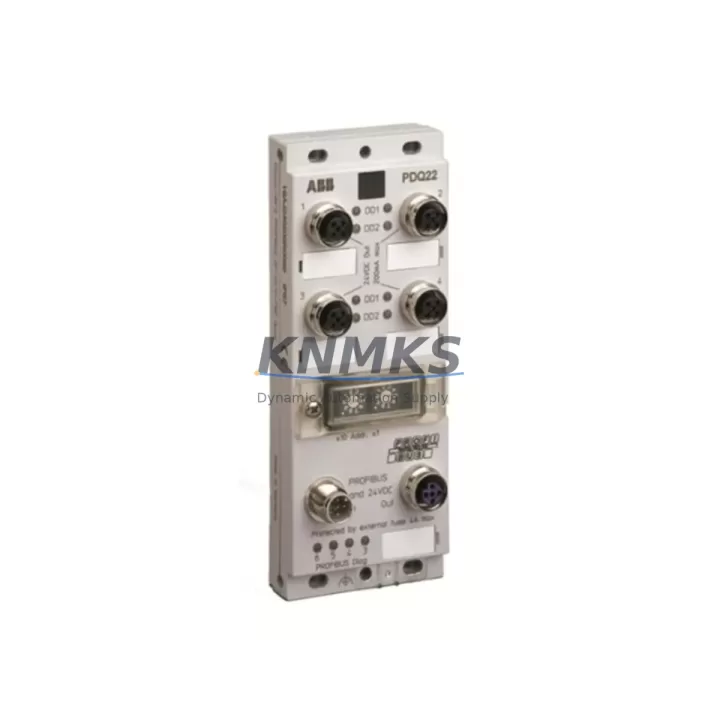
ABB PDQ22-FBP.0 Maintenance-Proven Spare Part for Factory Uptime
The ABB PDQ22-FBP.0 is an original FieldBusPlug Quad PROFIBUS DP communication interface module designed for the ABB AC500 PLC platform. As a plug-in fieldbus interface, it enables seamless PROFIBUS DP network integration directly at the CPU or I/O module level — eliminating the need for separate communication processors in distributed control architectures. For maintenance engineers managing aging AC500 installations, keeping a verified PDQ22-FBP.0 spare on the shelf is a proven strategy to minimize unplanned downtime and accelerate fault recovery.
Sourced directly from authorized supply chains and subjected to pre-shipment functional verification, every PDQ22-FBP.0 unit supplied by KNMKS is backed by a support terms confirmed by quotation and ships with full traceability documentation. Whether you are executing a planned annual overhaul, responding to a PROFIBUS communication fault, or building a strategic spare parts inventory for a multi-line AC500 installation, this module delivers the compatibility and reliability your operation demands.
Spare Maintenance Table
| Parameter | Specification |
|---|---|
| Part Number / SKU | PDQ22-FBP.0 |
| Brand | ABB |
| Series | AC500 / FieldBusPlug |
| Product Type | Fieldbus Interface Module (PROFIBUS DP) |
| Communication Protocol | PROFIBUS DP (EN 50170) |
| Interface | Plug-in FieldBusPlug (FBP) connector |
| Compatible Platforms | ABB AC500 CPU modules, S500 I/O modules with FBP slot |
| Baud Rate | Up to 12 Mbit/s |
| Supply Voltage | Powered via FBP slot (no external supply required) |
| Operating Temperature | -25°C to +60°C |
| Protection Class | IP20 |
| Country of Origin | Germany (DE) |
| Installation | Direct plug-in to FBP slot on AC500 CPU or I/O module |
| Maintenance Recommendation | Inspect connector pins and PROFIBUS termination resistors during annual overhaul; replace if communication errors persist after firmware check |
| Support terms | 12 Months — KNMKS Quality Guarantee |
| Pre-Shipment Test | Functional verification performed before dispatch |
Maintenance Planning for Continuous Operation
When a PROFIBUS DP communication fault is traced to the PDQ22-FBP.0 interface, experienced maintenance engineers know that the fault is rarely isolated. A systematic inspection of the surrounding control architecture is essential before returning the line to production. Begin by verifying the ABB AC500 CPU module (such as the PM573 or PM591 series) for firmware integrity and diagnostic buffer entries — a corrupted firmware image or a CPU hardware fault can mimic a fieldbus interface failure.
Next, inspect the PROFIBUS DP cable termination at both ends of the segment. Incorrect or missing termination resistors are a leading cause of intermittent communication errors that are often misattributed to the FieldBusPlug module itself. If the installation uses ABB S500 distributed I/O modules (such as the DC532 digital I/O or AI523 analog input modules) connected via PROFIBUS, verify that each slave address is unique and that the GSD file configuration in the engineering tool matches the physical hardware revision.
For control cabinets housing AC500 systems, the annual inspection checklist should also include the ABB CP600 HMI panel or equivalent operator interface connected to the same network segment — HMI communication timeouts are frequently the first visible symptom of a degrading PROFIBUS interface. Additionally, inspect the 24 VDC power supply module feeding the AC500 rack; voltage sags below 20.4 VDC can cause intermittent fieldbus resets that are difficult to reproduce under normal load conditions.
For installations where the AC500 system communicates upstream via Ethernet-based protocols (Modbus TCP, PROFINET, or EtherNet/IP), also verify the CM589-PNIO or CM572-DP communication module for error counters and connection state. A cascading communication failure originating at the PROFIBUS DP layer can propagate upstream and trigger SCADA alarms that obscure the root cause. Keeping a spare PDQ22-FBP.0 alongside a spare CM-series communication module in your critical spares cabinet ensures rapid fault isolation and recovery without waiting for emergency procurement.
Finally, review the terminal block wiring at the PROFIBUS connector. Loose or corroded screw terminals on the DB9 or M12 PROFIBUS connector are a common field failure mode in high-vibration or high-humidity environments. Torque verification and contact cleaning should be part of every scheduled maintenance cycle for AC500-based control systems.
Site Replacement Workflow
Step 1 — Fault Confirmation: Use the AC500 engineering tool (Automation Builder or PS501 Control Builder) to read the PROFIBUS DP diagnostic buffer. Confirm that the fault is attributed to the FBP slot and not to a slave device or cable segment fault.
Step 2 — Safe Isolation: Place the affected CPU or I/O module in STOP mode. Follow your site’s lockout/tagout (LOTO) procedure before accessing the control cabinet. The PDQ22-FBP.0 is a plug-in module and does not require tools for removal — however, always de-energize the rack before handling.
Step 3 — Module Swap: Remove the faulty PDQ22-FBP.0 by pressing the release tab and pulling the module from the FBP slot. Insert the replacement unit — no parameter configuration is required, as the PROFIBUS DP address and baud rate are stored in the CPU project, not in the FieldBusPlug module itself.
Step 4 — Compatibility Verification: Confirm that the replacement PDQ22-FBP.0 hardware revision is compatible with your AC500 CPU firmware version. Refer to the ABB AC500 compatibility matrix or contact KNMKS technical support for cross-reference assistance.
Step 5 — Restart and Validation: Restore power to the rack and place the CPU in RUN mode. Monitor the PROFIBUS DP diagnostic LEDs on the PDQ22-FBP.0 — a steady green BUS LED confirms successful network integration. Verify all slave devices are communicating normally before releasing the line to production.
Step 6 — Documentation: Record the replacement in your maintenance log, including the date, replaced module serial number, and post-replacement test results. Replenish your spare parts inventory immediately to maintain readiness for the next event.
Spare Parts Support FAQ
Q1: Is the PDQ22-FBP.0 a direct drop-in replacement for older ABB FieldBusPlug PROFIBUS modules?
Yes. The PDQ22-FBP.0 is backward compatible with earlier FBP-slot equipped AC500 CPU and S500 I/O modules. No re-parameterization of the PROFIBUS DP network is required after replacement, as all network configuration resides in the CPU project file. Always verify the hardware revision against your AC500 firmware version using the ABB compatibility matrix before installation.
Q2: What pre-shipment testing does KNMKS perform on the PDQ22-FBP.0?
Every PDQ22-FBP.0 unit undergoes functional verification prior to dispatch, including communication interface continuity checks and visual inspection for connector pin integrity. Units are shipped in anti-static packaging with full traceability documentation. The support terms confirmed by quotation cover manufacturing defects and functional failures under normal operating conditions.
Q3: How should I structure my spare parts inventory for an AC500 PROFIBUS installation?
For installations with three or more AC500 nodes on a single PROFIBUS DP segment, we recommend maintaining a minimum of one PDQ22-FBP.0 spare per ten installed units, with a floor of one spare per site. For critical production lines with zero-tolerance downtime requirements, consider a 1:5 ratio. Pair the PDQ22-FBP.0 spare with a spare AC500 CPU module and a spare 24 VDC power supply to cover the most common single-point failure scenarios.
Q4: Can KNMKS support long-term supply of the PDQ22-FBP.0 for multi-year maintenance contracts?
Yes. KNMKS maintains ongoing stock of the PDQ22-FBP.0 and can support blanket purchase orders and annual supply agreements for industrial customers with multi-site AC500 installations. Contact our sales team to discuss volume pricing, lead time commitments, and consignment stock arrangements tailored to your maintenance planning cycle.
© 2026 KNMKS. All rights reserved.
Original Source: https://knmks.com
Contact: admin@knmks.com | +86 18359268345
Product Identification
- Brand / Ecosystem
-
ABB
ABB - Model / Series
-
PDQ22-FBP.0
AC500 Series - Product Family
- PLCs & Controllers
- Availability Status
- Available on request after model and quantity confirmation
- Inquiry Type
- B2B RFQ, replacement inquiry and project spare-part request
- Pre-Quote Check
- Exact SKU, brand, series, quantity, nameplate photos and destination country are checked before quotation
System Path
Where this product fits in the KNMKS automation structure.
Specification & Inquiry Focus
- Control platform
- PLC, PAC and modular controllers
- Common needs
- CPU, rack, power and I/O expansion
- Project support
- Replacement, cabinet build and maintenance
Buyer Confirmation
Information KNMKS checks before replying.
- Exact model
- PDQ22-FBP.0
- Brand / ecosystem
- ABB
- Product family
- PLCs & Controllers
- Application note
- Replacement, maintenance, project build or spare-part list
- Useful photos
- Nameplate, installed unit, cabinet layout or connector side
- Delivery details
- Quantity, destination country and target schedule
Document Support
Files and notes can be confirmed during quotation.
- Product photos or nameplate confirmation when available
- Packing and delivery notes before quotation confirmation
- Support scope and delivery terms confirmed per inquiry
- Export document coordination for qualified B2B requests
Inquiry Support
- Model cross-checking before quotation
- CPU, power, rack and expansion module matching
- Support for replacement and project inquiry
What to Send Us
- Brand and exact model number: ABB PDQ22-FBP.0
- Quantity and required delivery time
- Application, replacement requirement or nameplate photo
- Destination country and shipping preference
RFQ Preparation
This is a product inquiry page built for RFQ communication.
Fast Model Check
Send this model to KNMKS for confirmation.
Include quantity, destination country and photos if this is a maintenance replacement. The inquiry will be saved with a reference number after submission.
Brand & Compatibility Note
KNMKS displays automation product information for well-known industrial brand ecosystems and compatible replacement references. Brand names are used for product identification and compatibility reference only; final availability and commercial terms are confirmed per quotation.
 Manufacturing
 Machine Tools
 Packaging
 Energy & Power



 HMI & Displays
 Servo Systems
 Variable Frequency Drives
 Sensors