
Overview
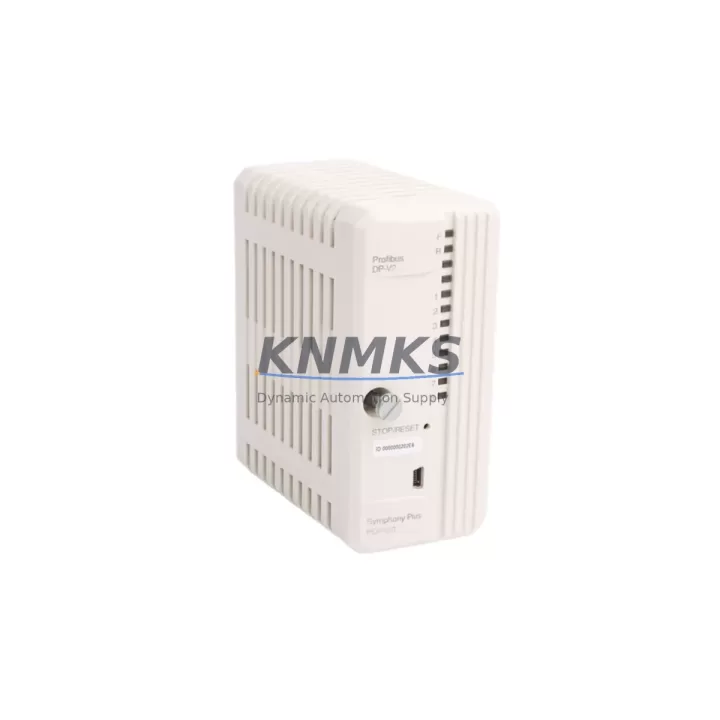
ABB PDP800 DP-V2 Maintenance-Proven Spare Part for Factory Uptime
The ABB PDP800 DP-V2 is a PROFIBUS DP-V2 communication interface module designed for the ABB AC500 and S500 PLC series. In industrial maintenance environments, this module serves as a critical fieldbus gateway — enabling cyclic and acyclic data exchange between the AC500 CPU and PROFIBUS DP slave devices across process automation, machine control, and drive coordination applications. When this module fails or degrades, the entire PROFIBUS segment loses communication, triggering immediate production downtime. Maintaining a verified spare on the shelf is the single most effective strategy for minimizing mean time to repair (MTTR).
At KNMKS, every ABB PDP800 DP-V2 unit is sourced from authorized supply chains, inspected against original ABB specifications, and shipped with a support terms confirmed by quotation. Each unit undergoes pre-shipment functional testing to confirm PROFIBUS DP-V2 protocol compliance, slot compatibility, and firmware integrity before dispatch.
Spare Maintenance Table
| Parameter | Specification |
|---|---|
| Part Number / SKU | PDP800 DP-V2 |
| Brand | ABB |
| Series | AC500 / S500 |
| Module Type | PROFIBUS DP-V2 Communication Interface Module |
| Protocol | PROFIBUS DP-V1 / DP-V2 (cyclic & acyclic) |
| Compatible CPUs | AC500 PM5xx, PM5xx-ETH series; S500 I/O expansion |
| Installation | Snap-on to AC500 CPU left-side communication slot |
| Country of Origin | Germany |
| Weight | 180 g |
| Operating Temperature | 0°C to +60°C (standard industrial range) |
| Mounting | DIN rail via AC500 backplane |
| Compatibility Verified | AC500 V2 / V3 firmware platforms |
| Maintenance Role | PROFIBUS master/slave fieldbus gateway for AC500 PLC |
| Support terms | 12 Months — covers manufacturing defects and functional failure |
| Pre-Shipment Test | Protocol handshake, slot recognition, firmware boot verified |
| Stock Status | availability confirmed by RFQ — ready for same-week dispatch |
Maintenance Planning for Continuous Operation
When a PROFIBUS communication fault is traced to the PDP800 DP-V2, experienced maintenance engineers know that the module rarely fails in isolation. A systematic inspection of the surrounding control cabinet is essential before and after replacement to prevent repeat faults and confirm full system restoration.
Begin with the AC500 CPU module (PM564, PM573, or PM583 series) — verify that the CPU firmware version is compatible with the PDP800 DP-V2 hardware revision. A firmware mismatch can cause the replacement module to fail to initialize even when the hardware is fully functional. Next, inspect the AC500 backplane and communication bus connectors: oxidized or loose contacts on the left-side expansion slot are a common root cause of intermittent PROFIBUS faults that are misdiagnosed as module failure.
Check the PROFIBUS cable termination resistors at both ends of the segment. Incorrect or missing termination is the leading cause of PROFIBUS communication instability in field installations. Inspect the 24 VDC power supply module feeding the AC500 rack — voltage sags below 20.4 VDC can cause the PDP800 to drop off the bus under load. If the cabinet includes ABB S500 digital or analog I/O modules (such as DC532 or AX522), verify their GSD configuration files are still aligned with the new module’s DP-V2 master parameters.
For cabinets integrating ABB ACS drive series (ACS355, ACS580, or ACS880) as PROFIBUS slaves, confirm that the drive PROFIBUS adapter (FPBA-01 or equivalent) is still correctly addressed and that the PPO type configuration matches the PLC program. Also inspect PROFIBUS repeaters or optical link modules if the segment spans multiple cabinets — these components degrade over time and can introduce latency or frame errors that destabilize the entire segment after a module swap.
Finally, review the 24 VDC fuse protection for the communication rack. A blown fuse on the logic supply rail is sometimes the actual cause of a PDP800 fault, and replacing the module without restoring fuse integrity will result in immediate repeat failure. Document all findings in the maintenance log before returning the line to production.
Site Replacement Workflow
Step 1 — Isolate and document. Before removing the PDP800 DP-V2, export the current AC500 project from Automation Builder or PS501 Control Builder. Record the PROFIBUS node address, baud rate, and DP-V2 parameter settings configured in the existing module. Take a photograph of the wiring and cable labeling on the PROFIBUS DB9 connector.
Step 2 — Power down safely. De-energize the AC500 rack following your site LOTO procedure. Do not hot-swap the PDP800 DP-V2 — the module must be installed and removed with the rack powered off to prevent backplane damage.
Step 3 — Remove and inspect. Slide the faulty PDP800 DP-V2 out of the CPU left-side slot. Inspect the slot connector pins for damage, corrosion, or debris. Clean with isopropyl alcohol if necessary before installing the replacement.
Step 4 — Install the replacement. Seat the new PDP800 DP-V2 firmly into the slot until the latch clicks. Reconnect the PROFIBUS DB9 cable, ensuring correct pin orientation and secure locking screws.
Step 5 — Power up and verify. Restore power to the rack. In Automation Builder, confirm the PDP800 DP-V2 is recognized in the hardware configuration. Download the project if required. Monitor the PROFIBUS diagnostic LEDs: BF (Bus Fault) should extinguish within 10 seconds of a successful bus initialization. Verify all slave devices return to cyclic data exchange.
Step 6 — Functional test before production restart. Run a controlled I/O test cycle to confirm all PROFIBUS slave devices (drives, I/O modules, instruments) are responding correctly. Log the replacement in the equipment maintenance record with the new module’s serial number and installation date.
Spare Parts Support FAQ
Q1: Is the ABB PDP800 DP-V2 compatible with both AC500 V2 and V3 hardware platforms?
The PDP800 DP-V2 is designed for the AC500 platform and is compatible with PM5xx CPU modules across both V2 and V3 hardware generations. However, always verify the firmware version in Automation Builder before installation — ABB periodically releases firmware updates that affect communication module compatibility. KNMKS can provide hardware revision details upon request to confirm fit before shipment.
Q2: What is covered under the support terms confirmed by quotation?
The support terms confirmed by quotation cover manufacturing defects and functional failures under normal operating conditions. Each unit is pre-tested for PROFIBUS protocol compliance and slot recognition before dispatch. Support requests are supported by KNMKS directly — contact admin@knmks.com with the order reference and fault description for rapid resolution.
Q3: Can KNMKS supply the PDP800 DP-V2 for long-term or repeat procurement?
Yes. KNMKS maintains stock of ABB AC500 series communication modules for ongoing MRO and project procurement. For facilities managing multiple AC500 installations, we recommend establishing a standing spare inventory of at least one PDP800 DP-V2 per PROFIBUS segment. Contact our team to discuss volume pricing, lead time commitments, and consignment stock arrangements.
Q4: How do I verify the replacement module is genuine before installation?
All KNMKS-supplied ABB modules include original ABB labeling, part number markings, and traceable batch documentation. Upon request, we provide a pre-shipment inspection report confirming the module’s functional test results. If your site requires additional third-party verification, we can coordinate with your QA team prior to dispatch.
© 2026 KNMKS. All rights reserved.
Original Source: https://knmks.com
Contact: admin@knmks.com | +86 18359268345
Product Identification
- Brand / Ecosystem
-
ABB
ABB - Model / Series
-
PDP800 DP-V2
AC500 Series - Product Family
- PLCs & Controllers
- Availability Status
- Available on request after model and quantity confirmation
- Inquiry Type
- B2B RFQ, replacement inquiry and project spare-part request
- Pre-Quote Check
- Exact SKU, brand, series, quantity, nameplate photos and destination country are checked before quotation
System Path
Where this product fits in the KNMKS automation structure.
Specification & Inquiry Focus
- Control platform
- PLC, PAC and modular controllers
- Common needs
- CPU, rack, power and I/O expansion
- Project support
- Replacement, cabinet build and maintenance
Buyer Confirmation
Information KNMKS checks before replying.
- Exact model
- PDP800 DP-V2
- Brand / ecosystem
- ABB
- Product family
- PLCs & Controllers
- Application note
- Replacement, maintenance, project build or spare-part list
- Useful photos
- Nameplate, installed unit, cabinet layout or connector side
- Delivery details
- Quantity, destination country and target schedule
Document Support
Files and notes can be confirmed during quotation.
- Product photos or nameplate confirmation when available
- Packing and delivery notes before quotation confirmation
- Support scope and delivery terms confirmed per inquiry
- Export document coordination for qualified B2B requests
Inquiry Support
- Model cross-checking before quotation
- CPU, power, rack and expansion module matching
- Support for replacement and project inquiry
What to Send Us
- Brand and exact model number: ABB PDP800 DP-V2
- Quantity and required delivery time
- Application, replacement requirement or nameplate photo
- Destination country and shipping preference
RFQ Preparation
This is a product inquiry page built for RFQ communication.
Fast Model Check
Send this model to KNMKS for confirmation.
Include quantity, destination country and photos if this is a maintenance replacement. The inquiry will be saved with a reference number after submission.
Brand & Compatibility Note
KNMKS displays automation product information for well-known industrial brand ecosystems and compatible replacement references. Brand names are used for product identification and compatibility reference only; final availability and commercial terms are confirmed per quotation.
 Manufacturing
 Machine Tools
 Packaging
 Energy & Power



 HMI & Displays
 Servo Systems
 Variable Frequency Drives
 Sensors