
Overview
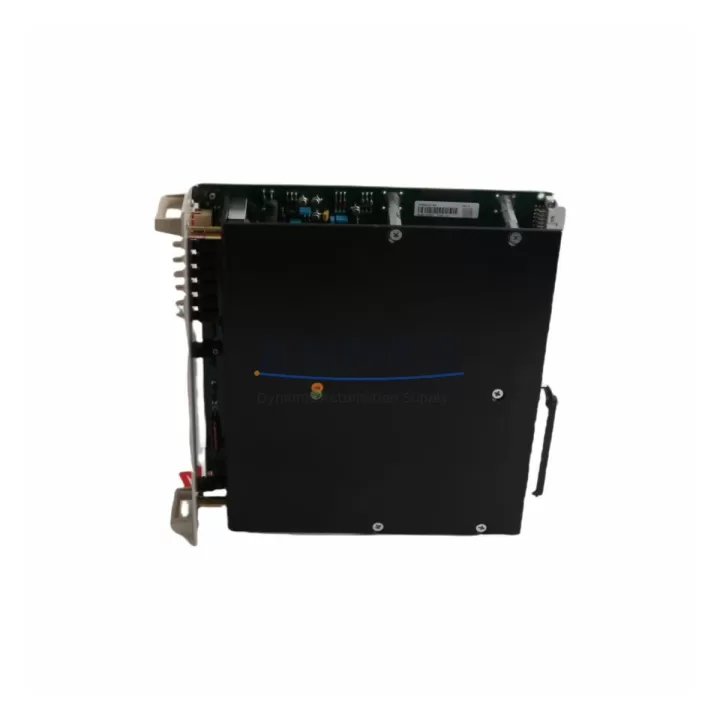
ABB PCPJ-11 Maintenance-Proven Spare Part for Factory Uptime
The ABB PCPJ-11 is a CPU module designed for the ABB AC500 programmable logic controller series — one of the most widely deployed automation platforms in process industries, manufacturing lines, and utility infrastructure worldwide. When a PCPJ-11 fails or reaches end-of-service life, the impact on production can be immediate and severe. Sourcing a verified, original-grade replacement is the fastest path to restoring control system integrity and resuming normal operations.
At KNMKS, we supply the ABB PCPJ-11 as a maintenance-proven spare part, pre-tested before shipment and backed by a support terms confirmed by quotation. Whether you are managing a planned annual overhaul, responding to an unscheduled shutdown, or building a strategic spare parts inventory for your control cabinet, the PCPJ-11 is a critical line item that should never be left to chance.
Spare Maintenance Table
| Parameter | Details |
|---|---|
| SKU / Part Number | PCPJ-11 |
| Brand | ABB |
| Series | AC500 |
| Product Type | PLC CPU Module |
| Origin | Germany (DE) |
| Compatible Platform | ABB AC500 PLC System |
| Communication Interface | Ethernet, serial (series-dependent) |
| Operating Temperature | 0°C to +60°C (standard industrial range) |
| Power Supply Requirement | 24 VDC (via AC500 backplane / power module) |
| Installation | DIN rail, AC500 backplane slot |
| Application Environment | Industrial automation, process control, utilities, manufacturing |
| Maintenance Recommendation | Replace at first sign of CPU fault, watchdog trip, or communication loss; inspect every 12–24 months |
| Pre-Shipment Testing | Yes — functional test performed before dispatch |
| Support terms | 12 Months |
Maintenance Planning for Continuous Operation
Replacing a PCPJ-11 CPU module is rarely an isolated task. A thorough maintenance engineer will treat a CPU swap as an opportunity to audit the entire control cabinet and associated electrical circuit. Before or during the replacement of the PCPJ-11, the following components should be inspected or tested to prevent repeat failures and ensure system stability after restart.
The AC500 power supply module (such as the PM573 or compatible PS501 series) should be checked for output voltage stability and ripple. An aging or undersized power module is a common root cause of CPU resets and memory corruption — replacing the CPU without verifying the power rail can lead to a repeat failure within weeks. Similarly, the AC500 backplane should be inspected for bent connector pins, oxidation, and secure module seating; a loose backplane connection can cause intermittent CPU communication faults that are difficult to diagnose remotely.
The digital and analog I/O modules connected to the PCPJ-11 — such as the DC532 digital input module or AX521 analog I/O module — should be verified for correct addressing and signal integrity after the CPU is replaced and the program is reloaded. I/O modules that were operating near their rated limits may have contributed to the original CPU overload condition.
Communication continuity is equally important. If the PCPJ-11 is networked via Ethernet or PROFIBUS, the network switch ports, cable terminations, and communication module settings (such as the CM572-DP PROFIBUS master module) should be confirmed before bringing the system back online. A misconfigured network address or duplicate node ID can prevent the new CPU from establishing communication with field devices.
For cabinets with relay output circuits, inspect the relay modules and terminal blocks for contact wear, loose wiring, and correct fuse ratings. Blown fuses or degraded relay contacts in the output circuit can cause the CPU to log persistent output errors even after a successful hardware replacement. Fuse holders and miniature circuit breakers protecting the 24 VDC control circuit should also be tested for continuity.
Finally, if the control system includes an HMI panel (such as an ABB CP600 series operator panel), verify that the HMI communication parameters match the new CPU configuration and that the HMI program version is compatible with the reloaded PLC application. Mismatched HMI-PLC versions are a frequent source of post-maintenance alarms that delay production restart.
Site Replacement Workflow
Replacing the ABB PCPJ-11 on-site follows a structured sequence to minimize downtime and avoid configuration loss. Begin by exporting and archiving the current PLC program from the existing CPU using ABB Automation Builder or the applicable programming environment. Confirm the program version, hardware configuration, and I/O mapping before powering down the cabinet.
After de-energizing the control panel and following your site’s lockout/tagout procedure, remove the faulty PCPJ-11 from the AC500 backplane. Inspect the backplane slot and connector for damage before inserting the replacement module. Seat the new PCPJ-11 firmly and restore power. Use the programming software to download the archived program to the new CPU, verify the hardware configuration matches, and perform a full I/O force test before releasing the system to production.
The PCPJ-11 is a direct form-fit-function replacement within the AC500 CPU family, which means no hardware rewiring is required in most standard installations. This significantly reduces the risk of wiring errors during emergency replacements and allows maintenance teams to complete the swap within a single shift. For older AC500 installations where the original CPU model has been discontinued, the PCPJ-11 serves as a compatible upgrade path that extends system life without requiring a full PLC migration.
Documenting the replacement — including the date, technician name, firmware version loaded, and post-replacement test results — is strongly recommended for ISO and audit compliance and for building an accurate maintenance history for the control system.
Spare Parts Support FAQ
Q1: Is the PCPJ-11 compatible with my existing AC500 backplane and I/O modules?
The PCPJ-11 is designed for the ABB AC500 platform and is compatible with standard AC500 backplanes and I/O modules within the same generation. We recommend confirming your backplane model and firmware version before installation. Our technical team can assist with compatibility verification prior to shipment.
Q2: What testing is performed before the PCPJ-11 is shipped?
Every PCPJ-11 unit supplied by KNMKS undergoes a functional pre-shipment test to verify power-on, communication, and basic I/O response. Units that do not pass testing are not dispatched. A support terms confirmed by quotation is provided from the date of shipment, covering manufacturing defects and functional failures under normal operating conditions.
Q3: Can KNMKS support long-term or repeat supply of the PCPJ-11?
Yes. KNMKS maintains stock and sourcing channels for the PCPJ-11 and related AC500 spare parts to support ongoing maintenance programs, annual overhaul schedules, and emergency procurement. We can provide quotations for single units or bulk orders and offer lead-time commitments for planned maintenance windows.
Q4: What should I do if the replacement PCPJ-11 does not resolve the original fault?
If the fault persists after CPU replacement, the issue is likely in an upstream or downstream component — most commonly the power supply module, backplane, or a field device causing a persistent I/O error. Contact our technical support team with your fault codes and system configuration details. We can assist with fault isolation guidance and, if necessary, arrange for the returned unit to be re-tested under support terms.
© 2026 KNMKS. All rights reserved.
Original Source: https://knmks.com
Contact: admin@knmks.com | +86 18359268345
Product Identification
- Brand / Ecosystem
-
ABB
ABB - Model / Series
-
PCPJ-11
AC500 Series - Product Family
- PLCs & Controllers
- Availability Status
- Available on request after model and quantity confirmation
- Inquiry Type
- B2B RFQ, replacement inquiry and project spare-part request
- Pre-Quote Check
- Exact SKU, brand, series, quantity, nameplate photos and destination country are checked before quotation
System Path
Where this product fits in the KNMKS automation structure.
Specification & Inquiry Focus
- Control platform
- PLC, PAC and modular controllers
- Common needs
- CPU, rack, power and I/O expansion
- Project support
- Replacement, cabinet build and maintenance
Buyer Confirmation
Information KNMKS checks before replying.
- Exact model
- PCPJ-11
- Brand / ecosystem
- ABB
- Product family
- PLCs & Controllers
- Application note
- Replacement, maintenance, project build or spare-part list
- Useful photos
- Nameplate, installed unit, cabinet layout or connector side
- Delivery details
- Quantity, destination country and target schedule
Document Support
Files and notes can be confirmed during quotation.
- Product photos or nameplate confirmation when available
- Packing and delivery notes before quotation confirmation
- Support scope and delivery terms confirmed per inquiry
- Export document coordination for qualified B2B requests
Inquiry Support
- Model cross-checking before quotation
- CPU, power, rack and expansion module matching
- Support for replacement and project inquiry
What to Send Us
- Brand and exact model number: ABB PCPJ-11
- Quantity and required delivery time
- Application, replacement requirement or nameplate photo
- Destination country and shipping preference
RFQ Preparation
This is a product inquiry page built for RFQ communication.
Fast Model Check
Send this model to KNMKS for confirmation.
Include quantity, destination country and photos if this is a maintenance replacement. The inquiry will be saved with a reference number after submission.
Brand & Compatibility Note
KNMKS displays automation product information for well-known industrial brand ecosystems and compatible replacement references. Brand names are used for product identification and compatibility reference only; final availability and commercial terms are confirmed per quotation.
 Manufacturing
 Machine Tools
 Packaging
 Energy & Power



 HMI & Displays
 Servo Systems
 Variable Frequency Drives
 Sensors