
Overview
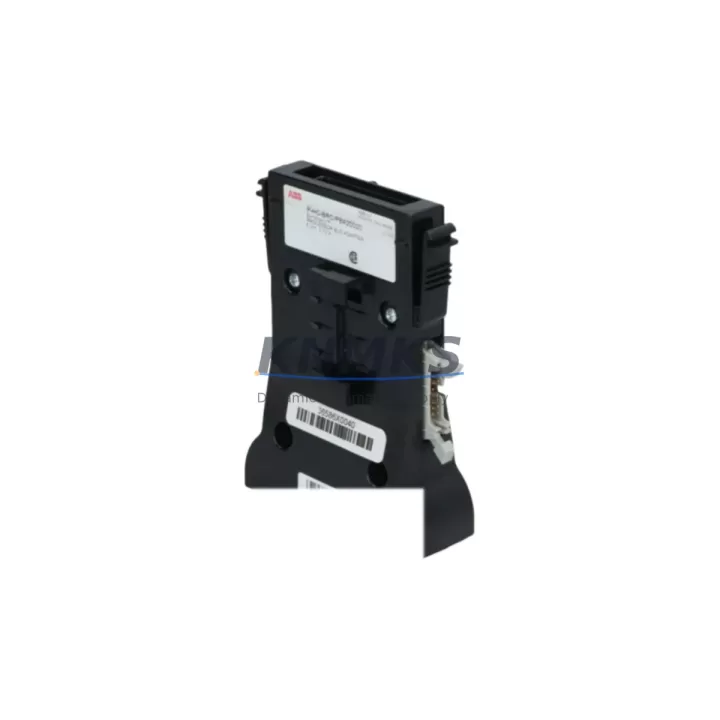
ABB PBA20000 Maintenance-Proven Spare Part for Factory Uptime
The ABB PBA20000 is a Process Bus Adapter designed for the ABB AC500 PLC platform — one of the most widely deployed programmable logic controller families in industrial automation, process control, and critical infrastructure applications. As a maintenance-proven spare part, the PBA20000 enables seamless communication between the AC500 CPU modules and field-level process bus networks, ensuring uninterrupted data exchange across distributed I/O, drive systems, and instrumentation loops. Sourced as an original ABB component, every PBA20000 unit supplied by KNMKS is individually tested prior to shipment and backed by a support terms confirmed by quotation, giving maintenance engineers and procurement teams the confidence to stock and deploy with minimal risk.
In high-availability production environments — from automotive assembly lines to chemical processing plants and power generation facilities — the PBA20000 plays a critical role in maintaining real-time communication integrity. When this adapter fails or degrades, the consequences can include loss of field device visibility, I/O scan errors, and unplanned production stoppages. Proactive spare parts stocking of the PBA20000 is therefore a standard recommendation in any AC500-based maintenance program.
Spare Maintenance Table
| Parameter | Specification |
|---|---|
| Part Number / SKU | PBA20000 |
| Brand | ABB |
| Series | AC500 |
| Product Type | Process Bus Adapter |
| Origin | Germany (DE) |
| Compatible Platform | ABB AC500 PLC Family (PM5xx, PM5xx-ETH, PM5xx-2ETH CPU modules) |
| Communication Interface | Process Bus (internal AC500 backplane bus) |
| Mounting | Direct plug-in to AC500 CPU or expansion module slot |
| Operating Temperature | -25°C to +70°C (typical AC500 range) |
| Power Supply | Supplied via AC500 backplane (no external power required) |
| Application Environment | Industrial automation, process control, infrastructure, utilities |
| Maintenance Recommendation | Inspect annually; replace immediately on communication fault or CRC error |
| Pre-shipment Testing | Yes — functional test performed before dispatch |
| Support terms | 12 Months |
| Supply Condition | Original ABB, new or refurbished-to-spec |
Maintenance Planning for Continuous Operation
When scheduling a replacement of the ABB PBA20000 in an AC500 control cabinet, experienced maintenance engineers treat the adapter swap as an opportunity to audit the surrounding electrical and communication infrastructure. A process bus adapter failure rarely occurs in isolation — it is often preceded or accompanied by degradation in adjacent components that share the same power rail, backplane slot, or communication loop.
Begin by verifying the AC500 CPU power supply module (such as the ABB PS501 or equivalent 24 VDC supply unit) for output voltage stability and ripple. A marginal power supply is a common root cause of intermittent bus adapter faults. Next, inspect the AC500 terminal base and backplane connector for oxidation, mechanical damage, or loose seating — the PBA20000 relies on a clean backplane interface for reliable data transfer.
Check all digital and analog I/O expansion modules connected downstream of the process bus. Modules such as the ABB DC532 (digital input) or DA501 (analog output) should be verified for correct addressing and fault-free status LEDs. If the PBA20000 was experiencing intermittent faults, I/O modules may have logged communication timeouts that require acknowledgment and reset after the adapter replacement.
Inspect communication cables and connectors between the AC500 rack and any remote I/O stations or field bus segments. Shielding integrity, connector torque, and cable routing away from high-voltage conductors should all be confirmed. For systems using PROFIBUS DP or Modbus RTU alongside the process bus, verify termination resistors and bus topology continuity.
If the control cabinet includes signal isolators or barriers for intrinsically safe field instruments, these should be inspected for drift or degradation — particularly in environments with high ambient temperature or humidity. Similarly, fuse holders and miniature circuit breakers protecting the 24 VDC control circuit should be checked for contact resistance and correct rating.
For systems with an ABB CP600 or CP400 series HMI panel communicating with the AC500 CPU, confirm that the HMI communication link is restored and tag values are updating correctly after the PBA20000 replacement. In some configurations, an HMI communication timeout alarm may persist and require manual reset at the operator panel.
Finally, update the maintenance log with the replacement date, new serial number, and post-replacement test results. Stocking a minimum of one PBA20000 as a cold spare — alongside a spare CPU module and at least one I/O expansion module — is recommended for any facility operating AC500-based control systems in critical process applications.
Site Replacement Workflow
The PBA20000 is designed for straightforward field replacement within the AC500 platform, minimizing the skill level and time required to restore system operation. Follow this workflow to ensure a safe, compatible, and efficient swap:
Step 1 — Preparation: Confirm the replacement PBA20000 part number matches the installed unit. Verify firmware compatibility with the AC500 CPU version in use. Download the current PLC program backup from the CPU before beginning any hardware work.
Step 2 — Safe Isolation: Place the AC500 CPU in STOP mode via the programming tool (ABB Automation Builder or PS501 Control Builder). Isolate the control cabinet 24 VDC supply using the appropriate MCB or isolator. Follow site lockout/tagout (LOTO) procedures.
Step 3 — Physical Replacement: Remove the faulty PBA20000 by releasing the locking mechanism on the terminal base or CPU slot. Insert the replacement unit, ensuring full engagement with the backplane connector. Restore power and observe the adapter status LED for normal indication.
Step 4 — Communication Verification: Bring the CPU back to RUN mode. Verify process bus communication is established — check for absence of bus fault LEDs and confirm I/O module status in the programming tool. Run a short functional test cycle to validate field device responses.
Step 5 — Documentation: Record the replacement in the site maintenance management system (CMMS). Note the old unit serial number, replacement date, and technician ID. Reorder a replacement spare to restore buffer stock.
This workflow is compatible with legacy AC500 installations and current-generation AC500-S safety PLC configurations. The PBA20000 maintains backward compatibility across the AC500 product family, eliminating the need for software reconfiguration in most standard replacement scenarios.
Spare Parts Support FAQ
Q1: Is the PBA20000 compatible with all AC500 CPU variants?
The PBA20000 is designed for the ABB AC500 PLC family and is compatible with the majority of PM5xx series CPU modules. Compatibility should be confirmed against the specific CPU firmware version and hardware revision in use. KNMKS technical support can assist with compatibility verification prior to order placement.
Q2: What testing is performed before the PBA20000 is shipped?
Every PBA20000 unit dispatched by KNMKS undergoes a functional pre-shipment test to verify communication interface integrity and electrical performance. Test records are available on request. Units are packaged in anti-static protective packaging to prevent damage during transit.
Q3: What does the support terms confirmed by quotation cover?
The support terms confirmed by quotation cover manufacturing defects and functional failures under normal operating conditions. It does not cover damage resulting from incorrect installation, overvoltage events, or environmental conditions outside the specified operating range. Support requests are processed directly through KNMKS with a target response time of 2 business days.
Q4: Can KNMKS support long-term or blanket stock orders for the PBA20000?
Yes. KNMKS supports scheduled delivery programs and blanket purchase orders for the PBA20000 and other AC500 spare parts. Long-term supply agreements help maintenance teams mitigate lead-time risk for discontinued or allocation-constrained ABB components. Contact our sales team to discuss volume pricing and delivery scheduling.
© 2026 KNMKS. All rights reserved.
Original Source: https://knmks.com
Contact: admin@knmks.com | +86 18359268345
Product Identification
- Brand / Ecosystem
-
ABB
ABB - Model / Series
-
PBA20000
AC500 Series - Product Family
- PLCs & Controllers
- Availability Status
- Available on request after model and quantity confirmation
- Inquiry Type
- B2B RFQ, replacement inquiry and project spare-part request
- Pre-Quote Check
- Exact SKU, brand, series, quantity, nameplate photos and destination country are checked before quotation
System Path
Where this product fits in the KNMKS automation structure.
Specification & Inquiry Focus
- Control platform
- PLC, PAC and modular controllers
- Common needs
- CPU, rack, power and I/O expansion
- Project support
- Replacement, cabinet build and maintenance
Buyer Confirmation
Information KNMKS checks before replying.
- Exact model
- PBA20000
- Brand / ecosystem
- ABB
- Product family
- PLCs & Controllers
- Application note
- Replacement, maintenance, project build or spare-part list
- Useful photos
- Nameplate, installed unit, cabinet layout or connector side
- Delivery details
- Quantity, destination country and target schedule
Document Support
Files and notes can be confirmed during quotation.
- Product photos or nameplate confirmation when available
- Packing and delivery notes before quotation confirmation
- Support scope and delivery terms confirmed per inquiry
- Export document coordination for qualified B2B requests
Inquiry Support
- Model cross-checking before quotation
- CPU, power, rack and expansion module matching
- Support for replacement and project inquiry
What to Send Us
- Brand and exact model number: ABB PBA20000
- Quantity and required delivery time
- Application, replacement requirement or nameplate photo
- Destination country and shipping preference
RFQ Preparation
This is a product inquiry page built for RFQ communication.
Fast Model Check
Send this model to KNMKS for confirmation.
Include quantity, destination country and photos if this is a maintenance replacement. The inquiry will be saved with a reference number after submission.
Brand & Compatibility Note
KNMKS displays automation product information for well-known industrial brand ecosystems and compatible replacement references. Brand names are used for product identification and compatibility reference only; final availability and commercial terms are confirmed per quotation.
 Manufacturing
 Machine Tools
 Packaging
 Energy & Power



 HMI & Displays
 Servo Systems
 Variable Frequency Drives
 Sensors