
Overview
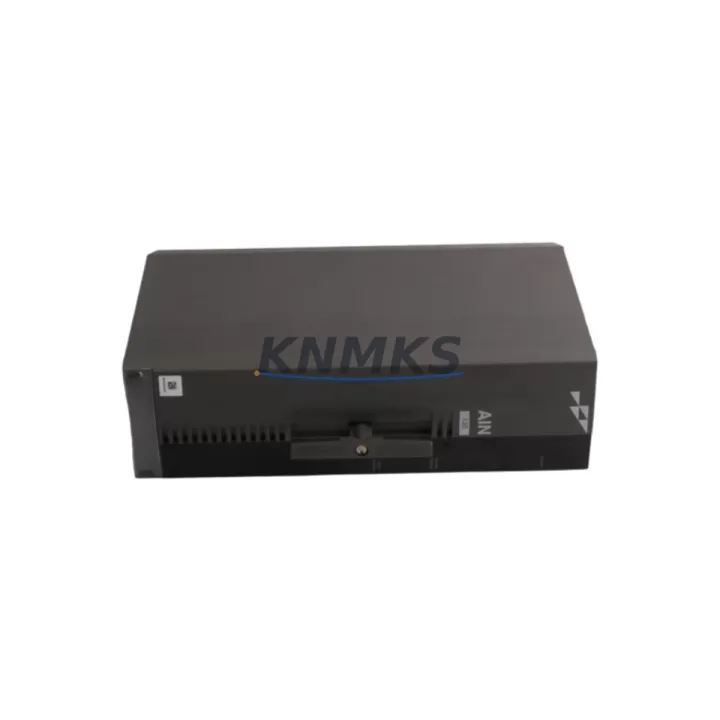
ABB P-HB-AIN-12010000 Maintenance-Proven Spare Part for Factory Uptime
The ABB P-HB-AIN-12010000 is a 12-channel analog input module designed for the ABB AC500 PLC platform — one of the most widely deployed programmable logic controller families in process automation, machine control, and utility infrastructure. As a maintenance-proven spare part, this module supports continuous factory operation by enabling rapid field replacement without system reconfiguration or extended downtime. Stocked and dispatched from verified inventory, each unit undergoes pre-shipment functional testing and ships with a support terms confirmed by quotation covering manufacturing defects and operational integrity.
For maintenance engineers managing aging AC500 control cabinets, the P-HB-AIN-12010000 addresses one of the most common failure points in analog signal chains: degraded or failed input channels caused by electrical transients, moisture ingress, or long-term thermal cycling. Keeping at least one unit in your on-site spare parts buffer eliminates the risk of extended lead times from OEM channels — lead times that can stretch 8 to 16 weeks for discontinued or allocation-constrained modules. Procurement engineers sourcing for annual maintenance budgets should treat this module as a Tier-1 critical spare, particularly in facilities running AC500 eCo, AC500-S, or AC500-XC variants where analog I/O density is high.
This module interfaces directly with the AC500 CPU backplane and is compatible with the PM5xx and PM5xx-ETH CPU families. Signal types supported include 4–20 mA current loops and 0–10 V voltage inputs, making it suitable for pressure transmitters, flow meters, temperature sensors (via external signal conditioners), and level transducers across a wide range of process industries including water treatment, food and beverage, oil and gas, and discrete manufacturing.
Spare Maintenance Table
| Parameter | Specification |
|---|---|
| SKU | P-HB-AIN-12010000 / PHBAIN12010000 |
| Brand | ABB |
| Series | AC500 (Harmony / eCo / XC) |
| Module Type | Analog Input Module |
| Number of Channels | 12 Analog Inputs |
| Signal Types | 4–20 mA / 0–10 V (configurable per channel) |
| Resolution | 12-bit (typical for AC500 AIN series) |
| Supply Voltage | 24 V DC (via backplane) |
| Backplane Compatibility | AC500 TB5xx / TB6xx terminal base |
| CPU Compatibility | PM554, PM564, PM573, PM583, PM591, PM592, PM595 |
| Operating Temperature | -25°C to +60°C (standard); -40°C to +70°C (XC variant) |
| Protection Rating | IP20 (panel-mounted) |
| Origin | Germany (ABB Automation Products GmbH) |
| Support terms | 12 Months — covers manufacturing defects and operational integrity |
| Pre-Shipment Test | Yes — functional verification before dispatch |
| Typical Lead Time | In-stock: 1–3 business days; Ex-stock: subject to availability |
| Maintenance Recommendation | Inspect annually; replace on channel drift >0.5% or signal loss |
Maintenance Planning for Continuous Operation
When replacing the P-HB-AIN-12010000 in the field, a disciplined maintenance workflow requires more than a module swap. The analog input chain extends from field sensors through signal wiring, terminal blocks, the module itself, and into the CPU’s process image — any element in this chain can contribute to or mask a fault. Before declaring the module as the root cause, maintenance engineers should verify the 24 V DC backplane supply rail using the AC500 power supply module (e.g., CP604 or CP605) and confirm that supply voltage is within ±5% tolerance under load. A sagging supply rail is a common cause of intermittent analog channel errors that are incorrectly attributed to module failure.
Terminal base integrity is equally critical. The TB5xx and TB6xx terminal bases used with AC500 I/O modules are subject to contact oxidation and mechanical loosening over time, particularly in high-vibration or high-humidity environments. During a P-HB-AIN-12010000 replacement, inspect the terminal base for discoloration, corrosion, or cracked housing, and replace the terminal base if any anomaly is found — a degraded terminal base will cause the same symptoms as a failed module.
Signal wiring from field instruments should be checked for shield continuity and grounding integrity. Unshielded or improperly grounded analog signal cables introduce 50/60 Hz noise that degrades measurement accuracy and can trigger false alarms in the SCADA or DCS layer. If the facility uses signal isolators or loop-powered transmitter barriers between field devices and the AC500 analog inputs, verify that these components — such as DIN-rail-mounted signal conditioners or galvanic isolators — are functioning correctly and have not drifted out of calibration.
For facilities running AC500 with PROFIBUS DP or Modbus RTU communication, also inspect the communication module (e.g., CM572-DP or CM577-ETH) for error counters and bus cycle time anomalies. A communication fault can cause the CPU to read stale analog values, which may be misinterpreted as sensor or module failure. Similarly, if the control cabinet includes an HMI panel connected via the AC500 serial port or Ethernet, verify that the HMI is displaying live process values and not cached data from a previous scan cycle.
Fuse protection for the 24 V DC field supply feeding the analog input loop should also be inspected. A blown or degraded fuse on the field supply rail will cause all channels on the affected loop to read zero or out-of-range, which is a common false-positive for module failure. Maintain a stock of appropriate fuse ratings (typically 1A or 2A fast-blow) alongside the P-HB-AIN-12010000 spare to support rapid fault isolation.
Site Replacement Workflow
Step 1 — Fault Isolation: Before removing the P-HB-AIN-12010000, use the AC500 diagnostic tools (via Automation Builder or PS501 Control Builder Plus) to read the module’s diagnostic buffer. Confirm whether the fault is channel-specific (suggesting wiring or sensor issues) or module-wide (suggesting module failure or supply fault).
Step 2 — Safe Removal: Place the CPU in STOP mode. De-energize the field supply to the affected terminal base. Disconnect the terminal base wiring connectors (if removable type) or label and remove individual wires. Slide the module off the terminal base by releasing the DIN-rail latch.
Step 3 — Module Verification: Before installing the replacement P-HB-AIN-12010000, visually inspect the backplane connector pins for damage or contamination. Confirm the replacement module’s firmware version is compatible with the installed CPU firmware — mismatched firmware versions can cause module recognition failures on AC500 platforms.
Step 4 — Installation and Commissioning: Seat the replacement module onto the terminal base and secure the DIN-rail latch. Reconnect field wiring. Restore the 24 V DC field supply. Set the CPU to RUN mode and monitor the diagnostic buffer for 5–10 minutes to confirm stable operation across all 12 channels.
Step 5 — Documentation: Record the replacement date, module serial number, and channel readings in the facility’s maintenance log. Update the spare parts inventory to trigger reorder of a replacement buffer unit. This ensures the facility maintains a minimum one-unit buffer for the P-HB-AIN-12010000 at all times.
This workflow is applicable to both like-for-like replacements and cross-series substitutions where an older AC500 analog input module is being retired in favor of the P-HB-AIN-12010000 as a compatible upgrade. The module’s backward compatibility with legacy AC500 terminal bases reduces the need for cabinet rewiring and minimizes total replacement time to under 30 minutes for experienced technicians.
Spare Parts Support FAQ
Q1: Is the P-HB-AIN-12010000 compatible with all AC500 CPU variants, including the AC500-XC for extreme environments?
The P-HB-AIN-12010000 is designed for the standard AC500 platform and is compatible with the PM5xx CPU family using TB5xx/TB6xx terminal bases. The AC500-XC (extreme conditions) variant uses the same backplane architecture but is rated for extended temperature and humidity ranges. Confirm the XC-rated suffix on the module label if your installation requires the XC specification — standard modules should not be substituted in XC-rated cabinets without engineering review.
Q2: What is the recommended spare parts buffer quantity for a facility running multiple AC500 analog input modules?
For facilities with 5 or more AC500 analog input modules in service, a minimum buffer of 2 units of the P-HB-AIN-12010000 is recommended. For critical process lines where downtime cost exceeds USD 10,000 per hour, a 3-unit buffer with annual rotation is advisable. Buffer units should be stored in anti-static packaging in a climate-controlled environment and rotated into service every 3–5 years to prevent storage-induced degradation.
Q3: How is each P-HB-AIN-12010000 unit tested before shipment?
Each unit undergoes a pre-shipment functional verification that includes power-on self-test, channel continuity check, and signal response validation across the full input range. Units that fail any test parameter are quarantined and not dispatched. A test record is available upon request for quality-critical procurement requirements. All dispatched units are covered by a support terms confirmed by quotation from the date of shipment.
Q4: Can long-term supply agreements be arranged for the P-HB-AIN-12010000 to support multi-year maintenance contracts?
Yes. Long-term supply agreements covering annual or multi-year procurement volumes are available. These agreements provide price stability, priority allocation from forward stock, and guaranteed lead times — critical for facilities operating under maintenance contracts where spare parts availability is a contractual obligation. Contact our sales team to discuss volume requirements and agreement terms.
© 2026 KNMKS. All rights reserved.
Original Source: https://knmks.com
Contact: admin@knmks.com | +86 18359268345
Product Identification
- Brand / Ecosystem
-
ABB
ABB - Model / Series
-
P-HB-AIN-12010000 PHBAIN12010000
AC500 Series - Product Family
- PLCs & Controllers
- Availability Status
- Available on request after model and quantity confirmation
- Inquiry Type
- B2B RFQ, replacement inquiry and project spare-part request
- Pre-Quote Check
- Exact SKU, brand, series, quantity, nameplate photos and destination country are checked before quotation
System Path
Where this product fits in the KNMKS automation structure.
Specification & Inquiry Focus
- Control platform
- PLC, PAC and modular controllers
- Common needs
- CPU, rack, power and I/O expansion
- Project support
- Replacement, cabinet build and maintenance
Buyer Confirmation
Information KNMKS checks before replying.
- Exact model
- P-HB-AIN-12010000 PHBAIN12010000
- Brand / ecosystem
- ABB
- Product family
- PLCs & Controllers
- Application note
- Replacement, maintenance, project build or spare-part list
- Useful photos
- Nameplate, installed unit, cabinet layout or connector side
- Delivery details
- Quantity, destination country and target schedule
Document Support
Files and notes can be confirmed during quotation.
- Product photos or nameplate confirmation when available
- Packing and delivery notes before quotation confirmation
- Support scope and delivery terms confirmed per inquiry
- Export document coordination for qualified B2B requests
Inquiry Support
- Model cross-checking before quotation
- CPU, power, rack and expansion module matching
- Support for replacement and project inquiry
What to Send Us
- Brand and exact model number: ABB P-HB-AIN-12010000 PHBAIN12010000
- Quantity and required delivery time
- Application, replacement requirement or nameplate photo
- Destination country and shipping preference
RFQ Preparation
This is a product inquiry page built for RFQ communication.
Fast Model Check
Send this model to KNMKS for confirmation.
Include quantity, destination country and photos if this is a maintenance replacement. The inquiry will be saved with a reference number after submission.
Brand & Compatibility Note
KNMKS displays automation product information for well-known industrial brand ecosystems and compatible replacement references. Brand names are used for product identification and compatibility reference only; final availability and commercial terms are confirmed per quotation.
 Manufacturing
 Machine Tools
 Packaging
 Energy & Power



 HMI & Displays
 Servo Systems
 Variable Frequency Drives
 Sensors