
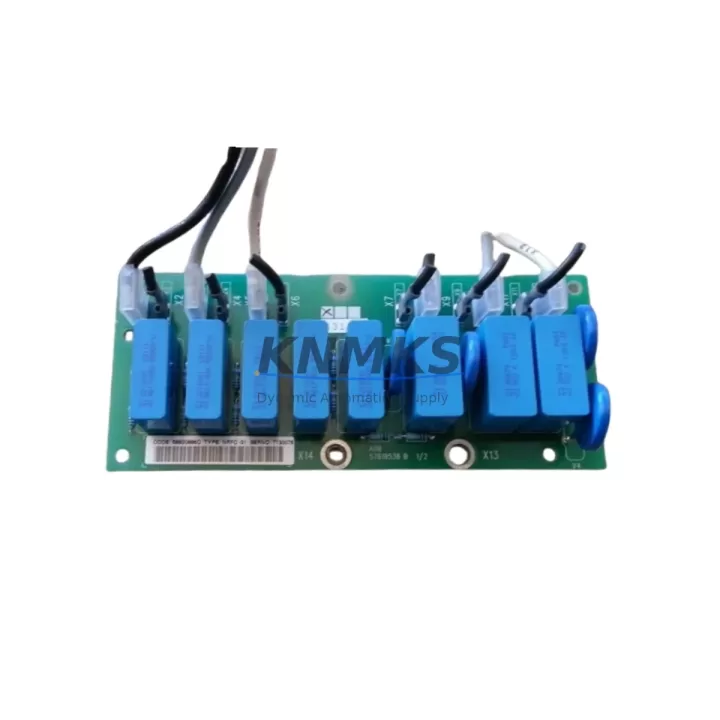
Overview
ABB NRFC-31 Maintenance-Proven Spare Part for Factory Uptime
The ABB NRFC-31 is a PROFIBUS DP fieldbus communication module designed for the ABB AC500 PLC platform — one of the most widely deployed programmable automation controllers in process and discrete manufacturing environments. As a direct original spare, the NRFC-31 enables seamless fieldbus integration between the AC500 CPU and PROFIBUS DP slave devices including remote I/O stations, variable frequency drives, intelligent field instruments, and distributed control nodes. Maintaining a verified stock of the NRFC-31 is a critical element of any industrial maintenance strategy where PROFIBUS DP networks underpin production continuity.
For maintenance engineers managing aging AC500 installations, the NRFC-31 represents a high-priority spare. Communication module failures are among the most disruptive fault categories in PLC-based control systems — they can isolate entire I/O segments, disable drive control loops, or sever HMI data links, all of which translate directly into unplanned downtime. Having a pre-tested, shelf-ready NRFC-31 on hand reduces mean time to repair (MTTR) from hours to minutes.
Spare Maintenance Table
| SKU / Part Number | NRFC-31 |
| Brand | ABB |
| Series | AC500 |
| Module Type | Fieldbus Communication Module |
| Fieldbus Protocol | PROFIBUS DP (EN 50170) |
| Baud Rate | Up to 12 Mbit/s |
| Mounting | AC500 CPU / Expansion Unit slot |
| Power Supply | Supplied via AC500 backplane bus |
| Operating Temperature | 0 °C to +60 °C |
| Protection Class | IP20 |
| Country of Origin | Germany |
| Compatibility | ABB AC500 PM5xx / PM5xx-ETH CPU families; AC500-eCo with appropriate expansion |
| Application Environment | Process automation, discrete manufacturing, water treatment, power distribution, material handling |
| Pre-Shipment Testing | Yes — functional verification before dispatch |
| Support terms | 12 Months |
| Condition | Original / New or Refurbished-to-OEM-spec |
Maintenance Planning for Continuous Operation
When replacing or inspecting the NRFC-31 in an AC500 control cabinet, a disciplined maintenance engineer will not limit the scope to the communication module alone. The PROFIBUS DP segment connected through the NRFC-31 typically feeds power to remote I/O racks, drives, and field instruments — all of which share electrical and signal dependencies that must be verified during any corrective or preventive maintenance event.
Begin with the AC500 CPU module (PM5xx series) itself: confirm firmware version compatibility with the NRFC-31 and check for any logged communication faults in the diagnostic buffer. Next, inspect the AC500 backplane and expansion bus connectors — oxidized or mechanically stressed bus contacts are a common root cause of intermittent fieldbus errors that are incorrectly attributed to the communication module. The 24 VDC power supply module feeding the AC500 rack should be load-tested; an under-voltage condition on the backplane bus can cause the NRFC-31 to drop off the PROFIBUS network without generating a hard fault.
On the PROFIBUS DP segment itself, verify termination resistors at both ends of the cable run — missing or double termination is a frequent cause of communication instability after module replacement. Inspect the PROFIBUS DP cable and connectors (DB9 or M12) for insulation damage, shield continuity, and correct impedance. If the segment includes ABB ACS series variable frequency drives with PROFIBUS DP adapters (such as the RPBA-01), confirm that the drive’s fieldbus adapter is seated correctly and that the drive’s parameter set matches the GSD file loaded in the AC500 project.
For installations where the NRFC-31 interfaces with remote I/O modules (e.g., ABB S500 I/O series), check each I/O module’s address DIP switches and power feed fuses. A blown fuse on a remote I/O power rail will cause that slave to disappear from the PROFIBUS scan list, which can be misdiagnosed as a master communication failure. Additionally, review any signal isolators or repeaters in the PROFIBUS segment — these components degrade over time and can introduce latency or signal distortion that destabilizes the network after a master module swap.
Finally, if the control system includes an ABB CP600 or CP400 HMI panel communicating via the AC500 CPU, verify that the HMI project’s communication driver settings are consistent with the restored PROFIBUS configuration. HMI communication timeouts are a common post-maintenance complaint that can be resolved by a simple driver reconnect or project re-download.
Site Replacement Workflow
The NRFC-31 is a slot-in module for the AC500 platform, making field replacement straightforward when the correct spare is available. Before removal, export the current AC500 project from Automation Builder to preserve the PROFIBUS DP configuration, GSD assignments, and I/O mapping. Power down the AC500 rack following the site’s lockout/tagout procedure, then extract the NRFC-31 from its slot. Inspect the slot connector on the CPU or expansion unit for debris or pin damage before inserting the replacement module.
After insertion, restore power and allow the AC500 to complete its startup diagnostics. In Automation Builder, verify that the NRFC-31 is recognized in the hardware configuration tree and that all PROFIBUS DP slaves return to active status. Check the diagnostic LEDs on the NRFC-31 — a steady green BF (Bus Fault) LED off and SF (System Fault) LED off confirms normal operation. If any slave remains in fault state, use the PROFIBUS diagnostic tool in Automation Builder to isolate the affected node before resuming production.
This replacement workflow is compatible with both hot-standby and single-CPU AC500 architectures. For redundant systems, coordinate the swap with the site’s redundancy switchover procedure to avoid a full system halt. The NRFC-31’s plug-and-play compatibility with the AC500 platform means no firmware flashing is required in most standard configurations — reducing replacement time to under 30 minutes for a prepared maintenance team.
Spare Parts Support FAQ
Q1: Is the NRFC-31 compatible with all AC500 CPU variants?
The NRFC-31 is designed for the ABB AC500 platform and is compatible with PM5xx and PM5xx-ETH CPU families. Compatibility with AC500-eCo CPUs depends on the specific expansion configuration. Always cross-reference the module’s GSD file version with the Automation Builder project version before installation. Our team can assist with compatibility verification prior to shipment.
Q2: What testing is performed before the NRFC-31 is shipped?
Every NRFC-31 unit undergoes functional verification before dispatch, including power-on self-test, PROFIBUS DP communication handshake validation, and physical inspection of connectors and housing. Units that do not pass testing are not shipped. A support terms confirmed by quotation is provided from the date of shipment, covering manufacturing defects and functional failures under normal operating conditions.
Q3: Can you supply the NRFC-31 for long-term or blanket purchase orders?
Yes. We maintain multi-region stock of the NRFC-31 to support emergency replacements, annual maintenance kits, and long-term supply agreements. For customers managing large AC500 fleets or operating in regions with extended lead times from OEM channels, we recommend establishing a standing order or consignment arrangement to ensure availability. Contact our sales team to discuss volume pricing and delivery scheduling.
Q4: How do I confirm the NRFC-31 is the correct module for my PROFIBUS DP application before ordering?
Provide your AC500 CPU part number, Automation Builder project version, and the number of PROFIBUS DP slaves on the segment. Our technical team will confirm module compatibility, GSD file requirements, and any firmware considerations. We can also advise on whether a refurbished-to-OEM-spec unit is appropriate for your application or whether a new original is required by your site’s maintenance standards.
© 2026 KNMKS. All rights reserved.
Original Source: https://knmks.com
Contact: admin@knmks.com | +86 18359268345
Product Identification
- Brand / Ecosystem
-
ABB
ABB - Model / Series
-
NRFC-31
AC500 Series - Product Family
- PLCs & Controllers
- Availability Status
- Available on request after model and quantity confirmation
- Inquiry Type
- B2B RFQ, replacement inquiry and project spare-part request
- Pre-Quote Check
- Exact SKU, brand, series, quantity, nameplate photos and destination country are checked before quotation
System Path
Where this product fits in the KNMKS automation structure.
Specification & Inquiry Focus
- Control platform
- PLC, PAC and modular controllers
- Common needs
- CPU, rack, power and I/O expansion
- Project support
- Replacement, cabinet build and maintenance
Buyer Confirmation
Information KNMKS checks before replying.
- Exact model
- NRFC-31
- Brand / ecosystem
- ABB
- Product family
- PLCs & Controllers
- Application note
- Replacement, maintenance, project build or spare-part list
- Useful photos
- Nameplate, installed unit, cabinet layout or connector side
- Delivery details
- Quantity, destination country and target schedule
Document Support
Files and notes can be confirmed during quotation.
- Product photos or nameplate confirmation when available
- Packing and delivery notes before quotation confirmation
- Support scope and delivery terms confirmed per inquiry
- Export document coordination for qualified B2B requests
Inquiry Support
- Model cross-checking before quotation
- CPU, power, rack and expansion module matching
- Support for replacement and project inquiry
What to Send Us
- Brand and exact model number: ABB NRFC-31
- Quantity and required delivery time
- Application, replacement requirement or nameplate photo
- Destination country and shipping preference
RFQ Preparation
This is a product inquiry page built for RFQ communication.
Fast Model Check
Send this model to KNMKS for confirmation.
Include quantity, destination country and photos if this is a maintenance replacement. The inquiry will be saved with a reference number after submission.
Brand & Compatibility Note
KNMKS displays automation product information for well-known industrial brand ecosystems and compatible replacement references. Brand names are used for product identification and compatibility reference only; final availability and commercial terms are confirmed per quotation.
 Manufacturing
 Machine Tools
 Packaging
 Energy & Power



 HMI & Displays
 Servo Systems
 Variable Frequency Drives
 Sensors