
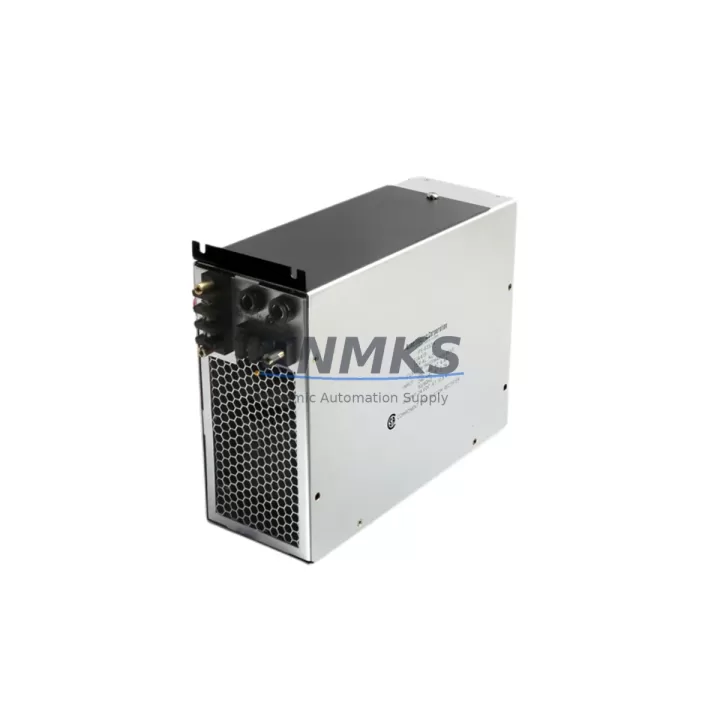
Overview
ABB NPCI03 Maintenance-Proven Spare Part for Factory Uptime
The ABB NPCI03 is an original I/O power supply module designed for the ABB AC500 PLC platform — one of the most widely deployed programmable logic controller families in process automation, discrete manufacturing, and utility infrastructure. For maintenance engineers managing aging control systems or executing planned shutdowns, the NPCI03 represents a critical spare that directly supports I/O bus integrity and field device power distribution within the AC500 rack architecture.
Sourced as an original ABB component, each NPCI03 unit supplied by KNMKS undergoes pre-shipment functional verification to confirm output voltage stability, connector integrity, and module identification. This ensures that when your team installs the replacement on-site, the module initializes correctly within the AC500 backplane without requiring firmware intervention or parameter re-entry.
Industrial facilities operating continuous processes — chemical plants, water treatment stations, automotive assembly lines, and power substations — cannot afford extended downtime caused by a failed I/O power supply. The NPCI03 is a direct-fit replacement that restores I/O bus power without reconfiguration, making it the preferred spare for both emergency breakdown response and scheduled preventive maintenance cycles.
Procurement engineers managing MRO (Maintenance, Repair, and Operations) inventories for ABB AC500-based control systems should consider stocking at least one NPCI03 per control cabinet as part of a minimum viable spare parts strategy. Given the module’s role in powering the I/O bus, its failure cascades immediately to field signal loss — making it a high-priority item on any critical spare list.
KNMKS maintains long-term supply continuity for the NPCI03 and related AC500 components, supporting both single-unit emergency orders and bulk procurement for multi-site maintenance programs. All units ship with a support terms confirmed by quotation covering manufacturing defects and functional failure under normal operating conditions.
Spare Maintenance Table
| Parameter | Specification |
|---|---|
| Part Number | NPCI03 |
| Brand | ABB |
| Series | AC500 |
| Module Type | I/O Power Supply Module |
| Platform Compatibility | ABB AC500 PLC Rack System |
| Mounting | DIN Rail / AC500 Backplane Slot |
| Origin | Germany |
| Application Environment | Industrial Control Cabinets, Process Automation, Discrete Manufacturing |
| Maintenance Role | I/O Bus Power Distribution, Field Device Supply |
| Replacement Scope | Direct drop-in for failed or degraded NPCI03 units in AC500 racks |
| Pre-Shipment Testing | Yes — output voltage, connector, and module ID verified |
| Support terms | 12 Months |
| Supply Type | Original ABB Component |
| Lead Time | Contact admin@knmks.com for availability |
Maintenance Planning for Continuous Operation
When replacing the NPCI03 in an AC500 control cabinet, a disciplined maintenance engineer will not stop at the module itself. The I/O power supply interfaces directly with the AC500 backplane, the CPU module (such as the PM573 or PM591 series), and the distributed I/O expansion modules. A failure in the NPCI03 often coincides with — or is caused by — stress on adjacent components, and a thorough site inspection should cover the following areas:
AC500 CPU and Communication Modules: Verify that the CPU module (e.g., PM573-ETH or PM591) is operating within normal temperature and load parameters. A degraded NPCI03 may have subjected the CPU backplane connector to voltage irregularities. Inspect the CS31 or PROFIBUS communication modules (such as the CI590-CS31 or CI501-PNIO) for any fault LEDs or communication timeouts that may have been masked by the power event.
I/O Expansion Modules: The NPCI03 supplies power to digital and analog I/O modules mounted in the same rack. After replacement, cycle through all DI/DO and AI/AO modules — including common types like the DC532 (digital input) and DA501 (analog output) — to confirm signal integrity and correct channel mapping in the PLC program.
Terminal Blocks and Field Wiring: Inspect the terminal blocks connected to field devices powered through the I/O bus. Loose or corroded terminals can cause intermittent faults that are misdiagnosed as module failures. Tighten all connections and check for discoloration or heat damage on the wiring insulation.
Cabinet Power Distribution and Fusing: Trace the 24 VDC supply feeding the NPCI03 back to the cabinet power supply unit (PSU). Verify fuse continuity on the incoming supply rail and check the PSU output voltage under load. A marginal PSU can cause repeated NPCI03 failures if not addressed during the same maintenance window.
Signal Isolators and Relay Outputs: For cabinets where the AC500 controls relay output modules or signal isolators on the same power rail, inspect these components for contact wear or isolation degradation. Relay modules with high switching cycles are common co-failure items in aging control cabinets.
Documenting all findings during the NPCI03 replacement creates a maintenance record that supports future spare parts planning and reduces diagnostic time during the next incident.
Site Replacement Workflow
Step 1 — Isolate and De-energize: Follow your site’s lockout/tagout (LOTO) procedure. Confirm that the AC500 rack is de-energized before removing the NPCI03. Note the slot position and any LED status observed before power-down.
Step 2 — Remove the Failed Module: Release the DIN rail locking tab or backplane retention mechanism. Slide the NPCI03 out of its slot carefully to avoid stressing adjacent module connectors. Inspect the backplane connector pins for damage or contamination.
Step 3 — Inspect and Clean: Before inserting the replacement NPCI03, clean the backplane slot with dry compressed air. Verify that no connector pins are bent or corroded. Check the slot labeling against your cabinet documentation to confirm correct positioning.
Step 4 — Install the Replacement NPCI03: Align the module with the backplane slot and press firmly until the retention mechanism clicks. The NPCI03 is a direct-fit replacement — no jumper settings or DIP switch configuration is required for standard AC500 rack installations.
Step 5 — Re-energize and Verify: Restore power to the cabinet. Observe the NPCI03 status LED for normal run indication. In the AC500 programming environment (Automation Builder), confirm that all I/O modules in the rack are recognized and reporting correctly. Run a short I/O diagnostic cycle before returning the system to production.
Step 6 — Update Maintenance Records: Log the replacement date, module serial number, and any observations from the inspection. Update your spare parts inventory to trigger reorder of a replacement NPCI03 for future use.
Spare Parts Support FAQ
Q1: Is the NPCI03 supplied by KNMKS an original ABB component?
Yes. KNMKS supplies original ABB NPCI03 modules. Each unit is sourced through verified supply channels and undergoes pre-shipment functional testing covering output voltage, connector integrity, and module identification before dispatch.
Q2: What is the support terms coverage for the NPCI03?
All NPCI03 units supplied by KNMKS carry a support terms confirmed by quotation from the date of shipment. The support terms covers manufacturing defects and functional failure under normal industrial operating conditions. Contact admin@knmks.com to initiate a support terms claim.
Q3: Can the NPCI03 replace older or discontinued ABB AC500 I/O power supply modules?
The NPCI03 is designed for the ABB AC500 platform and is compatible with standard AC500 rack configurations. For cross-compatibility with specific legacy rack versions or earlier AC500 hardware revisions, contact KNMKS with your existing module part number and rack configuration details for a compatibility confirmation before ordering.
Q4: Does KNMKS support long-term or bulk procurement of the NPCI03 for multi-site maintenance programs?
Yes. KNMKS supports both emergency single-unit orders and structured bulk procurement for facilities managing multiple AC500-based control systems. Long-term supply agreements and reserved inventory arrangements are available. Contact admin@knmks.com or call +86 18359268345 to discuss your procurement requirements.
© 2026 KNMKS. All rights reserved.
Original Source: https://knmks.com
Contact: admin@knmks.com | +86 18359268345
Product Identification
- Brand / Ecosystem
-
ABB
ABB - Model / Series
-
NPCI03
AC500 Series - Product Family
- PLCs & Controllers
- Availability Status
- Available on request after model and quantity confirmation
- Inquiry Type
- B2B RFQ, replacement inquiry and project spare-part request
- Pre-Quote Check
- Exact SKU, brand, series, quantity, nameplate photos and destination country are checked before quotation
System Path
Where this product fits in the KNMKS automation structure.
Specification & Inquiry Focus
- Control platform
- PLC, PAC and modular controllers
- Common needs
- CPU, rack, power and I/O expansion
- Project support
- Replacement, cabinet build and maintenance
Buyer Confirmation
Information KNMKS checks before replying.
- Exact model
- NPCI03
- Brand / ecosystem
- ABB
- Product family
- PLCs & Controllers
- Application note
- Replacement, maintenance, project build or spare-part list
- Useful photos
- Nameplate, installed unit, cabinet layout or connector side
- Delivery details
- Quantity, destination country and target schedule
Document Support
Files and notes can be confirmed during quotation.
- Product photos or nameplate confirmation when available
- Packing and delivery notes before quotation confirmation
- Support scope and delivery terms confirmed per inquiry
- Export document coordination for qualified B2B requests
Inquiry Support
- Model cross-checking before quotation
- CPU, power, rack and expansion module matching
- Support for replacement and project inquiry
What to Send Us
- Brand and exact model number: ABB NPCI03
- Quantity and required delivery time
- Application, replacement requirement or nameplate photo
- Destination country and shipping preference
RFQ Preparation
This is a product inquiry page built for RFQ communication.
Fast Model Check
Send this model to KNMKS for confirmation.
Include quantity, destination country and photos if this is a maintenance replacement. The inquiry will be saved with a reference number after submission.
Brand & Compatibility Note
KNMKS displays automation product information for well-known industrial brand ecosystems and compatible replacement references. Brand names are used for product identification and compatibility reference only; final availability and commercial terms are confirmed per quotation.
 Manufacturing
 Machine Tools
 Packaging
 Energy & Power



 HMI & Displays
 Servo Systems
 Variable Frequency Drives
 Sensors