
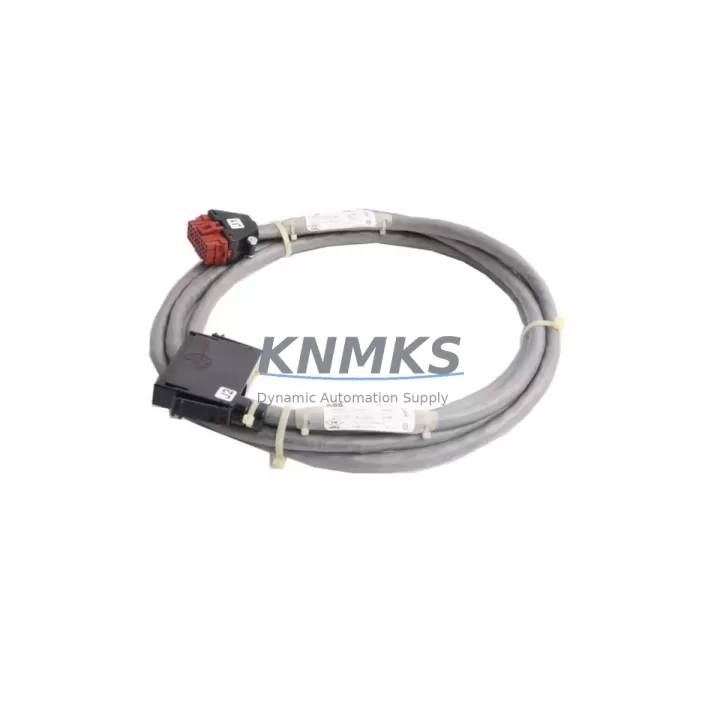
Overview
ABB NKLS01-10 Maintenance-Proven Spare Part for Factory Uptime
The ABB NKLS01-10 is an original communications cable engineered for the ABB AC500 PLC series — one of the most widely deployed programmable logic controller platforms in industrial automation, process control, and discrete manufacturing. Designed to maintain reliable data exchange between AC500 CPU modules and peripheral devices, the NKLS01-10 is a critical link in control cabinet wiring that directly affects system availability and production continuity.
For maintenance engineers managing aging control systems, the NKLS01-10 represents a high-priority spare. Communications cable failures are among the most disruptive fault modes in PLC-based systems: they can cause intermittent I/O dropouts, CPU communication errors, and in worst cases, unplanned line stoppages that are difficult to diagnose without a verified replacement on hand. Stocking the NKLS01-10 as part of your preventive maintenance inventory eliminates this diagnostic uncertainty and dramatically reduces mean time to repair (MTTR).
At KNMKS, every NKLS01-10 unit is sourced as an original ABB component, subjected to pre-shipment functional testing, and backed by a support terms confirmed by quotation. We support long-term supply agreements for multi-site operations and MRO procurement teams requiring consistent availability across 12–36 month planning horizons.
Spare Maintenance Table
| Part Number | NKLS01-10 |
| Brand | ABB |
| Series Compatibility | ABB AC500 PLC Series (PM571, PM581, PM591, PM595 and compatible CPU modules) |
| Product Type | PLC Communications Cable |
| Cable Length | 1.0 m (nominal) |
| Connector Type | Proprietary ABB AC500 interface connector |
| Application | CPU-to-peripheral communication, programming interface, HMI link, field device connectivity |
| Operating Environment | Industrial control cabinet; rated for standard IEC 61131-2 environmental conditions |
| Origin | Germany (DE) |
| Weight | 520 g |
| Condition | Original New / Verified Surplus |
| Pre-Shipment Testing | Yes — continuity, connector integrity, and signal path verified |
| Support terms | 12 Months from date of shipment |
| Long-Term Supply | Available — 12–36 month supply agreements supported |
Maintenance Planning for Continuous Operation
When replacing or inspecting the NKLS01-10 during scheduled maintenance or emergency fault response, a thorough control cabinet audit is strongly recommended. Communications cable degradation rarely occurs in isolation — it is often accompanied by or caused by related component stress in the same electrical circuit or backplane assembly.
Maintenance engineers should simultaneously inspect the ABB AC500 CPU module (such as the PM581 or PM591) for firmware version compatibility and connector wear, as a degraded CPU port can cause repeated cable failures. The AC500 I/O expansion modules (e.g., DC532 digital I/O or AX522 analog modules) connected via the same communication bus should be checked for loose terminal connections and signal integrity. If the system includes an ABB CP600 or CP400 HMI panel, verify that the HMI communication link is stable after cable replacement, as HMI disconnection events are a common downstream symptom of cable faults.
Power supply quality is another critical factor. The ABB PS501 or equivalent 24 VDC power supply module feeding the AC500 rack should be load-tested to confirm stable output voltage under full I/O load — voltage sag can accelerate connector oxidation and cable insulation fatigue. Additionally, inspect the terminal blocks and DIN rail mounting hardware within the cabinet for signs of vibration loosening or thermal cycling damage, particularly in high-cycle production environments.
For systems with serial or fieldbus communication (PROFIBUS, Modbus RTU, or CANopen), check the associated communication interface modules (e.g., ABB CI590-CS31 or CI501-PNIO) for correct termination resistor settings and cable shielding continuity. Finally, review the cabinet fusing and circuit protection — blown or degraded fuses in the 24 VDC control circuit are a frequent co-failure with communications cable issues and should be replaced as a precautionary measure during any unplanned downtime event.
Site Replacement Workflow
Step 1 — Isolate and document: Before removing the NKLS01-10, record the current system state including CPU diagnostic LEDs, active fault codes, and communication status in the engineering log. Photograph the existing cable routing and connector orientation.
Step 2 — Safe de-energization: Follow your site LOTO (Lockout/Tagout) procedure. De-energize the AC500 rack and confirm zero-energy state before disconnecting the cable. Do not hot-swap communications cables on live AC500 systems unless explicitly supported by the installed firmware version.
Step 3 — Physical replacement: Remove the faulty NKLS01-10 by releasing the connector locking mechanism. Install the replacement cable, ensuring full connector seating and audible/tactile locking confirmation. Verify cable routing does not create bend radii below the manufacturer’s minimum specification.
Step 4 — Re-energize and verify: Power up the AC500 system and monitor CPU communication status LEDs. Confirm all I/O modules, HMI panels, and field devices re-establish communication within the expected initialization window. Clear any latched fault codes and run a short functional test cycle before returning the line to production.
Step 5 — Update maintenance records: Log the replacement date, part number (NKLS01-10), and post-replacement test results in your CMMS or maintenance logbook. Flag the next inspection interval for this cable assembly based on your site’s preventive maintenance schedule.
This workflow is designed to minimize downtime to under 30 minutes for a trained maintenance technician with the replacement part on hand — reinforcing the value of maintaining at least one NKLS01-10 in your on-site spare parts inventory at all times.
Spare Parts Support FAQ
Q1: Is the NKLS01-10 compatible with all AC500 CPU variants?
The NKLS01-10 is designed for the ABB AC500 PLC series and is compatible with the primary CPU modules in that family, including PM571, PM581, PM591, and PM595. For legacy AC500 V1 installations or specialized communication configurations, confirm the connector type and firmware version with your ABB documentation or contact KNMKS for compatibility verification before ordering.
Q2: How is each NKLS01-10 unit tested before shipment?
Every unit shipped by KNMKS undergoes pre-shipment testing covering electrical continuity across all conductors, connector mechanical integrity, and visual inspection for insulation damage or connector pin deformation. Test results are retained on file. Units that do not pass all checks are not shipped. This process is the foundation of our support terms confirmed by quotation commitment.
Q3: Can KNMKS support long-term or blanket purchase orders for the NKLS01-10?
Yes. KNMKS supports 12–36 month supply agreements for MRO procurement teams and multi-site operations requiring guaranteed availability. Long-term agreements can include scheduled delivery releases, reserved stock allocation, and fixed pricing to protect against market volatility. Contact admin@knmks.com to discuss your requirements.
Q4: What is the recommended spare parts stocking strategy for the NKLS01-10?
For facilities running AC500-based control systems in continuous or high-availability production environments, we recommend maintaining a minimum of 2 units of the NKLS01-10 on-site: one as an active hot spare and one as a long-term reserve. For multi-line or multi-cabinet installations, scale stocking levels proportionally to the number of AC500 racks in service. Given the low unit cost relative to the cost of unplanned downtime, the NKLS01-10 is a high-ROI addition to any industrial spare parts program.
© 2026 KNMKS. All rights reserved.
Original Source: https://knmks.com
Contact: admin@knmks.com | +86 18359268345
Product Identification
- Brand / Ecosystem
-
ABB
ABB - Model / Series
-
NKLS01-10
AC500 Series - Product Family
- PLCs & Controllers
- Availability Status
- Available on request after model and quantity confirmation
- Inquiry Type
- B2B RFQ, replacement inquiry and project spare-part request
- Pre-Quote Check
- Exact SKU, brand, series, quantity, nameplate photos and destination country are checked before quotation
System Path
Where this product fits in the KNMKS automation structure.
Specification & Inquiry Focus
- Control platform
- PLC, PAC and modular controllers
- Common needs
- CPU, rack, power and I/O expansion
- Project support
- Replacement, cabinet build and maintenance
Buyer Confirmation
Information KNMKS checks before replying.
- Exact model
- NKLS01-10
- Brand / ecosystem
- ABB
- Product family
- PLCs & Controllers
- Application note
- Replacement, maintenance, project build or spare-part list
- Useful photos
- Nameplate, installed unit, cabinet layout or connector side
- Delivery details
- Quantity, destination country and target schedule
Document Support
Files and notes can be confirmed during quotation.
- Product photos or nameplate confirmation when available
- Packing and delivery notes before quotation confirmation
- Support scope and delivery terms confirmed per inquiry
- Export document coordination for qualified B2B requests
Inquiry Support
- Model cross-checking before quotation
- CPU, power, rack and expansion module matching
- Support for replacement and project inquiry
What to Send Us
- Brand and exact model number: ABB NKLS01-10
- Quantity and required delivery time
- Application, replacement requirement or nameplate photo
- Destination country and shipping preference
RFQ Preparation
This is a product inquiry page built for RFQ communication.
Fast Model Check
Send this model to KNMKS for confirmation.
Include quantity, destination country and photos if this is a maintenance replacement. The inquiry will be saved with a reference number after submission.
Brand & Compatibility Note
KNMKS displays automation product information for well-known industrial brand ecosystems and compatible replacement references. Brand names are used for product identification and compatibility reference only; final availability and commercial terms are confirmed per quotation.
 Manufacturing
 Machine Tools
 Packaging
 Energy & Power



 HMI & Displays
 Servo Systems
 Variable Frequency Drives
 Sensors