
Overview
ABB NINP-21C 64268422 Migration-Ready PROFIBUS DP Adapter for Legacy Control Systems
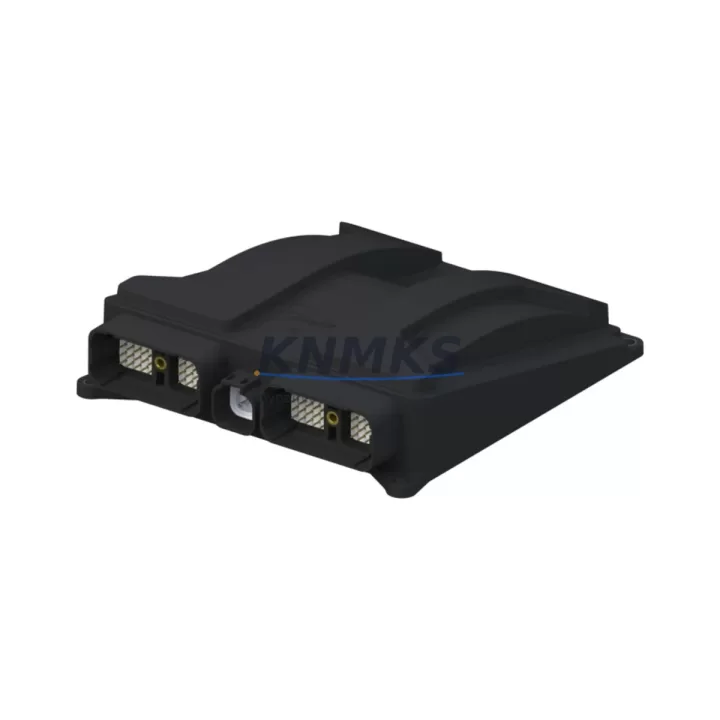
The ABB NINP-21C (part number 64268422) is a PROFIBUS DP communication adapter designed for the ABB AC500 PLC platform. As legacy fieldbus architectures face end-of-life pressures across process and discrete manufacturing environments, the NINP-21C has become a critical component in retrofit and migration projects where PROFIBUS DP connectivity must be preserved or re-established without full system replacement. This module enables engineers to maintain existing PROFIBUS DP network topologies while upgrading or replacing aging CPU modules, I/O racks, and communication infrastructure within the AC500 control cabinet.
For facilities operating legacy ABB Advant, AC31, or early-generation AC500 systems, the NINP-21C provides a validated migration path that avoids the cost and risk of full DCS or PLC platform replacement. Its compatibility with the AC500 CPU modules — including the PM571, PM581, and PM591 series — allows maintenance teams to slot the adapter into existing backplane configurations with minimal rewiring. The module supports standard PROFIBUS DP-V0 and DP-V1 communication profiles, ensuring compatibility with downstream field devices such as remote I/O stations, variable frequency drives, valve positioners, and intelligent motor controllers already installed in the plant.
Before committing to a retrofit using the NINP-21C, engineers should verify several critical parameters. Power supply capacity within the AC500 rack must be confirmed — the module draws from the internal bus, and racks running near their power budget may require an additional PS501 or PS502 power supply module to maintain stable operation. Terminal wiring for the PROFIBUS DP connector (9-pin D-sub) should be inspected for correct A/B line polarity and bus termination resistor placement, particularly at segment endpoints. Backplane slot assignment and module addressing must be configured in Automation Builder to match the existing GSD file entries for connected field devices.
Program compatibility is a key concern during any PROFIBUS DP adapter replacement. If the existing application was developed in Control Builder Plus or an earlier Automation Builder version, the I/O mapping and communication function blocks referencing the NINP-21C must be validated against the current firmware version loaded on the replacement module. Firmware mismatches between the adapter and the AC500 CPU can cause communication faults or prevent the DP master from initializing the slave device table. Pre-shipment firmware verification is included with every NINP-21C unit shipped from KNMKS stock.
HMI screens connected to the AC500 via OPC or Modbus TCP — such as those running on ABB CP600 or CP620 operator panels — should be reviewed to confirm that PROFIBUS DP diagnostic data mapped to HMI tags remains valid after the adapter swap. Communication links to upstream SCADA systems via the AC500 Ethernet port are typically unaffected by the NINP-21C replacement, but fieldbus segment diagnostics visible in the SCADA historian should be re-validated after commissioning.
Installation space within the control cabinet should be confirmed before ordering. The NINP-21C mounts directly onto the AC500 CPU module’s left-side communication slot and does not occupy a separate rack slot, making it suitable for cabinets with limited horizontal DIN rail space. Commissioning typically involves a cold restart of the AC500 CPU after adapter insertion, followed by a PROFIBUS DP network scan in Automation Builder to confirm all slave addresses are recognized. Field technicians should document the pre-retrofit slave address table and GSD configuration to enable rapid rollback if unexpected compatibility issues arise during the commissioning window.
Migration Compatibility Table
| Parameter | NINP-21C (64268422) Details |
|---|---|
| Compatible Platform | ABB AC500 PLC (PM571, PM581, PM591, PM592, PM595) |
| Communication Protocol | PROFIBUS DP-V0 / DP-V1 |
| Mounting Interface | AC500 CPU left-side communication slot (direct plug-in) |
| Connector Type | 9-pin D-sub (RS-485), standard PROFIBUS pinout |
| Bus Termination | External termination resistor required at segment endpoints |
| Max Slave Devices | Up to 125 PROFIBUS DP slaves per segment |
| Baud Rate Support | 9.6 kbps – 12 Mbps (auto-detect) |
| Power Source | Internal AC500 backplane bus (no external power required) |
| Firmware Compatibility | Verify against installed AC500 CPU firmware; pre-shipment tested |
| Legacy Replacement Path | Replaces PROFIBUS adapters in AC31 and early AC500 migration projects |
| Installation Space | No additional rack slot required; mounts on CPU module directly |
| Programming Tool | ABB Automation Builder (GSD file import required for slave configuration) |
| Commissioning Requirement | Cold CPU restart + PROFIBUS DP network scan post-installation |
| Country of Origin | Germany |
| Support terms | support terms confirmed by quotation — All units pre-tested before shipment |
Retrofit Planning for Existing Automation Systems
A successful retrofit using the NINP-21C requires a structured approach to component verification across the entire AC500 control cabinet. Engineers typically begin by auditing the existing rack configuration — identifying the CPU module variant, the number of occupied communication slots, and the power budget consumed by installed I/O modules such as the DC532 digital input module or the AX522 analog I/O module. If the rack is operating near its power limit, adding the NINP-21C may require upgrading to a higher-capacity PS502 power supply module before the adapter is installed.
PROFIBUS DP segment integrity must be assessed before the retrofit. Aging cable runs, corroded D-sub connectors, or improperly terminated bus segments can cause intermittent communication faults that are difficult to distinguish from module failures. A PROFIBUS DP bus analyzer or the diagnostic functions within Automation Builder should be used to baseline segment quality before the NINP-21C is swapped in. This is particularly important in plants where the PROFIBUS segment connects to legacy Siemens ET 200 remote I/O stations or third-party variable frequency drives that may have strict timing requirements.
For systems where the AC500 communicates upstream via the CM572-DP or CM575-DN communication modules, the NINP-21C replacement does not affect those upper-layer communication paths. However, if the plant uses a TA526 terminal unit or TB526 bus terminal for field wiring, the wiring documentation should be reviewed to confirm that PROFIBUS signal lines are correctly routed and shielded. Signal isolation may be required in environments with high electromagnetic interference — a dedicated PROFIBUS signal isolator or repeater should be considered for segments exceeding 200 meters or crossing electrical noise boundaries.
HMI integration should be validated as part of the retrofit plan. ABB CP600 and CP620 operator panels connected to the AC500 via internal Ethernet or serial links will continue to function normally, but any PROFIBUS DP diagnostic variables mapped to HMI faceplates should be re-tested after commissioning. Programming cables such as the TK501 USB programming cable are required for firmware verification and Automation Builder connectivity during the commissioning phase.
Downtime Control During System Migration
Minimizing downtime during a PROFIBUS DP adapter replacement requires advance preparation and a disciplined commissioning sequence. Before the maintenance window begins, the existing AC500 program should be backed up from the CPU using Automation Builder’s project upload function. The current PROFIBUS DP slave address table, GSD file assignments, and I/O mapping should be exported and stored offline. This ensures that if the replacement NINP-21C requires a firmware update or configuration adjustment, the original program logic can be restored without delay.
During the physical swap, the AC500 CPU must be powered down before removing the existing PROFIBUS DP adapter. The NINP-21C is a hot-swap-incompatible module — insertion or removal under power risks corrupting the CPU’s communication configuration registers. Once the replacement adapter is seated, the CPU should be powered on without loading the application program first, allowing Automation Builder to detect the new module and confirm firmware compatibility before the program is re-downloaded.
Field control continuity can be maintained during the commissioning window by placing the AC500 in a controlled stop state rather than a full power-off, where process safety systems and hardwired interlocks remain active. PROFIBUS DP slaves with local fallback logic — such as drives configured to hold last speed or valves with spring-return actuators — will maintain safe process states during the brief communication interruption. The typical commissioning sequence for a NINP-21C replacement, from power-down to confirmed PROFIBUS DP network operation, is 15–45 minutes for experienced technicians with pre-prepared documentation.
Post-commissioning, a full I/O check across all PROFIBUS DP slave devices should be performed before returning the system to automatic control. KNMKS provides pre-shipment functional testing on all NINP-21C units, with test reports available on request, reducing the risk of receiving a non-functional module during a planned maintenance window.
Retrofit Support FAQ
Q: Is the NINP-21C 64268422 a direct drop-in replacement for the original ABB PROFIBUS DP adapter in my AC500 system?
A: Yes, the NINP-21C is designed as a direct plug-in replacement for the AC500 CPU’s left-side communication slot. No additional mounting hardware or wiring changes are required. Firmware version compatibility with your installed CPU should be confirmed before installation — KNMKS pre-tests all units and can verify firmware alignment with your CPU variant on request.
Q: Will my existing PROFIBUS DP GSD files and slave configurations remain valid after replacing the adapter?
A: In most cases, yes. The NINP-21C uses the same GSD file structure as previous AC500 PROFIBUS DP adapters. If your Automation Builder project was developed for an earlier adapter revision, a GSD file update may be required. KNMKS recommends downloading the latest GSD file from the ABB library and re-importing it into your project before commissioning the replacement module.
Q: What is the lead time and support terms coverage for the NINP-21C 64268422?
A: KNMKS maintains in-stock inventory of the NINP-21C 64268422 for rapid global dispatch. All units are covered by a support terms confirmed by quotation from the date of shipment and are functionally tested before dispatch. Emergency orders with expedited shipping are supported — contact admin@knmks.com for availability confirmation and lead time.
Q: Can the NINP-21C be used in a PROFIBUS DP network that also includes non-ABB slave devices?
A: Yes. The NINP-21C operates as a standard PROFIBUS DP master and is compatible with any DP-V0 or DP-V1 compliant slave device, regardless of manufacturer. This includes Siemens ET 200 remote I/O, Schneider Electric Altivar drives, and third-party valve positioners or intelligent field devices. Slave device GSD files must be imported into Automation Builder for each non-ABB device on the segment.
© 2026 KNMKS. All rights reserved.
Original Source: https://knmks.com
Contact: admin@knmks.com | +86 18359268345
Product Identification
- Brand / Ecosystem
-
ABB
ABB - Model / Series
-
NINP-21C-64268422
AC500 Series - Product Family
- PLCs & Controllers
- Availability Status
- Available on request after model and quantity confirmation
- Inquiry Type
- B2B RFQ, replacement inquiry and project spare-part request
- Pre-Quote Check
- Exact SKU, brand, series, quantity, nameplate photos and destination country are checked before quotation
System Path
Where this product fits in the KNMKS automation structure.
Specification & Inquiry Focus
- Control platform
- PLC, PAC and modular controllers
- Common needs
- CPU, rack, power and I/O expansion
- Project support
- Replacement, cabinet build and maintenance
Buyer Confirmation
Information KNMKS checks before replying.
- Exact model
- NINP-21C-64268422
- Brand / ecosystem
- ABB
- Product family
- PLCs & Controllers
- Application note
- Replacement, maintenance, project build or spare-part list
- Useful photos
- Nameplate, installed unit, cabinet layout or connector side
- Delivery details
- Quantity, destination country and target schedule
Document Support
Files and notes can be confirmed during quotation.
- Product photos or nameplate confirmation when available
- Packing and delivery notes before quotation confirmation
- Support scope and delivery terms confirmed per inquiry
- Export document coordination for qualified B2B requests
Inquiry Support
- Model cross-checking before quotation
- CPU, power, rack and expansion module matching
- Support for replacement and project inquiry
What to Send Us
- Brand and exact model number: ABB NINP-21C-64268422
- Quantity and required delivery time
- Application, replacement requirement or nameplate photo
- Destination country and shipping preference
RFQ Preparation
This is a product inquiry page built for RFQ communication.
Fast Model Check
Send this model to KNMKS for confirmation.
Include quantity, destination country and photos if this is a maintenance replacement. The inquiry will be saved with a reference number after submission.
Brand & Compatibility Note
KNMKS displays automation product information for well-known industrial brand ecosystems and compatible replacement references. Brand names are used for product identification and compatibility reference only; final availability and commercial terms are confirmed per quotation.
 Manufacturing
 Machine Tools
 Packaging
 Energy & Power



 HMI & Displays
 Servo Systems
 Variable Frequency Drives
 Sensors