
Overview
ABB NIMP02 Retrofit-Ready Rack Termination for AC500: Legacy System Migration & Compatible Upgrade
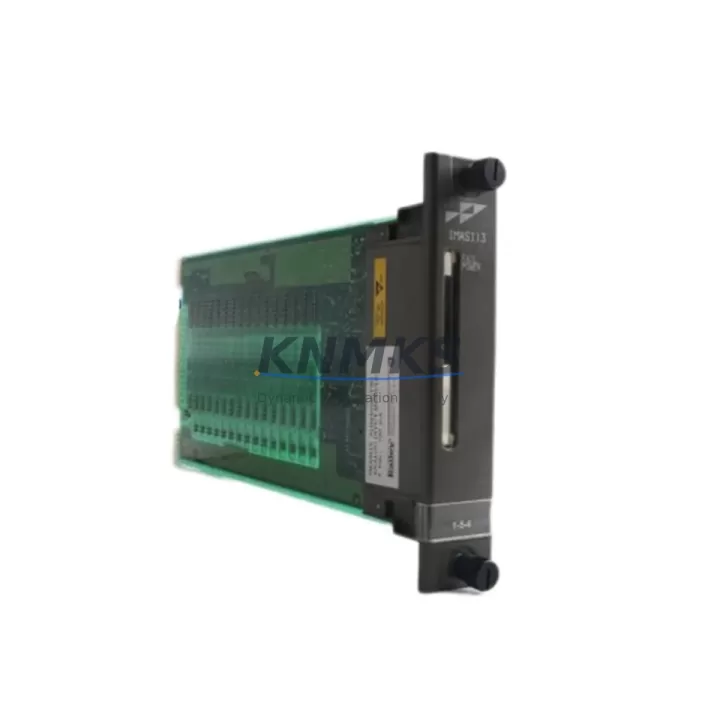
The ABB NIMP02 is a rack termination module engineered for the ABB AC500 PLC platform, designed to serve as a migration-ready replacement in legacy control system modernization projects. Whether you are retiring an aging S500 rack assembly, consolidating distributed I/O cabinets, or upgrading a discontinued termination interface, the NIMP02 provides a verified, drop-in-compatible solution that minimizes engineering rework and reduces field commissioning time.
Industrial facilities operating legacy ABB control architectures frequently encounter end-of-life termination modules that are no longer available through standard distribution channels. The NIMP02 addresses this gap directly — offering a stocked, tested, and support terms-backed replacement that integrates into existing AC500 rack configurations without requiring backplane redesign or PLC program modification. For maintenance engineers managing aging production lines, this translates to reduced downtime exposure and a lower total cost of retrofit.
Before initiating a replacement, engineers should verify the following parameters against the existing installation: rack slot assignment and backplane bus compatibility, terminal block wiring layout and conductor gauge ratings, module address configuration within the AC500 CPU scan list, power rail loading relative to the PS501 or PS502 power supply module capacity, and available cabinet depth for module seating. These checks are essential to ensure that the NIMP02 seats correctly and that the existing field wiring can be transferred without re-termination.
In multi-rack configurations, the NIMP02 is commonly deployed alongside the ABB TB521-ETH communication module for Ethernet-based I/O expansion, and the ABB CI590-CS31-HA coupler where CS31 serial bus legacy segments remain active. Facilities migrating from older S100 or S800 field bus architectures to AC500 Modbus TCP or PROFIBUS DP topologies will find that the NIMP02 termination interface supports the physical layer requirements of these protocol transitions without additional signal conditioning hardware.
For I/O-intensive retrofit projects, the NIMP02 is frequently paired with ABB DC532 digital input modules and ABB DA501 analog output modules to reconstruct legacy I/O channel counts within a modernized rack assembly. Where signal isolation is required between field instruments and the PLC backplane — particularly in high-noise environments such as motor control centers or variable frequency drive cabinets — inline signal isolators should be specified at the termination layer before the NIMP02 interface.
HMI integration should also be reviewed during the retrofit planning phase. If the existing operator panel communicates with the AC500 CPU via a serial RS-232 or RS-485 link, confirm that the HMI screen tags and data block addresses remain consistent after the rack termination module is replaced. In most AC500 configurations, the NIMP02 does not alter the CPU memory map, so HMI variable bindings typically remain valid — but this should be verified in the offline project file before live commissioning.
Migration Compatibility Table
| Parameter | Specification / Recommendation |
|---|---|
| Compatible Platform | ABB AC500 PLC Series (PM571, PM581, PM591, PM595) |
| Backplane Interface | AC500 standard rack bus — verify slot position before installation |
| Terminal Wiring | Match existing conductor gauge; re-use field wiring where possible |
| Communication Compatibility | Compatible with PROFIBUS DP, Modbus TCP, CS31, CANopen via AC500 CPU |
| Power Supply Requirement | Verify rack power budget against PS501/PS502 supply module rating |
| Module Address | Retain original slot address in AC500 hardware configuration (Automation Builder) |
| Firmware Compatibility | Compatible with AC500 firmware V2.x and V3.x — confirm CPU firmware version |
| Installation Space | Standard AC500 rack slot width — no cabinet modification required |
| Replacement Recommendation | Direct drop-in for legacy NIMP02 units; no program modification required |
| Commissioning Focus | Verify I/O channel mapping, terminal continuity, and CPU scan list after installation |
| Support terms | support terms confirmed by quotation — tested and verified before shipment |
Retrofit Planning for Existing Automation Systems
Successful integration of the ABB NIMP02 into a legacy control system requires a structured retrofit plan that accounts for both hardware and software dependencies. Begin by auditing the existing rack assembly to identify all installed modules — including the CPU module (e.g., ABB PM591), power supply, communication interfaces, and I/O modules — and document their slot positions and wiring schedules.
Where the existing installation includes a ABB TB511-ETH terminal base or similar interface, confirm that the NIMP02 is mechanically compatible with the installed base before ordering. In cabinets where space is constrained, measure the available rail depth and module projection to ensure the NIMP02 seats fully without obstructing adjacent wiring ducts or door clearance.
For systems that include distributed I/O nodes connected via ABB CI501-PNIO PROFINET coupler or legacy CS31 field bus segments, the rack termination replacement should be coordinated with a review of the network topology to confirm that no address conflicts are introduced. If the retrofit involves migrating from a CS31 serial segment to an Ethernet-based I/O architecture, the NIMP02 termination layer should be validated against the new coupler’s channel mapping before field wiring is transferred.
Signal integrity should be verified at the termination layer using a continuity tester before powering the rack. In environments with high electromagnetic interference — such as those containing ABB ACS880 variable frequency drives or large motor starters — shielded cable termination and proper grounding at the NIMP02 terminal block are essential to prevent spurious I/O faults after commissioning.
Programming cable access (e.g., USB or Ethernet connection to the AC500 CPU) should be arranged in advance so that the Automation Builder project file can be uploaded, verified, and re-downloaded if any hardware configuration changes are required during the retrofit. Keeping the original program backup on a secure engineering workstation before any physical intervention is a non-negotiable step in any legacy system migration.
Downtime Control During System Migration
Minimizing production downtime during a rack termination module replacement requires advance preparation, clear task sequencing, and a tested rollback plan. For the ABB NIMP02 retrofit, the following approach is recommended to protect program logic integrity and maintain field control continuity:
Pre-shutdown preparation: Export and archive the current Automation Builder project file. Document all I/O channel states, analog scaling parameters, and communication link statuses. Photograph the existing terminal wiring before disconnection. Confirm that the replacement NIMP02 unit has been bench-tested and verified against the original module’s terminal layout.
Controlled shutdown sequence: Place the AC500 CPU in STOP mode via the programming interface before removing the termination module. This prevents spurious output activations during the physical swap. Where the process requires a warm handover — for example, in continuous manufacturing lines — coordinate with the operations team to identify the safest intervention window and pre-position the replacement module at the cabinet.
Post-installation verification: After seating the NIMP02 and re-terminating field wiring, perform a point-by-point I/O check against the wiring schedule before returning the CPU to RUN mode. Verify communication link status on all active network segments. Confirm HMI display values against field instrument readings before releasing the system to production.
Rollback readiness: Retain the original NIMP02 unit (if functional) as a fallback option until the replacement has completed a full production cycle without fault. This is particularly important in safety-instrumented systems or processes with long restart sequences.
Retrofit Support FAQ
Q: Is the ABB NIMP02 a direct replacement for the original module in my AC500 rack?
A: Yes. The NIMP02 is designed as a drop-in replacement for existing AC500 rack termination positions. No backplane modification or PLC program change is required in standard configurations. Verify the slot position and terminal wiring schedule against your existing installation documentation before replacement.
Q: What commissioning steps are required after installing the NIMP02?
A: After physical installation and field wiring re-termination, perform a continuity check on all terminal connections, upload the existing Automation Builder project to confirm hardware configuration alignment, and execute a full I/O channel verification in STOP mode before returning the CPU to RUN. Check all active communication links and HMI data bindings before releasing to production.
Q: How is the NIMP02 tested before shipment?
A: Each NIMP02 unit undergoes functional verification prior to dispatch, including backplane interface testing and terminal continuity checks. Units are shipped with a support terms confirmed by quotation covering manufacturing defects and functional failures under normal operating conditions. Expedited shipping options are available for urgent maintenance requirements.
Q: What is the stock availability and lead time for the ABB NIMP02?
A: The NIMP02 is maintained availability confirmed by RFQ to support urgent replacement and planned retrofit projects. Standard lead times apply for in-stock units, with global shipping available. Contact our sales team for current inventory status, volume pricing, and expedited fulfillment options.
© 2026 KNMKS. All rights reserved.
Original Source: https://knmks.com
Contact: admin@knmks.com | +86 18359268345
Product Identification
- Brand / Ecosystem
-
ABB
ABB - Model / Series
-
NIMP02
AC500 Series - Product Family
- PLCs & Controllers
- Availability Status
- Available on request after model and quantity confirmation
- Inquiry Type
- B2B RFQ, replacement inquiry and project spare-part request
- Pre-Quote Check
- Exact SKU, brand, series, quantity, nameplate photos and destination country are checked before quotation
System Path
Where this product fits in the KNMKS automation structure.
Specification & Inquiry Focus
- Control platform
- PLC, PAC and modular controllers
- Common needs
- CPU, rack, power and I/O expansion
- Project support
- Replacement, cabinet build and maintenance
Buyer Confirmation
Information KNMKS checks before replying.
- Exact model
- NIMP02
- Brand / ecosystem
- ABB
- Product family
- PLCs & Controllers
- Application note
- Replacement, maintenance, project build or spare-part list
- Useful photos
- Nameplate, installed unit, cabinet layout or connector side
- Delivery details
- Quantity, destination country and target schedule
Document Support
Files and notes can be confirmed during quotation.
- Product photos or nameplate confirmation when available
- Packing and delivery notes before quotation confirmation
- Support scope and delivery terms confirmed per inquiry
- Export document coordination for qualified B2B requests
Inquiry Support
- Model cross-checking before quotation
- CPU, power, rack and expansion module matching
- Support for replacement and project inquiry
What to Send Us
- Brand and exact model number: ABB NIMP02
- Quantity and required delivery time
- Application, replacement requirement or nameplate photo
- Destination country and shipping preference
RFQ Preparation
This is a product inquiry page built for RFQ communication.
Fast Model Check
Send this model to KNMKS for confirmation.
Include quantity, destination country and photos if this is a maintenance replacement. The inquiry will be saved with a reference number after submission.
Brand & Compatibility Note
KNMKS displays automation product information for well-known industrial brand ecosystems and compatible replacement references. Brand names are used for product identification and compatibility reference only; final availability and commercial terms are confirmed per quotation.
 Manufacturing
 Machine Tools
 Packaging
 Energy & Power



 HMI & Displays
 Servo Systems
 Variable Frequency Drives
 Sensors