
Overview
ABB NAOM01 Retrofit-Ready Analog Output for AC500: Legacy Control System Migration & Compatibility Upgrade
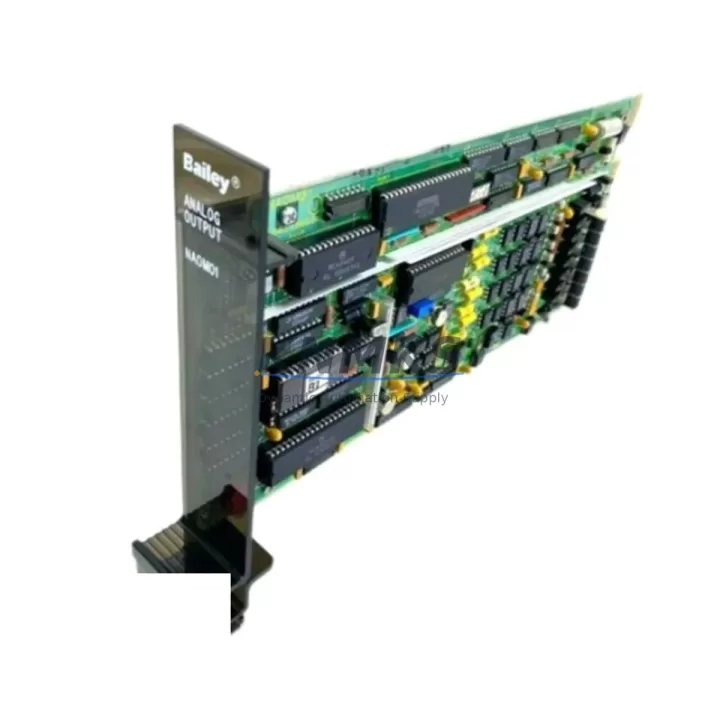
The ABB NAOM01 is a 4-channel analog output module designed for the ABB AC500 PLC platform, purpose-built to support industrial sites undertaking control system modernization, legacy I/O replacement, and distributed automation upgrades. Whether you are retiring an aging S500 rack, migrating from a third-party analog output card, or expanding an existing AC500 cabinet with additional signal channels, the NAOM01 delivers the electrical compatibility, form factor consistency, and firmware alignment required for a low-risk, minimum-downtime retrofit.
Each channel supports selectable output ranges of 0–20 mA, 4–20 mA, 0–10 V, and ±10 V, making the NAOM01 directly interchangeable with a wide range of legacy analog output modules used in process control, drive speed reference, valve positioning, and HMI setpoint transmission applications. The module mounts on standard DIN rail within the AC500 backplane system and is addressed automatically through the CPU’s I/O configuration table, eliminating the need for manual DIP switch settings common in older generation hardware.
Migration Compatibility Table
| Parameter | ABB NAOM01 | Typical Legacy Analog Output Module |
|---|---|---|
| Output Channels | 4 channels | 2–4 channels (varies by model) |
| Output Ranges | 0–20 mA / 4–20 mA / 0–10 V / ±10 V | Often fixed range; limited configurability |
| Resolution | 12-bit | 8–12 bit (model dependent) |
| Backplane Interface | AC500 S500 I/O bus | Proprietary bus; adapter may be required |
| Mounting | DIN rail, S500 terminal unit | DIN rail or card cage (verify slot width) |
| Address Configuration | Automatic via CPU I/O table | Manual DIP switch or jumper setting |
| Communication Protocol | AC500 internal I/O bus (PROFIBUS-compatible CPU) | Varies: PROFIBUS, DeviceNet, proprietary |
| Power Supply | 24 V DC via backplane | 24 V DC or 120/240 V AC (verify before swap) |
| Terminal Wiring | Screw terminals on S500 terminal unit | Varies; re-termination may be required |
| Firmware Compatibility | AC500 V2.x / V3.x firmware | Not applicable; verify CPU firmware version |
| Replacement Recommendation | Direct drop-in for AC500 S500 I/O slots | Confirm backplane slot count and terminal unit type |
| Commissioning Focus | I/O mapping, output range selection, loop calibration | Address reassignment, wiring re-termination, PLC scan update |
| Support terms | support terms confirmed by quotation — All units tested before shipment | |
Retrofit Planning for Existing Automation Systems
Integrating the NAOM01 into an existing control cabinet requires a structured pre-installation review. Begin by auditing the current AC500 CPU module — typically a PM573, PM583, or PM595 — to confirm the installed firmware version supports the NAOM01’s I/O descriptor. ABB AC500 V2.x and V3.x firmware both recognize the NAOM01 natively; however, if the CPU is running a legacy firmware branch below V2.4, a firmware update should be scheduled as part of the migration window.
Next, verify the S500 terminal unit already installed in the rack. The NAOM01 is designed to seat on the TA521 or TA526 terminal unit, which provides the screw-terminal field wiring interface. If the existing rack uses an older terminal unit variant, confirm pin-out compatibility before re-terminating field cables. This step is critical when replacing a discontinued analog output card from a third-party vendor, as terminal pitch and channel sequencing may differ.
Power budget verification is the next checkpoint. The NAOM01 draws its operating power from the AC500 power supply module — commonly the PS501 or PS502 — through the backplane bus. When adding the NAOM01 to an existing rack that already carries digital I/O modules, communication modules such as the CM572-DP PROFIBUS master, and analog input modules, recalculate the total backplane current draw to confirm the installed power supply has sufficient headroom. Exceeding the rated backplane current is a common cause of intermittent faults during retrofit commissioning.
For sites migrating from a legacy control platform to AC500, the NAOM01’s output channel mapping must be reflected in the updated PLC program. If the original program used absolute I/O addresses tied to a different hardware architecture, the address table must be remapped in Automation Builder before the new hardware is energized. Retain a backup of the original program logic and create a parallel simulation environment where possible to validate output behavior before live commissioning.
HMI screen updates are frequently overlooked during analog output module replacements. If the existing ABB CP600 or CP400 HMI panel displays real-time setpoint values sourced from the analog output channel, verify that the tag addresses in the HMI project match the remapped I/O addresses in the updated PLC program. Mismatched tags will cause the HMI to display stale or incorrect setpoint values without triggering a fault alarm, making this a silent commissioning risk.
Finally, confirm installation space within the control cabinet. The NAOM01 occupies one S500 I/O slot on the backplane. If the existing rack is fully populated, an additional S500 expansion rack with a dedicated backplane coupler may be required. Plan cable routing for the additional terminal unit wiring before the maintenance window begins to avoid unplanned downtime extensions.
Downtime Control During System Migration
Minimizing production interruption during an analog output module replacement depends on preparation quality, not installation speed. The following approach is recommended for sites where the AC500 system controls continuous process equipment such as variable frequency drives, control valves, or temperature regulators.
Pre-migration: Document all existing analog output channel assignments, engineering unit ranges, and field device calibration points. Export the current PLC program from the CPU using Automation Builder and store a timestamped backup offline. Photograph all terminal wiring before disconnection. If the system supports online program modification, prepare the updated I/O configuration in a test project and validate it against the hardware descriptor library before the maintenance window.
During migration: Place all field devices connected to the analog output channels in manual or local control mode before removing the legacy module. This prevents uncontrolled output transitions during the hardware swap. Install the NAOM01 into the vacated S500 slot, reconnect field wiring to the terminal unit in channel sequence order, and power up the rack. The CPU will automatically detect the new module and load its I/O descriptor. Verify that no I/O configuration fault is reported on the CPU status LED before transferring the updated program.
Post-migration: Perform a loop calibration check on each of the four output channels using a calibrated milliamp meter or voltage reference. Confirm that the output values displayed in the PLC program match the physical signal measured at the field device terminals. Return field devices to automatic control mode one channel at a time, monitoring process response before releasing the next channel. This staged return-to-service approach limits the blast radius of any residual configuration error and protects original program logic from being overwritten by an incomplete commissioning step.
All NAOM01 units supplied by KNMKS are pre-tested under load conditions prior to shipment, reducing the risk of DOA hardware during a time-critical maintenance window. Stock availability is maintained to support urgent replacement orders with fast dispatch.
Retrofit Support FAQ
Q1: Can the ABB NAOM01 directly replace a discontinued third-party analog output module in an AC500 rack?
The NAOM01 is designed exclusively for the ABB AC500 S500 I/O platform and will only operate correctly when seated on a compatible S500 terminal unit within an AC500 backplane. It cannot replace modules from non-ABB platforms without a full rack and CPU migration. For AC500-to-AC500 replacements involving discontinued ABB analog output variants, the NAOM01 is a direct functional substitute provided the terminal unit type and firmware version are compatible.
Q2: What commissioning steps are required after installing the NAOM01 in an existing AC500 system?
After physical installation, connect to the CPU via Automation Builder, open the hardware configuration, and confirm the NAOM01 appears in the I/O tree without fault flags. Update the I/O address mapping if the module occupies a different slot position than the replaced unit. Download the updated configuration to the CPU, perform a cold restart if required by the firmware, and execute a channel-by-channel output verification using a calibrated reference instrument before returning the system to automatic operation.
Q3: How should field wiring be handled when migrating from a legacy module with a different terminal pitch?
If the legacy module used a terminal pitch or connector type incompatible with the S500 TA521/TA526 terminal unit, field cables will require re-termination. Label all cables before disconnection using the original wiring diagram. Use ferrule-terminated conductors for screw terminal connections to ensure reliable contact. Verify conductor cross-section compatibility with the terminal unit’s rated clamping range before tightening. Do not reuse damaged or corroded conductors — replace them as part of the retrofit to avoid intermittent signal faults post-commissioning.
Q4: What does the support terms confirmed by quotation cover, and how is it supported?
All ABB NAOM01 units supplied by KNMKS carry a support terms confirmed by quotation covering manufacturing defects and functional failures under normal operating conditions. Each unit undergoes pre-shipment functional testing to verify output accuracy across all four channels and both current and voltage output modes. In the event of a support terms claim, contact KNMKS with the order reference and a description of the fault. Replacement units are dispatched from stock to minimize system downtime. Support terms does not cover damage resulting from incorrect installation, overvoltage, or operation outside the module’s rated environmental specifications.
© 2026 KNMKS. All rights reserved.
Original Source: https://knmks.com
Contact: admin@knmks.com | +86 18359268345
Product Identification
- Brand / Ecosystem
-
ABB
ABB - Model / Series
-
NAOM01
AC500 Series - Product Family
- PLCs & Controllers
- Availability Status
- Available on request after model and quantity confirmation
- Inquiry Type
- B2B RFQ, replacement inquiry and project spare-part request
- Pre-Quote Check
- Exact SKU, brand, series, quantity, nameplate photos and destination country are checked before quotation
System Path
Where this product fits in the KNMKS automation structure.
Specification & Inquiry Focus
- Control platform
- PLC, PAC and modular controllers
- Common needs
- CPU, rack, power and I/O expansion
- Project support
- Replacement, cabinet build and maintenance
Buyer Confirmation
Information KNMKS checks before replying.
- Exact model
- NAOM01
- Brand / ecosystem
- ABB
- Product family
- PLCs & Controllers
- Application note
- Replacement, maintenance, project build or spare-part list
- Useful photos
- Nameplate, installed unit, cabinet layout or connector side
- Delivery details
- Quantity, destination country and target schedule
Document Support
Files and notes can be confirmed during quotation.
- Product photos or nameplate confirmation when available
- Packing and delivery notes before quotation confirmation
- Support scope and delivery terms confirmed per inquiry
- Export document coordination for qualified B2B requests
Inquiry Support
- Model cross-checking before quotation
- CPU, power, rack and expansion module matching
- Support for replacement and project inquiry
What to Send Us
- Brand and exact model number: ABB NAOM01
- Quantity and required delivery time
- Application, replacement requirement or nameplate photo
- Destination country and shipping preference
RFQ Preparation
This is a product inquiry page built for RFQ communication.
Fast Model Check
Send this model to KNMKS for confirmation.
Include quantity, destination country and photos if this is a maintenance replacement. The inquiry will be saved with a reference number after submission.
Brand & Compatibility Note
KNMKS displays automation product information for well-known industrial brand ecosystems and compatible replacement references. Brand names are used for product identification and compatibility reference only; final availability and commercial terms are confirmed per quotation.
 Manufacturing
 Machine Tools
 Packaging
 Energy & Power



 HMI & Displays
 Servo Systems
 Variable Frequency Drives
 Sensors