
Overview
ABB NAMM03 Maintenance-Proven Spare Part for Factory Uptime
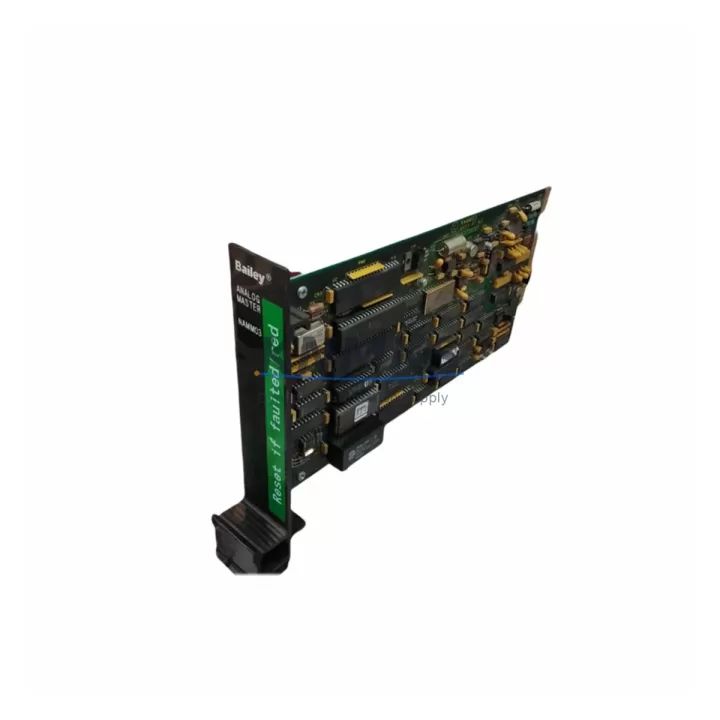
The ABB NAMM03 is an analog master module designed for the ABB AC500 PLC platform, widely deployed in process automation, power distribution, water treatment, and discrete manufacturing environments. As a critical interface between field instrumentation and the AC500 CPU, the NAMM03 handles analog signal acquisition and distribution across multi-drop MODBUS or proprietary ABB communication loops. When this module fails or degrades, the consequences extend beyond a single I/O channel — entire analog loops, PID control strategies, and process interlocks can be compromised, triggering unplanned shutdowns and costly production losses.
Sourced as an original ABB component and dispatched from multi-region stock, this NAMM03 spare is pre-shipment tested, fully compatible with the AC500 backplane architecture, and backed by a support terms confirmed by quotation. Whether you are responding to an emergency fault, executing a scheduled annual overhaul, or building a resilient spare parts inventory for your control room, this unit is ready for immediate deployment.
Spare Maintenance Table
| Parameter | Specification |
|---|---|
| Part Number | NAMM03 |
| Brand | ABB |
| Series | AC500 |
| Module Type | Analog Master Module |
| Product Type | PLC Analog I/O Module |
| Communication Interface | MODBUS RTU / ABB Proprietary Analog Bus |
| Backplane Compatibility | ABB AC500 TB5xx / TB6xx Series Backplanes |
| Operating Voltage | 24 VDC (via backplane) |
| Operating Temperature | 0°C to +60°C |
| Mounting | DIN Rail / AC500 Backplane Slot |
| Origin | Germany |
| Condition | Original, Pre-Shipment Tested |
| Support terms | 12 Months |
| Dispatch | Multi-Region Stock, global delivery details confirmed by RFQ |
| Application | Process Automation, Power, Water Treatment, Manufacturing |
Maintenance Planning for Continuous Operation
Replacing the NAMM03 in an AC500 system is rarely an isolated task. Maintenance engineers and procurement teams working on AC500 control cabinets should treat this replacement as an opportunity to audit the surrounding electrical and communication infrastructure to prevent repeat failures and extend system life.
Begin with the AC500 CPU module (such as the PM573 or PM583 series) to confirm firmware compatibility with the replacement NAMM03 and verify that the CPU’s analog master configuration parameters are correctly mapped. Next, inspect the AC500 backplane (TB511, TB521, or TB541 series) for signs of oxidation, bent connector pins, or mechanical stress that could cause intermittent communication faults after module swap.
On the field side, check the analog signal cables and shielding connected to the NAMM03’s terminal blocks. Degraded cable insulation or improper shield grounding is a common root cause of analog drift and module faults that are often misdiagnosed as module failure. Inspect terminal blocks and wiring ferrules for corrosion or loose connections, particularly in high-humidity or chemically aggressive environments.
The 24 VDC power supply module feeding the AC500 backplane should be load-tested during the maintenance window. An undersized or aging power supply can cause voltage sag under full I/O load, leading to erratic analog readings and spurious module resets. If the cabinet includes an ABB CI502 or CI504 PROFIBUS/PROFINET communication module, verify that the network configuration is intact after the NAMM03 swap, as analog master reconfiguration can affect network node addressing in some AC500 firmware versions.
For sites running redundant control strategies, also review the analog signal isolators or barriers installed between the NAMM03 and field transmitters. These components protect the module from field-side surges and ground loops; worn isolators can silently degrade signal quality and shorten module service life. Finally, confirm that cabinet-level fusing and surge protection devices are rated correctly for the analog loop currents and that no fuse has been replaced with an oversized substitute during a previous emergency repair.
Site Replacement Workflow
Step 1 — Pre-Replacement Verification: Download and archive the current AC500 project from the CPU using ABB Automation Builder or PS501 Control Builder. Record all NAMM03 channel configurations, scaling parameters, and alarm setpoints before powering down the cabinet.
Step 2 — Safe Isolation: Follow site LOTO (Lockout/Tagout) procedures. Isolate the 24 VDC backplane supply and confirm zero-energy state with a calibrated multimeter before touching any backplane slot.
Step 3 — Module Removal: Release the NAMM03 from the backplane slot using the module ejector lever. Avoid pulling on the wiring harness. Label all field cables before disconnection if they are not already permanently marked.
Step 4 — Replacement Installation: Seat the new NAMM03 firmly into the backplane slot until the locking tab engages. Reconnect field cables in the correct terminal sequence. Verify terminal torque to manufacturer specification to prevent loose connections under vibration.
Step 5 — Power-Up and Configuration Restore: Restore power and download the archived project to the CPU. Verify that the NAMM03 is recognized by the CPU and that all analog channels report expected values. Perform a live signal check against field instrumentation readings before returning the system to automatic control.
Step 6 — Documentation: Update the site maintenance log with the replacement date, new module serial number, and any observations noted during the replacement. Retain the failed module for root cause analysis if required by site quality procedures.
Spare Parts Support FAQ
Q1: Is this NAMM03 unit an original ABB component or a third-party compatible replacement?
This is an original ABB NAMM03 module sourced through verified industrial supply channels. It is not a clone, refurbished third-party unit, or compatible substitute. Each unit undergoes pre-shipment functional testing before dispatch to confirm analog channel integrity and backplane communication performance.
Q2: What is the support terms coverage and what does it include?
All NAMM03 units are covered by a support terms confirmed by quotation from the date of delivery. The support terms covers manufacturing defects and functional failures under normal operating conditions. It does not cover damage resulting from incorrect installation, overvoltage events, or physical mishandling. Our technical team provides post-sale support to assist with installation verification and fault diagnosis during the confirmed support period.
Q3: How do I confirm compatibility with my existing AC500 system before ordering?
The NAMM03 is designed for the ABB AC500 PLC platform and is compatible with TB5xx and TB6xx series backplanes. Compatibility depends on your specific AC500 CPU firmware version and project configuration. We recommend sharing your CPU part number and current firmware version with our sales team at admin@knmks.com so we can confirm compatibility before shipment. For sites running older AC500 V2 firmware, a firmware update may be required to support the latest NAMM03 hardware revision.
Q4: Can you support long-term supply agreements for NAMM03 and other AC500 spare parts?
Yes. We maintain multi-region stock of NAMM03 and related AC500 components to support both emergency replacement orders and planned annual maintenance programs. Long-term supply agreements with fixed pricing and reserved stock allocation are available for industrial sites with recurring maintenance requirements. Contact admin@knmks.com or call +86 18359268345 to discuss a supply agreement tailored to your maintenance schedule and inventory strategy.
© 2026 KNMKS. All rights reserved.
Original Source: https://knmks.com
Contact: admin@knmks.com | +86 18359268345
Product Identification
- Brand / Ecosystem
-
ABB
ABB - Model / Series
-
NAMM03
AC500 Series - Product Family
- PLCs & Controllers
- Availability Status
- Available on request after model and quantity confirmation
- Inquiry Type
- B2B RFQ, replacement inquiry and project spare-part request
- Pre-Quote Check
- Exact SKU, brand, series, quantity, nameplate photos and destination country are checked before quotation
System Path
Where this product fits in the KNMKS automation structure.
Specification & Inquiry Focus
- Control platform
- PLC, PAC and modular controllers
- Common needs
- CPU, rack, power and I/O expansion
- Project support
- Replacement, cabinet build and maintenance
Buyer Confirmation
Information KNMKS checks before replying.
- Exact model
- NAMM03
- Brand / ecosystem
- ABB
- Product family
- PLCs & Controllers
- Application note
- Replacement, maintenance, project build or spare-part list
- Useful photos
- Nameplate, installed unit, cabinet layout or connector side
- Delivery details
- Quantity, destination country and target schedule
Document Support
Files and notes can be confirmed during quotation.
- Product photos or nameplate confirmation when available
- Packing and delivery notes before quotation confirmation
- Support scope and delivery terms confirmed per inquiry
- Export document coordination for qualified B2B requests
Inquiry Support
- Model cross-checking before quotation
- CPU, power, rack and expansion module matching
- Support for replacement and project inquiry
What to Send Us
- Brand and exact model number: ABB NAMM03
- Quantity and required delivery time
- Application, replacement requirement or nameplate photo
- Destination country and shipping preference
RFQ Preparation
This is a product inquiry page built for RFQ communication.
Fast Model Check
Send this model to KNMKS for confirmation.
Include quantity, destination country and photos if this is a maintenance replacement. The inquiry will be saved with a reference number after submission.
Brand & Compatibility Note
KNMKS displays automation product information for well-known industrial brand ecosystems and compatible replacement references. Brand names are used for product identification and compatibility reference only; final availability and commercial terms are confirmed per quotation.
 Manufacturing
 Machine Tools
 Packaging
 Energy & Power



 HMI & Displays
 Servo Systems
 Variable Frequency Drives
 Sensors