
Overview
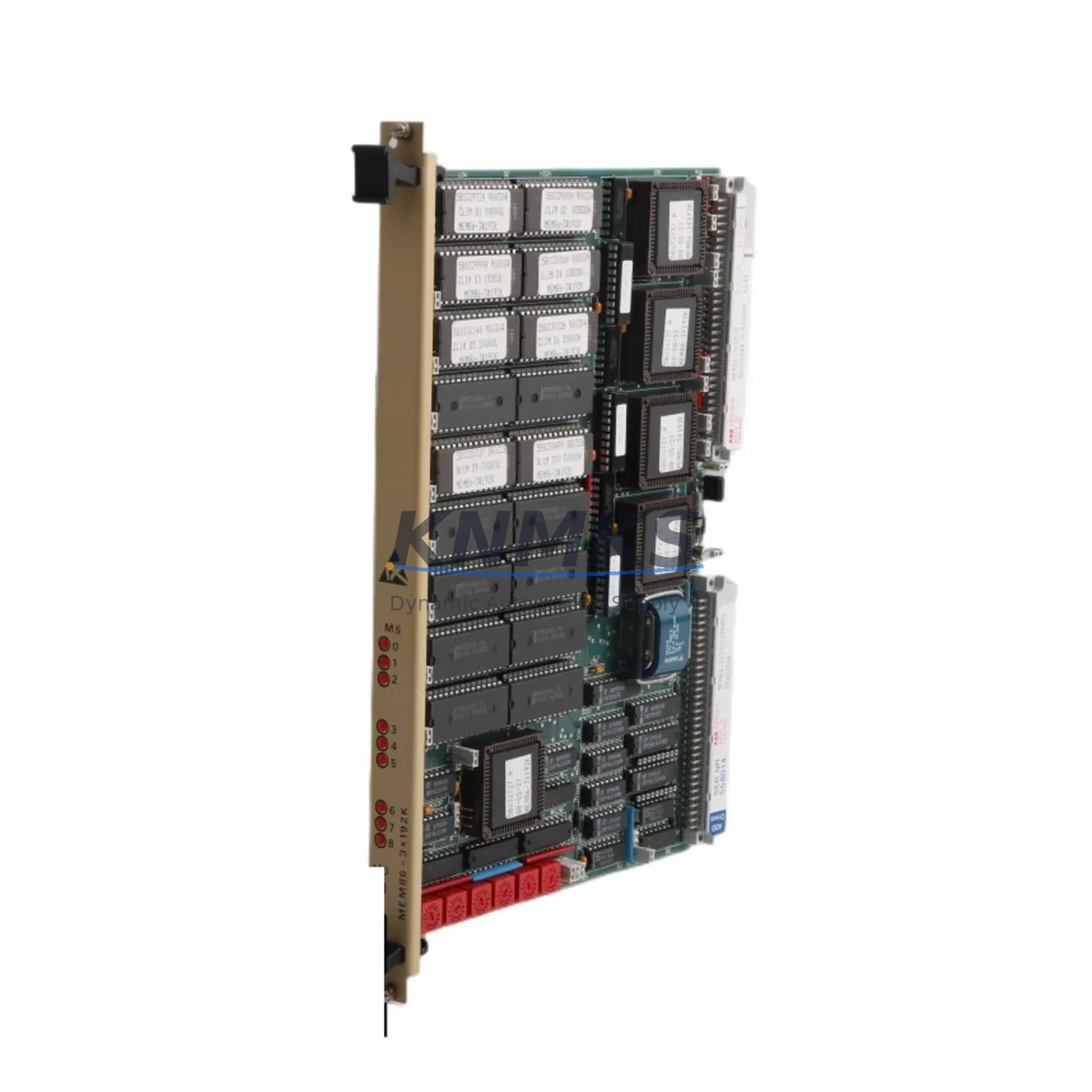
ABB MEM86-3*192 Maintenance-Proven Spare Part for Factory Uptime
The ABB MEM86-3*192 is a factory-original memory board designed for the CMBMR3 series DCS (Distributed Control System) platform. In continuous-process industries — including petrochemical, power generation, pulp and paper, and heavy manufacturing — the CMBMR3 controller backbone depends on this memory module to retain program logic, configuration data, and runtime parameters across power cycles. A failed or degraded MEM86-3*192 can result in controller faults, loss of process data, and unplanned shutdowns that cost thousands of dollars per hour. Stocking a verified replacement is the most cost-effective insurance against that risk.
KNMKS supplies the ABB MEM86-3*192 CMBMR3 as a tested, original spare with full functional verification prior to shipment. Each unit undergoes bench-level inspection covering memory integrity, connector condition, and firmware compatibility before it leaves our facility. Orders are supported by a support terms confirmed by quotation and long-term supply commitment — critical for maintenance teams managing aging DCS infrastructure where OEM support has been discontinued or lead times are unacceptably long.
Spare Maintenance Table
| Field | Details |
|---|---|
| Part Number / SKU | MEM86-3*192 CMBMR3 |
| Brand | ABB |
| Series | CMBMR3 / MEM86 |
| Product Type | Memory Board (DCS Controller Module) |
| Compatible Platform | ABB CMBMR3 DCS Controller Series |
| Memory Capacity | 3 × 192 KB (per module designation) |
| Form Factor | Plug-in board module, DIN-rail / backplane mount |
| Operating Voltage | 5 VDC (supplied via backplane) |
| Operating Temperature | 0°C to +60°C (industrial grade) |
| Country of Origin | Germany (DE) |
| Weight | 540 g |
| Application Environment | Industrial DCS control cabinets, process automation panels |
| Maintenance Recommendation | Inspect every 12–24 months; replace on first sign of memory fault or controller alarm |
| Support terms | 12 Months — covers functional defects under normal operating conditions |
| Pre-shipment Testing | Full functional verification: memory integrity, connector check, firmware compatibility |
| Supply Commitment | Long-term availability for legacy CMBMR3 systems |
Maintenance Planning for Continuous Operation
When scheduling a replacement of the MEM86-3*192 CMBMR3, maintenance engineers should treat the intervention as a full controller health audit rather than a single-component swap. The memory board interfaces directly with the CMBMR3 processor module and the system backplane — both of which should be inspected for oxidation, loose connectors, and thermal stress marks before the new board is seated.
Power supply integrity is the first checkpoint. The CMBMR3 backplane draws regulated 5 VDC and 24 VDC rails; a failing ABB NPOW-41 or equivalent DCS power supply module can cause intermittent memory errors that mimic a faulty MEM86-3*192. Verify rail voltages under load before condemning the memory board. Similarly, the ABB DSMB-01 or DSMC-01 communication modules mounted in adjacent backplane slots should be checked for firmware version compatibility, as mismatched firmware can prevent the controller from correctly initializing a replacement memory board.
I/O module health is the next priority. In CMBMR3-based cabinets, analog input modules such as the ABB DSAI-130 and digital output modules such as the ABB DSDO-115 are often co-located in the same rack. A controller memory fault can corrupt I/O configuration tables, so after installing the MEM86-3*192 replacement, engineers should perform a full I/O scan and verify that all channel assignments match the as-built documentation. Terminal blocks and field wiring should be torque-checked at this stage — loose connections are a common source of spurious I/O faults that get misattributed to controller hardware.
For cabinets with relay output modules or signal isolators, inspect the ABB DSRO-151 relay output cards and any interposing signal isolation barriers for contact wear or insulation degradation. These components share the same control power bus as the memory board and can introduce noise that shortens memory module service life. Fuse holders on the 24 VDC distribution rail should also be checked — a high-resistance fuse contact is a frequent but overlooked cause of intermittent DCS faults.
Finally, if the CMBMR3 system includes an operator interface, verify that the connected HMI (such as an ABB Panel 800 or legacy OP series terminal) can re-establish communication with the controller after the memory board replacement. HMI tag databases and alarm configurations are sometimes stored in controller memory and may require re-download from the engineering workstation following a board swap.
Site Replacement Workflow
Step 1 — Pre-replacement backup: Connect the ABB engineering workstation and perform a full controller backup (program, configuration, and I/O mapping) before powering down the rack. Store the backup on a local drive and a network share.
Step 2 — Safe power-down: Follow the site LOTO (Lockout/Tagout) procedure. Confirm that the CMBMR3 rack is de-energized and that all field devices are in a safe state before opening the cabinet.
Step 3 — Board extraction: Release the MEM86-3*192 retaining latch, slide the board out along the backplane guides, and place it in an ESD-safe bag. Inspect the backplane connector for bent pins or debris.
Step 4 — New board installation: Remove the replacement MEM86-3*192 CMBMR3 from its ESD packaging. Align with the backplane slot and seat firmly until the latch engages. Do not force — misalignment will damage the connector.
Step 5 — Power-up and download: Restore power to the rack. The controller will initialize; download the backed-up program and configuration from the engineering workstation. Verify that all I/O channels report correctly and that no memory fault alarms are active.
Step 6 — Functional test: Run a loop check on critical I/O channels. Confirm HMI communication and alarm functionality. Document the replacement in the site maintenance log with the new board serial number and installation date.
This workflow minimizes downtime to a planned maintenance window and ensures full system compatibility without the risk of configuration loss.
Spare Parts Support FAQ
Q1: Is the MEM86-3*192 CMBMR3 compatible with all CMBMR3 controller revisions?
The MEM86-3*192 is designed for the ABB CMBMR3 platform. Compatibility across hardware revisions depends on the backplane slot assignment and firmware version of the processor module. KNMKS recommends providing your controller serial number and firmware version when ordering so we can confirm compatibility before shipment.
Q2: How is each unit tested before shipment?
Every MEM86-3*192 CMBMR3 unit shipped by KNMKS undergoes bench-level functional verification: memory read/write integrity test, connector inspection, and firmware compatibility check. A test report is available on request. Units that do not pass all checks are not offered for sale.
Q3: What does the support terms confirmed by quotation cover?
The support terms confirmed by quotation cover functional defects arising under normal operating conditions — including memory failure, connector faults, and firmware incompatibility attributable to the module itself. It does not cover damage caused by incorrect installation, overvoltage, or physical impact. Support requests are processed with a replacement-first policy to minimize your downtime.
Q4: Can KNMKS support long-term supply for legacy CMBMR3 systems?
Yes. KNMKS maintains ongoing sourcing relationships for ABB CMBMR3 series components, including the MEM86-3*192, to support customers managing legacy DCS infrastructure beyond OEM support windows. Contact our team to discuss blanket order arrangements, consignment stock, or annual supply agreements tailored to your maintenance schedule.
© 2026 KNMKS. All rights reserved.
Original Source: https://knmks.com
Contact: admin@knmks.com | +86 18359268345
Product Identification
- Brand / Ecosystem
-
ABB
ABB - Model / Series
- MEM86-3*192 CMBMR3
- Product Family
- Other Components
- Availability Status
- Available on request after model and quantity confirmation
- Inquiry Type
- B2B RFQ, replacement inquiry and project spare-part request
- Pre-Quote Check
- Exact SKU, brand, series, quantity, nameplate photos and destination country are checked before quotation
System Path
Where this product fits in the KNMKS automation structure.
Specification & Inquiry Focus
- Component range
- Breakers, terminals and cabinet accessories
- Common needs
- Model, photo and installation requirement
- Project support
- Maintenance and mixed spare-part inquiry
Buyer Confirmation
Information KNMKS checks before replying.
- Exact model
- MEM86-3*192 CMBMR3
- Brand / ecosystem
- ABB
- Product family
- Other Components
- Application note
- Replacement, maintenance, project build or spare-part list
- Useful photos
- Nameplate, installed unit, cabinet layout or connector side
- Delivery details
- Quantity, destination country and target schedule
Document Support
Files and notes can be confirmed during quotation.
- Product photos or nameplate confirmation when available
- Packing and delivery notes before quotation confirmation
- Support scope and delivery terms confirmed per inquiry
- Export document coordination for qualified B2B requests
Inquiry Support
- Mixed automation spare parts inquiry
- Cabinet component and accessory support
- Model identification from photos or labels
What to Send Us
- Brand and exact model number: ABB MEM86-3*192 CMBMR3
- Quantity and required delivery time
- Application, replacement requirement or nameplate photo
- Destination country and shipping preference
RFQ Preparation
This is a product inquiry page built for RFQ communication.
Fast Model Check
Send this model to KNMKS for confirmation.
Include quantity, destination country and photos if this is a maintenance replacement. The inquiry will be saved with a reference number after submission.
Brand & Compatibility Note
KNMKS displays automation product information for well-known industrial brand ecosystems and compatible replacement references. Brand names are used for product identification and compatibility reference only; final availability and commercial terms are confirmed per quotation.
 Manufacturing
 Machine Tools
 Packaging
 Energy & Power

 PLCs & Controllers
 HMI & Displays
 Servo Systems
 Variable Frequency Drives