
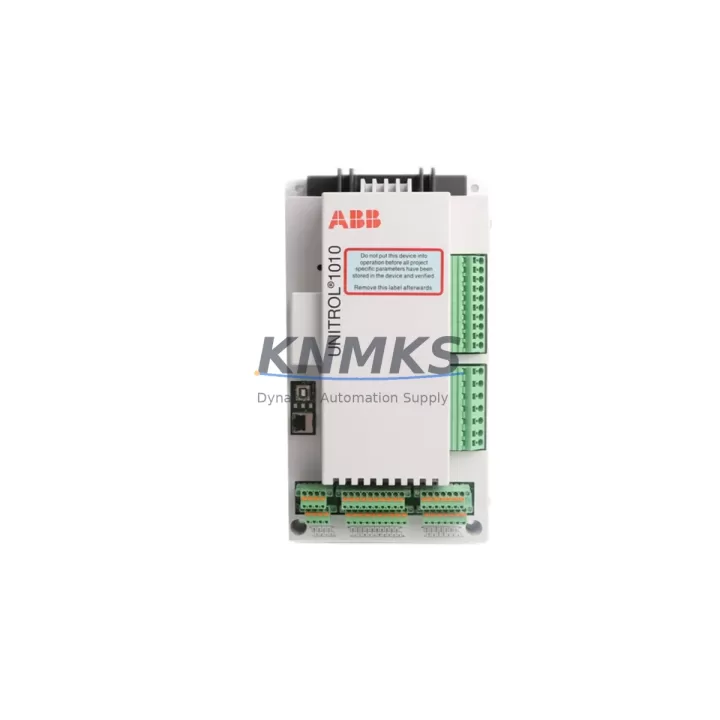
Overview
ABB MB21 Maintenance-Proven Spare Part for Factory Uptime
The ABB MB21 is an original communication module designed for the H&B Contronic DCS platform — one of the most widely deployed distributed control systems in process industries including chemical, petrochemical, power generation, and pulp & paper. As a maintenance-proven spare part, the MB21 plays a critical role in sustaining continuous plant operation by ensuring reliable data exchange between field devices, I/O subsystems, and the central control architecture.
For maintenance engineers managing aging Contronic installations, sourcing a verified MB21 spare is often the difference between a two-hour recovery and a multi-day production halt. This module handles bus communication tasks that are foundational to the DCS loop — any degradation or failure in the MB21 directly impacts process visibility, alarm management, and control output integrity. Stocking at least one verified MB21 in your spare parts inventory is a standard recommendation for any facility running H&B Contronic systems beyond their original support lifecycle.
Procurement engineers should note that the MB21 is a legacy component with limited availability on the open market. Units sourced from unverified channels carry significant risk of counterfeit or refurbished-as-new misrepresentation. Every MB21 unit supplied by KNMKS undergoes functional verification and electrical testing prior to shipment, backed by a support terms confirmed by quotation covering manufacturing defects and operational failure under normal industrial conditions.
Spare Maintenance Table
| SKU / Part Number | MB21 |
| Brand | ABB (formerly H&B Hartmann & Braun) |
| Series | Contronic DCS |
| Module Type | Communication Module |
| Country of Origin | Germany |
| Compatible Systems | H&B Contronic P, Contronic E, Contronic S series DCS |
| Application Environment | Process industries: chemical, petrochemical, power, pulp & paper |
| Installation | Backplane / rack-mount, DIN rail compatible enclosure |
| Condition | Original spare — functionally tested before shipment |
| Maintenance Role | Bus communication, data exchange, I/O coordination within Contronic DCS |
| Recommended Stock Level | Minimum 1 unit per Contronic cabinet cluster |
| Support terms | 12 months from date of shipment |
| Lead Time | Typically 3–7 business days; expedited available |
| Export / Compliance | Available for global shipment; documentation provided on request |
Maintenance Planning for Continuous Operation
When replacing or inspecting the MB21 communication module in a Contronic DCS cabinet, a thorough site assessment should extend beyond the module itself. The MB21 interfaces with multiple subsystems, and a failure in any adjacent component can mask the root cause or cause repeat failures after replacement.
Begin by inspecting the Contronic backplane and bus connectors — oxidized or loose backplane contacts are a common cause of intermittent communication faults that are incorrectly attributed to the MB21 module. Next, verify the 24VDC or 5VDC power supply rails feeding the communication rack; voltage ripple or under-voltage conditions will cause erratic module behavior even with a new MB21 installed. Power supply modules such as the NT series or PS series Contronic power units should be load-tested during the same maintenance window.
Check all I/O modules in the same rack segment — particularly analog input modules and digital output modules — for alarm flags or communication timeouts that may have been triggered by the MB21 fault. Inspect terminal blocks and field wiring connections for corrosion, loose ferrules, or insulation breakdown, especially in high-humidity or chemically aggressive environments.
If the Contronic system includes serial or fieldbus communication links (such as PROFIBUS or proprietary H&B bus segments), verify that the communication cable shielding is intact and properly grounded. Signal integrity issues on the bus can cause the MB21 to report errors even when the module itself is functional. Additionally, inspect any signal isolators or repeaters in the communication chain — these are often overlooked during fault isolation but are critical for long-distance or electrically noisy installations.
For facilities running Contronic HMI workstations, confirm that the operator station software is correctly recognizing the replaced module after restart. Some Contronic configurations require a manual address assignment or configuration download following a module swap. Finally, check fuse holders and circuit protection on the 24VDC distribution board — a blown fuse upstream of the communication rack is a frequent secondary finding during MB21 replacement events.
Site Replacement Workflow
Step 1 — Pre-Replacement Verification: Confirm the MB21 part number against the existing module label and the Contronic system configuration documentation. Verify that the replacement unit’s firmware revision is compatible with your installed DCS version. If documentation is unavailable, KNMKS technical support can assist with compatibility cross-referencing based on your system serial number or cabinet layout photos.
Step 2 — Safe Isolation: Follow your site’s lockout/tagout (LOTO) procedure for the affected DCS cabinet. For hot-swap capable Contronic configurations, confirm with your system documentation whether the MB21 can be replaced under power. In most legacy Contronic installations, a controlled rack power-down is recommended to avoid bus errors during module extraction.
Step 3 — Module Extraction and Inspection: Remove the MB21 carefully using the module ejector levers. Inspect the backplane connector pins for damage or contamination. Clean the connector area with appropriate contact cleaner before installing the replacement unit.
Step 4 — Installation and Configuration: Seat the new MB21 firmly into the backplane slot. Restore power and observe the module status LEDs during initialization. Refer to the Contronic system manager or engineering workstation to confirm that the module is recognized and communicating correctly on the bus.
Step 5 — Functional Test: Perform a loop check on the I/O channels associated with the MB21 communication segment. Confirm that all process values are reading correctly at the HMI and that no communication alarms remain active. Document the replacement in your maintenance management system (CMMS) with the new module serial number and installation date.
This workflow minimizes downtime, ensures system compatibility, and provides a clear audit trail for regulatory and insurance compliance — particularly important in process industries subject to functional safety standards.
Spare Parts Support FAQ
Q1: Is the MB21 an original ABB / H&B part or a third-party replacement?
Every MB21 unit supplied by KNMKS is an original ABB (H&B Hartmann & Braun) component, not a third-party clone or reverse-engineered substitute. Original spare parts are essential for maintaining the functional safety and communication integrity of the Contronic DCS platform. We do not supply counterfeit or unverified units.
Q2: How do I confirm compatibility with my specific Contronic system version?
Compatibility depends on your Contronic system generation (P, E, or S series) and the firmware version running on your engineering workstation. Please provide your system model, cabinet configuration, or existing module label when enquiring — our technical team will confirm compatibility before shipment. We can also cross-reference against known Contronic BOM lists for common process industry installations.
Q3: What testing is performed before the MB21 is shipped?
Each MB21 undergoes a multi-point functional test including power-on initialization, bus communication verification, and connector integrity inspection. Units that do not pass all test criteria are not shipped. A test report is available on request. All units are shipped with ESD-protective packaging to prevent damage in transit.
Q4: What does the support terms confirmed by quotation cover, and what is the process for a support terms claim?
The support terms confirmed by quotation cover manufacturing defects and operational failure under normal industrial operating conditions. It does not cover damage caused by incorrect installation, overvoltage events, or physical mishandling. To initiate a support terms claim, contact admin@knmks.com with your order number, a description of the fault, and any available diagnostic data. We will arrange return shipping and provide a replacement or repair within an agreed timeframe.
© 2026 KNMKS. All rights reserved.
Original Source: https://knmks.com
Contact: admin@knmks.com | +86 18359268345
Product Identification
- Brand / Ecosystem
-
ABB
ABB - Model / Series
- MB21
- Product Family
- PLCs & Controllers
- Availability Status
- Available on request after model and quantity confirmation
- Inquiry Type
- B2B RFQ, replacement inquiry and project spare-part request
- Pre-Quote Check
- Exact SKU, brand, series, quantity, nameplate photos and destination country are checked before quotation
System Path
Where this product fits in the KNMKS automation structure.
Specification & Inquiry Focus
- Control platform
- PLC, PAC and modular controllers
- Common needs
- CPU, rack, power and I/O expansion
- Project support
- Replacement, cabinet build and maintenance
Buyer Confirmation
Information KNMKS checks before replying.
- Exact model
- MB21
- Brand / ecosystem
- ABB
- Product family
- PLCs & Controllers
- Application note
- Replacement, maintenance, project build or spare-part list
- Useful photos
- Nameplate, installed unit, cabinet layout or connector side
- Delivery details
- Quantity, destination country and target schedule
Document Support
Files and notes can be confirmed during quotation.
- Product photos or nameplate confirmation when available
- Packing and delivery notes before quotation confirmation
- Support scope and delivery terms confirmed per inquiry
- Export document coordination for qualified B2B requests
Inquiry Support
- Model cross-checking before quotation
- CPU, power, rack and expansion module matching
- Support for replacement and project inquiry
What to Send Us
- Brand and exact model number: ABB MB21
- Quantity and required delivery time
- Application, replacement requirement or nameplate photo
- Destination country and shipping preference
RFQ Preparation
This is a product inquiry page built for RFQ communication.
Fast Model Check
Send this model to KNMKS for confirmation.
Include quantity, destination country and photos if this is a maintenance replacement. The inquiry will be saved with a reference number after submission.
Brand & Compatibility Note
KNMKS displays automation product information for well-known industrial brand ecosystems and compatible replacement references. Brand names are used for product identification and compatibility reference only; final availability and commercial terms are confirmed per quotation.
 Manufacturing
 Machine Tools
 Packaging
 Energy & Power



 HMI & Displays
 Servo Systems
 Variable Frequency Drives
 Sensors