
Overview
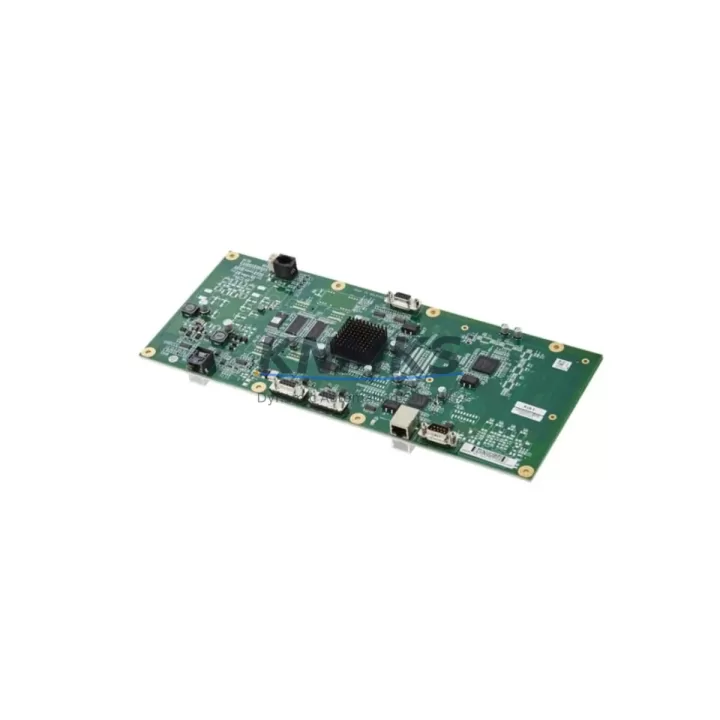
ABB JZRCR-YPP01-1 DSQC602 Maintenance-Proven Spare Part for Factory Uptime
The ABB JZRCR-YPP01-1 (also referenced as DSQC602) is a critical communication card designed for the ABB DX100 robot controller platform. In high-throughput manufacturing environments — automotive body shops, arc welding cells, material handling lines, and precision assembly stations — this card serves as the backbone of real-time data exchange between the robot controller and the plant-level network. When this component fails or degrades, the entire robot cell goes offline, triggering unplanned downtime that can cost thousands of dollars per hour. Stocking a verified replacement is not optional for serious maintenance teams; it is a fundamental pillar of a robust spare parts strategy.
At KNMKS, every JZRCR-YPP01-1 / DSQC602 unit is sourced from verified supply channels, subjected to pre-shipment functional testing, and shipped with a support terms confirmed by quotation. Whether you are responding to an emergency breakdown, executing a planned annual overhaul, or building a strategic spare parts buffer for a multi-robot line, this unit is ready to deploy.
Spare Maintenance Table
| Part Number | JZRCR-YPP01-1 |
| Cross Reference | DSQC602 |
| Brand | ABB |
| Series / Platform | DX100 Robot Controller |
| Product Type | Robot Controller Communication Card |
| Function | Network communication interface for DX100 controller; supports real-time I/O and fieldbus data exchange |
| Compatible Controllers | ABB DX100 series robot controllers |
| Compatible Robots | ABB IRB series robots paired with DX100 controller (IRB 1600, IRB 2400, IRB 4600 and related variants) |
| Installation Type | Internal controller card — slot-mounted inside DX100 cabinet |
| Operating Environment | Industrial control cabinet; standard DX100 environmental ratings apply |
| Origin | CN (sourced and tested) |
| Weight | 420 g |
| Pre-Shipment Testing | Yes — functional verification before dispatch |
| Support terms | 12 Months |
| Lead Time | availability confirmed by RFQ — same or next business day dispatch available |
| Maintenance Recommendation | Inspect communication card during annual overhaul; replace proactively if communication errors or E-stop faults are logged |
Maintenance Planning for Continuous Operation
A communication card failure in the DX100 controller rarely occurs in isolation. Experienced maintenance engineers know that when the JZRCR-YPP01-1 / DSQC602 is flagged for replacement, a thorough inspection of the surrounding electrical ecosystem is essential to prevent repeat failures and ensure a clean return to production.
Begin with the DX100 power supply unit (DSQC661 or equivalent) — an unstable or aging PSU is one of the most common root causes of premature communication card failure. Voltage ripple and transient spikes degrade card components over time. Verify output voltages are within specification before installing the replacement card.
Next, inspect the I/O unit (DSQC652 or DSQC651) mounted within the same controller cabinet. If the communication card was experiencing intermittent faults, the I/O unit may have logged latent errors or sustained damage from the same electrical event. Confirm all digital and analog I/O channels are responding correctly after the card swap.
The axis computer board (DSQC668) should also be checked for firmware version compatibility. After replacing the JZRCR-YPP01-1, confirm that the axis computer and communication card firmware revisions are aligned to avoid handshake errors during robot initialization.
Do not overlook the teach pendant cable and FlexPendant connector. A damaged pendant cable can generate communication errors that are misdiagnosed as card failures. Inspect the cable routing, connector pins, and strain relief points as part of the replacement workflow.
For sites running DeviceNet or PROFIBUS fieldbus networks, verify the network termination resistors and bus cable integrity after the card replacement. A poorly terminated fieldbus segment will cause the new card to report communication faults immediately, leading to unnecessary repeat troubleshooting cycles.
Finally, review the controller backplane connectors and card slot contacts. Oxidized or mechanically worn slot contacts are a common cause of intermittent card seating issues. Clean contacts with appropriate contact cleaner and confirm the card is fully seated and secured before powering up the controller.
Building a spare parts kit that includes the JZRCR-YPP01-1 / DSQC602 alongside the DSQC661 power supply, DSQC652 I/O unit, and a spare FlexPendant cable gives your maintenance team the coverage needed to resolve the most common DX100 controller failures within a single shift — without waiting for emergency procurement.
Site Replacement Workflow
Step 1 — Fault Isolation: Log the active alarms from the DX100 teach pendant. Communication-related fault codes (typically in the 3xxxx or 5xxxx range on ABB systems) pointing to the communication card confirm the JZRCR-YPP01-1 as the replacement target. Document the robot program, tool data, and I/O configuration before proceeding.
Step 2 — Safe Shutdown: Place the robot in manual mode, execute a controlled E-stop, and isolate the DX100 controller from mains power following your site LOTO (Lockout/Tagout) procedure. Allow the controller capacitors to discharge fully before opening the cabinet.
Step 3 — Card Removal: Locate the JZRCR-YPP01-1 / DSQC602 in its designated slot within the DX100 cabinet. Photograph the cable connections and labeling before disconnecting. Remove the card carefully, avoiding static discharge — use an ESD wrist strap.
Step 4 — Replacement Installation: Insert the new JZRCR-YPP01-1 unit into the slot, reconnect all cables in the documented order, and confirm the card is fully seated. The KNMKS-supplied unit is pre-tested and ready for installation without additional bench configuration.
Step 5 — Power-Up and Verification: Restore power to the DX100 controller and observe the startup sequence. Confirm no communication fault codes are active. Verify fieldbus network status, I/O channel mapping, and robot program integrity before returning the cell to automatic mode.
Step 6 — Documentation: Record the replacement in your maintenance log, including the old card serial number, replacement date, and post-installation test results. Update your spare parts inventory to trigger reorder of a replacement buffer unit.
This workflow is compatible with both direct replacement of a failed JZRCR-YPP01-1 and proactive swap-out during scheduled annual maintenance windows, minimizing production impact in either scenario.
Spare Parts Support FAQ
Q1: Is the JZRCR-YPP01-1 directly interchangeable with the DSQC602?
Yes. JZRCR-YPP01-1 and DSQC602 are cross-referenced part numbers for the same communication card used in the ABB DX100 robot controller platform. Both designations refer to the identical hardware. When ordering, either part number can be used to confirm compatibility with your controller configuration.
Q2: What does the support terms confirmed by quotation cover, and how is it supported?
The support terms confirmed by quotation cover manufacturing defects and functional failures under normal operating conditions. Every unit shipped by KNMKS undergoes pre-shipment functional testing. If a unit fails within the confirmed support period under normal use, KNMKS will provide a replacement or repair. Contact admin@knmks.com with your order reference and fault description to initiate a support terms claim.
Q3: How do I confirm compatibility before ordering if my DX100 controller has been modified or upgraded?
Provide your DX100 controller serial number and current firmware version to our technical team at admin@knmks.com. We will cross-reference against known hardware revisions and confirm whether the standard JZRCR-YPP01-1 / DSQC602 is the correct fit, or whether a specific hardware revision is required for your configuration.
Q4: Can KNMKS support long-term supply for multi-site or multi-robot fleet maintenance programs?
Yes. KNMKS maintains stock of DX100 platform components to support ongoing maintenance programs. For customers managing fleets of ABB robots across multiple facilities, we offer reserved stock arrangements and priority dispatch agreements. Contact us to discuss annual volume requirements and lead time commitments tailored to your maintenance schedule.
© 2026 KNMKS. All rights reserved.
Original Source: https://knmks.com
Contact: admin@knmks.com | +86 18359268345
Product Identification
- Brand / Ecosystem
-
ABB
ABB - Model / Series
-
DX100-JZRCR-YPP01-1-DSQC602-2600
IRC5 Series - Product Family
- PLCs & Controllers
- Availability Status
- Available on request after model and quantity confirmation
- Inquiry Type
- B2B RFQ, replacement inquiry and project spare-part request
- Pre-Quote Check
- Exact SKU, brand, series, quantity, nameplate photos and destination country are checked before quotation
System Path
Where this product fits in the KNMKS automation structure.
Specification & Inquiry Focus
- Control platform
- PLC, PAC and modular controllers
- Common needs
- CPU, rack, power and I/O expansion
- Project support
- Replacement, cabinet build and maintenance
Buyer Confirmation
Information KNMKS checks before replying.
- Exact model
- DX100-JZRCR-YPP01-1-DSQC602-2600
- Brand / ecosystem
- ABB
- Product family
- PLCs & Controllers
- Application note
- Replacement, maintenance, project build or spare-part list
- Useful photos
- Nameplate, installed unit, cabinet layout or connector side
- Delivery details
- Quantity, destination country and target schedule
Document Support
Files and notes can be confirmed during quotation.
- Product photos or nameplate confirmation when available
- Packing and delivery notes before quotation confirmation
- Support scope and delivery terms confirmed per inquiry
- Export document coordination for qualified B2B requests
Inquiry Support
- Model cross-checking before quotation
- CPU, power, rack and expansion module matching
- Support for replacement and project inquiry
What to Send Us
- Brand and exact model number: ABB DX100-JZRCR-YPP01-1-DSQC602-2600
- Quantity and required delivery time
- Application, replacement requirement or nameplate photo
- Destination country and shipping preference
RFQ Preparation
This is a product inquiry page built for RFQ communication.
Fast Model Check
Send this model to KNMKS for confirmation.
Include quantity, destination country and photos if this is a maintenance replacement. The inquiry will be saved with a reference number after submission.
Brand & Compatibility Note
KNMKS displays automation product information for well-known industrial brand ecosystems and compatible replacement references. Brand names are used for product identification and compatibility reference only; final availability and commercial terms are confirmed per quotation.
 Manufacturing
 Machine Tools
 Packaging
 Energy & Power



 HMI & Displays
 Servo Systems
 Variable Frequency Drives
 Sensors