
Overview
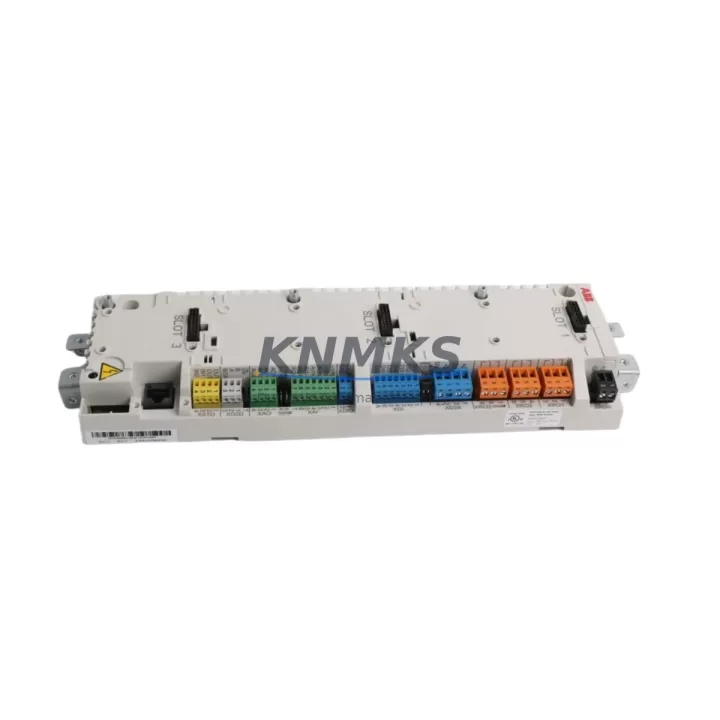
ABB JCU-11 3AUA0000047068 Maintenance-Proven Spare Part for Factory Uptime
The ABB JCU-11 (part number 3AUA0000047068) is the dedicated control unit for the ACS800 series variable frequency drive platform — one of ABB’s most widely deployed industrial drive families across pulp and paper, metals, mining, water treatment, and general manufacturing. As a maintenance-proven spare part, the JCU-11 serves as the intelligence layer of the ACS800 drive, managing motor control algorithms, I/O interfacing, fieldbus communication, and fault diagnostics. When this unit fails or degrades, the entire drive becomes inoperable, making rapid access to a verified replacement unit critical for production continuity.
For maintenance engineers managing aging ACS800 installations, the JCU-11 is a high-priority line item in any spare parts inventory plan. Its role in coordinating encoder feedback, digital I/O, analog signal conditioning, and communication adapter slots means that a single failed JCU-11 can cascade into full drive shutdown, motor trip, and unplanned line stoppage. Stocking at least one verified JCU-11 per critical drive or drive group is a widely adopted best practice in facilities with zero-tolerance downtime requirements.
Spare Maintenance Table
| Part Number | 3AUA0000047068 |
| Model | JCU-11 |
| Brand | ABB |
| Series | ACS800 |
| Product Type | Drive Control Unit (DCU) |
| Compatible Drives | ACS800-01, ACS800-02, ACS800-04, ACS800-07, ACS800-11, ACS800-17, ACS800-31, ACS800-37 and related ACS800 multi-drive configurations |
| Supply Voltage | 24 VDC (internal supply from drive power unit) |
| Digital Inputs | 6 DI (programmable) |
| Digital Outputs | 3 DO (relay outputs) |
| Analog Inputs | 2 AI (0–10 V / 0–20 mA, selectable) |
| Analog Outputs | 2 AO (0–20 mA) |
| Communication Slots | 2 option slots (fieldbus adapter: PROFIBUS, Modbus, DeviceNet, CANopen, etc.) |
| Encoder Interface | Pulse encoder input via RTAC-01 or MTAC-01 adapter |
| Operating Temperature | -10°C to +55°C (storage: -40°C to +70°C) |
| Origin | Finland |
| Condition | Original, tested before dispatch |
| Support terms | 12 Months |
| Lead Time | In-stock units ship within 3–5 business days; confirm availability at inquiry |
Maintenance Planning for Continuous Operation
A JCU-11 replacement should never be treated as an isolated swap. The control unit sits at the center of a tightly integrated electrical system, and a thorough site inspection before and after replacement is essential to prevent repeat failures and ensure stable recommissioning.
Begin with the 24 VDC auxiliary power supply feeding the control board. A degraded or undersized APBU-44C or APBU-12C power distribution unit can cause intermittent JCU-11 resets and false fault codes — verify output voltage stability under load before installing the new unit. Next, inspect all I/O wiring terminals on the JCU-11 connector block: corroded, loose, or mis-terminated signal wires are a leading cause of premature control board failure, particularly in humid or vibration-prone environments.
If the drive uses a fieldbus communication adapter — such as the RPBA-01 (PROFIBUS-DP), RMBA-01 (Modbus RTU), or RDNA-01 (DeviceNet) — confirm that the adapter firmware is compatible with the replacement JCU-11 firmware version. Mismatched firmware between the control unit and communication adapter can result in bus timeout faults immediately after startup. Similarly, if the installation uses an RTAC-01 pulse encoder interface module for closed-loop speed control, verify encoder cable shielding integrity and connector seating before re-enabling the drive.
Check the RMIO-11 or RMIO-12 motor control board (where applicable in larger ACS800 configurations) for signs of thermal stress or capacitor aging — these boards work in tandem with the JCU-11 and a failing RMIO board can be misdiagnosed as a JCU-11 fault. Inspect control cabinet fusing, particularly the 2A or 4A control circuit fuses protecting the 24 VDC rail, and replace any fuse showing signs of heat discoloration. Finally, review the DDCS fiber optic links if the drive is part of an ACS800 multi-drive or master-follower configuration — a cracked or dirty fiber connector can generate communication faults that mimic JCU-11 hardware failure.
Site Replacement Workflow
Step 1 — Fault Isolation: Before ordering a replacement JCU-11, retrieve the full fault history from the ACS800 panel (or via DriveWindow / DriveStudio software). Confirm that fault codes point to the control unit (e.g., FF52, FF61, or persistent ID fault) rather than to a peripheral module or wiring issue. This prevents unnecessary part replacement and reduces procurement cost.
Step 2 — Parameter Backup: If the existing JCU-11 is still partially functional, perform a full parameter backup using DriveStudio or the ACS800 control panel upload function. Store the backup file with the drive’s asset tag and date. This backup is essential for restoring motor tuning, PID settings, and I/O configurations after the swap.
Step 3 — Safe Isolation: De-energize the drive following your site LOTO (Lockout/Tagout) procedure. Wait a minimum of 5 minutes after main power disconnection before opening the drive cabinet — the DC bus capacitors in ACS800 units retain dangerous charge levels. Verify DC bus voltage with a calibrated meter before touching internal components.
Step 4 — Physical Replacement: Remove the JCU-11 by disconnecting all I/O connectors, the DDCS fiber links (if present), and the communication adapter modules. Note the slot positions of all adapters before removal. Install the replacement JCU-11, re-seat all connectors firmly, and reinstall adapters in their original slots.
Step 5 — Parameter Restore and Commissioning: Power up the drive and restore parameters from backup. Verify motor nameplate data, control mode (DTC or scalar), and I/O assignments. Run a no-load motor identification (ID run) if the drive firmware requires it after a control board replacement. Confirm fieldbus communication is re-established and all digital I/O signals are responding correctly before returning the drive to production.
This structured workflow minimizes recommissioning time, reduces the risk of repeat faults, and ensures the replacement JCU-11 operates within its rated parameters from the first power-up.
Spare Parts Support FAQ
Q1: Is this JCU-11 (3AUA0000047068) compatible with all ACS800 drive variants?
The JCU-11 is the standard control unit for the ACS800 single-drive product family, including the ACS800-01, -02, -04, -07, -11, -17, -31, and -37 frame sizes. Compatibility with specific hardware revisions and firmware versions should be confirmed against your drive’s type designation plate and existing firmware version. Contact us with your drive’s full type code for pre-shipment compatibility verification.
Q2: How is the unit tested before dispatch?
Each JCU-11 unit undergoes functional verification prior to shipment, including power-on self-test, I/O continuity check, and visual inspection for component damage, corrosion, or mechanical stress. Units that do not pass inspection are not dispatched. A support terms confirmed by quotation cover manufacturing defects and functional failures under normal operating conditions.
Q3: What is your lead time and long-term supply capability for the JCU-11?
In-stock units are dispatched within 3–5 business days of order confirmation. For facilities requiring blanket stock agreements or multi-unit procurement to cover multiple ACS800 drives, we support scheduled release orders and reserved inventory arrangements. Contact our team to discuss volume pricing and long-term supply terms.
Q4: Can I use a JCU-11 from a different ACS800 unit as a direct replacement?
Yes, provided the firmware version is compatible with your drive’s hardware revision and the parameter set is restored from backup. Swapping a JCU-11 between drives of the same type code is a standard maintenance practice. However, if the donor unit carries a different firmware version, a firmware upgrade or downgrade may be required — consult the ACS800 firmware release notes or contact our technical support team before proceeding.
© 2026 KNMKS. All rights reserved.
Original Source: https://knmks.com
Contact: admin@knmks.com | +86 18359268345
Product Identification
- Brand / Ecosystem
-
ABB
ABB - Model / Series
-
JCU-11 3AUA0000047068
S800 Series - Product Family
- Variable Frequency Drives
- Availability Status
- Available on request after model and quantity confirmation
- Inquiry Type
- B2B RFQ, replacement inquiry and project spare-part request
- Pre-Quote Check
- Exact SKU, brand, series, quantity, nameplate photos and destination country are checked before quotation
System Path
Where this product fits in the KNMKS automation structure.
Specification & Inquiry Focus
- Drive range
- AC drives, VFDs and accessories
- Common needs
- Voltage, kW/HP and load type
- Project support
- Motor control, energy saving and spares
Buyer Confirmation
Information KNMKS checks before replying.
- Exact model
- JCU-11 3AUA0000047068
- Brand / ecosystem
- ABB
- Product family
- Variable Frequency Drives
- Application note
- Replacement, maintenance, project build or spare-part list
- Useful photos
- Nameplate, installed unit, cabinet layout or connector side
- Delivery details
- Quantity, destination country and target schedule
Document Support
Files and notes can be confirmed during quotation.
- Product photos or nameplate confirmation when available
- Packing and delivery notes before quotation confirmation
- Support scope and delivery terms confirmed per inquiry
- Export document coordination for qualified B2B requests
Inquiry Support
- Input/output voltage and kW/HP confirmation
- Energy-saving motor control inquiry
- Accessory and spare-unit support
What to Send Us
- Brand and exact model number: ABB JCU-11 3AUA0000047068
- Quantity and required delivery time
- Application, replacement requirement or nameplate photo
- Destination country and shipping preference
RFQ Preparation
This is a product inquiry page built for RFQ communication.
Fast Model Check
Send this model to KNMKS for confirmation.
Include quantity, destination country and photos if this is a maintenance replacement. The inquiry will be saved with a reference number after submission.
Brand & Compatibility Note
KNMKS displays automation product information for well-known industrial brand ecosystems and compatible replacement references. Brand names are used for product identification and compatibility reference only; final availability and commercial terms are confirmed per quotation.
 Manufacturing
 Machine Tools
 Packaging
 Energy & Power
 PLCs & Controllers
 HMI & Displays
 Servo Systems
 Sensors