

Overview
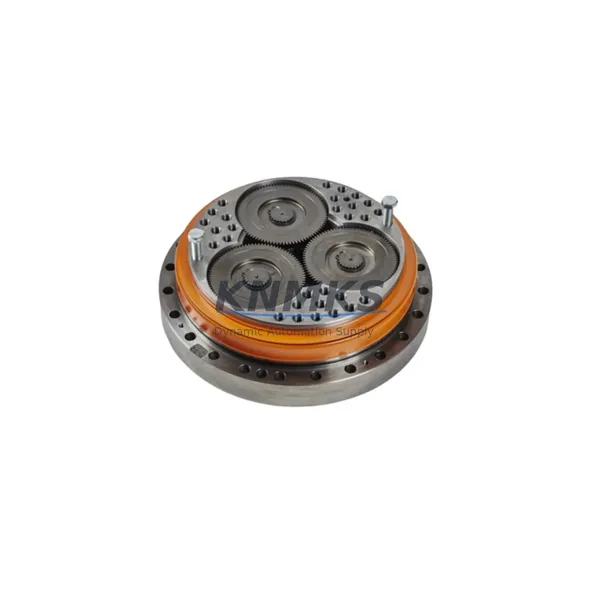
ABB IRC5-WRIST-IRB7600/IRB6700/IRB4600 Migration-Ready Wrist Unit for Legacy Robot Systems
The ABB IRC5-WRIST-IRB7600/IRB6700/IRB4600 is a migration-ready wrist unit engineered for direct replacement and retrofit deployment across ABB’s IRB7600, IRB6700, and IRB4600 robot families operating under the IRC5 controller platform. As legacy robotic systems approach end-of-service milestones and OEM spare part availability declines, this wrist unit provides a verified, in-stock solution for maintenance engineers and system integrators managing aging production lines in automotive, heavy manufacturing, foundry, and material handling environments.
This unit is pre-tested prior to shipment and carries a support terms confirmed by quotation, making it a reliable choice for facilities that cannot afford unplanned downtime or extended lead times on critical robot components. Whether you are executing a planned overhaul, responding to an unscheduled failure, or building a strategic spare parts inventory for a multi-robot cell, the IRC5-WRIST-IRB7600/IRB6700/IRB4600 is available for immediate dispatch.
Migration Compatibility Table
| Parameter | Details |
|---|---|
| Compatible Robot Models | IRB7600, IRB6700, IRB4600 |
| Controller Platform | ABB IRC5 (single cabinet & dual cabinet configurations) |
| Mounting Interface | Standard ABB wrist flange — direct bolt-on replacement, no adapter required |
| Axis Coverage | Axes 4, 5, 6 (wrist axes) |
| Communication Compatibility | Compatible with IRC5 SMB (Serial Measurement Board) and resolver feedback chain |
| Harness & Connector | Verify dress pack routing and signal cable connector pinout against existing installation drawing |
| Firmware Requirement | No firmware update required for wrist unit; confirm RobotWare version compatibility on IRC5 controller |
| Installation Space | Identical envelope to OEM unit — no structural modification required |
| Replacement Recommendation | Recommended for units showing backlash, resolver drift, gear wear, or seal failure |
| Commissioning Notes | Fine calibration required post-installation; use ABB calibration pendulum or CalPen tool with FlexPendant |
| Pre-Shipment Testing | Yes — functional and dimensional verification completed before dispatch |
| Support terms | support terms confirmed by quotation |
Retrofit Planning for Existing Automation Systems
Replacing a wrist unit on an IRB7600, IRB6700, or IRB4600 is rarely an isolated task. A successful retrofit requires a structured review of the surrounding system to ensure the robot returns to full operational accuracy without introducing new failure points.
Before beginning the replacement, engineers should audit the condition of the ABB IRC5 controller’s SMB (Serial Measurement Board), which manages resolver signals from all six axes. A degraded SMB can produce calibration errors that are incorrectly attributed to the wrist unit itself. If the SMB has not been replaced within the last major service interval, it is advisable to address it concurrently to avoid a repeat intervention.
The IRC5 drive module powering axes 4–6 should also be inspected. Wrist gear failures caused by sustained overload can leave thermal stress signatures on the corresponding drive module. Confirming drive module health before commissioning the new wrist unit prevents premature failure of the replacement component.
Dress pack integrity is a critical but frequently overlooked element of wrist retrofits. The ABB dress pack assembly — including the signal cable harness, power cable, and protective conduit routed through the upper arm — must be inspected for chafing, connector wear, and correct routing clearance. A damaged dress pack can cause intermittent resolver faults or axis errors that complicate post-installation calibration.
For cells where the IRB7600 or IRB6700 is integrated with an ABB FlexPendant (IRC5 teach pendant), engineers should verify that the calibration offsets stored in the controller are backed up before the wrist is removed. The existing calibration data will be invalidated by the physical replacement, and a clean backup ensures the original program reference frames can be restored accurately after fine calibration is completed.
In multi-robot cells where the IRC5 controller communicates over PROFIBUS-DP or DeviceNet to a supervisory PLC, confirm that the robot’s node address and I/O mapping remain unchanged after the maintenance window. Wrist replacement does not affect network configuration, but a controller restart during commissioning may trigger a brief communication interruption that the PLC program must handle gracefully.
Finally, if the production line uses an ABB IRC5 Panel Board Computer (PBC) for process data logging or remote diagnostics, verify that the maintenance event is logged and that any condition-based monitoring thresholds are reset to reflect the new wrist unit’s baseline performance. This is particularly important for facilities operating under ISO 9001 or IATF 16949 quality frameworks where traceability of component replacements is mandatory.
Downtime Control During System Migration
Minimizing production downtime during a wrist unit replacement on a high-payload robot requires preparation that begins well before the maintenance window opens. The following approach is recommended for facilities where robot availability is directly tied to line throughput.
Pre-stage the replacement unit. Having the IRC5-WRIST-IRB7600/IRB6700/IRB4600 on-site and inspected before the scheduled maintenance window eliminates the risk of a delayed delivery extending the outage. Confirm the unit’s physical condition, verify the mounting flange dimensions, and ensure all required tooling — torque wrenches, calibration equipment, and connector extraction tools — is available at the work site.
Back up the robot program and system parameters. Use the IRC5 FlexPendant or RobotStudio to create a full system backup, including RAPID programs, I/O configuration, tool data, work object definitions, and calibration offsets. Store the backup on an external USB drive and verify it is readable before proceeding with disassembly. This backup is the single most important safeguard against extended downtime caused by data loss during the replacement.
Isolate and lock out the system safely. Follow the facility’s lockout/tagout (LOTO) procedure for the IRC5 controller and any associated pneumatic or process utilities connected to the robot’s end-of-arm tooling. Confirm that the robot is in a mechanically safe position — ideally with the arm supported — before removing the wrist unit.
Execute calibration immediately after installation. Do not defer calibration to a later shift. Fine calibration of axes 4, 5, and 6 using the ABB calibration method appropriate for the robot model (revolution counter update followed by fine calibration) must be completed before the robot is returned to automatic mode. Running production with uncalibrated wrist axes risks path deviation, tool collision, and product quality failures.
Validate with a dry-run cycle. Before resuming full production speed, run the robot through its complete program cycle at reduced speed (typically 25–50%) to verify path accuracy, confirm there are no resolver alarms, and check that the dress pack moves freely without snagging. Only after a clean dry-run cycle should the robot be returned to full automatic production.
Retrofit Support FAQ
Q: Is the IRC5-WRIST-IRB7600/IRB6700/IRB4600 a direct drop-in replacement for all three robot models?
A: Yes. The wrist unit shares a common mounting interface across the IRB7600, IRB6700, and IRB4600 platforms under the IRC5 controller. No mechanical adapters are required. Post-installation fine calibration is mandatory on all three models to restore path accuracy.
Q: What commissioning steps are required after installation?
A: After mechanical installation and dress pack reconnection, perform a revolution counter update for axes 4, 5, and 6 using the IRC5 FlexPendant, followed by fine calibration using the ABB calibration method applicable to your robot model. Verify resolver feedback on all three wrist axes before returning the robot to automatic mode.
Q: Has this unit been tested before shipment?
A: Yes. Every unit undergoes functional and dimensional pre-shipment testing before dispatch. The support terms confirmed by quotation cover manufacturing defects and verified functional failures under normal operating conditions.
Q: What is the lead time and stock availability?
A: This unit is held availability confirmed by RFQ and available for immediate dispatch. Contact our sales team to confirm current inventory status and arrange expedited shipping if required for an urgent maintenance situation.
© 2026 KNMKS. All rights reserved.
Original Source: https://knmks.com
Contact: admin@knmks.com | +86 18359268345
Product Identification
- Brand / Ecosystem
-
ABB
ABB - Model / Series
-
ABB-IRC5-WRIST-IRB7600-IRB6700-IRB4600
IRC5 Series - Product Family
- Other Components
- Availability Status
- Available on request after model and quantity confirmation
- Inquiry Type
- B2B RFQ, replacement inquiry and project spare-part request
- Pre-Quote Check
- Exact SKU, brand, series, quantity, nameplate photos and destination country are checked before quotation
System Path
Where this product fits in the KNMKS automation structure.
Specification & Inquiry Focus
- Component range
- Breakers, terminals and cabinet accessories
- Common needs
- Model, photo and installation requirement
- Project support
- Maintenance and mixed spare-part inquiry
Buyer Confirmation
Information KNMKS checks before replying.
- Exact model
- ABB-IRC5-WRIST-IRB7600-IRB6700-IRB4600
- Brand / ecosystem
- ABB
- Product family
- Other Components
- Application note
- Replacement, maintenance, project build or spare-part list
- Useful photos
- Nameplate, installed unit, cabinet layout or connector side
- Delivery details
- Quantity, destination country and target schedule
Document Support
Files and notes can be confirmed during quotation.
- Product photos or nameplate confirmation when available
- Packing and delivery notes before quotation confirmation
- Support scope and delivery terms confirmed per inquiry
- Export document coordination for qualified B2B requests
Inquiry Support
- Mixed automation spare parts inquiry
- Cabinet component and accessory support
- Model identification from photos or labels
What to Send Us
- Brand and exact model number: ABB ABB-IRC5-WRIST-IRB7600-IRB6700-IRB4600
- Quantity and required delivery time
- Application, replacement requirement or nameplate photo
- Destination country and shipping preference
RFQ Preparation
This is a product inquiry page built for RFQ communication.
Fast Model Check
Send this model to KNMKS for confirmation.
Include quantity, destination country and photos if this is a maintenance replacement. The inquiry will be saved with a reference number after submission.
Brand & Compatibility Note
KNMKS displays automation product information for well-known industrial brand ecosystems and compatible replacement references. Brand names are used for product identification and compatibility reference only; final availability and commercial terms are confirmed per quotation.
 Manufacturing
 Machine Tools
 Packaging
 Energy & Power

 PLCs & Controllers
 HMI & Displays
 Servo Systems
 Variable Frequency Drives