
Overview
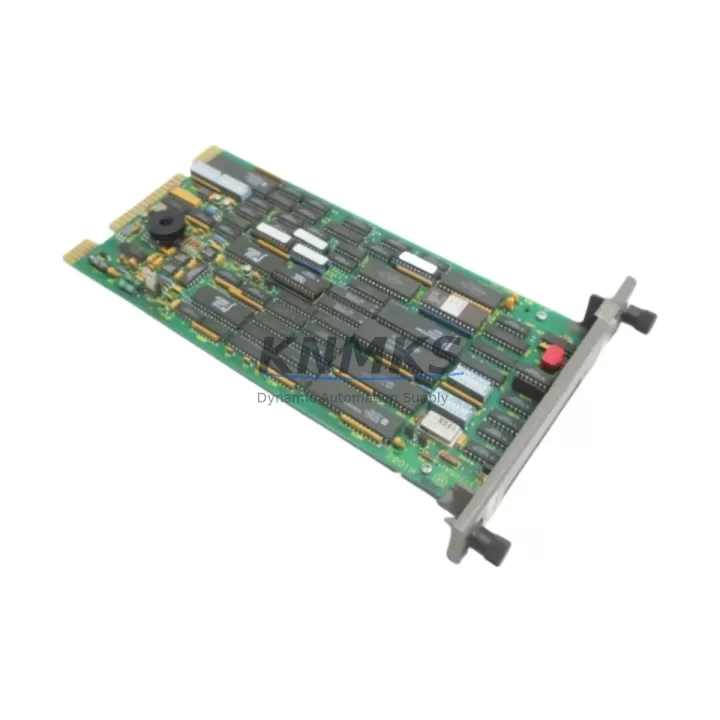
ABB IMRIO22 Maintenance-Proven Spare Part for Factory Uptime
The ABB IMRIO22 is a digital output module designed for the ABB AC500 PLC series, one of the most widely deployed programmable logic controller platforms in process automation, machine control, and critical infrastructure applications. As production lines age and OEM support windows narrow, maintaining a verified stock of the IMRIO22 becomes a cornerstone of any proactive maintenance strategy. Whether you are managing a scheduled annual overhaul, responding to an unplanned fault, or building a resilient spare parts inventory for a multi-line facility, the IMRIO22 represents a high-priority line item that directly governs digital output signal integrity across your control architecture.
Sourced as an original ABB component and manufactured in Germany, each IMRIO22 unit supplied by KNMKS undergoes pre-shipment functional verification to confirm output channel continuity, terminal block integrity, and module identification compatibility with the AC500 CPU and communication bus. This testing discipline ensures that the module you receive is field-ready — not simply warehouse-stored — reducing the risk of a secondary fault event during a time-critical restoration window.
Spare Maintenance Table
| Parameter | Specification / Value |
|---|---|
| SKU / Part Number | IMRIO22 |
| Brand | ABB |
| Series | AC500 |
| Module Type | Digital Output Module |
| Output Channels | 16 digital outputs (relay or transistor, per variant) |
| Output Voltage Range | 24 V DC / 120–230 V AC (load-side, channel-dependent) |
| Rated Output Current | Up to 0.5 A per channel (transistor); up to 2 A per channel (relay) |
| Backplane Interface | AC500 I/O bus — direct slot mounting on TB5xx terminal base |
| Compatible Terminal Base | TB5xx series (e.g., TB511, TB521, TB541) |
| Compatible CPUs | PM571, PM581, PM591, PM595 and AC500 eCo variants |
| Operating Temperature | -25 °C to +60 °C |
| Protection Class | IP20 (panel-mounted) |
| Country of Origin | Germany |
| Certification | CE, UL (series-level) |
| Installation | DIN rail via TB5xx terminal base; no tools required for module swap |
| Maintenance Recommendation | Inspect output channel LEDs, terminal torque, and bus connector pins at each scheduled PM interval |
| Support terms | 12 months from date of shipment — KNMKS |
| Pre-Shipment Test | Functional output channel verification, bus connector inspection, firmware ID check |
Maintenance Planning for Continuous Operation
A digital output module failure in an AC500-based control cabinet rarely occurs in isolation. When the IMRIO22 is flagged during a fault diagnostic or routine point-check, maintenance engineers should treat the event as a trigger for a broader cabinet inspection. The output module interfaces directly with field devices — actuators, solenoid valves, motor starters, and indicator lamps — through the TB5xx terminal base, and any degradation in the module’s output channels can cascade into ambiguous field-device behavior that is difficult to isolate without a systematic approach.
Begin by verifying the AC500 CPU module (such as the PM581 or PM591) is logging clean diagnostics with no persistent I/O bus errors. A faulty IMRIO22 can generate spurious bus fault codes that persist even after module replacement if the terminal base connector pins are oxidized or the bus termination resistor on the backplane is compromised. Inspect the TB5xx terminal base for pin corrosion, mechanical damage, and correct torque on all field wiring terminals — loose terminals are a leading cause of intermittent output faults that are misattributed to the module itself.
On the power supply side, confirm that the 24 V DC panel power supply (typically a SITOP, Phoenix Contact QUINT, or equivalent industrial DIN-rail PSU) is delivering stable voltage within ±1% tolerance under full load. Output modules are sensitive to supply ripple, and an aging capacitor bank in the PSU can introduce voltage sag that causes output channel dropout without triggering a hard fault code. If the IMRIO22 replacement is part of a broader cabinet refresh, this is the appropriate moment to evaluate the PSU’s service life.
For cabinets that include analog I/O alongside digital outputs, check the IMXAI22 or IMXDI22 analog and digital input modules in adjacent slots. Cross-slot interference is uncommon in well-maintained AC500 racks, but physical inspection of the bus connectors across all modules is a best practice during any corrective maintenance event. Similarly, if the control system includes communication modules such as the CM572-DP PROFIBUS master or an Ethernet CM589, verify that the network topology remains intact and that no bus address conflicts have been introduced during the fault period.
Relay output applications should also prompt an inspection of the downstream intermediate relay bank — particularly if the IMRIO22 is driving inductive loads directly. Relay coil surge can degrade output transistors over time, and a suppression diode or RC snubber circuit check is warranted. Finally, review the fuse protection on each output group: blown fuses are frequently the root cause of apparent module failures, and replacing the IMRIO22 without restoring fuse integrity will result in an immediate repeat fault.
Site Replacement Workflow
The IMRIO22 is designed for tool-free module swap on the AC500 platform, which significantly reduces mean time to repair (MTTR) compared to legacy wired I/O architectures. The following workflow is recommended for site replacement to minimize downtime and ensure system compatibility:
Step 1 — Isolate and document: Place the affected CPU in STOP mode via the local keyswitch or programming tool (Automation Builder or PS501 Control Builder Plus). Record the current I/O mapping and output channel assignments from the project configuration before removing the module. Photograph the terminal wiring if field modifications have been made since the original installation.
Step 2 — Module removal: Disengage the IMRIO22 from the TB5xx terminal base by releasing the module locking tab. The terminal base remains wired in place — field wiring does not need to be disturbed. This is a key advantage of the AC500 modular architecture and the primary reason why maintaining a spare IMRIO22 in the local cabinet stock delivers a measurable reduction in restoration time versus sourcing a replacement reactively.
Step 3 — Compatibility verification: Confirm the replacement IMRIO22 firmware version is compatible with the installed CPU firmware. In most AC500 installations, the module is auto-recognized by the CPU on power-up, but projects using older Automation Builder versions may require a manual hardware configuration update. KNMKS can provide firmware version documentation on request for compatibility-critical applications.
Step 4 — Reinsertion and test: Seat the replacement module onto the TB5xx terminal base until the locking tab engages. Restore power and transition the CPU to RUN mode. Verify all 16 output channels via the diagnostic LED array and confirm field device response through the SCADA or HMI display. Log the replacement event in the maintenance management system with the module serial number and date.
Step 5 — Spare stock replenishment: Immediately initiate a procurement order to restore the spare IMRIO22 to your cabinet stock. A single-unit buffer is the minimum recommended holding for high-criticality lines; facilities with multiple AC500 racks should consider a two-unit buffer to cover simultaneous fault scenarios during peak production periods.
Spare Parts Support FAQ
Q1: Is the IMRIO22 supplied by KNMKS an original ABB component, and how is it tested before shipment?
Yes. Every IMRIO22 unit is sourced as an original ABB component manufactured in Germany. Prior to shipment, KNMKS performs a functional verification covering output channel continuity, bus connector integrity, and module identification. A support terms confirmed by quotation is provided from the date of shipment, covering manufacturing defects and functional failures under normal operating conditions.
Q2: Which AC500 CPU and terminal base models are compatible with the IMRIO22?
The IMRIO22 is compatible with the full AC500 I/O bus architecture and mounts on TB5xx series terminal bases (TB511, TB521, TB541, and equivalents). It operates with AC500 CPUs including the PM571, PM581, PM591, and PM595, as well as AC500 eCo variants. If your installation uses a non-standard configuration or an older CPU firmware revision, KNMKS can provide compatibility documentation prior to order confirmation.
Q3: What is the recommended spare parts inventory strategy for the IMRIO22 in a multi-rack AC500 installation?
For facilities operating two or more AC500 racks, a minimum of two IMRIO22 units in local cabinet stock is recommended. This buffer covers simultaneous fault scenarios and eliminates lead-time exposure during peak production or seasonal maintenance freezes. KNMKS supports blanket order arrangements and long-term supply agreements for customers requiring guaranteed stock availability over a 12- to 36-month horizon.
Q4: Can the IMRIO22 replace older or discontinued ABB AC500 digital output modules?
In most cases, yes. The IMRIO22 is backward-compatible with earlier AC500 I/O bus generations when used with the appropriate TB5xx terminal base. For legacy installations using discontinued module variants, KNMKS recommends providing the existing module part number and CPU firmware version for a compatibility assessment before ordering. This step eliminates the risk of a configuration mismatch and ensures the replacement module is recognized correctly by the Automation Builder project.
© 2026 KNMKS. All rights reserved.
Original Source: https://knmks.com
Contact: admin@knmks.com | +86 18359268345
Product Identification
- Brand / Ecosystem
-
ABB
ABB - Model / Series
-
IMRIO22
AC500 Series - Product Family
- PLCs & Controllers
- Availability Status
- Available on request after model and quantity confirmation
- Inquiry Type
- B2B RFQ, replacement inquiry and project spare-part request
- Pre-Quote Check
- Exact SKU, brand, series, quantity, nameplate photos and destination country are checked before quotation
System Path
Where this product fits in the KNMKS automation structure.
Specification & Inquiry Focus
- Control platform
- PLC, PAC and modular controllers
- Common needs
- CPU, rack, power and I/O expansion
- Project support
- Replacement, cabinet build and maintenance
Buyer Confirmation
Information KNMKS checks before replying.
- Exact model
- IMRIO22
- Brand / ecosystem
- ABB
- Product family
- PLCs & Controllers
- Application note
- Replacement, maintenance, project build or spare-part list
- Useful photos
- Nameplate, installed unit, cabinet layout or connector side
- Delivery details
- Quantity, destination country and target schedule
Document Support
Files and notes can be confirmed during quotation.
- Product photos or nameplate confirmation when available
- Packing and delivery notes before quotation confirmation
- Support scope and delivery terms confirmed per inquiry
- Export document coordination for qualified B2B requests
Inquiry Support
- Model cross-checking before quotation
- CPU, power, rack and expansion module matching
- Support for replacement and project inquiry
What to Send Us
- Brand and exact model number: ABB IMRIO22
- Quantity and required delivery time
- Application, replacement requirement or nameplate photo
- Destination country and shipping preference
RFQ Preparation
This is a product inquiry page built for RFQ communication.
Fast Model Check
Send this model to KNMKS for confirmation.
Include quantity, destination country and photos if this is a maintenance replacement. The inquiry will be saved with a reference number after submission.
Brand & Compatibility Note
KNMKS displays automation product information for well-known industrial brand ecosystems and compatible replacement references. Brand names are used for product identification and compatibility reference only; final availability and commercial terms are confirmed per quotation.
 Manufacturing
 Machine Tools
 Packaging
 Energy & Power



 HMI & Displays
 Servo Systems
 Variable Frequency Drives
 Sensors