
Overview
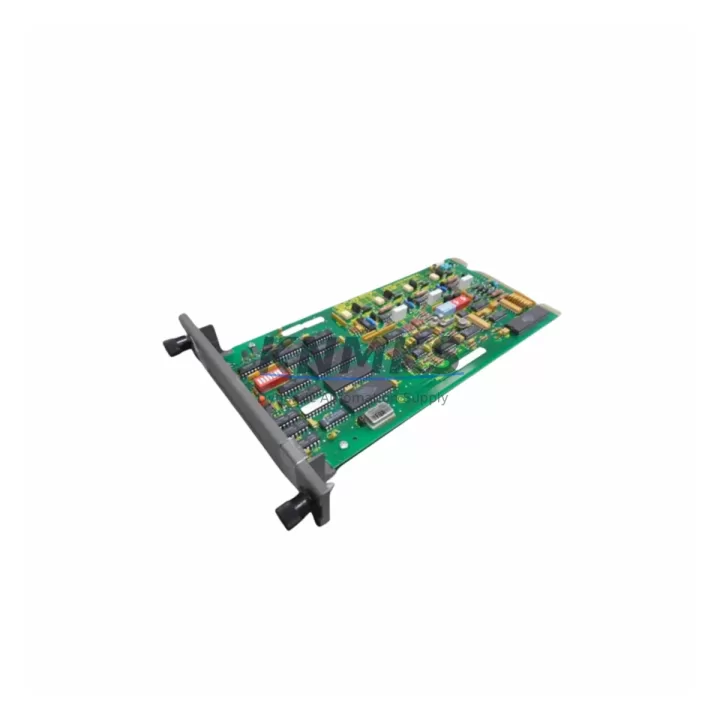
ABB IMPCT01 Maintenance-Proven Spare Part for Factory Uptime
The ABB IMPCT01 is a hardware selector module designed for the ABB AC500 PLC platform — one of the most widely deployed programmable logic controller families in process automation, discrete manufacturing, and utility infrastructure. Sourced directly from authorized supply chains and pre-tested before shipment, the IMPCT01 is a maintenance-proven spare part that supports fast fault recovery, scheduled outage replacement, and long-term system continuity for engineering teams managing legacy and active AC500 installations.
For maintenance engineers and spare parts procurement teams, the IMPCT01 represents a critical component in the AC500 hardware architecture. Its role as a hardware selector module means it directly influences how the CPU communicates with I/O expansion modules and determines slot addressing within the control rack. A failed or degraded IMPCT01 can cause partial or complete loss of I/O visibility, leading to unplanned downtime that cascades across the production line. Keeping a verified replacement unit in your on-site spare parts inventory is a standard risk mitigation practice for any facility running AC500-based control systems.
Our IMPCT01 units are supplied with a support terms confirmed by quotation, multi-region stock availability, and documented pre-shipment testing — ensuring that the part you receive is ready for immediate installation without additional bench verification delays.
Spare Maintenance Table
| Parameter | Specification |
|---|---|
| Part Number / SKU | IMPCT01 |
| Brand | ABB |
| Series | AC500 PLC Platform |
| Module Type | Hardware Selector Module |
| Function | Slot addressing and hardware configuration selection within AC500 I/O rack |
| Compatibility | ABB AC500 CPU modules (PM571, PM581, PM591, PM595 series) and associated I/O expansion racks |
| Country of Origin | Germany (DE) |
| Installation Environment | Industrial control cabinet; DIN rail or rack-mount per AC500 system design |
| Operating Temperature | 0°C to +60°C (standard AC500 operating range) |
| Supply Condition | Original, pre-tested, ready for installation |
| Support terms | 12 Months from date of shipment |
| Dispatch | Multi-region stock; global express available for emergency replacement |
| Testing | Pre-shipment functional verification included |
Maintenance Planning for Continuous Operation
When replacing the IMPCT01 in an AC500 control cabinet, a thorough site inspection of adjacent components is essential to prevent repeat failures and ensure full system restoration. Maintenance engineers should begin by verifying the 24 VDC power supply feeding the AC500 rack — modules such as the ABB CP600 HMI panel or the PS501 power supply unit should be checked for output stability and ripple before the new IMPCT01 is seated.
I/O modules connected to the same rack — including ABB DC532 digital input modules and DA501 analog output modules — should be inspected for correct addressing after the IMPCT01 is replaced, as hardware selector settings directly affect slot recognition. Communication modules such as the ABB CI590-CS31-HA or CI501-PNIO PROFINET interface module should be verified for active link status and correct node addressing post-replacement.
Terminal blocks and field wiring connected to I/O modules in the same rack should be inspected for loose connections, corrosion, or insulation degradation — particularly in high-vibration or high-humidity environments. Fuse protection on the 24 VDC bus feeding the rack should be tested and replaced if showing signs of thermal stress. If the control cabinet includes signal isolators between field instruments and the AC500 I/O, these should be verified for correct output range and calibration after the rack is restored to service.
For facilities running extended AC500 installations, it is recommended to maintain at least one IMPCT01 unit in the on-site spare parts inventory alongside a matched set of I/O module spares and a spare CPU module (PM581 or PM591) to support full rack recovery within a single maintenance window.
Site Replacement Workflow
Step 1 — Isolate and de-energize: Follow site LOTO (Lockout/Tagout) procedures. De-energize the AC500 rack and confirm zero voltage on the 24 VDC bus before opening the cabinet.
Step 2 — Document current hardware selector position: Before removing the failed IMPCT01, photograph or record the current selector switch position. This setting determines the slot address recognized by the CPU and must be replicated exactly on the replacement unit.
Step 3 — Remove and inspect: Extract the IMPCT01 from its slot. Inspect the connector pins and backplane contacts for damage, oxidation, or debris. Clean the slot contacts if necessary before installing the replacement.
Step 4 — Configure and install replacement: Set the hardware selector on the new IMPCT01 to match the documented position. Seat the module firmly into the rack slot and verify mechanical engagement.
Step 5 — Re-energize and verify: Restore 24 VDC power to the rack. Confirm that the CPU recognizes the module at the correct slot address via the AC500 engineering tool (Automation Builder or PS501 Control Builder). Verify all I/O channels in the affected rack are reporting correctly before returning the system to automatic operation.
Step 6 — Update maintenance records: Log the replacement date, part serial number, and selector position in the site maintenance management system (CMMS). Schedule the next inspection interval per the facility’s preventive maintenance plan.
Spare Parts Support FAQ
Q1: Is the IMPCT01 compatible with all AC500 CPU variants?
The IMPCT01 is designed for use within the ABB AC500 platform and is compatible with the PM571, PM581, PM591, and PM595 CPU families. Compatibility with specific rack configurations should be verified against the AC500 system manual or confirmed with our technical team prior to ordering.
Q2: What pre-shipment testing is performed on each IMPCT01 unit?
Each unit undergoes functional verification prior to dispatch, including connector integrity checks and hardware selector operation confirmation. Units are supplied with test documentation upon request. Our support terms confirmed by quotation cover manufacturing defects and functional failures under normal operating conditions.
Q3: How quickly can an IMPCT01 be dispatched for an emergency replacement?
We maintain multi-region stock to support fast global dispatch. Emergency orders are prioritized for same-day or next-business-day shipment depending on the destination region. Contact admin@knmks.com or call +86 18359268345 to confirm stock availability and lead time for your location.
Q4: Can KNMKS support long-term supply agreements for IMPCT01 and other AC500 spare parts?
Yes. We offer long-term supply agreements for critical spare parts including the IMPCT01 and related AC500 components. These agreements include reserved stock allocation, fixed pricing, and priority dispatch — designed to support facilities with multi-year maintenance plans or phased migration programs moving from AC500 to newer ABB control platforms.
© 2026 KNMKS. All rights reserved.
Original Source: https://knmks.com
Contact: admin@knmks.com | +86 18359268345
Product Identification
- Brand / Ecosystem
-
ABB
ABB - Model / Series
-
IMPCT01
AC500 Series - Product Family
- PLCs & Controllers
- Availability Status
- Available on request after model and quantity confirmation
- Inquiry Type
- B2B RFQ, replacement inquiry and project spare-part request
- Pre-Quote Check
- Exact SKU, brand, series, quantity, nameplate photos and destination country are checked before quotation
System Path
Where this product fits in the KNMKS automation structure.
Specification & Inquiry Focus
- Control platform
- PLC, PAC and modular controllers
- Common needs
- CPU, rack, power and I/O expansion
- Project support
- Replacement, cabinet build and maintenance
Buyer Confirmation
Information KNMKS checks before replying.
- Exact model
- IMPCT01
- Brand / ecosystem
- ABB
- Product family
- PLCs & Controllers
- Application note
- Replacement, maintenance, project build or spare-part list
- Useful photos
- Nameplate, installed unit, cabinet layout or connector side
- Delivery details
- Quantity, destination country and target schedule
Document Support
Files and notes can be confirmed during quotation.
- Product photos or nameplate confirmation when available
- Packing and delivery notes before quotation confirmation
- Support scope and delivery terms confirmed per inquiry
- Export document coordination for qualified B2B requests
Inquiry Support
- Model cross-checking before quotation
- CPU, power, rack and expansion module matching
- Support for replacement and project inquiry
What to Send Us
- Brand and exact model number: ABB IMPCT01
- Quantity and required delivery time
- Application, replacement requirement or nameplate photo
- Destination country and shipping preference
RFQ Preparation
This is a product inquiry page built for RFQ communication.
Fast Model Check
Send this model to KNMKS for confirmation.
Include quantity, destination country and photos if this is a maintenance replacement. The inquiry will be saved with a reference number after submission.
Brand & Compatibility Note
KNMKS displays automation product information for well-known industrial brand ecosystems and compatible replacement references. Brand names are used for product identification and compatibility reference only; final availability and commercial terms are confirmed per quotation.
 Manufacturing
 Machine Tools
 Packaging
 Energy & Power



 HMI & Displays
 Servo Systems
 Variable Frequency Drives
 Sensors