
Overview
ABB IMCPM02 Maintenance-Proven Spare Part for Factory Uptime
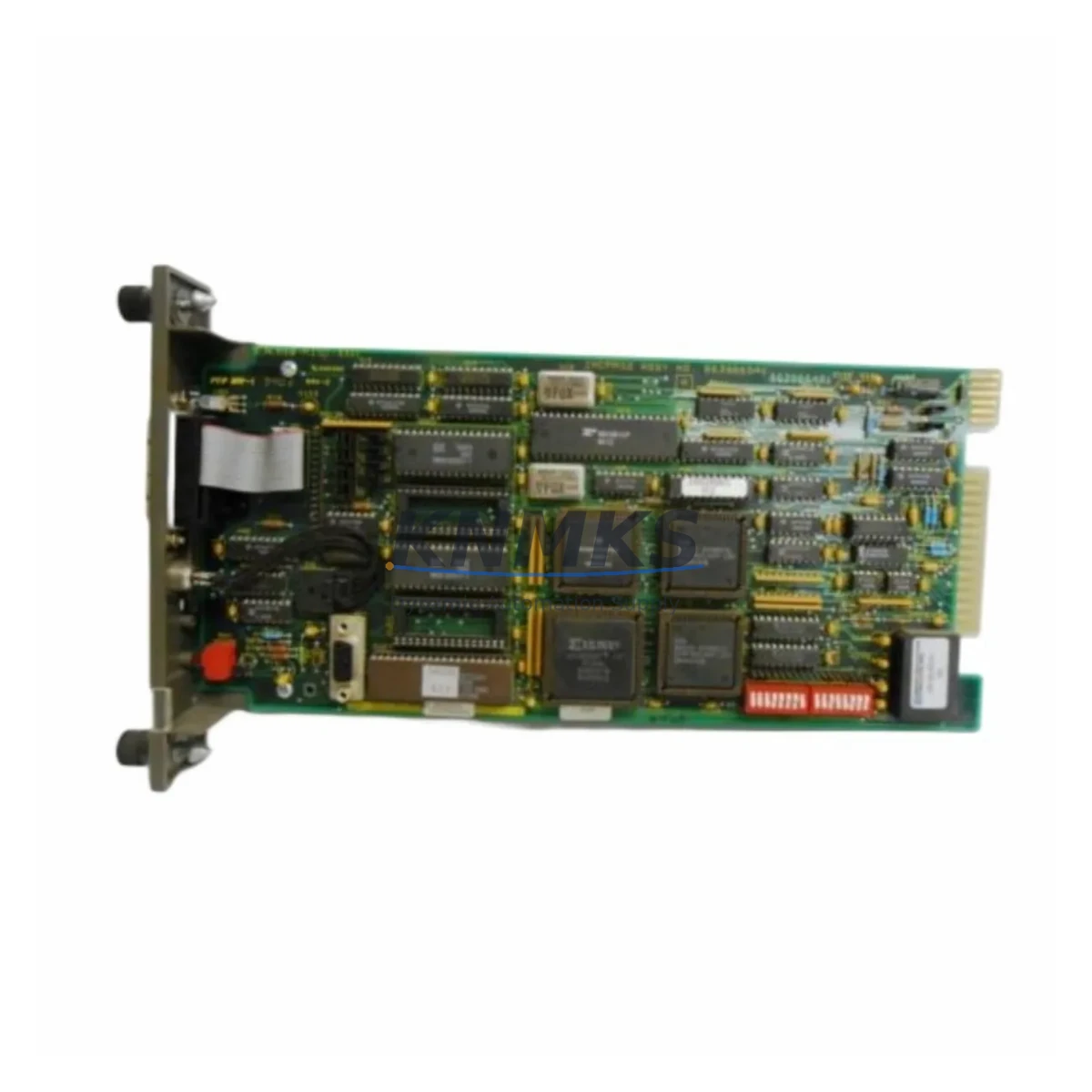
The ABB IMCPM02 is an original communication port module designed for the Advant MOD 300 Distributed Control System (DCS). As a critical interface component within the MOD 300 control architecture, the IMCPM02 manages serial communication between the process controller and field devices, operator stations, and engineering workstations. For maintenance engineers responsible for continuous plant operations, having a verified, tested IMCPM02 spare on the shelf is a fundamental risk-reduction strategy — one that directly shortens mean time to repair (MTTR) and protects production uptime.
KNMKS supplies the IMCPM02 as an original ABB spare part, sourced through established industrial channels, individually tested before shipment, and backed by a support terms confirmed by quotation. Each unit is inspected for firmware integrity, connector condition, and communication port functionality prior to dispatch.
Spare Maintenance Table
| Parameter | Specification |
|---|---|
| Part Number / SKU | IMCPM02 |
| Brand | ABB |
| Series | Advant MOD 300 DCS |
| Module Type | Communication Port Module |
| Communication Interface | Serial (RS-232 / RS-485 compatible within MOD 300 architecture) |
| Mounting | MOD 300 backplane / rack-mount |
| Operating Voltage | 24 VDC (supplied via backplane) |
| Operating Temperature | 0°C to +55°C |
| Compatibility | ABB Advant MOD 300 controller racks; replaces earlier IMCPM01 revisions where firmware permits |
| Origin | Germany (Original ABB manufacture) |
| Condition | Original spare — tested before shipment |
| Support terms | 12 Months |
| Delivery | Global express shipping available; lead time confirmed at order |
| Application Environment | Process industries: oil & gas, chemical, power generation, pulp & paper |
Maintenance Planning for Continuous Operation
When a MOD 300 system experiences a communication fault traceable to the IMCPM02, the failure rarely occurs in isolation. Experienced maintenance engineers know that a degraded communication module often signals stress across adjacent components in the same control loop or cabinet. Before returning the system to service after replacing an IMCPM02, a structured inspection of the surrounding hardware is strongly recommended.
Start with the MOD 300 backplane and rack assembly. Connector pins on the backplane slot that hosts the IMCPM02 should be inspected for oxidation, mechanical damage, or intermittent contact — issues that can cause recurring communication faults even after a module swap. If the rack has been in service for more than five years, consider scheduling a full backplane inspection during the next planned outage.
Next, verify the IMFEC02 or IMFEC04 field expansion controllers in the same rack. These modules share the internal communication bus with the IMCPM02, and a failing field expansion controller can generate error patterns that mimic a communication port fault. Confirming their status eliminates a common misdiagnosis.
The IMASM03 power supply module supplying the rack should also be checked. Voltage ripple or marginal output on the 24 VDC rail is a known contributor to intermittent communication module resets in MOD 300 systems. Measure rail voltage under load and compare against ABB’s published tolerance band before closing the cabinet.
For plants running INNIS21 or INNIS31 network interface modules on the same control network segment, confirm that network traffic load and termination resistors are within specification. An overloaded or improperly terminated segment can cause the IMCPM02 to report communication errors that are actually network-layer issues rather than module failures.
Where the MOD 300 system interfaces with an operator station or HMI running Advant Station software, verify that the communication configuration in the engineering database matches the physical port assignment of the replacement IMCPM02. A mismatch in port addressing is a common commissioning error after a module replacement that can delay restart by hours.
Finally, inspect the cabinet-level fusing and surge protection on the communication wiring. MOD 300 installations in heavy industrial environments — particularly those near variable-frequency drives, large motor starters, or arc furnaces — are susceptible to transient-induced communication faults. Replacing a damaged IMCPM02 without addressing the root cause of the transient will result in repeat failures. Signal isolators on the serial lines and proper cable shielding grounding are cost-effective protective measures worth reviewing during any IMCPM02 replacement event.
Site Replacement Workflow
Step 1 — Pre-replacement documentation: Record the current IMCPM02 firmware revision, slot address, and communication port configuration from the MOD 300 engineering workstation before powering down. This data is essential for configuring the replacement module and avoids delays during recommissioning.
Step 2 — Safe isolation: Follow your site’s lockout/tagout (LOTO) procedure for the affected rack. The IMCPM02 is not hot-swappable in standard MOD 300 configurations — the rack must be de-energized before module removal unless your specific system revision and site procedures explicitly permit live replacement.
Step 3 — Physical replacement: Remove the faulty IMCPM02 by releasing the module locking lever and sliding it clear of the backplane. Insert the replacement unit, ensuring full seating of the backplane connector. Secure the locking lever before re-energizing.
Step 4 — Configuration restore: Using the MOD 300 engineering workstation, load the saved communication configuration to the replacement module. Verify port addressing, baud rate, and protocol settings match the pre-replacement record.
Step 5 — Functional verification: Restore power to the rack and monitor the IMCPM02 status LEDs through the startup sequence. Confirm communication link establishment with all connected field devices and operator stations. Run a short-duration data integrity check before returning the loop to automatic control.
This workflow supports a target replacement time of under two hours for a prepared maintenance team with a tested spare on hand — compared to multi-day delays when sourcing a replacement reactively after a failure.
Spare Parts Support FAQ
Q: Is the IMCPM02 still available as a new original spare, or only as refurbished stock?
A: KNMKS supplies the IMCPM02 as original ABB spare parts sourced through established industrial channels. Each unit is individually tested before shipment. Where original new stock is available, it is offered preferentially; tested original surplus units are clearly identified. Contact admin@knmks.com to confirm current stock status for your order.
Q: What is the support terms coverage and what does it include?
A: All IMCPM02 units supplied by KNMKS carry a support terms confirmed by quotation from the date of shipment. The support terms covers manufacturing defects and functional failures under normal operating conditions. It does not cover damage resulting from incorrect installation, overvoltage events, or use outside the module’s specified environmental range. Support requests are handled directly by KNMKS — contact admin@knmks.com with your order reference and a description of the fault.
Q: How do I confirm compatibility before ordering if my MOD 300 system is an older revision?
A: Provide your rack type, controller revision, and existing module part number (including any suffix or revision letter) when contacting KNMKS. Our technical team will cross-reference against ABB’s compatibility documentation and advise on any firmware or configuration considerations before you commit to the purchase. This pre-order compatibility check is provided at no charge.
Q: Can KNMKS support long-term supply for ongoing maintenance programs?
A: Yes. KNMKS maintains stock of MOD 300 series components to support planned maintenance schedules, annual turnarounds, and multi-year spare parts agreements. For facilities managing aging ABB DCS installations, we recommend establishing a standing supply arrangement to avoid lead-time risk as original stock becomes scarcer. Contact us to discuss volume pricing and reserved stock options.
© 2026 KNMKS. All rights reserved.
Original Source: https://knmks.com
Contact: admin@knmks.com | +86 18359268345
Product Identification
- Brand / Ecosystem
-
ABB
ABB - Model / Series
- IMCPM02
- Product Family
- PLCs & Controllers
- Availability Status
- Available on request after model and quantity confirmation
- Inquiry Type
- B2B RFQ, replacement inquiry and project spare-part request
- Pre-Quote Check
- Exact SKU, brand, series, quantity, nameplate photos and destination country are checked before quotation
System Path
Where this product fits in the KNMKS automation structure.
Specification & Inquiry Focus
- Control platform
- PLC, PAC and modular controllers
- Common needs
- CPU, rack, power and I/O expansion
- Project support
- Replacement, cabinet build and maintenance
Buyer Confirmation
Information KNMKS checks before replying.
- Exact model
- IMCPM02
- Brand / ecosystem
- ABB
- Product family
- PLCs & Controllers
- Application note
- Replacement, maintenance, project build or spare-part list
- Useful photos
- Nameplate, installed unit, cabinet layout or connector side
- Delivery details
- Quantity, destination country and target schedule
Document Support
Files and notes can be confirmed during quotation.
- Product photos or nameplate confirmation when available
- Packing and delivery notes before quotation confirmation
- Support scope and delivery terms confirmed per inquiry
- Export document coordination for qualified B2B requests
Inquiry Support
- Model cross-checking before quotation
- CPU, power, rack and expansion module matching
- Support for replacement and project inquiry
What to Send Us
- Brand and exact model number: ABB IMCPM02
- Quantity and required delivery time
- Application, replacement requirement or nameplate photo
- Destination country and shipping preference
RFQ Preparation
This is a product inquiry page built for RFQ communication.
Fast Model Check
Send this model to KNMKS for confirmation.
Include quantity, destination country and photos if this is a maintenance replacement. The inquiry will be saved with a reference number after submission.
Brand & Compatibility Note
KNMKS displays automation product information for well-known industrial brand ecosystems and compatible replacement references. Brand names are used for product identification and compatibility reference only; final availability and commercial terms are confirmed per quotation.
 Manufacturing
 Machine Tools
 Packaging
 Energy & Power



 HMI & Displays
 Servo Systems
 Variable Frequency Drives
 Sensors