
Overview
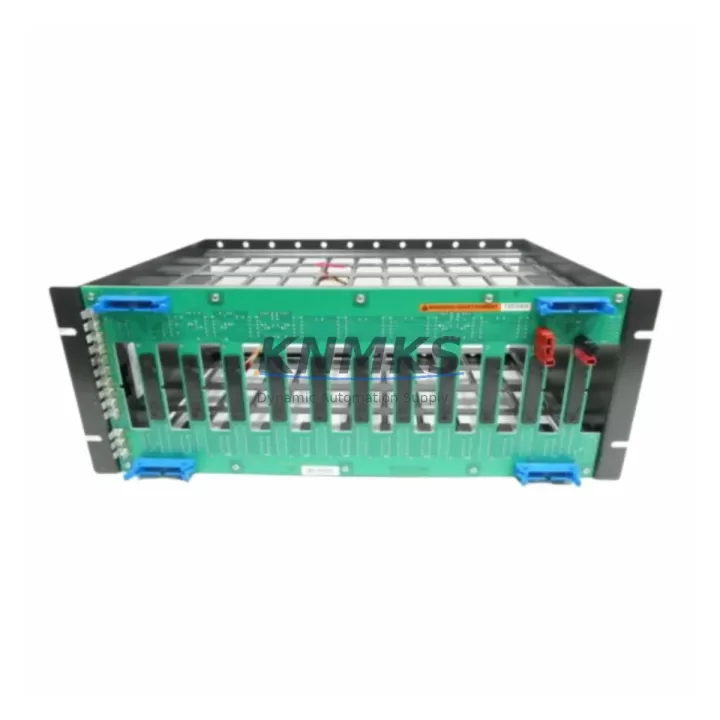
ABB IEMMU11 Migration-Ready Mounting Unit for Legacy Control Systems
The ABB IEMMU11 is a modular mounting unit designed for the ABB AC500 PLC platform, engineered to support seamless integration into both new control panel builds and legacy system retrofits. As industrial facilities face increasing pressure to modernize aging automation infrastructure, the IEMMU11 serves as a critical mechanical and electrical interface component — enabling engineers to replace discontinued mounting assemblies, expand existing I/O racks, and upgrade control cabinets without full system redesign.
Whether you are migrating from an obsolete ABB Advant, S500, or third-party PLC platform, the IEMMU11 provides a stable, standards-compliant foundation for mounting AC500 CPU modules, communication processors, and I/O expansion units. Its compact form factor and DIN rail compatibility make it suitable for retrofit projects where installation space is constrained and downtime must be minimized.
For procurement engineers and system integrators managing spare parts lifecycle, the IEMMU11 is available from verified stock with a support terms confirmed by quotation, pre-shipment functional testing, and documentation support for customs and compliance.
Migration Compatibility Table
| Parameter | Details |
|---|---|
| Compatible Platform | ABB AC500 PLC Series (PM571, PM581, PM591, PM595) |
| Replaces / Supersedes | Legacy ABB S500 mounting bases; discontinued third-party equivalents |
| Installation Type | DIN Rail (EN 60715) and panel mounting |
| Backplane Interface | AC500 modular backplane bus connector |
| Communication Compatibility | PROFIBUS DP, Modbus RTU/TCP, CANopen (via AC500 comm modules) |
| I/O Expansion Support | Compatible with AC500 S500 I/O modules via TB5xx terminal bases |
| Power Supply Requirement | 24 VDC system bus; verify cabinet PSU capacity before retrofit |
| Firmware Dependency | No firmware — mechanical/electrical interface component |
| Replacement Recommendation | Direct drop-in for same-series mounting positions; verify slot count |
| Commissioning Notes | Confirm module address assignment and terminal wiring after installation |
| Support terms | 12 months from shipment date |
| Pre-shipment Testing | Functional inspection and continuity check included |
Retrofit Planning for Existing Automation Systems
Successful integration of the IEMMU11 into a legacy control system requires a structured pre-retrofit assessment. Engineers should begin by auditing the existing cabinet layout to confirm available DIN rail space and backplane slot positions. In many AC500 retrofit scenarios, the IEMMU11 is installed alongside the ABB TB511-ETH terminal base or TB521-ETH, which provide the physical I/O connection layer for digital and analog signal modules.
Power budget verification is essential before installation. The existing ABB CP-E 24/10.0 power supply module or equivalent 24 VDC industrial PSU must be confirmed to support the additional load introduced by new AC500 modules mounted on the IEMMU11. In cabinet upgrades where multiple I/O expansion units such as the DC532 digital I/O module or AI531 analog input module are being added, total current draw must be recalculated against the PSU’s rated output.
Communication architecture should be reviewed in parallel. If the legacy system used PROFIBUS DP as its primary fieldbus, the retrofit plan should include a CM572-DP communication module to maintain protocol continuity. For facilities transitioning to Ethernet-based control, the CM589-PNIO PROFINET module provides a migration path without requiring HMI screen redesign or full PLC program rewrite — preserving existing ladder logic and function block structures.
Terminal wiring documentation from the original installation must be cross-referenced against the new module pinout. In cases where the original mounting base used a different terminal pitch or connector type, field wiring adapters or re-termination at the marshalling panel may be required. Labeling all field cables before disassembly is a standard practice that significantly reduces commissioning time and the risk of wiring errors during cutover.
For projects involving HMI integration, confirm that the existing panel view or SCADA system can communicate with the upgraded AC500 CPU via the retained communication protocol. In most cases, the HMI tag database and screen logic remain valid if the CPU model and communication module are selected to maintain backward compatibility with the original program structure.
Downtime Control During System Migration
Minimizing production downtime is the primary operational constraint in any live-system retrofit. For installations using the IEMMU11 as a replacement mounting base, the recommended approach is a staged cutover: pre-assemble and pre-wire the new mounting unit with all required AC500 modules on a temporary panel or test bench, verify module addressing and I/O mapping offline, then execute the physical swap during a scheduled maintenance window.
Before powering down the existing system, export and archive the current PLC program from the CPU using ABB Automation Builder or the legacy programming environment. Confirm that the program backup includes all data blocks, retain variables, and communication configuration parameters. This backup serves as the recovery baseline if the cutover encounters unexpected compatibility issues.
During the physical installation, maintain field wiring continuity by using terminal jumpers or temporary bypass circuits where process safety permits. After mounting the IEMMU11 and seating all modules, restore power incrementally — energize the PSU first, confirm bus voltage, then bring the CPU online before enabling I/O modules. This sequence reduces the risk of transient faults triggering safety shutdowns or corrupting retain data.
Post-installation commissioning should include a full I/O loop check, communication link verification, and a timed observation period under normal process load before returning the system to automatic control. Document all wiring changes, module addresses, and firmware versions as part of the as-built record for future maintenance reference.
Retrofit Support FAQ
Q1: Is the ABB IEMMU11 a direct replacement for older AC500 mounting units?
The IEMMU11 is designed for the AC500 modular platform and is compatible with the standard backplane bus and DIN rail mounting dimensions used across the AC500 series. For specific legacy mounting bases from earlier ABB PLC families, verify slot count, connector type, and rail spacing before ordering. Our technical team can assist with cross-reference confirmation.
Q2: What wiring checks are required before installing the IEMMU11 in an existing cabinet?
Confirm field terminal assignments against the new module’s I/O pinout, verify 24 VDC supply voltage at the cabinet bus, and check that all cable shields are properly grounded. If the original installation used a different terminal base pitch, plan for re-termination or use of wiring adapters at the marshalling level.
Q3: Has the unit been tested before shipment?
Yes. All units undergo pre-shipment functional inspection including mechanical integrity check and electrical continuity verification. A support terms confirmed by quotation is provided from the date of shipment, covering manufacturing defects and functional failures under normal operating conditions.
Q4: What is the typical lead time and stock availability?
The IEMMU11 is maintained in verified stock for immediate dispatch. Standard lead time for in-stock units is 3–7 business days for international shipments. For urgent retrofit requirements or bulk procurement, contact our sales team directly to confirm availability and arrange expedited shipping.
© 2026 KNMKS. All rights reserved.
Original Source: https://knmks.com
Contact: admin@knmks.com | +86 18359268345
Product Identification
- Brand / Ecosystem
-
ABB
ABB - Model / Series
-
IEMMU11
AC500 Series - Product Family
- PLCs & Controllers
- Availability Status
- Available on request after model and quantity confirmation
- Inquiry Type
- B2B RFQ, replacement inquiry and project spare-part request
- Pre-Quote Check
- Exact SKU, brand, series, quantity, nameplate photos and destination country are checked before quotation
System Path
Where this product fits in the KNMKS automation structure.
Specification & Inquiry Focus
- Control platform
- PLC, PAC and modular controllers
- Common needs
- CPU, rack, power and I/O expansion
- Project support
- Replacement, cabinet build and maintenance
Buyer Confirmation
Information KNMKS checks before replying.
- Exact model
- IEMMU11
- Brand / ecosystem
- ABB
- Product family
- PLCs & Controllers
- Application note
- Replacement, maintenance, project build or spare-part list
- Useful photos
- Nameplate, installed unit, cabinet layout or connector side
- Delivery details
- Quantity, destination country and target schedule
Document Support
Files and notes can be confirmed during quotation.
- Product photos or nameplate confirmation when available
- Packing and delivery notes before quotation confirmation
- Support scope and delivery terms confirmed per inquiry
- Export document coordination for qualified B2B requests
Inquiry Support
- Model cross-checking before quotation
- CPU, power, rack and expansion module matching
- Support for replacement and project inquiry
What to Send Us
- Brand and exact model number: ABB IEMMU11
- Quantity and required delivery time
- Application, replacement requirement or nameplate photo
- Destination country and shipping preference
RFQ Preparation
This is a product inquiry page built for RFQ communication.
Fast Model Check
Send this model to KNMKS for confirmation.
Include quantity, destination country and photos if this is a maintenance replacement. The inquiry will be saved with a reference number after submission.
Brand & Compatibility Note
KNMKS displays automation product information for well-known industrial brand ecosystems and compatible replacement references. Brand names are used for product identification and compatibility reference only; final availability and commercial terms are confirmed per quotation.
 Manufacturing
 Machine Tools
 Packaging
 Energy & Power



 HMI & Displays
 Servo Systems
 Variable Frequency Drives
 Sensors