
Overview
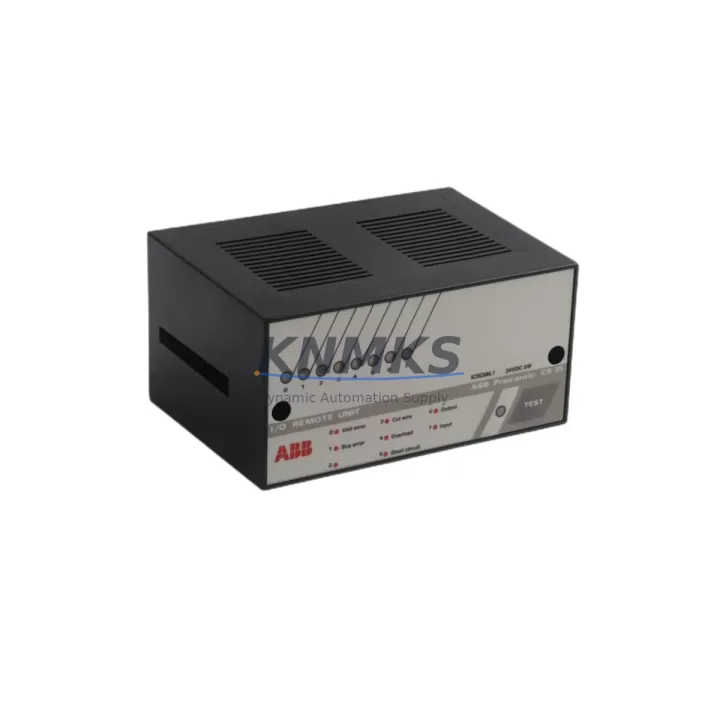
ABB ICSC08L1 FPR3319101R1082 Migration-Ready Digital I/O for Legacy AC500 Systems
The ABB ICSC08L1 (part number FPR3319101R1082) is a 24 Vdc digital I/O module engineered for the ABB AC500 PLC platform. As legacy control systems age and original spare parts become increasingly difficult to source, the ICSC08L1 has become a critical component in retrofit projects, panel upgrades, and production-line modernization programs across process, manufacturing, and infrastructure industries. Whether you are replacing a failed module in an existing AC500 rack or planning a phased migration from an older ABB Advant, MOD 300, or Freelance control platform, this module provides a verified, wiring-compatible solution that minimizes engineering rework and reduces commissioning time on the plant floor.
Before installing the ICSC08L1 into a legacy system, engineers should confirm several key parameters. Power supply capacity within the existing control cabinet must be assessed — the AC500 backplane distributes 24 Vdc to I/O modules, and adding or replacing modules may affect the load budget of the PM5xx or PM5xx-ETH CPU power section. Terminal wiring assignments should be cross-referenced against the original I/O list and field wiring schedule to ensure signal polarity, common references, and cable screen connections are preserved. Backplane slot addressing must be verified in the hardware configuration tool (Automation Builder or PS501 Control Builder) to prevent address conflicts with adjacent modules such as the DC532 digital input module or the DA501 analog I/O module already installed in the same rack. If the system uses a CI590-CS31-HA or CI592-CS31 communication interface for CS31 field bus expansion, module addressing on the CS31 segment must also be reconciled before power-up.
Program compatibility is a frequent concern during AC500 retrofit work. The ICSC08L1 retains the same I/O channel mapping as earlier AC500 digital I/O generations, which means existing IEC 61131-3 ladder, FBD, or ST programs referencing the original module’s I/O variables typically require no logic changes — only a hardware configuration update in Automation Builder to reflect the replacement module. HMI screens built on CP600 or CP400 operator panels that display digital status from this module’s channels will continue to function without modification, provided the variable binding in the HMI project references the PLC variable name rather than a hard-coded memory address.
Communication link integrity should be verified after module replacement. In AC500 systems using PROFIBUS-DP via the CI501-PNIO or Modbus TCP via the CM589-PNIO coupler, the replacement module does not affect the fieldbus configuration as long as the CPU rack slot assignment is unchanged. For systems with redundant CPU configurations using the PM591-ETH or PM595-ETH, the module swap should be performed during a planned maintenance window with the redundant controller in standby to avoid unplanned switchover events.
Physical installation space should be confirmed before ordering. The ICSC08L1 occupies a standard AC500 I/O slot and is compatible with the TB521, TB522, and TB523 terminal base units. If the existing terminal base is damaged or unavailable, a replacement terminal base must be sourced alongside the module to avoid installation delays. Firmware version compatibility between the ICSC08L1 and the installed CPU firmware should be checked in the ABB AC500 firmware compatibility matrix — in most retrofit scenarios involving PM554, PM564, or PM583 CPUs, the ICSC08L1 is supported across all firmware generations released after 2010.
On-site commissioning for a single-module replacement typically requires less than two hours when pre-tested hardware is used. Each ICSC08L1 unit shipped from our inventory undergoes functional verification prior to dispatch, including channel continuity checks and power-on self-test confirmation. This pre-shipment testing protocol, combined with our support terms confirmed by quotation covering manufacturing defects and functional failures, reduces the risk of repeat downtime caused by infant-mortality failures in replacement parts.
Migration Compatibility Table
| Parameter | ICSC08L1 FPR3319101R1082 | Notes for Legacy Retrofit |
|---|---|---|
| Platform Compatibility | ABB AC500 (all generations) | Compatible with PM554, PM564, PM572, PM583, PM591, PM595 CPUs |
| Terminal Base | TB521 / TB522 / TB523 | Verify existing terminal base condition before installation |
| Supply Voltage | 24 Vdc (backplane supplied) | Confirm cabinet PSU load budget before adding modules |
| Communication Interface | AC500 internal backplane bus | No fieldbus address change required if slot position is unchanged |
| I/O Channel Mapping | Preserved from legacy AC500 I/O | Existing PLC program variables remain valid; only HW config update needed |
| Firmware Compatibility | AC500 firmware v1.x – v3.x | Check ABB compatibility matrix for PM5xx CPU firmware version |
| Installation Space | Standard AC500 I/O slot width | No panel modification required for like-for-like replacement |
| Replacement Path | Direct drop-in for ICSC08L1 variants | Cross-reference FPR number to confirm exact variant match |
| Commissioning Time | Typically < 2 hours (single module) | Pre-tested units reduce on-site verification time |
| Support terms | 12 Months | Covers manufacturing defects and functional failures from dispatch date |
Retrofit Planning for Existing Automation Systems
Successful retrofit of an AC500-based control system requires a structured bill-of-materials review that goes beyond the failed module itself. In most aging AC500 panels, the ICSC08L1 digital I/O module is installed alongside a mix of analog and digital expansion modules. Engineers planning a full panel refresh should audit the condition of the TB523 terminal base units, as terminal spring contacts can degrade after 10–15 years of thermal cycling. If the system includes a CI590-CS31-HA remote I/O coupler for distributed field devices, the coupler’s firmware and wiring harness should be inspected at the same time as the I/O module replacement to avoid a second maintenance window.
Power distribution within the control cabinet is another common retrofit bottleneck. The existing 24 Vdc PSU — often an ABB CP-E 24/10.0 or equivalent DIN-rail power supply — may be operating near its rated output current after years of incremental I/O expansion. Adding a replacement ICSC08L1 alongside other new modules may require a PSU upgrade or load redistribution across multiple supply rails. Similarly, if the retrofit scope includes adding a new CM589-PNIO Ethernet coupler for PROFINET connectivity, the additional current draw must be factored into the cabinet power budget.
For systems migrating from older Advant Controller 31 or MOD 300 architectures to AC500, the ICSC08L1 serves as the target digital I/O module in the new rack. In these cross-platform migrations, the engineering team must remap all field wiring from the legacy terminal blocks to the new TB521 or TB522 terminal bases, update the I/O list in the new Automation Builder project, and verify that the CP600 HMI or SCADA system receives updated OPC-UA or Modbus TCP data tags reflecting the new module addresses. A programming cable (e.g., USB-to-serial adapter with TK501 cable) is required for initial CPU configuration and firmware upload before the new rack is energized.
Downtime Control During System Migration
Minimizing production downtime during an AC500 module replacement requires preparation before the maintenance window begins. The existing PLC program should be backed up from the PM5xx CPU using Automation Builder’s online upload function and stored on a secure engineering workstation. The I/O force table should be documented so that any forced outputs or bypassed interlocks can be reinstated after the module swap. If the system controls a continuous process — such as a conveyor, pump station, or packaging line — a partial shutdown sequence should be agreed with operations to bring the affected I/O channels to a safe state before the module is removed from the backplane.
During the physical swap, the terminal base remains wired to the field cables, and only the ICSC08L1 module body is removed and replaced. This plug-and-play characteristic of the AC500 I/O architecture means that field wiring does not need to be disturbed, significantly reducing the risk of wiring errors during recommissioning. After the new module is seated, the CPU performs an automatic hardware recognition cycle. The engineer should verify the module status LED and confirm the I/O channel status in the Automation Builder online diagnostic view before releasing the system back to automatic control. Total planned downtime for a single-module replacement using pre-tested hardware is typically 60–90 minutes, including safety isolation, module swap, and functional verification.
Retrofit Support FAQ
Q1: Is the ICSC08L1 FPR3319101R1082 a direct replacement for all ICSC08L1 variants?
The FPR3319101R1082 is the primary part number for the ICSC08L1 module. Some legacy systems may reference earlier FPR suffix variants. Before ordering, cross-reference the FPR number on the existing module’s label with our technical team to confirm exact variant compatibility. In most cases, later FPR revisions are backward-compatible with earlier hardware generations.
Q2: Do I need to update the PLC program after replacing the module?
In a like-for-like replacement where the module occupies the same backplane slot, no program logic changes are required. You will need to perform a hardware configuration update in Automation Builder to clear any module fault flags, then download the updated hardware configuration to the CPU. Existing I/O variable names, HMI bindings, and SCADA tags remain valid.
Q3: What pre-shipment testing is performed on each unit?
Each ICSC08L1 unit undergoes power-on self-test, channel continuity verification, and visual inspection before dispatch. Units that fail any test stage are quarantined and not shipped. A support terms confirmed by quotation covering manufacturing defects and functional failures is included with every unit, with confirmed support period starting from the dispatch date shown on the shipping document.
Q4: What is the typical lead time and stock availability?
The ICSC08L1 FPR3319101R1082 is held availability confirmed by RFQ for immediate dispatch. Standard orders are processed within 1–2 business days. For urgent breakdown situations, expedited shipping options are available. Contact admin@knmks.com or call +86 18359268345 to confirm current stock levels and arrange priority dispatch.
© 2026 KNMKS. All rights reserved.
Original Source: https://knmks.com
Contact: admin@knmks.com | +86 18359268345
Product Identification
- Brand / Ecosystem
-
ABB
ABB - Model / Series
-
ICSC08L1 FPR3319101R1082
AC500 Series - Product Family
- PLCs & Controllers
- Availability Status
- Available on request after model and quantity confirmation
- Inquiry Type
- B2B RFQ, replacement inquiry and project spare-part request
- Pre-Quote Check
- Exact SKU, brand, series, quantity, nameplate photos and destination country are checked before quotation
System Path
Where this product fits in the KNMKS automation structure.
Specification & Inquiry Focus
- Control platform
- PLC, PAC and modular controllers
- Common needs
- CPU, rack, power and I/O expansion
- Project support
- Replacement, cabinet build and maintenance
Buyer Confirmation
Information KNMKS checks before replying.
- Exact model
- ICSC08L1 FPR3319101R1082
- Brand / ecosystem
- ABB
- Product family
- PLCs & Controllers
- Application note
- Replacement, maintenance, project build or spare-part list
- Useful photos
- Nameplate, installed unit, cabinet layout or connector side
- Delivery details
- Quantity, destination country and target schedule
Document Support
Files and notes can be confirmed during quotation.
- Product photos or nameplate confirmation when available
- Packing and delivery notes before quotation confirmation
- Support scope and delivery terms confirmed per inquiry
- Export document coordination for qualified B2B requests
Inquiry Support
- Model cross-checking before quotation
- CPU, power, rack and expansion module matching
- Support for replacement and project inquiry
What to Send Us
- Brand and exact model number: ABB ICSC08L1 FPR3319101R1082
- Quantity and required delivery time
- Application, replacement requirement or nameplate photo
- Destination country and shipping preference
RFQ Preparation
This is a product inquiry page built for RFQ communication.
Fast Model Check
Send this model to KNMKS for confirmation.
Include quantity, destination country and photos if this is a maintenance replacement. The inquiry will be saved with a reference number after submission.
Brand & Compatibility Note
KNMKS displays automation product information for well-known industrial brand ecosystems and compatible replacement references. Brand names are used for product identification and compatibility reference only; final availability and commercial terms are confirmed per quotation.
 Manufacturing
 Machine Tools
 Packaging
 Energy & Power



 HMI & Displays
 Servo Systems
 Variable Frequency Drives
 Sensors