
Overview
ABB ICFC16L1 Maintenance-Proven Spare Part for Factory Uptime
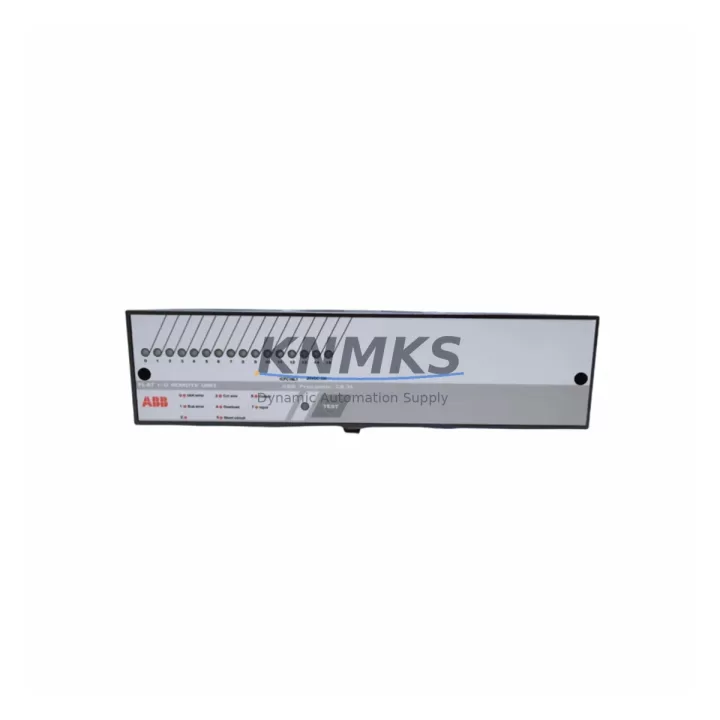
The ABB ICFC16L1 is a remote I/O coupler module designed for the ABB AC500 PLC platform — one of the most widely deployed automation architectures in process control, discrete manufacturing, and utility infrastructure. As a field-replaceable unit, the ICFC16L1 serves as the communication backbone between the AC500 CPU and distributed I/O stations, making it a critical component in any planned maintenance program or emergency recovery scenario. Sourced as an original ABB spare, each unit is pre-tested before shipment and backed by a support terms confirmed by quotation, ensuring your replacement cycle is predictable and your production line stays online.
For maintenance engineers managing aging AC500 installations, the ICFC16L1 is a high-priority stocking item. Coupler module failures are among the most disruptive events in a distributed I/O architecture — they can take down entire I/O segments, triggering unplanned shutdowns that cascade across production zones. Having a verified, ready-to-install spare on the shelf is the single most effective way to reduce mean time to repair (MTTR) and protect factory uptime commitments.
Spare Maintenance Table
| Parameter | Specification |
|---|---|
| Part Number / SKU | ICFC16L1 |
| Brand | ABB |
| Series | AC500 |
| Module Type | Remote I/O Coupler Module |
| Communication Interface | PROFIBUS-DP / CS31 (series-dependent configuration) |
| Compatible Platform | ABB AC500 PLC System, S500 I/O Modules |
| Mounting | DIN rail, AC500 I/O terminal unit |
| Operating Temperature | -25°C to +60°C |
| Protection Class | IP20 |
| Country of Origin | Germany (DE) |
| Product Condition | Original New / Tested Spare |
| Pre-Shipment Testing | Yes — functional verification before dispatch |
| Support terms | 12 Months |
| Delivery | Global dispatch, multi-region stock available |
| Maintenance Role | Emergency replacement, scheduled outage spare, inventory buffer |
Maintenance Planning for Continuous Operation
When replacing the ICFC16L1 in the field, a thorough inspection of the surrounding electrical environment is essential to prevent repeat failures and ensure stable recommissioning. Maintenance engineers should begin by verifying the 24 VDC supply rail feeding the coupler — voltage sags or ripple from an aging ABB CP-E 24/5.0 power supply module are a common root cause of coupler instability and should be measured before the new unit is installed.
Next, inspect the PROFIBUS-DP segment termination resistors and cable shielding. A degraded bus terminator or improperly grounded cable shield can cause intermittent communication faults that mimic coupler hardware failure. If the installation uses ABB TB511-ETH or TB521-ETH terminal base units, confirm that the backplane connectors are free of oxidation and that the locking tabs are fully engaged — poor backplane contact is a frequent source of nuisance faults in high-vibration environments.
Review the I/O module complement connected downstream of the ICFC16L1. Digital input modules such as the ABB DI524 and digital output modules such as the ABB DO524 should be checked for blown fuse indicators and correct LED status after the coupler is restored. If any analog I/O modules — for example the ABB AI523 — are present in the segment, verify signal loop integrity and 4–20 mA calibration before returning the segment to automatic control.
For installations where the AC500 system communicates upstream to a SCADA or DCS via Ethernet, inspect the ABB CM589-PNIO PROFINET communication module or equivalent gateway for correct IP addressing and network health indicators. A coupler replacement that disrupts the fieldbus topology can cause the gateway to lose its device table, requiring a re-download of the GSD configuration from the engineering workstation.
Finally, check the control cabinet’s surge protection devices (SPDs) and fuse holders on the 24 VDC distribution rail. Coupler failures caused by transient overvoltage events will recur if the upstream protection is not replaced simultaneously. Document all findings in the maintenance log and update the spare parts inventory to reflect the consumed ICFC16L1 unit.
Site Replacement Workflow
Step 1 — Isolate and de-energize: Place the AC500 CPU in STOP mode via the programming tool (Automation Builder or PS501 Control Builder). De-energize the 24 VDC supply to the affected I/O segment. Lock out / tag out (LOTO) per site safety procedure.
Step 2 — Document existing configuration: Record the PROFIBUS node address set on the rotary switches of the existing ICFC16L1. Photograph the wiring and cable routing before removal. Export the current project from Automation Builder as a backup.
Step 3 — Remove the failed module: Release the module from the terminal base by pressing the release lever and sliding the ICFC16L1 upward. Inspect the terminal base connector pins for damage or contamination.
Step 4 — Install the replacement ICFC16L1: Set the PROFIBUS node address on the replacement unit to match the documented value. Slide the module into the terminal base until it clicks into place. Verify the locking tab is fully engaged.
Step 5 — Re-energize and verify: Restore 24 VDC power. Place the CPU in RUN mode. Confirm that the ICFC16L1 BF (Bus Fault) LED is off and the RUN LED is solid green. Verify all downstream I/O modules report correct status in Automation Builder. Conduct a functional test of all I/O points in the segment before releasing the line to production.
Step 6 — Update records: Log the replacement in the CMMS, update the spare parts inventory, and reorder a replacement ICFC16L1 to restore the buffer stock level.
Spare Parts Support FAQ
Q1: Is this ICFC16L1 an original ABB part or a compatible aftermarket unit?
This is an original ABB ICFC16L1 spare part, not an aftermarket or third-party compatible. Each unit is sourced through verified supply channels and undergoes functional pre-shipment testing. A support terms confirmed by quotation is included with every order.
Q2: How do I confirm compatibility with my existing AC500 installation before ordering?
The ICFC16L1 is designed for use with ABB AC500 S500 I/O terminal bases. Confirm the terminal base model installed in your cabinet (e.g., TB511, TB521) and the PROFIBUS-DP segment configuration. If you have the existing module’s label or the cabinet drawing, share it with our technical team at admin@knmks.com for a compatibility check before purchase.
Q3: What is your lead time and do you maintain stock for emergency orders?
We maintain multi-region stock of the ICFC16L1 to support both emergency replacements and scheduled outage planning. Standard orders are dispatched within 1–3 business days. For critical downtime situations, contact us directly at +86 18359268345 to confirm real-time availability and expedited shipping options.
Q4: Can I establish a long-term supply agreement for ongoing AC500 spare parts?
Yes. We support long-term supply agreements for maintenance teams managing large AC500 fleets. Agreements can cover the ICFC16L1 and related modules including power supplies, I/O modules, and communication cards. Contact admin@knmks.com to discuss volume pricing, reserved stock arrangements, and annual maintenance kit configurations.
© 2026 KNMKS. All rights reserved.
Original Source: https://knmks.com
Contact: admin@knmks.com | +86 18359268345
Product Identification
- Brand / Ecosystem
-
ABB
ABB - Model / Series
-
ICFC16L1
AC500 Series - Product Family
- PLCs & Controllers
- Availability Status
- Available on request after model and quantity confirmation
- Inquiry Type
- B2B RFQ, replacement inquiry and project spare-part request
- Pre-Quote Check
- Exact SKU, brand, series, quantity, nameplate photos and destination country are checked before quotation
System Path
Where this product fits in the KNMKS automation structure.
Specification & Inquiry Focus
- Control platform
- PLC, PAC and modular controllers
- Common needs
- CPU, rack, power and I/O expansion
- Project support
- Replacement, cabinet build and maintenance
Buyer Confirmation
Information KNMKS checks before replying.
- Exact model
- ICFC16L1
- Brand / ecosystem
- ABB
- Product family
- PLCs & Controllers
- Application note
- Replacement, maintenance, project build or spare-part list
- Useful photos
- Nameplate, installed unit, cabinet layout or connector side
- Delivery details
- Quantity, destination country and target schedule
Document Support
Files and notes can be confirmed during quotation.
- Product photos or nameplate confirmation when available
- Packing and delivery notes before quotation confirmation
- Support scope and delivery terms confirmed per inquiry
- Export document coordination for qualified B2B requests
Inquiry Support
- Model cross-checking before quotation
- CPU, power, rack and expansion module matching
- Support for replacement and project inquiry
What to Send Us
- Brand and exact model number: ABB ICFC16L1
- Quantity and required delivery time
- Application, replacement requirement or nameplate photo
- Destination country and shipping preference
RFQ Preparation
This is a product inquiry page built for RFQ communication.
Fast Model Check
Send this model to KNMKS for confirmation.
Include quantity, destination country and photos if this is a maintenance replacement. The inquiry will be saved with a reference number after submission.
Brand & Compatibility Note
KNMKS displays automation product information for well-known industrial brand ecosystems and compatible replacement references. Brand names are used for product identification and compatibility reference only; final availability and commercial terms are confirmed per quotation.
 Manufacturing
 Machine Tools
 Packaging
 Energy & Power



 HMI & Displays
 Servo Systems
 Variable Frequency Drives
 Sensors