
Overview
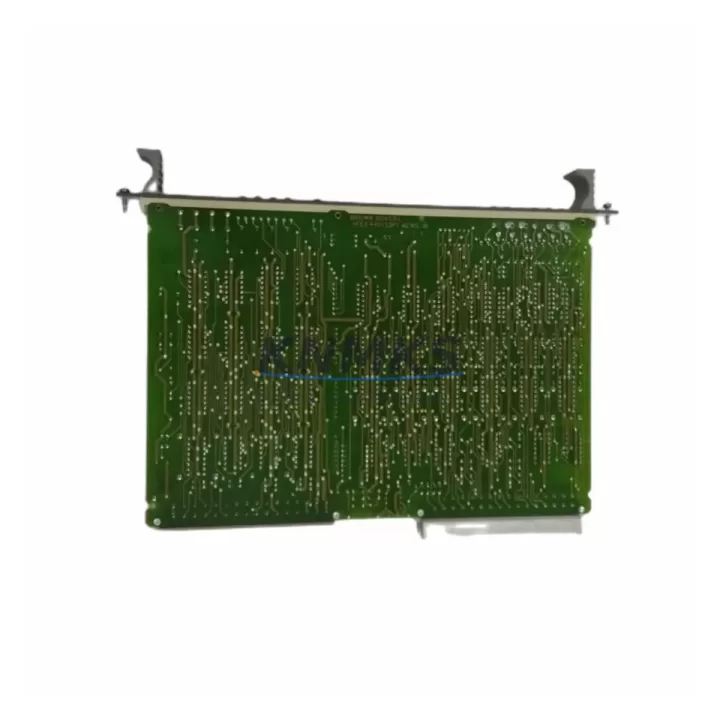
ABB HIEE401091R0002 Migration-Ready I/O Card for Legacy AC500 Control Systems
The ABB HIEE401091R0002 GD9924 BE V2 is a proven I/O extension card engineered for seamless integration into ABB AC500 PLC platforms. As legacy control systems approach end-of-life and OEM support windows close, this module serves as a verified drop-in replacement for discontinued I/O cards within the AC500 ecosystem. Whether you are managing a planned retrofit, responding to an unplanned failure, or extending the operational life of an existing control cabinet, the HIEE401091R0002 delivers the electrical compatibility, backplane interface alignment, and firmware recognition required to restore system continuity with minimal engineering overhead.
Industrial facilities running AC500-based automation lines — including process control, machine safety, conveyor management, and utility monitoring applications — frequently encounter the challenge of sourcing compatible I/O hardware as original production batches are discontinued. The HIEE401091R0002 addresses this directly: it maintains the same slot addressing, terminal wiring layout, and communication handshake expected by the AC500 CPU, eliminating the need for program restructuring or HMI screen remapping in most retrofit scenarios.
Migration Compatibility Table
| Parameter | Detail |
|---|---|
| Part Number | HIEE401091R0002 |
| Firmware Designation | GD9924 BE V2 |
| Platform Compatibility | ABB AC500 PLC Series |
| Module Type | I/O Extension Card |
| Backplane Interface | AC500 standard backplane bus |
| Installation Format | DIN rail / rack-mount per AC500 chassis spec |
| Communication Protocol | AC500 internal I/O bus |
| Replacement Suitability | Direct replacement for legacy AC500 I/O cards with equivalent slot addressing |
| Wiring Compatibility | Terminal block layout consistent with AC500 I/O wiring standards |
| Commissioning Requirement | Slot address confirmation; no program rewrite required in standard retrofit |
| Country of Origin | Germany |
| Support terms | 12 months from date of shipment |
| Pre-shipment Testing | Function-verified before dispatch |
| Stock Status | Available — contact for lead time confirmation |
Retrofit Planning for Existing Automation Systems
A successful retrofit using the HIEE401091R0002 begins well before the module arrives on site. Engineers should audit the existing AC500 rack configuration to confirm available slot positions, verify that the CPU firmware version supports the GD9924 BE V2 hardware revision, and document the current I/O channel assignments mapped in the PLC program. In multi-rack installations, the AC500 expansion backplane — typically connected via the TB511-ETH or similar communication coupler — must be checked for address conflicts before the new card is inserted.
Power budget verification is a critical pre-installation step. The AC500 power supply module feeding the rack must have sufficient residual capacity to support the HIEE401091R0002 alongside existing modules. In cabinets where the PM573 or PM591 CPU module is already loaded with multiple I/O cards, a current draw audit prevents nuisance tripping during commissioning. If the power margin is tight, replacing the existing power supply with a higher-capacity unit — or redistributing modules across a second rack — should be planned before the maintenance window opens.
Terminal wiring on the HIEE401091R0002 follows the AC500 standard screw-terminal convention. Field cables from sensors, actuators, or signal isolators can typically be reconnected directly from the legacy card without re-termination, provided the channel sequence is preserved. Where signal conditioning is required — particularly for thermocouple or RTD inputs — inline signal isolators should be verified for compatibility with the new card’s input impedance specification.
HMI screens built on CP600 or CP400 operator panels that reference I/O tags mapped to the replaced card will continue to function without modification, as the tag addresses remain consistent with the AC500 hardware configuration. Communication links to upstream SCADA systems via Modbus TCP, PROFIBUS DP, or CS31 bus are unaffected by the I/O card swap, since these protocols terminate at the CPU or communication module layer rather than at the I/O card itself.
For installations involving the TB521 or TB541 terminal base units, confirm that the base unit revision is compatible with the GD9924 BE V2 firmware before proceeding. In most AC500 installations, the terminal base and I/O card are paired; using a mismatched base unit is the most common source of commissioning errors during I/O card retrofits.
Downtime Control During System Migration
Minimizing production downtime during an I/O card replacement requires a structured approach to pre-staging, backup, and verification. Before the maintenance window begins, export a full backup of the AC500 program using Automation Builder, including hardware configuration, symbol tables, and communication settings. This backup serves as the recovery baseline if the retrofit encounters unexpected compatibility issues.
During the swap, the existing I/O card should be removed with field wiring labeled and photographed at the terminal block level. The HIEE401091R0002 is inserted into the same slot, the terminal connections are restored in sequence, and the CPU is powered up in stop mode before the program is restarted. This sequence allows the hardware configuration to be recognized and validated by the CPU before live I/O scanning resumes, reducing the risk of output state errors at startup.
Where continuous process control is required and a cold swap is not acceptable, a parallel commissioning approach can be used: the HIEE401091R0002 is installed in an adjacent slot with a temporary I/O address, the program logic is duplicated to the new address, and the cutover is executed at a controlled moment with both cards active. This method extends the maintenance window but eliminates the risk of uncontrolled process interruption.
Post-installation, a channel-by-channel I/O verification test should be performed against the original signal list before the system is returned to automatic mode. Any discrepancies in signal state, scaling, or response time should be resolved before the maintenance window closes. Our pre-shipment function test documentation is available upon request and can be used as a baseline for site acceptance testing.
Retrofit Support FAQ
Q: Is the HIEE401091R0002 GD9924 BE V2 a direct replacement for the original ABB AC500 I/O card in my existing rack?
A: In the majority of AC500 installations, yes. The module maintains the same backplane interface, slot addressing, and terminal wiring layout as the original card. We recommend confirming the CPU firmware version and terminal base revision before installation to ensure full compatibility with the GD9924 BE V2 hardware designation.
Q: Will I need to modify my PLC program or HMI configuration after replacing the I/O card?
A: In standard retrofit scenarios, no program modification is required. The HIEE401091R0002 is recognized by the AC500 CPU using the existing hardware configuration. HMI tag mappings and SCADA communication links remain unaffected. If your installation uses a non-standard slot assignment or a customized hardware configuration file, a configuration update in Automation Builder may be needed.
Q: What pre-shipment testing is performed on the HIEE401091R0002 before dispatch?
A: Each unit undergoes function verification testing prior to shipment, confirming power-up behavior, backplane communication, and I/O channel response. Test records are available upon request. All units are shipped with a support terms confirmed by quotation covering manufacturing defects and functional failures under normal operating conditions.
Q: What is the typical lead time and stock availability for the HIEE401091R0002?
A: We maintain inventory of the HIEE401091R0002 to support urgent retrofit and breakdown replacement requirements. Contact our team at admin@knmks.com or +86 18359268345 for current stock confirmation and lead time. Priority dispatch is available for emergency breakdown situations.
© 2026 KNMKS. All rights reserved.
Original Source: https://knmks.com
Contact: admin@knmks.com | +86 18359268345
Product Identification
- Brand / Ecosystem
-
ABB
ABB - Model / Series
-
HIEE401091R0002 GD9924 BE V2
AC500 Series - Product Family
- PLCs & Controllers
- Availability Status
- Available on request after model and quantity confirmation
- Inquiry Type
- B2B RFQ, replacement inquiry and project spare-part request
- Pre-Quote Check
- Exact SKU, brand, series, quantity, nameplate photos and destination country are checked before quotation
System Path
Where this product fits in the KNMKS automation structure.
Specification & Inquiry Focus
- Control platform
- PLC, PAC and modular controllers
- Common needs
- CPU, rack, power and I/O expansion
- Project support
- Replacement, cabinet build and maintenance
Buyer Confirmation
Information KNMKS checks before replying.
- Exact model
- HIEE401091R0002 GD9924 BE V2
- Brand / ecosystem
- ABB
- Product family
- PLCs & Controllers
- Application note
- Replacement, maintenance, project build or spare-part list
- Useful photos
- Nameplate, installed unit, cabinet layout or connector side
- Delivery details
- Quantity, destination country and target schedule
Document Support
Files and notes can be confirmed during quotation.
- Product photos or nameplate confirmation when available
- Packing and delivery notes before quotation confirmation
- Support scope and delivery terms confirmed per inquiry
- Export document coordination for qualified B2B requests
Inquiry Support
- Model cross-checking before quotation
- CPU, power, rack and expansion module matching
- Support for replacement and project inquiry
What to Send Us
- Brand and exact model number: ABB HIEE401091R0002 GD9924 BE V2
- Quantity and required delivery time
- Application, replacement requirement or nameplate photo
- Destination country and shipping preference
RFQ Preparation
This is a product inquiry page built for RFQ communication.
Fast Model Check
Send this model to KNMKS for confirmation.
Include quantity, destination country and photos if this is a maintenance replacement. The inquiry will be saved with a reference number after submission.
Brand & Compatibility Note
KNMKS displays automation product information for well-known industrial brand ecosystems and compatible replacement references. Brand names are used for product identification and compatibility reference only; final availability and commercial terms are confirmed per quotation.
 Manufacturing
 Machine Tools
 Packaging
 Energy & Power



 HMI & Displays
 Servo Systems
 Variable Frequency Drives
 Sensors