
Overview
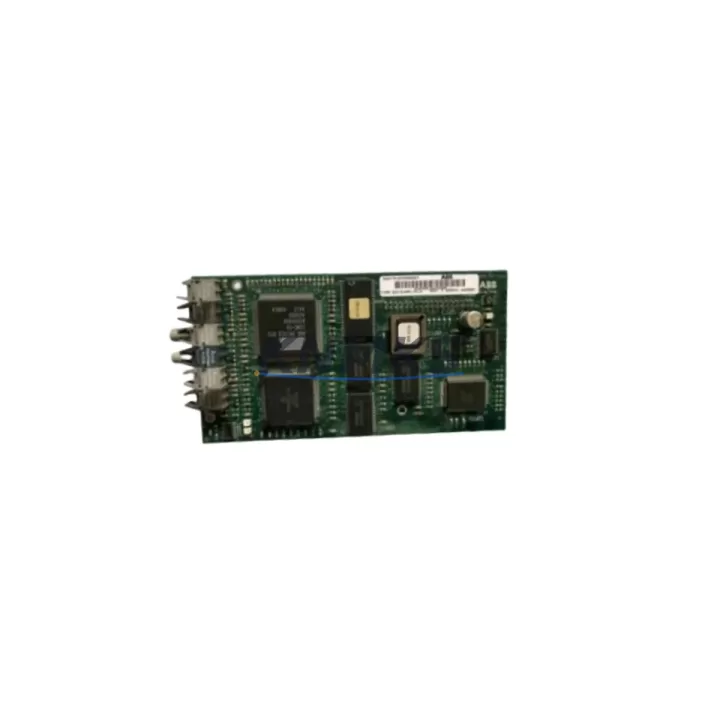
ABB GKWE850000R001 Maintenance-Proven Spare Part for Factory Uptime
The ABB GKWE850000R001 (internal order code: 81EB10) is an original analog I/O module designed for the ABB AC500 PLC platform — one of the most widely deployed programmable automation controllers in process, manufacturing, and utility industries. As a maintenance-proven spare part, the GKWE850000R001 is a critical component for facilities that depend on continuous analog signal acquisition and output control across sensors, transmitters, and final control elements.
For maintenance engineers managing aging AC500 installations, having a verified, in-stock GKWE850000R001 on the shelf is not optional — it is a fundamental element of any credible spare parts strategy. Signal interruptions caused by a failed analog module can cascade into process shutdowns, batch losses, and unplanned downtime events that far exceed the cost of the module itself. KNMKS supplies this module as a tested, original-specification spare with a support terms confirmed by quotation, ready for immediate dispatch to minimize your mean time to repair (MTTR).
Spare Maintenance Table
| Part Number | GKWE850000R001 |
| Order Code / SKU | 81EB10 |
| Brand | ABB |
| Series | AC500 |
| Module Type | Analog I/O Module |
| Platform Compatibility | ABB AC500 PLC family (PM5xx, PM5xx-ETH, PM5xx-2ETH CPUs) |
| Signal Type | Analog input/output (voltage and current signals, 0–10 V / 4–20 mA typical) |
| Installation | DIN rail mount via AC500 backplane / terminal unit |
| Operating Temperature | 0 °C to +60 °C (standard industrial environment) |
| Origin | Germany (DE) |
| Condition | Original, new or tested-serviceable |
| Support terms | 12 Months |
| Dispatch | Tested before shipment; express logistics available |
| Application | Process control, manufacturing automation, utility SCADA, water treatment, energy management |
Maintenance Planning for Continuous Operation
When a GKWE850000R001 analog module fails or shows degraded signal accuracy, the replacement procedure should be treated as an opportunity for a broader control cabinet inspection. Maintenance engineers are advised to simultaneously verify the condition of the associated AC500 terminal unit (TB5xx series) that the analog module plugs into — worn or corroded terminal contacts are a common secondary failure point that can cause intermittent signal faults even after a module swap.
The AC500 CPU module (such as the PM554 or PM564 series) should be checked for firmware currency and diagnostic fault logs before and after the analog module replacement. If the CPU has been logging analog channel errors, clearing the fault history and confirming clean operation post-replacement is essential for handover documentation.
Power supply integrity is equally critical. The ABB CP-E 24VDC power supply feeding the AC500 rack should be load-tested to confirm it can sustain the full module complement without voltage sag — analog modules are particularly sensitive to supply ripple, which can manifest as signal drift or calibration offset. A failing power supply is frequently misdiagnosed as an analog module fault.
For installations using AC500 communication modules (such as CM572-DP for PROFIBUS or CM577-ETH for Ethernet/IP), confirm that the fieldbus network remains stable after the module replacement. Analog module hot-swap procedures on some AC500 configurations may trigger a brief CPU scan cycle interruption; coordinating with the control room operator before replacement prevents false alarms on the SCADA or DCS historian.
Where the AC500 system interfaces with signal isolators or loop-powered transmitters on the analog input channels, verify that the isolator output range matches the GKWE850000R001 input specification. Mismatched signal ranges are a leading cause of post-replacement calibration errors. Additionally, inspect the fuse protection on each analog channel loop — blown channel fuses are often overlooked during fault isolation and can simulate a module failure.
For facilities running ABB Panel Builder or Automation Builder engineering software, ensure the hardware configuration file reflects the correct module type and slot assignment after replacement. An incorrect hardware configuration will prevent the CPU from recognizing the new module and may generate persistent fault codes.
Site Replacement Workflow
Step 1 — Pre-replacement verification: Confirm the GKWE850000R001 part number and 81EB10 order code against the existing module label and the project’s bill of materials. Cross-reference with the AC500 hardware catalog to confirm the terminal unit compatibility for your specific rack configuration.
Step 2 — Safe isolation: Follow your site’s lockout/tagout (LOTO) procedure. De-energize the analog loop circuits at the field junction box before removing the module. Note the channel wiring assignments from the terminal unit label or as-built drawings.
Step 3 — Module extraction and inspection: Remove the failed module and inspect the terminal unit connector for bent pins, corrosion, or debris. Clean with approved contact cleaner if necessary before inserting the replacement.
Step 4 — Replacement and configuration: Insert the GKWE850000R001 into the correct slot. Power up the rack and confirm the CPU recognizes the module without fault codes. If using Automation Builder, perform an online hardware comparison to validate the configuration.
Step 5 — Signal verification: Apply known reference signals to each analog input channel and verify the PLC process values match within the specified accuracy. For output channels, confirm the field device responds correctly to commanded output values.
Step 6 — Documentation and handover: Record the replacement date, new module serial number, and post-replacement test results in the maintenance log. Update the spare parts inventory to trigger a reorder for the consumed module.
This workflow is compatible with both hot-standby and standard single-CPU AC500 configurations and supports a controlled return to service that minimizes the risk of repeat failures or process upsets.
Spare Parts Support FAQ
Q1: Is the GKWE850000R001 a direct drop-in replacement for older AC500 analog modules?
Yes. The GKWE850000R001 (81EB10) is designed for the AC500 platform and is compatible with the standard AC500 terminal unit and backplane architecture. For installations using earlier AC500 hardware revisions, confirm the firmware version of the CPU module supports the module variant. KNMKS technical support can assist with compatibility verification prior to order.
Q2: How does KNMKS verify the module before shipment?
Every GKWE850000R001 unit dispatched by KNMKS undergoes functional testing to confirm analog channel integrity, communication with the AC500 backplane, and correct signal range response. Test records are available upon request. All units are covered by a support terms confirmed by quotation from the date of dispatch.
Q3: Can KNMKS support long-term supply for multi-site maintenance programs?
Yes. KNMKS maintains buffer stock of high-demand AC500 spare parts including the GKWE850000R001 to support annual maintenance contracts, scheduled turnarounds, and emergency breakdown coverage. Framework agreements with agreed lead times and pricing are available for procurement teams managing multi-site or multi-year maintenance programs.
Q4: What is the recommended spare parts holding strategy for the GKWE850000R001?
For facilities with more than four AC500 racks in service, a minimum of one GKWE850000R001 per analog module type per site is recommended as a critical spare. For high-availability processes (continuous production, water treatment, energy), a two-unit holding with staggered procurement cycles reduces the risk of simultaneous stock-out during peak maintenance periods. KNMKS can advise on a site-specific spare parts criticality assessment on request.
© 2026 KNMKS. All rights reserved.
Original Source: https://knmks.com
Contact: admin@knmks.com | +86 18359268345
Product Identification
- Brand / Ecosystem
-
ABB
ABB - Model / Series
-
81EB10-GKWE850000R001
AC500 Series - Product Family
- PLCs & Controllers
- Availability Status
- Available on request after model and quantity confirmation
- Inquiry Type
- B2B RFQ, replacement inquiry and project spare-part request
- Pre-Quote Check
- Exact SKU, brand, series, quantity, nameplate photos and destination country are checked before quotation
System Path
Where this product fits in the KNMKS automation structure.
Specification & Inquiry Focus
- Control platform
- PLC, PAC and modular controllers
- Common needs
- CPU, rack, power and I/O expansion
- Project support
- Replacement, cabinet build and maintenance
Buyer Confirmation
Information KNMKS checks before replying.
- Exact model
- 81EB10-GKWE850000R001
- Brand / ecosystem
- ABB
- Product family
- PLCs & Controllers
- Application note
- Replacement, maintenance, project build or spare-part list
- Useful photos
- Nameplate, installed unit, cabinet layout or connector side
- Delivery details
- Quantity, destination country and target schedule
Document Support
Files and notes can be confirmed during quotation.
- Product photos or nameplate confirmation when available
- Packing and delivery notes before quotation confirmation
- Support scope and delivery terms confirmed per inquiry
- Export document coordination for qualified B2B requests
Inquiry Support
- Model cross-checking before quotation
- CPU, power, rack and expansion module matching
- Support for replacement and project inquiry
What to Send Us
- Brand and exact model number: ABB 81EB10-GKWE850000R001
- Quantity and required delivery time
- Application, replacement requirement or nameplate photo
- Destination country and shipping preference
RFQ Preparation
This is a product inquiry page built for RFQ communication.
Fast Model Check
Send this model to KNMKS for confirmation.
Include quantity, destination country and photos if this is a maintenance replacement. The inquiry will be saved with a reference number after submission.
Brand & Compatibility Note
KNMKS displays automation product information for well-known industrial brand ecosystems and compatible replacement references. Brand names are used for product identification and compatibility reference only; final availability and commercial terms are confirmed per quotation.
 Manufacturing
 Machine Tools
 Packaging
 Energy & Power



 HMI & Displays
 Servo Systems
 Variable Frequency Drives
 Sensors