
Overview
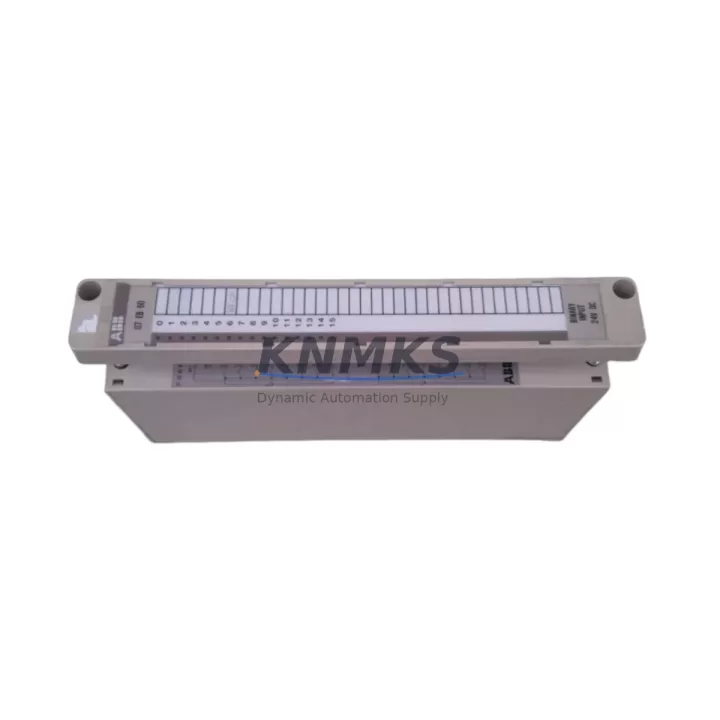
ABB GJV3074340R1 Migration-Ready DI Module for Legacy PLC Systems
The ABB GJV3074340R1 is a digital input module designed for the ABB AC500 programmable logic controller platform, widely deployed across process automation, machine control, and utility infrastructure projects. As legacy control cabinets age and original spare parts reach end-of-life, the GJV3074340R1 has become a critical migration-ready replacement for discontinued DI modules in AC500-based systems. Whether you are managing a planned retrofit or responding to an unplanned failure, this module provides a verified drop-in upgrade path that preserves existing wiring topology, backplane addressing, and program logic without requiring a full system redesign.
The GJV3074340R1 is compatible with the AC500 CPU modules including the PM571, PM581, and PM591, and integrates directly into the standard AC500 I/O bus via the terminal unit backplane. Engineers replacing older DI modules in the same rack will find that the module slot addressing, channel mapping, and diagnostic behavior remain consistent with the original configuration, significantly reducing the risk of logic errors during commissioning. Before installation, it is essential to verify the terminal unit type — the GJV3074340R1 is paired with a specific TU505 or TU516 terminal unit, and mismatched terminal units will prevent correct signal routing even if the module seats physically.
Power budget confirmation is a mandatory step in any AC500 retrofit. The GJV3074340R1 draws its supply from the backplane bus, and the total current consumption of all modules in the rack must remain within the rated output of the PS501 or PS502 power supply module installed in the system. In aging installations where additional I/O expansion modules such as the DC532 or AI523 have been added over time, the cumulative load may approach the power supply limit. A pre-retrofit power audit prevents unexpected shutdowns during the first live test after module swap.
For systems communicating over PROFIBUS DP or Modbus RTU, the GJV3074340R1 does not alter the communication module configuration. The CI501-PNIO or CI502-PNIO PROFINET communication interface modules installed in the same rack continue to operate without reconfiguration, provided the GSD file and network topology remain unchanged. However, if the retrofit is part of a broader migration from PROFIBUS to PROFINET, the communication module replacement must be planned and executed separately, with corresponding updates to the HMI tag database and SCADA driver configuration.
HMI screen updates are frequently overlooked during DI module replacements. If the original module used custom diagnostic bits or channel-level fault indicators mapped to operator panels running CP600 or CP635 HMI terminals, those tag addresses must be verified against the new module’s diagnostic word structure. A mismatch between the HMI tag map and the actual module diagnostic output can result in false alarms or silent faults that are difficult to trace during post-retrofit operation.
Firmware compatibility should be confirmed before deployment. The GJV3074340R1 is supported under AC500 firmware versions that align with the PS501 Control Builder Plus programming environment. If the target system is running an older firmware baseline, a firmware update on the CPU module may be required to enable full diagnostic transparency for the replacement DI module. This step should be scheduled during the planned maintenance window and validated in a test environment before field execution.
All units supplied by KNMKS are tested prior to shipment, with functional verification of all digital input channels under simulated field conditions. Stock is maintained in regional warehouses to support urgent replacement requirements with short lead times. Each GJV3074340R1 unit is covered by a support terms confirmed by quotation from the date of shipment, applicable to manufacturing defects and functional failures under normal operating conditions.
Migration Compatibility Table
| Parameter | Details |
|---|---|
| Compatible CPU Modules | PM571, PM581, PM591 (ABB AC500 series) |
| Terminal Unit Requirement | TU505 or TU516 — must match original installation |
| Backplane Interface | AC500 I/O bus — direct slot replacement, no address reconfiguration required |
| Communication Compatibility | PROFIBUS DP, PROFINET (via CI501-PNIO / CI502-PNIO), Modbus RTU |
| Power Supply Compatibility | PS501, PS502 — verify rack power budget before installation |
| Programming Environment | PS501 Control Builder Plus — confirm firmware version alignment |
| HMI Compatibility | CP600, CP635 — verify diagnostic tag mapping after replacement |
| Installation Space | Standard AC500 rack slot — no mechanical modification required |
| Replacement Recommendation | Direct drop-in for discontinued AC500 DI modules in same rack position |
| Commissioning Focus | Channel mapping verification, power budget audit, HMI tag validation, firmware check |
| Support terms | 12 months from shipment date — manufacturing defects and functional failures |
Retrofit Planning for Existing Automation Systems
A successful retrofit of the GJV3074340R1 into an existing AC500 installation requires a structured pre-work checklist that addresses every layer of the control system. Starting at the hardware level, the engineer must confirm that the existing TU505 or TU516 terminal unit is in serviceable condition — corroded terminals or damaged locking clips on the terminal unit are a common source of intermittent faults after module replacement and should be replaced proactively rather than reactively.
At the rack level, the physical slot position of the replacement module must match the original configuration. The AC500 backplane assigns module addresses based on slot position, and any deviation will cause the CPU to report a configuration mismatch fault on startup. If the original module occupied slot 3 of a rack containing a DC532 digital combined I/O module and an AI523 analog input module, the GJV3074340R1 must be installed in the same slot 3 position to maintain address continuity without modifying the hardware configuration in Control Builder Plus.
Signal isolation requirements should be reviewed for input channels connected to field devices operating at different voltage references or in electrically noisy environments. In installations where the GJV3074340R1 receives signals from proximity sensors, limit switches, or relay contacts located in separate control cabinets, signal isolators or surge protection devices may be required on the terminal unit wiring to protect the module input circuits from transient voltages. This is particularly relevant in retrofit scenarios where the original wiring was installed without isolation and the field environment has changed since the original commissioning.
For systems that include a CI501-PNIO PROFINET communication module or a CI502-PNIO interface in the same rack, the network configuration does not require modification when replacing a DI module in the same slot. However, if the retrofit is being performed alongside a communication protocol migration — for example, moving from a legacy PROFIBUS DP network to a PROFINET architecture — the communication module replacement, GSD file update, and SCADA driver reconfiguration must be completed and validated before the DI module swap is executed. Attempting to commission both changes simultaneously significantly increases the risk of extended downtime.
Programming cable access is required if the CPU firmware needs to be updated prior to module installation. The standard USB programming cable for the AC500 platform provides direct access to the PS501 Control Builder Plus environment for firmware upload and hardware configuration verification. Ensure the programming cable and laptop with the correct Control Builder Plus version are available on-site before the maintenance window begins.
Downtime Control During System Migration
Minimizing downtime during a DI module replacement on an active AC500 system requires preparation that begins well before the maintenance window. The most effective approach is to export and archive the current hardware configuration and application program from the CPU using PS501 Control Builder Plus before any physical work begins. This backup serves as the recovery baseline if the replacement module triggers an unexpected configuration fault or if the CPU requires a cold restart during commissioning.
Where the process allows, the input channels served by the GJV3074340R1 should be placed in a safe state before the module is removed. For digital inputs connected to interlock circuits or safety-critical signals, the control logic should be reviewed to confirm that removing the module will not trigger an unintended shutdown or process trip. In some installations, it may be necessary to temporarily bypass the affected input channels in the program logic — with appropriate authorization and documentation — to allow the module swap to proceed without interrupting the broader process.
After the replacement module is installed and the system is powered, the first commissioning step is to verify that the CPU recognizes the GJV3074340R1 in the correct slot without generating a hardware mismatch fault. If the CPU reports a configuration error, the hardware configuration in Control Builder Plus must be updated to reflect the replacement module type and downloaded to the CPU before the application program is restarted. Channel-by-channel input verification using a loop tester or by activating the connected field devices confirms that all 16 input channels are reading correctly before the system is returned to automatic operation.
Post-retrofit monitoring for the first 24 to 48 hours of operation is strongly recommended. Reviewing the CPU diagnostic buffer and the module’s channel-level fault indicators during this period allows engineers to identify any latent wiring issues or signal quality problems that were not apparent during the initial commissioning test. Early detection of these issues prevents them from escalating into unplanned shutdowns after the maintenance team has left the site.
Retrofit Support FAQ
Q: Is the GJV3074340R1 a direct replacement for the discontinued DI module in my AC500 rack?
A: Yes, provided the terminal unit type (TU505 or TU516) and slot position match the original installation. The module uses the same backplane interface and channel addressing as the original AC500 DI modules, allowing direct replacement without modifying the hardware configuration in Control Builder Plus in most cases. Confirm the exact terminal unit model before ordering.
Q: What pre-shipment testing is performed on each unit?
A: Every GJV3074340R1 unit supplied by KNMKS undergoes functional testing of all digital input channels under simulated field signal conditions prior to shipment. Units that do not meet the original ABB specification are not dispatched. A support terms confirmed by quotation from the shipment date covers manufacturing defects and functional failures under normal operating conditions.
Q: Do I need to update the firmware on my AC500 CPU before installing the replacement module?
A: Firmware compatibility depends on the current firmware version running on your PM571, PM581, or PM591 CPU. In most cases, systems running a recent firmware baseline will recognize the GJV3074340R1 without a firmware update. However, if your system is running a significantly older firmware version, a firmware update via PS501 Control Builder Plus may be required to enable full diagnostic transparency. Contact our technical team with your CPU model and current firmware version for a compatibility confirmation before scheduling the maintenance window.
Q: What is the lead time and stock availability?
A: KNMKS maintains regional warehouse stock of the GJV3074340R1 to support urgent replacement requirements. Standard lead time for in-stock units is 3 to 7 business days depending on destination. For critical applications with zero-tolerance downtime requirements, contact admin@knmks.com or call +86 18359268345 to confirm current stock levels and expedited shipping options before placing your order.
© 2026 KNMKS. All rights reserved.
Original Source: https://knmks.com
Contact: admin@knmks.com | +86 18359268345
Product Identification
- Brand / Ecosystem
-
ABB
ABB - Model / Series
-
GJV3074340R1
AC500 Series - Product Family
- PLCs & Controllers
- Availability Status
- Available on request after model and quantity confirmation
- Inquiry Type
- B2B RFQ, replacement inquiry and project spare-part request
- Pre-Quote Check
- Exact SKU, brand, series, quantity, nameplate photos and destination country are checked before quotation
System Path
Where this product fits in the KNMKS automation structure.
Specification & Inquiry Focus
- Control platform
- PLC, PAC and modular controllers
- Common needs
- CPU, rack, power and I/O expansion
- Project support
- Replacement, cabinet build and maintenance
Buyer Confirmation
Information KNMKS checks before replying.
- Exact model
- GJV3074340R1
- Brand / ecosystem
- ABB
- Product family
- PLCs & Controllers
- Application note
- Replacement, maintenance, project build or spare-part list
- Useful photos
- Nameplate, installed unit, cabinet layout or connector side
- Delivery details
- Quantity, destination country and target schedule
Document Support
Files and notes can be confirmed during quotation.
- Product photos or nameplate confirmation when available
- Packing and delivery notes before quotation confirmation
- Support scope and delivery terms confirmed per inquiry
- Export document coordination for qualified B2B requests
Inquiry Support
- Model cross-checking before quotation
- CPU, power, rack and expansion module matching
- Support for replacement and project inquiry
What to Send Us
- Brand and exact model number: ABB GJV3074340R1
- Quantity and required delivery time
- Application, replacement requirement or nameplate photo
- Destination country and shipping preference
RFQ Preparation
This is a product inquiry page built for RFQ communication.
Fast Model Check
Send this model to KNMKS for confirmation.
Include quantity, destination country and photos if this is a maintenance replacement. The inquiry will be saved with a reference number after submission.
Brand & Compatibility Note
KNMKS displays automation product information for well-known industrial brand ecosystems and compatible replacement references. Brand names are used for product identification and compatibility reference only; final availability and commercial terms are confirmed per quotation.
 Manufacturing
 Machine Tools
 Packaging
 Energy & Power



 HMI & Displays
 Servo Systems
 Variable Frequency Drives
 Sensors