
Overview
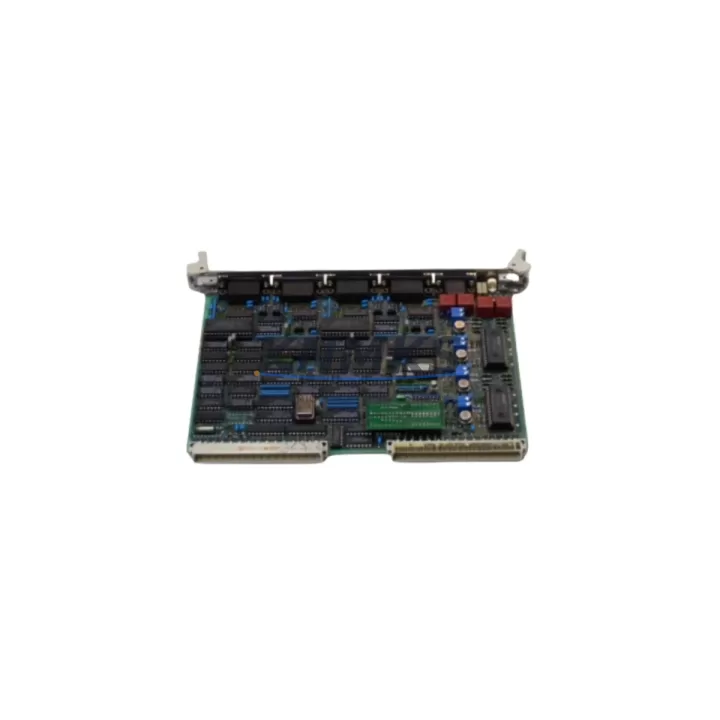
ABB GJR5137200R0005 Migration-Ready Digital I/O for Legacy Control Systems
The ABB GJR5137200R0005 (also referenced as 35AE92G-E) is a digital I/O module designed for the ABB AC500 PLC platform — one of the most widely deployed modular control architectures in industrial automation. As legacy AC500 installations approach end-of-support cycles, this module serves as a verified drop-in replacement for aging or discontinued I/O hardware, enabling engineers to extend system life, restore lost capacity, and execute phased control cabinet upgrades without full platform migration.
Whether you are replacing a failed module in a running production line, expanding I/O capacity in an existing AC500 rack, or preparing a control cabinet for a broader retrofit, the GJR5137200R0005 provides the electrical compatibility, backplane interface alignment, and firmware recognition required for seamless integration. Pre-shipment functional testing is performed on every unit prior to dispatch, and all modules are covered by a support terms confirmed by quotation from the date of delivery.
Migration Compatibility Table
| Parameter | Details |
|---|---|
| Module SKU | GJR5137200R0005 / 35AE92G-E |
| Platform | ABB AC500 PLC Series |
| Module Type | Digital I/O Module |
| Backplane Interface | AC500 S500 I/O bus — compatible with TB511, TB521, TB541 terminal bases |
| Installation | Snap-fit onto compatible terminal base; no tools required for module swap |
| Wiring Compatibility | Existing field wiring retained on terminal base; no rewiring required during module replacement |
| Communication | AC500 internal I/O bus; compatible with CS31, PROFIBUS-DP, Modbus, CANopen via CPU coupler |
| Firmware Recognition | Recognized by AC500 V2 and V3 CPU firmware; verify PS501 Control Builder version compatibility |
| Replacement Scope | Direct replacement for same-series discontinued or failed digital I/O modules |
| Commissioning | Module address auto-assigned by rack slot position; no manual address configuration required |
| Pre-Shipment Testing | Full functional test performed before dispatch |
| Support terms | support terms confirmed by quotation from date of delivery |
Retrofit Planning for Existing Automation Systems
Successful integration of the GJR5137200R0005 into an existing AC500 installation requires a structured pre-retrofit assessment. Begin by confirming the terminal base model currently installed in the rack — the TB511-ETH, TB521, or TB541 series are the most common bases found in legacy AC500 cabinets, and the GJR5137200R0005 must be matched to the correct base variant to ensure proper I/O bus connectivity and signal routing.
Power budget verification is a critical step often overlooked during module replacement. The AC500 PM5xx or PM5xx-ETH CPU module supplies backplane power to all connected I/O modules; adding or replacing digital I/O modules changes the total current draw on the internal bus. Confirm that the existing power supply module — typically an ABB CP600 series HMI power rail or a dedicated 24 VDC panel supply — has sufficient headroom to support the replacement module alongside existing loads.
For installations where the AC500 rack communicates with field devices via PROFIBUS-DP or CANopen, verify that the communication coupler — such as the AC500 CI590-CS31-HA or CI501-PNIO PROFINET adapter — is configured to recognize the updated I/O map after module replacement. If the slot position of the GJR5137200R0005 differs from the original module, the I/O address map in the PS501 Control Builder project must be updated and re-downloaded to the CPU before the system is returned to automatic mode.
HMI screens linked to specific I/O tags — particularly on CP600 or CP620 operator panels — should be reviewed to confirm that tag addresses remain valid after the retrofit. In cases where the module replacement is part of a broader control cabinet upgrade involving additional DI/DO expansion modules or analog I/O cards, the full rack I/O configuration should be exported from PS501, validated offline, and re-imported after hardware changes are complete. Signal isolators or relay output modules installed between the AC500 I/O and field devices should also be inspected for compatibility with the updated channel configuration.
Downtime Control During System Migration
Minimizing unplanned downtime during an AC500 I/O module replacement requires preparation before the maintenance window begins. The most effective approach is to export and archive the current PS501 Control Builder project — including all hardware configuration, I/O mapping, and program logic — before any physical work begins. This archived project serves as the recovery baseline if commissioning issues arise after the module swap.
Because the GJR5137200R0005 installs on the terminal base without disturbing field wiring, the physical swap can typically be completed in under five minutes. The primary time risk lies in firmware recognition and I/O map validation after power-up. To reduce this risk, confirm in advance that the CPU firmware version supports the replacement module, and prepare the updated hardware configuration in PS501 offline so it can be downloaded immediately after the module is seated and power is restored.
For critical production lines where even brief interruptions are costly, consider staging the replacement during a scheduled maintenance window and having a verified spare module on-site before beginning work. Our pre-shipment testing protocol ensures that every GJR5137200R0005 unit shipped has been functionally verified, reducing the risk of receiving a non-operational module during a time-sensitive retrofit. The support terms confirmed by quotation provides additional assurance that the replacement module will perform reliably throughout the post-retrofit commissioning period and beyond.
Where the AC500 system is integrated with upstream SCADA or DCS platforms via Modbus TCP or OPC-UA, coordinate with the control room team to confirm that the communication link remains stable during the module swap and that any watchdog timers or heartbeat signals are temporarily suspended to prevent false fault alarms during the maintenance window.
Retrofit Support FAQ
Q: Is the GJR5137200R0005 a direct replacement for my existing AC500 digital I/O module?
A: The GJR5137200R0005 is designed for the ABB AC500 S500 I/O platform and is compatible with the standard AC500 terminal base and backplane bus. Confirm that your existing terminal base model matches the required base variant for this module. If the original module SKU differs, cross-reference the AC500 I/O module selection guide or contact us with your existing module part number for a compatibility confirmation before ordering.
Q: Will I need to modify my existing field wiring or terminal connections?
A: No. The AC500 architecture separates the I/O module from the field wiring terminal base. When replacing the GJR5137200R0005, the terminal base — and all connected field wiring — remains in place. Only the module itself is swapped, which eliminates rewiring risk and significantly reduces replacement time.
Q: What commissioning steps are required after installing the replacement module?
A: After seating the module, power up the AC500 rack and confirm that the CPU recognizes the module in the correct slot. In PS501 Control Builder, verify that the hardware configuration matches the physical rack layout and download the project to the CPU if any configuration changes were made. Check I/O channel status in the diagnostic view and confirm that all field signals are reading correctly before returning the system to automatic mode.
Q: What does the support terms confirmed by quotation cover, and how quickly can replacement stock be supplied?
A: The support terms confirmed by quotation cover manufacturing defects and functional failures under normal operating conditions from the date of delivery. Every unit undergoes pre-shipment functional testing before dispatch. We maintain in-stock inventory of the GJR5137200R0005 to support urgent retrofit and breakdown replacement requirements — contact us at admin@knmks.com or +86 18359268345 to confirm current availability and lead time for your order.
© 2026 KNMKS. All rights reserved.
Original Source: https://knmks.com
Contact: admin@knmks.com | +86 18359268345
Product Identification
- Brand / Ecosystem
-
ABB
ABB - Model / Series
-
GJR5137200R0005 35AE92G-E
AC500 Series - Product Family
- PLCs & Controllers
- Availability Status
- Available on request after model and quantity confirmation
- Inquiry Type
- B2B RFQ, replacement inquiry and project spare-part request
- Pre-Quote Check
- Exact SKU, brand, series, quantity, nameplate photos and destination country are checked before quotation
System Path
Where this product fits in the KNMKS automation structure.
Specification & Inquiry Focus
- Control platform
- PLC, PAC and modular controllers
- Common needs
- CPU, rack, power and I/O expansion
- Project support
- Replacement, cabinet build and maintenance
Buyer Confirmation
Information KNMKS checks before replying.
- Exact model
- GJR5137200R0005 35AE92G-E
- Brand / ecosystem
- ABB
- Product family
- PLCs & Controllers
- Application note
- Replacement, maintenance, project build or spare-part list
- Useful photos
- Nameplate, installed unit, cabinet layout or connector side
- Delivery details
- Quantity, destination country and target schedule
Document Support
Files and notes can be confirmed during quotation.
- Product photos or nameplate confirmation when available
- Packing and delivery notes before quotation confirmation
- Support scope and delivery terms confirmed per inquiry
- Export document coordination for qualified B2B requests
Inquiry Support
- Model cross-checking before quotation
- CPU, power, rack and expansion module matching
- Support for replacement and project inquiry
What to Send Us
- Brand and exact model number: ABB GJR5137200R0005 35AE92G-E
- Quantity and required delivery time
- Application, replacement requirement or nameplate photo
- Destination country and shipping preference
RFQ Preparation
This is a product inquiry page built for RFQ communication.
Fast Model Check
Send this model to KNMKS for confirmation.
Include quantity, destination country and photos if this is a maintenance replacement. The inquiry will be saved with a reference number after submission.
Brand & Compatibility Note
KNMKS displays automation product information for well-known industrial brand ecosystems and compatible replacement references. Brand names are used for product identification and compatibility reference only; final availability and commercial terms are confirmed per quotation.
 Manufacturing
 Machine Tools
 Packaging
 Energy & Power



 HMI & Displays
 Servo Systems
 Variable Frequency Drives
 Sensors