
Overview
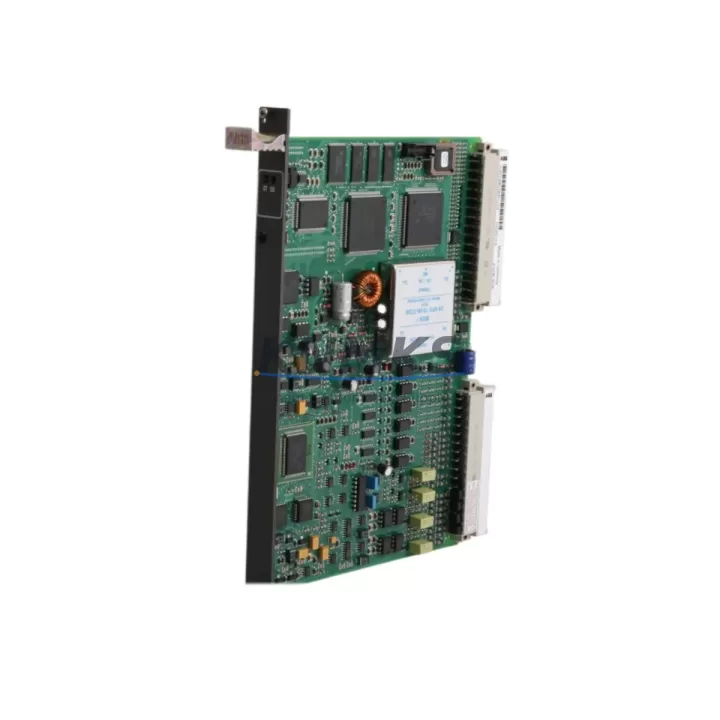
ABB GJR2396200R1210 83SR51F-E Migration-Ready I/O Module for Legacy AC500 Control Systems
The ABB GJR2396200R1210 (83SR51F-E) is a proven I/O module designed for seamless integration into existing AC500 PLC architectures. As industrial facilities face increasing pressure to modernize aging control infrastructure, this module serves as a critical bridge between legacy field wiring and current automation platforms. Whether you are replacing a failed unit in a running production line, upgrading a discontinued I/O tier, or consolidating a multi-rack control cabinet, the GJR2396200R1210 delivers the electrical compatibility and mechanical fit required to minimize engineering rework and reduce unplanned downtime.
Before committing to a retrofit, engineers must verify several key parameters. Power supply capacity at the backplane must support the module’s current draw without exceeding the rack’s total budget — particularly important when the GJR2396200R1210 is installed alongside power-hungry communication modules such as the CM572-DP PROFIBUS master or the CM577-ETH Ethernet coupler. Terminal wiring must be mapped against the original I/O list to confirm signal type, polarity, and shielding requirements. Backplane slot addressing should be confirmed in the PLC configuration tool (Automation Builder or PS501 Control Builder) to ensure the module address matches the existing program logic without requiring a full re-download.
Program compatibility is a frequent concern during I/O module replacement. If the original module was configured with specific diagnostic blocks or interrupt-driven routines, the replacement unit must support equivalent function codes. In most AC500 retrofit scenarios, the GJR2396200R1210 can be substituted without modifying the application program, provided the firmware version on the CPU module — typically a PM573, PM583, or PM595 — is at or above the minimum supported release. Firmware version mismatches between the CPU and I/O modules are a leading cause of initialization failures during first power-up after replacement.
HMI screen mappings tied to I/O tags should be reviewed before the cutover. If the facility uses a CP600 operator panel or a third-party SCADA system communicating over Modbus TCP or PROFIBUS DP, tag addresses linked to the replaced module must remain consistent. Communication link integrity — including baud rate settings, node addresses, and termination resistor placement — should be re-verified after the module is seated and the rack is powered. Installation space within the control cabinet must also be confirmed: the GJR2396200R1210 occupies a standard AC500 backplane slot, but cable routing and DIN rail clearance should be checked when retrofitting into older enclosures with limited depth.
Field commissioning typically follows a structured sequence: visual inspection of terminal connections, cold power-up with the CPU in STOP mode, diagnostic LED verification, forced I/O test against the field device list, and finally a controlled transfer to RUN mode with the original application loaded. This process, when executed with a pre-tested replacement module, routinely achieves full restoration within a single maintenance window.
All units supplied by KNMKS are tested prior to shipment, covered by a support terms confirmed by quotation, and supported by in-stock inventory for rapid dispatch.
Migration Compatibility Table
| Parameter | Details |
|---|---|
| SKU / Part Number | GJR2396200R1210 (83SR51F-E) |
| Brand / Series | ABB AC500 |
| Module Type | Digital/Analog I/O Module |
| Backplane Interface | AC500 standard backplane slot |
| Communication Compatibility | PROFIBUS DP, Modbus TCP, CS31 (platform dependent) |
| Supported CPU Modules | PM573, PM583, PM595 and compatible AC500 CPUs |
| Firmware Requirement | Verify CPU firmware ≥ minimum supported release in Automation Builder |
| Installation | Standard DIN rail / backplane slot mounting |
| Replacement Recommendation | Direct drop-in for same-series legacy I/O modules; verify slot address in program |
| Commissioning Notes | Cold power-up in STOP mode; LED diagnostic check; forced I/O test before RUN |
| Origin | Germany |
| Support terms | 12 Months — KNMKS verified, tested before shipment |
Retrofit Planning for Existing Automation Systems
A successful retrofit begins well before the module arrives on site. The engineering team should pull the existing rack configuration from the PLC project file and cross-reference each occupied slot against the replacement bill of materials. In a typical AC500 control cabinet, the GJR2396200R1210 shares the backplane with a TB521 or TB541 terminal base, which must be confirmed as present and undamaged before the new module is inserted. If the terminal base shows signs of corrosion or mechanical wear from years of field service, replacing it alongside the I/O module eliminates a common source of intermittent faults after commissioning.
Power distribution within the cabinet deserves careful attention. The PS501 power supply module feeding the rack must have sufficient headroom to support the GJR2396200R1210 alongside any co-installed modules. Engineers frequently overlook the cumulative load of signal isolators and loop-powered transmitters connected to analog input channels — these contribute to the total current budget and can cause nuisance tripping if the power supply is already near its rated output. Where the existing PS501 is undersized, a parallel power feed or a higher-capacity replacement should be planned as part of the retrofit scope.
For systems communicating over PROFIBUS DP, the DP node address of the replaced module must be set identically to the original before the network is re-energized. A DP configuration mismatch will cause the master — often a CM572-DP coupler — to report a slave fault and prevent the CPU from entering RUN mode. Similarly, for Ethernet-connected systems using the CM577-ETH module, IP address assignments and subnet masks should be documented before any hardware is disturbed. Programming cables such as the TK503 USB programming cable are recommended for a final program upload from the CPU before the cutover, preserving the last known-good application as a recovery baseline.
Downtime Control During System Migration
Minimizing production interruption during an I/O module replacement requires a disciplined pre-outage preparation process. The original application program should be uploaded and archived at least 24 hours before the planned maintenance window. A full I/O list with current process values — captured from the HMI or SCADA historian — provides the commissioning team with a reference baseline for post-replacement verification. Where the process cannot tolerate a complete shutdown, partial isolation of the affected I/O group using hardwired bypass switches allows the remainder of the control system to continue operating while the module is exchanged.
During the physical swap, the CPU should be placed in STOP mode before the module is removed from the backplane. This prevents spurious output signals from reaching field devices during the transition. After the GJR2396200R1210 is seated and the terminal base connections are verified, the system should be powered up with all outputs inhibited. A channel-by-channel forced I/O test confirms that each input reads correctly from the field and each output drives its actuator as expected before the application is restarted in RUN mode. This structured approach consistently reduces commissioning time and eliminates the trial-and-error cycles that extend unplanned outages.
KNMKS maintains in-stock inventory of the GJR2396200R1210 and related AC500 components to support same-day or next-day dispatch, further compressing the total downtime window for facilities that cannot pre-stock spare modules.
Retrofit Support FAQ
Q: Is the GJR2396200R1210 a direct replacement for my existing AC500 I/O module?
A: In most AC500 retrofit scenarios, yes. The module is designed for drop-in compatibility within the AC500 backplane family. You should verify the slot address in your PLC project and confirm the terminal base type (TB521 or TB541) matches before installation.
Q: What commissioning steps are required after installation?
A: Power up the rack with the CPU in STOP mode, check diagnostic LEDs for any fault indication, perform a forced I/O test on all channels against your field device list, then transfer the CPU to RUN mode with the original application. The full sequence typically takes 30–90 minutes depending on I/O count.
Q: How do I confirm wiring compatibility with my existing terminal connections?
A: Compare the terminal assignment diagram for the GJR2396200R1210 against your as-built wiring drawings. Signal type (digital/analog), voltage range, and common reference must match. If your existing wiring uses shielded cables, ensure the shield termination point on the terminal base is intact.
Q: Does KNMKS provide pre-shipment testing and support terms coverage?
A: Yes. Every unit is functionally tested before dispatch. All GJR2396200R1210 modules supplied by KNMKS carry a support terms confirmed by quotation covering manufacturing defects and functional failures under normal operating conditions. In-stock units are available for same-day or next-day shipment.
© 2026 KNMKS. All rights reserved.
Original Source: https://knmks.com
Contact: admin@knmks.com | +86 18359268345
Product Identification
- Brand / Ecosystem
-
ABB
ABB - Model / Series
-
GJR2396200R1210-83SR51F-E
AC500 Series - Product Family
- PLCs & Controllers
- Availability Status
- Available on request after model and quantity confirmation
- Inquiry Type
- B2B RFQ, replacement inquiry and project spare-part request
- Pre-Quote Check
- Exact SKU, brand, series, quantity, nameplate photos and destination country are checked before quotation
System Path
Where this product fits in the KNMKS automation structure.
Specification & Inquiry Focus
- Control platform
- PLC, PAC and modular controllers
- Common needs
- CPU, rack, power and I/O expansion
- Project support
- Replacement, cabinet build and maintenance
Buyer Confirmation
Information KNMKS checks before replying.
- Exact model
- GJR2396200R1210-83SR51F-E
- Brand / ecosystem
- ABB
- Product family
- PLCs & Controllers
- Application note
- Replacement, maintenance, project build or spare-part list
- Useful photos
- Nameplate, installed unit, cabinet layout or connector side
- Delivery details
- Quantity, destination country and target schedule
Document Support
Files and notes can be confirmed during quotation.
- Product photos or nameplate confirmation when available
- Packing and delivery notes before quotation confirmation
- Support scope and delivery terms confirmed per inquiry
- Export document coordination for qualified B2B requests
Inquiry Support
- Model cross-checking before quotation
- CPU, power, rack and expansion module matching
- Support for replacement and project inquiry
What to Send Us
- Brand and exact model number: ABB GJR2396200R1210-83SR51F-E
- Quantity and required delivery time
- Application, replacement requirement or nameplate photo
- Destination country and shipping preference
RFQ Preparation
This is a product inquiry page built for RFQ communication.
Fast Model Check
Send this model to KNMKS for confirmation.
Include quantity, destination country and photos if this is a maintenance replacement. The inquiry will be saved with a reference number after submission.
Brand & Compatibility Note
KNMKS displays automation product information for well-known industrial brand ecosystems and compatible replacement references. Brand names are used for product identification and compatibility reference only; final availability and commercial terms are confirmed per quotation.
 Manufacturing
 Machine Tools
 Packaging
 Energy & Power



 HMI & Displays
 Servo Systems
 Variable Frequency Drives
 Sensors