
Overview
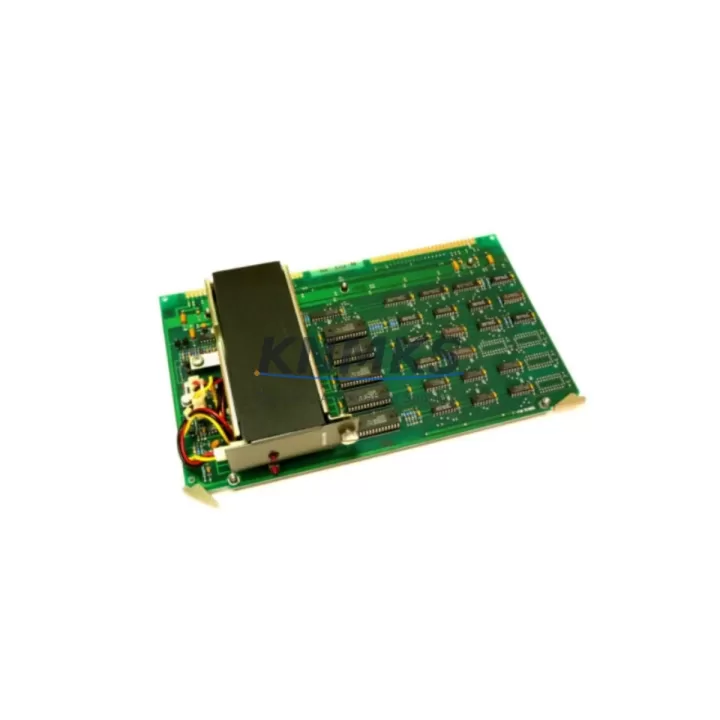
ABB GJR2393100R1200 88FT05C-E Migration-Ready Coupling Module: Legacy System Retrofit & Upgrade
The ABB GJR2393100R1200 88FT05C-E is a coupling module designed for the AC500 programmable logic controller platform, widely deployed across process automation, machine control, and infrastructure applications. As legacy AC500 installations approach end-of-life or face spare parts shortages, this module serves as a critical component in retrofit projects, enabling engineers to extend system lifespan, restore discontinued functionality, and bridge communication between aging backplane architectures and modern field devices.
When planning a replacement for a discontinued or obsolete coupling module, the first step is to verify the backplane slot compatibility. The GJR2393100R1200 88FT05C-E is designed to seat directly into the AC500 rack without mechanical modification, but engineers must confirm the rack generation — PM5xx and PM5xx-ETH series CPUs use different backplane bus protocols than earlier PM5xx variants. Mismatched backplane interfaces are a common source of commissioning delays, so cross-referencing the existing rack part number against the module’s compatibility matrix before installation is strongly recommended.
Power budget verification is equally important. The coupling module draws supply from the rack’s internal 5 VDC and 24 VDC rails. Before installing a replacement unit, calculate the total current draw across all installed I/O modules — including any TB5xx terminal base units and TA5xx adapter modules already in the cabinet — to ensure the power supply module (for example, a PS501 or PS502 series unit) has sufficient headroom. Overloaded power rails are a leading cause of intermittent faults in retrofitted systems.
For installations where the original system used PROFIBUS DP or Modbus RTU as the primary field communication protocol, the GJR2393100R1200 88FT05C-E supports transparent coupling between the CPU and downstream communication modules. If the retrofit also involves migrating from a serial fieldbus to PROFINET or EtherNet/IP, a communication module such as the CM589-PNIO or CM579-ETHIP should be added to the rack alongside the coupling module to handle protocol translation without requiring changes to the existing PLC program structure.
Terminal wiring compatibility is another key checkpoint. Many legacy AC500 installations use TB5xx terminal bases with fixed screw terminals. If the replacement project involves upgrading to spring-clamp terminal bases for improved vibration resistance, verify that the new terminal base footprint matches the existing DIN rail spacing and that signal assignments are preserved. Mislabeled or transposed wiring during a module swap is a preventable source of extended downtime.
HMI screen updates are often overlooked during coupling module replacements. If the system uses a CP600 or CP400 series operator panel connected via the internal AC500 bus, confirm that the HMI project references the correct module address. After a module replacement, re-download the HMI project to the panel and verify that all process values, alarm tags, and diagnostic screens display correctly before returning the system to production.
Firmware version alignment is mandatory. The GJR2393100R1200 88FT05C-E must be used with a CPU firmware version that supports the module’s hardware revision. Use Automation Builder or the legacy Control Builder Plus software to check the firmware version on the installed CPU and compare it against the module’s compatibility table. If a firmware update is required, schedule it during the same maintenance window as the module replacement to minimize total downtime.
All units supplied by KNMKS are sourced from verified industrial channels, pre-tested for electrical integrity, and shipped with a support terms confirmed by quotation covering manufacturing defects and functional failures under normal operating conditions. Stock is maintained across regional distribution points to support urgent replacement requirements with short lead times.
Migration Compatibility Table
| Parameter | Details |
|---|---|
| SKU / Part Number | GJR2393100R1200 88FT05C-E |
| Brand / Series | ABB AC500 |
| Module Type | PLC Coupling Module |
| Backplane Interface | AC500 internal bus (rack-mounted) |
| Compatible CPU Series | PM5xx, PM5xx-ETH (verify rack generation) |
| Communication Protocols | PROFIBUS DP, Modbus RTU (via communication modules) |
| Power Supply Compatibility | AC500 rack 5 VDC / 24 VDC internal rails |
| Terminal Base Compatibility | TB5xx series (confirm DIN rail spacing) |
| Installation Type | Direct rack insertion, no mechanical modification required |
| Firmware Requirement | Must match CPU firmware revision — verify via Automation Builder |
| HMI Compatibility | CP600 / CP400 series (re-download HMI project after swap) |
| Replacement Recommendation | Drop-in replacement for legacy AC500 coupling modules |
| Commissioning Notes | Verify module address, power budget, and fieldbus links before restart |
| Origin | China (CN) |
| Support terms | 12 months from date of shipment |
Retrofit Planning for Existing Automation Systems
A successful AC500 retrofit begins with a complete audit of the existing control cabinet. Document every installed module by part number and slot position before removing any hardware. In a typical AC500 rack, the coupling module occupies a dedicated slot adjacent to the CPU module — displacing it without first recording the slot map can result in address conflicts that are difficult to diagnose after reassembly.
When the retrofit scope extends beyond a single module replacement, consider the full bill of materials. A common upgrade path involves replacing the coupling module alongside a new I/O expansion module from the DI5xx or DO5xx series to add digital input or output capacity without expanding the physical cabinet footprint. If analog signal conditioning is required, AI5xx or AO5xx analog I/O modules can be added to the same rack, provided the power supply module has sufficient capacity.
For systems where the original control architecture relied on a dedicated programming cable (such as the TK501 USB programming cable) for CPU access, verify that the cable driver is compatible with the engineering workstation’s operating system before the maintenance window begins. Discovering a driver incompatibility on-site during a planned outage significantly extends downtime. Similarly, if the project involves migrating the PLC program from an older Control Builder Plus project to Automation Builder, complete the program conversion and simulation in the office environment before the field retrofit date.
Signal isolators are frequently required when integrating legacy 4–20 mA field instruments into a retrofitted AC500 system, particularly where long cable runs or ground loop issues exist. Installing a signal isolator between the field device and the AI5xx analog input module protects the new hardware from electrical noise and ensures measurement accuracy. This step is often omitted in fast-turnaround retrofits and becomes a source of intermittent analog faults post-commissioning.
Where the retrofit involves expanding the system to a second rack, a bus extension module is required to link the primary and secondary racks. Confirm that the bus extension cable length does not exceed the manufacturer’s specification, and that both racks share a common earth ground to prevent communication errors caused by ground potential differences.
Downtime Control During System Migration
Minimizing production downtime during a coupling module replacement requires preparation that begins weeks before the scheduled maintenance window. The most effective approach is to pre-configure the replacement module on a bench test rack, load the existing PLC program, and verify that all I/O addresses, communication links, and diagnostic functions operate correctly before the module is transported to the field site.
On the day of the replacement, begin by creating a full backup of the CPU program, data blocks, and hardware configuration using Automation Builder’s project archive function. Store the backup on at least two separate media — a local engineering laptop and a USB drive kept with the site documentation. This ensures that the original program logic can be restored within minutes if the replacement module exhibits unexpected behavior during commissioning.
During the physical swap, power down the rack in the correct sequence: disable field outputs first, then shut down the CPU, and finally remove rack power. Reversing this sequence risks writing undefined output states to field devices during the power-down transient. After installing the GJR2393100R1200 88FT05C-E, restore power in the reverse order and monitor the CPU diagnostic LEDs for any fault codes before re-enabling field outputs.
Once the system is back online, perform a structured commissioning check: verify all I/O module status LEDs, confirm fieldbus communication links are active, check HMI tag values against known process conditions, and review the CPU diagnostic log for any new fault entries. Document the commissioning results and retain them with the site maintenance record. A well-documented retrofit reduces the risk of repeat failures and supports future spare parts planning.
Retrofit Support FAQ
Q: Is the GJR2393100R1200 88FT05C-E a direct drop-in replacement for my existing AC500 coupling module?
A: In most AC500 rack configurations, yes — the module is designed for direct slot insertion without mechanical modification. However, you must verify the rack generation and CPU firmware version to confirm full compatibility before installation. Contact our technical team with your existing rack part number for a pre-sale compatibility check.
Q: What wiring changes are required when replacing the coupling module?
A: The coupling module itself does not have external field wiring — it connects via the backplane bus. No terminal rewiring is required for the module swap. If you are simultaneously upgrading terminal bases or I/O modules, document all existing wiring before disconnecting any terminals.
Q: How do I confirm the replacement module is functioning correctly after installation?
A: After powering up the rack, check the module’s status LED — a steady green indicates normal operation. Use Automation Builder to go online with the CPU and verify that the module appears in the hardware configuration without fault codes. All units shipped by KNMKS are pre-tested prior to dispatch to reduce on-site commissioning risk.
Q: What is the support terms coverage and what does it include?
A: All GJR2393100R1200 88FT05C-E units supplied by KNMKS carry a support terms confirmed by quotation from the date of shipment. The support terms covers manufacturing defects and functional failures under normal operating conditions. Units damaged by incorrect installation, overvoltage, or environmental factors outside the module’s rated specifications are not covered. Replacement or repair is arranged directly through our sales team.
© 2026 KNMKS. All rights reserved.
Original Source: https://knmks.com
Contact: admin@knmks.com | +86 18359268345
Product Identification
- Brand / Ecosystem
-
ABB
ABB - Model / Series
-
GJR2393100R1200 88FT05C-E
AC500 Series - Product Family
- PLCs & Controllers
- Availability Status
- Available on request after model and quantity confirmation
- Inquiry Type
- B2B RFQ, replacement inquiry and project spare-part request
- Pre-Quote Check
- Exact SKU, brand, series, quantity, nameplate photos and destination country are checked before quotation
System Path
Where this product fits in the KNMKS automation structure.
Specification & Inquiry Focus
- Control platform
- PLC, PAC and modular controllers
- Common needs
- CPU, rack, power and I/O expansion
- Project support
- Replacement, cabinet build and maintenance
Buyer Confirmation
Information KNMKS checks before replying.
- Exact model
- GJR2393100R1200 88FT05C-E
- Brand / ecosystem
- ABB
- Product family
- PLCs & Controllers
- Application note
- Replacement, maintenance, project build or spare-part list
- Useful photos
- Nameplate, installed unit, cabinet layout or connector side
- Delivery details
- Quantity, destination country and target schedule
Document Support
Files and notes can be confirmed during quotation.
- Product photos or nameplate confirmation when available
- Packing and delivery notes before quotation confirmation
- Support scope and delivery terms confirmed per inquiry
- Export document coordination for qualified B2B requests
Inquiry Support
- Model cross-checking before quotation
- CPU, power, rack and expansion module matching
- Support for replacement and project inquiry
What to Send Us
- Brand and exact model number: ABB GJR2393100R1200 88FT05C-E
- Quantity and required delivery time
- Application, replacement requirement or nameplate photo
- Destination country and shipping preference
RFQ Preparation
This is a product inquiry page built for RFQ communication.
Fast Model Check
Send this model to KNMKS for confirmation.
Include quantity, destination country and photos if this is a maintenance replacement. The inquiry will be saved with a reference number after submission.
Brand & Compatibility Note
KNMKS displays automation product information for well-known industrial brand ecosystems and compatible replacement references. Brand names are used for product identification and compatibility reference only; final availability and commercial terms are confirmed per quotation.
 Manufacturing
 Machine Tools
 Packaging
 Energy & Power



 HMI & Displays
 Servo Systems
 Variable Frequency Drives
 Sensors