
Overview
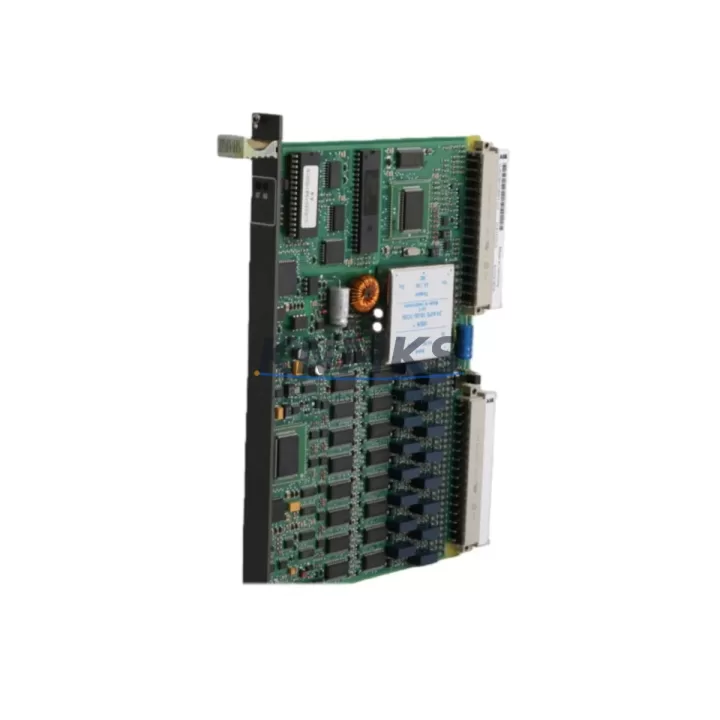
ABB GJR2391500R1210 81EU01H Migration-Ready Universal Input Module: Legacy System Migration and Compatible Upgrade
The ABB GJR2391500R1210 81EU01H (81EU01H) is a Universal Input Module designed for the ABB AC500 PLC platform, widely deployed across energy, manufacturing, petrochemical, and infrastructure automation systems. As legacy control architectures reach end-of-life and OEM support windows close, this module serves as a verified migration-ready replacement for discontinued or aging I/O hardware within existing AC500 control cabinets. Whether you are executing a planned retrofit, responding to an unplanned failure, or extending the operational life of a brownfield system, the GJR2391500R1210 81EU01H provides a direct-fit solution that minimizes engineering rework and reduces commissioning risk.
This module accepts multiple signal types across its input channels, making it suitable for mixed-signal environments common in legacy panel upgrades where sensor types may vary across zones. Its compatibility with the AC500 backplane architecture means it can be installed into existing racks without requiring a new CPU or communications infrastructure, preserving the original program logic and HMI screen layouts already validated in the field.
Migration Compatibility Table
| Parameter | Specification / Retrofit Guidance |
|---|---|
| SKU / Part Number | GJR2391500R1210 / 81EU01H |
| Platform Compatibility | ABB AC500 PLC series (PM5xx, PM5xx-ETH, PM5xx-2ETH) |
| Backplane Interface | AC500 I/O bus — direct slot replacement, no adapter required |
| Input Signal Types | Universal analog/digital inputs (verify channel configuration in existing program) |
| Terminal Wiring | Screw-terminal block; verify existing field wiring gauge and torque spec before re-termination |
| Power Supply Requirement | Supplied via AC500 backplane; confirm rack PSU (e.g., PS501) capacity before adding modules |
| Module Address / Slot | Address assigned by CPU slot position; re-use original slot to avoid program variable remapping |
| Firmware Compatibility | Compatible with AC500 firmware V2.x and V3.x; confirm CPU firmware version before installation |
| Communication Protocol | AC500 internal I/O bus; external protocols (PROFIBUS, Modbus, PROFINET) handled by CM modules |
| Installation Space | Standard AC500 module width; verify rack slot availability in existing control cabinet |
| Replacement Recommendation | Direct replacement for equivalent 81EU01H variants; cross-reference original BOM before ordering |
| Commissioning Focus | Signal scaling, channel enable/disable, watchdog timeout, and I/O forcing during hot-swap validation |
| Support terms | support terms confirmed by quotation — covers manufacturing defects; includes pre-shipment functional test |
Retrofit Planning for Existing Automation Systems
Successful integration of the GJR2391500R1210 81EU01H into a running automation system requires a structured pre-retrofit assessment. Begin by auditing the existing rack configuration: confirm the number of occupied slots, the current power budget drawn from the PS501 or equivalent AC500 power supply module, and whether any adjacent slots are occupied by communication modules such as the CM572-DP (PROFIBUS DP master) or CM589-PNIO (PROFINET I/O controller). Adding or replacing an I/O module changes the rack’s power draw, and an undersized PSU is a common cause of intermittent faults after retrofit.
Terminal wiring is the next critical checkpoint. The 81EU01H uses a screw-terminal interface; when replacing a failed or obsolete module, photograph and document the existing field wiring before disconnection. Verify conductor cross-sections against the module’s rated terminal capacity, and inspect for any field-side signal conditioning — shielded cables, surge suppressors, or signal isolators — that may need to be retained or replaced. In mixed-signal environments, confirm that each channel’s input type (voltage, current, RTD, thermocouple) matches the channel configuration stored in the CPU program, as a mismatch will produce incorrect process values without triggering a hardware fault.
For systems running on older AC500 CPUs such as the PM554 or PM564, verify the CPU firmware version against ABB’s compatibility matrix before installing the replacement module. In some cases, a firmware update to the CPU is required to recognize newer hardware revisions of the 81EU01H. This step is particularly important in multi-rack configurations where a TB521 or TB541 terminal base is used, as the base unit’s revision may also affect module recognition. If the system includes an HMI panel — for example, a CP600 series operator panel — confirm that the HMI variable bindings reference the correct I/O addresses, since a slot change will shift the module’s logical address and break existing screen animations or alarm triggers.
Where the retrofit involves a protocol migration — for instance, moving from a legacy PROFIBUS segment to PROFINET — the 81EU01H’s role as a local I/O module remains unchanged, but the upstream CM module swap must be coordinated carefully. Ensure the new communication module is configured and tested on the network before cutting over field I/O, and retain the original CM module as a cold standby until the new segment is validated. Programming cable access (e.g., via USB or Ethernet to the CPU) should be confirmed before the maintenance window begins, as some older cabinets route the programming port through a panel-mounted connector that may require a TK501 or TK502 programming cable adapter.
Downtime Control During System Migration
Minimizing unplanned downtime during a module replacement or system retrofit requires preparation that begins well before the maintenance window. The first priority is a full program backup: use ABB Automation Builder or the legacy Control Builder Plus to export the current CPU project, including all variable declarations, network configurations, and HMI symbol tables. Store the backup on an offline medium independent of the engineering workstation, and verify the backup can be restored to a test CPU before proceeding with the live system.
Where process conditions allow, use the AC500’s I/O forcing capability to hold critical output states at their last known good values during the module swap. This technique is particularly effective in continuous process applications — flow control, temperature regulation, pressure management — where a brief loss of input signal is preferable to an uncontrolled output change. Document the forced values and the expected duration of the maintenance window, and communicate these to the operations team before work begins.
Physical installation of the GJR2391500R1210 81EU01H should follow a defined sequence: power down the rack segment (or the full cabinet if a hot-swap is not supported by the installed firmware), remove the failed module, inspect the backplane connector for damage or contamination, seat the replacement module firmly, and restore power. After power-up, monitor the CPU diagnostic buffer for any module recognition errors before releasing I/O forcing. Conduct a channel-by-channel signal verification against the process P&ID to confirm that all field instruments are reading correctly before returning the system to automatic control. A structured commissioning checklist — covering signal scaling, alarm setpoints, interlock logic, and communication link status — reduces the risk of a secondary fault caused by an overlooked configuration step.
For sites with strict uptime requirements, consider staging a pre-configured spare module with the correct channel settings loaded, so that the on-site swap time is reduced to a physical replacement and a brief signal verification rather than a full configuration exercise. KNMKS maintains stock of the GJR2391500R1210 81EU01H and can provide pre-shipment functional testing on request, reducing the risk of receiving a module that requires additional on-site troubleshooting.
Retrofit Support FAQ
Q1: Is the GJR2391500R1210 81EU01H a direct replacement for my existing AC500 input module?
In most cases, yes — provided the replacement module occupies the same rack slot and the CPU firmware is compatible with the hardware revision. Cross-reference the original module’s part number and terminal base type (TB521, TB541, or equivalent) before ordering. If the original module used a different terminal base, a new terminal base may be required alongside the module replacement.
Q2: What commissioning steps are required after installation?
After physical installation, power up the rack and confirm the CPU recognizes the module in the hardware configuration. Verify that all channel signal types match the program configuration, check signal scaling parameters, and perform a live signal test against known process values. If I/O forcing was used during the swap, release forced values one channel at a time and confirm process response before returning to automatic mode.
Q3: Can this module be used in a system that is migrating from PROFIBUS to PROFINET?
Yes. The 81EU01H operates on the AC500 internal I/O bus and is independent of the external communication protocol. The protocol migration is handled by swapping the CM module (e.g., from CM572-DP to CM589-PNIO) without affecting the local I/O module configuration. Coordinate the CM module swap and network reconfiguration separately from the I/O module replacement to isolate variables during commissioning.
Q4: What does the support terms confirmed by quotation cover, and is pre-shipment testing available?
The support terms confirmed by quotation cover manufacturing defects and functional failures under normal operating conditions. Pre-shipment functional testing is available on request — each module is powered and verified against its specification before dispatch. Inventory is maintained availability confirmed by RFQ for prompt shipment; lead times and availability can be confirmed by contacting the sales team directly.
© 2026 KNMKS. All rights reserved.
Original Source: https://knmks.com
Contact: admin@knmks.com | +86 18359268345
Product Identification
- Brand / Ecosystem
-
ABB
ABB - Model / Series
-
GJR2391500R1210 81EU01H
AC500 Series - Product Family
- PLCs & Controllers
- Availability Status
- Available on request after model and quantity confirmation
- Inquiry Type
- B2B RFQ, replacement inquiry and project spare-part request
- Pre-Quote Check
- Exact SKU, brand, series, quantity, nameplate photos and destination country are checked before quotation
System Path
Where this product fits in the KNMKS automation structure.
Specification & Inquiry Focus
- Control platform
- PLC, PAC and modular controllers
- Common needs
- CPU, rack, power and I/O expansion
- Project support
- Replacement, cabinet build and maintenance
Buyer Confirmation
Information KNMKS checks before replying.
- Exact model
- GJR2391500R1210 81EU01H
- Brand / ecosystem
- ABB
- Product family
- PLCs & Controllers
- Application note
- Replacement, maintenance, project build or spare-part list
- Useful photos
- Nameplate, installed unit, cabinet layout or connector side
- Delivery details
- Quantity, destination country and target schedule
Document Support
Files and notes can be confirmed during quotation.
- Product photos or nameplate confirmation when available
- Packing and delivery notes before quotation confirmation
- Support scope and delivery terms confirmed per inquiry
- Export document coordination for qualified B2B requests
Inquiry Support
- Model cross-checking before quotation
- CPU, power, rack and expansion module matching
- Support for replacement and project inquiry
What to Send Us
- Brand and exact model number: ABB GJR2391500R1210 81EU01H
- Quantity and required delivery time
- Application, replacement requirement or nameplate photo
- Destination country and shipping preference
RFQ Preparation
This is a product inquiry page built for RFQ communication.
Fast Model Check
Send this model to KNMKS for confirmation.
Include quantity, destination country and photos if this is a maintenance replacement. The inquiry will be saved with a reference number after submission.
Brand & Compatibility Note
KNMKS displays automation product information for well-known industrial brand ecosystems and compatible replacement references. Brand names are used for product identification and compatibility reference only; final availability and commercial terms are confirmed per quotation.
 Manufacturing
 Machine Tools
 Packaging
 Energy & Power



 HMI & Displays
 Servo Systems
 Variable Frequency Drives
 Sensors