
Overview
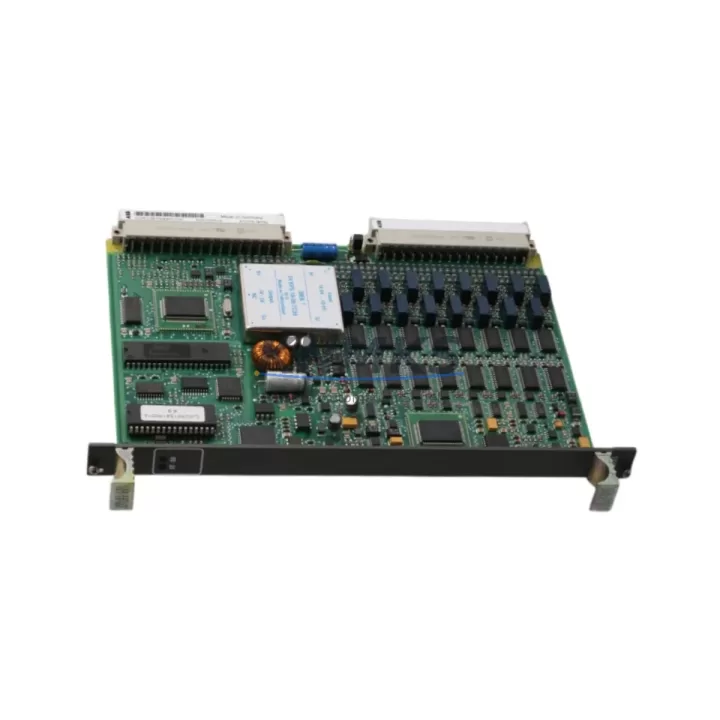
ABB GJR2391500R1210 81EU01H-E Maintenance-Proven Spare Part for Factory Uptime
The ABB GJR2391500R1210 (also identified by the variant designation 81EU01H-E) is an original digital input module designed for the ABB AC500 programmable logic controller platform — one of the most widely deployed modular PLC families in industrial automation, process control, and manufacturing environments worldwide. For maintenance engineers managing aging AC500 control cabinets, securing a verified replacement for this module is a critical step in any planned or emergency maintenance strategy. This listing provides a factory-tested, original-specification spare with a support terms confirmed by quotation and pre-shipment functional verification, ensuring your production line returns to full operation with minimal downtime.
Whether you are responding to an unplanned I/O failure, executing a scheduled annual overhaul, or building a strategic spare parts inventory for a multi-line facility, the GJR2391500R1210 represents a direct, drop-in replacement that preserves your existing wiring, configuration, and system architecture without requiring software re-engineering or hardware adaptation.
Spare Maintenance Table
| Parameter | Specification |
|---|---|
| Part Number | GJR2391500R1210 |
| Variant / Order Code | 81EU01H-E |
| Brand | ABB |
| Series | AC500 PLC Platform |
| Module Type | Digital Input Module |
| Compatible System | ABB AC500 (PM5xx / PM5xxV2 CPU families) |
| Input Channels | 16 DI (24 VDC, IEC 61131-2 Type 1/3) |
| Input Voltage | 24 VDC nominal |
| Signal Logic | Positive / Negative logic selectable |
| Backplane Interface | AC500 S500 I/O bus |
| Mounting | DIN rail via AC500 terminal unit (TB5xx series) |
| Operating Temperature | -25°C to +60°C |
| Protection Rating | IP20 |
| Origin | Germany |
| Weight | Approx. 420 g |
| Support terms | 12 Months from shipment date |
| Pre-shipment Test | Functional verification performed on every unit |
| Condition | Original spare — new or refurbished to OEM specification |
Maintenance Planning for Continuous Operation
When a GJR2391500R1210 digital input module fails or is flagged during a routine control cabinet inspection, experienced maintenance engineers know that the fault rarely exists in isolation. The AC500 platform distributes I/O across multiple modules sharing a common backplane bus, power rail, and CPU communication path. A thorough site assessment should always accompany any module replacement.
Begin by verifying the 24 VDC field power supply feeding the input channels. A degraded or undersized power supply — such as an aging ABB CP-E 24/5.0 or equivalent DIN rail PSU — can cause intermittent input signal errors that mimic module failure. Confirm output voltage under load and check for ripple before condemning the I/O module itself.
Next, inspect the terminal unit (TB511 or TB521 series) on which the GJR2391500R1210 is seated. Terminal units accumulate oxidation and mechanical wear over years of field service; a corroded or loose backplane connector will cause communication faults that persist even after module replacement. Clean or replace the terminal unit as part of the same maintenance window.
Review the adjacent I/O modules in the same rack. If the system includes analog input modules such as the AI523 or digital output modules such as the DO531, check their diagnostic LEDs and CPU error logs simultaneously. A single wiring fault on a shared 0V common can affect multiple modules across the I/O bus. Signal isolators or barriers installed between field sensors and the input module should also be tested for correct output range and isolation integrity.
For systems using the AC500 eCo or AC500-S safety variants, verify that the CPU module (PM564 or PM583 series) firmware is compatible with the replacement module hardware revision. Mismatched firmware and hardware revisions can cause the CPU to reject the module during startup. Update firmware via the Automation Builder engineering tool before commissioning the replacement.
Communication modules such as the CM572-DP (PROFIBUS DP) or CM589-PNIO (PROFINET IO) installed in the same rack should be checked for active network faults during the replacement window. A module swap that causes a brief bus interruption may trigger latched faults in the communication layer that require a controlled CPU restart to clear. Document the network topology and confirm all slave devices return to normal communication after the replacement is complete.
Finally, review the fuse and circuit protection for the 24 VDC input loop. Blade fuses or miniature circuit breakers protecting the field wiring to the GJR2391500R1210 input channels should be tested for correct rating and continuity. Replacing a failed module without checking upstream protection leaves the new spare vulnerable to the same fault condition that caused the original failure.
Site Replacement Workflow
Step 1 — Pre-replacement documentation: Before powering down, capture a photograph of the existing wiring on the terminal unit and export the current CPU program and I/O configuration from Automation Builder. This ensures you have a verified baseline to restore if any configuration discrepancy is discovered during commissioning.
Step 2 — Controlled shutdown: Place the AC500 CPU in STOP mode via the Automation Builder online interface or the local RUN/STOP switch. Confirm all output modules are de-energized and field devices are in a safe state before removing the module.
Step 3 — Module extraction: Release the GJR2391500R1210 from the terminal unit by pressing the release lever and sliding the module upward. Inspect the backplane connector pins on both the module and the terminal unit for damage or contamination before installing the replacement.
Step 4 — Replacement installation: Seat the new GJR2391500R1210 firmly onto the terminal unit until the locking lever engages. No re-wiring is required — the terminal unit retains all field connections. This is the primary advantage of the AC500 S500 I/O architecture for maintenance teams: module replacement does not disturb field wiring.
Step 5 — Power-up and verification: Restore 24 VDC field power and place the CPU in RUN mode. Confirm all 16 input channels report correct status in the Automation Builder I/O monitor. Verify that no diagnostic alarms are active in the CPU error log. Document the replacement in your maintenance management system (CMMS) with the module serial number, replacement date, and technician name.
Step 6 — Spare parts inventory update: Record the consumed spare and initiate a replenishment order to maintain your minimum stock level. For facilities operating multiple AC500 racks, a recommended minimum holding of two GJR2391500R1210 modules per site reduces the risk of extended downtime during future failures.
Spare Parts Support FAQ
Q1: Is this GJR2391500R1210 compatible with all AC500 CPU variants, including PM564, PM573, and PM583?
A: The GJR2391500R1210 is designed for the ABB AC500 S500 I/O bus and is compatible with the full range of AC500 CPU modules that support the S500 I/O platform, including PM564, PM573, PM583, and their V2 variants. Always verify the hardware revision of the replacement module against your system’s firmware version using the ABB Automation Builder compatibility matrix before installation.
Q2: What pre-shipment testing is performed on each unit?
A: Every GJR2391500R1210 unit is functionally tested prior to shipment. Testing includes verification of all 16 digital input channels, backplane communication interface integrity, and LED diagnostic indicator operation. A test report is available upon request. The support terms confirmed by quotation cover manufacturing defects and functional failures under normal operating conditions from the date of shipment.
Q3: Can this module replace older hardware revisions of the GJR2391500R1210 without software changes?
A: In most cases, yes. The GJR2391500R1210 is designed as a direct hardware replacement within the AC500 S500 I/O family. However, if the existing CPU firmware predates the hardware revision of the replacement module, a firmware update via Automation Builder may be required. We recommend confirming the hardware revision compatibility before installation, particularly for systems running firmware versions older than 2.x.
Q4: What is your long-term supply commitment for this part number?
A: We maintain ongoing stock of the GJR2391500R1210 to support long-term maintenance programs for AC500 installations. For facilities with extended service life requirements — particularly older systems where the original part has been discontinued by the OEM — we can provide sourcing support, quantity reservation agreements, and advance procurement planning. Contact our team to discuss annual blanket orders or consignment stock arrangements tailored to your maintenance schedule.
© 2026 KNMKS. All rights reserved.
Original Source: https://knmks.com
Contact: admin@knmks.com | +86 18359268345
Product Identification
- Brand / Ecosystem
-
ABB
ABB - Model / Series
-
GJR2391500R1210 81EU01H-E
AC500 Series - Product Family
- PLCs & Controllers
- Availability Status
- Available on request after model and quantity confirmation
- Inquiry Type
- B2B RFQ, replacement inquiry and project spare-part request
- Pre-Quote Check
- Exact SKU, brand, series, quantity, nameplate photos and destination country are checked before quotation
System Path
Where this product fits in the KNMKS automation structure.
Specification & Inquiry Focus
- Control platform
- PLC, PAC and modular controllers
- Common needs
- CPU, rack, power and I/O expansion
- Project support
- Replacement, cabinet build and maintenance
Buyer Confirmation
Information KNMKS checks before replying.
- Exact model
- GJR2391500R1210 81EU01H-E
- Brand / ecosystem
- ABB
- Product family
- PLCs & Controllers
- Application note
- Replacement, maintenance, project build or spare-part list
- Useful photos
- Nameplate, installed unit, cabinet layout or connector side
- Delivery details
- Quantity, destination country and target schedule
Document Support
Files and notes can be confirmed during quotation.
- Product photos or nameplate confirmation when available
- Packing and delivery notes before quotation confirmation
- Support scope and delivery terms confirmed per inquiry
- Export document coordination for qualified B2B requests
Inquiry Support
- Model cross-checking before quotation
- CPU, power, rack and expansion module matching
- Support for replacement and project inquiry
What to Send Us
- Brand and exact model number: ABB GJR2391500R1210 81EU01H-E
- Quantity and required delivery time
- Application, replacement requirement or nameplate photo
- Destination country and shipping preference
RFQ Preparation
This is a product inquiry page built for RFQ communication.
Fast Model Check
Send this model to KNMKS for confirmation.
Include quantity, destination country and photos if this is a maintenance replacement. The inquiry will be saved with a reference number after submission.
Brand & Compatibility Note
KNMKS displays automation product information for well-known industrial brand ecosystems and compatible replacement references. Brand names are used for product identification and compatibility reference only; final availability and commercial terms are confirmed per quotation.
 Manufacturing
 Machine Tools
 Packaging
 Energy & Power



 HMI & Displays
 Servo Systems
 Variable Frequency Drives
 Sensors