
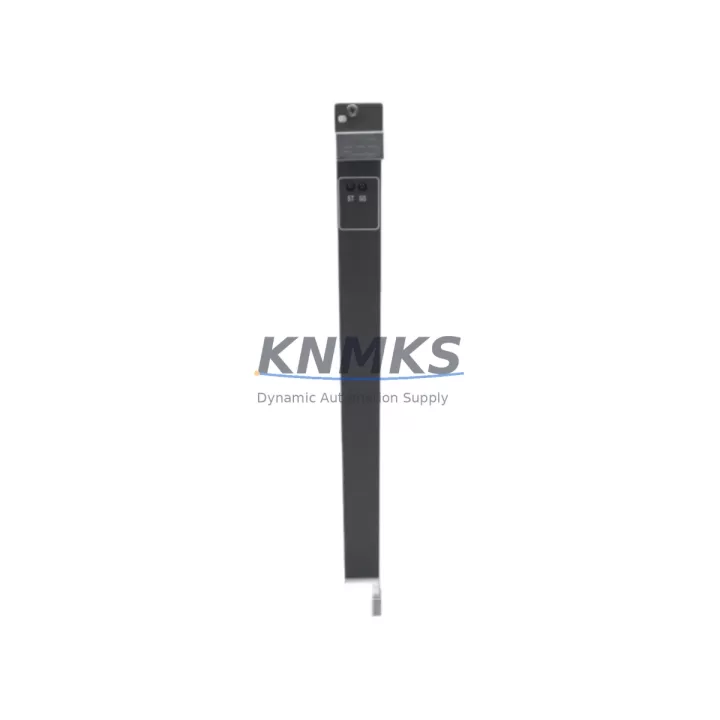
Overview
ABB GJR2389800R1210 81ET03N-E Spare Part AC500: Maintenance-Proven for Factory Uptime
The ABB GJR2389800R1210 (also identified as 81ET03N-E) is an original temperature input module designed for the ABB AC500 PLC series — one of the most widely deployed programmable logic controller platforms in process automation, power distribution, and discrete manufacturing environments. For maintenance engineers managing aging control systems or procurement teams building strategic spare parts inventories, this module represents a critical line item: a verified, original-source component that ensures seamless integration without firmware conflicts, signal calibration drift, or compatibility surprises.
When a temperature input channel fails on an AC500 rack, the consequences extend far beyond a single I/O point. Process variables go blind, safety interlocks may trip, and production lines halt. Having a pre-tested GJR2389800R1210 on the shelf — verified, labeled, and ready to install — is the difference between a 20-minute swap and a multi-day outage waiting for emergency freight. KNMKS supplies this module with full functional testing prior to shipment, a support terms confirmed by quotation, and long-term availability support for customers running extended maintenance cycles on legacy AC500 installations.
Spare Maintenance Table
| Parameter | Specification |
|---|---|
| Part Number | GJR2389800R1210 |
| Alternate ID | 81ET03N-E |
| Brand | ABB |
| Series | AC500 |
| Module Type | Temperature Input Module |
| Origin | Germany (DE) |
| Input Channels | Multi-channel RTD/Thermocouple (PT100, PT1000, NI100, TC types) |
| Signal Range | Per channel configurable via AC500 CPU programming tool |
| Backplane Compatibility | AC500 S500 I/O bus; compatible with PM5xx, PM5x5 CPU modules |
| Installation | DIN rail / AC500 backplane slot mounting |
| Operating Temperature | -25°C to +60°C (standard industrial range) |
| Protection Class | IP20 |
| Weight | Approx. 500 g (with packaging) |
| Maintenance Recommendation | Inspect terminal connections annually; verify channel calibration during scheduled shutdowns |
| Support terms | 12 Months — Covered by KNMKS quality guarantee |
| Pre-shipment Testing | Full functional test performed before dispatch |
| Availability | Long-term supply supported for legacy AC500 systems |
Maintenance Planning for Continuous Operation
Replacing the GJR2389800R1210 in the field is rarely an isolated task. A disciplined maintenance engineer will treat this module swap as an opportunity to audit the surrounding electrical environment and prevent the next unplanned stoppage. Begin with the AC500 power supply module — typically a CP-E series unit — to confirm output voltage stability and ripple within specification, since degraded DC bus quality is a leading cause of premature I/O module failure. Next, inspect the S500 backplane or terminal unit (TU5xx series) for oxidized contacts, loose locking tabs, or mechanical stress from repeated insertions.
On the signal side, verify that all RTD or thermocouple wiring to the terminal block is correctly shielded and grounded. Unshielded sensor cables running parallel to power conductors are a common source of measurement noise that can mask genuine process deviations or trigger nuisance alarms. If the installation uses signal isolators between field sensors and the GJR2389800R1210 input terminals, confirm that the isolator output range matches the module’s configured input type — a mismatch here will produce systematic temperature offset errors that are difficult to diagnose remotely.
While the control cabinet is open, this is also the right moment to inspect adjacent I/O modules sharing the same AC500 rack — digital input modules such as the DI524 or analog output modules like the AO523 — for signs of overheating, discoloration, or loose field wiring. Check the 24 VDC field power fuses and circuit breakers supplying the I/O bus; a marginal fuse that hasn’t blown yet can cause intermittent module resets that are misdiagnosed as firmware or communication issues. If the system uses a CM572-DP PROFIBUS communication module or a CM589-PNIO PROFINET adapter, verify that the network diagnostic LEDs show no persistent fault states, as communication errors during a module replacement can complicate the recommissioning sequence. Finally, review the CPU module’s (PM583 or PM591) event log for any prior fault codes associated with the temperature input channels — this history often reveals whether the failure was sudden or progressive, informing your spare parts stocking strategy going forward.
Site Replacement Workflow
Before removing the failed GJR2389800R1210, document the current channel configuration — input type, range, filter settings, and engineering unit scaling — either from the AC500 project file in Automation Builder or from a printed configuration record. If the project file is unavailable, photograph the existing wiring and note the terminal assignments before disconnecting any field cables.
Power down the affected I/O segment following your site’s lockout/tagout procedure. Remove the module from the backplane slot, taking care not to bend the bus connector pins. Insert the replacement GJR2389800R1210, ensuring the locking lever clicks fully into position. Reconnect field wiring per the documented terminal layout. Restore power and observe the module’s status LED — a steady green indicates successful backplane communication. Download the existing project to the CPU (or confirm the CPU retains the configuration in flash memory) and verify that all temperature channels report plausible values before releasing the process back to automatic control.
For sites running older AC500 firmware versions, confirm that the replacement module’s hardware revision is compatible with the installed CPU firmware. KNMKS can provide hardware revision details upon request to support compatibility verification before shipment, eliminating the risk of a revision mismatch causing a second delay on the day of installation.
Spare Parts Support FAQ
Q1: How long will KNMKS be able to supply the GJR2389800R1210 for legacy AC500 systems?
KNMKS maintains long-term sourcing relationships specifically to support customers running extended lifecycle programs on discontinued or end-of-life ABB AC500 hardware. We actively stock and source GJR2389800R1210 units and can advise on minimum order quantities for multi-year maintenance contracts. Contact admin@knmks.com to discuss your long-term supply requirements.
Q2: What pre-shipment testing is performed on each GJR2389800R1210 unit?
Every unit undergoes full functional testing before dispatch, including backplane communication verification and channel input response checks. A test report is available upon request. All units are shipped with a support terms confirmed by quotation covering manufacturing defects and functional failures under normal operating conditions.
Q3: Can the GJR2389800R1210 replace older temperature input modules from earlier AC500 generations?
Compatibility depends on the specific CPU firmware version and backplane generation in your installation. The GJR2389800R1210 (81ET03N-E) is designed for the S500 I/O bus architecture. KNMKS recommends providing your CPU part number and firmware version so we can confirm compatibility before shipment, reducing the risk of a field incompatibility.
Q4: What is the recommended spare parts stocking strategy for AC500 temperature input modules?
For critical process lines, maintenance best practice is to hold a minimum of one spare GJR2389800R1210 per installed rack, with an additional buffer unit for sites with more than three racks. Annual consumption data from your CMMS should guide reorder points. KNMKS can support blanket purchase orders and scheduled delivery programs to align spare parts replenishment with your annual maintenance budget cycle.
© 2026 KNMKS. All rights reserved.
Original Source: https://knmks.com
Contact: admin@knmks.com | +86 18359268345
Product Identification
- Brand / Ecosystem
-
ABB
ABB - Model / Series
-
GJR2389800R1210 81ET03N-E
AC500 Series - Product Family
- PLCs & Controllers
- Availability Status
- Available on request after model and quantity confirmation
- Inquiry Type
- B2B RFQ, replacement inquiry and project spare-part request
- Pre-Quote Check
- Exact SKU, brand, series, quantity, nameplate photos and destination country are checked before quotation
System Path
Where this product fits in the KNMKS automation structure.
Specification & Inquiry Focus
- Control platform
- PLC, PAC and modular controllers
- Common needs
- CPU, rack, power and I/O expansion
- Project support
- Replacement, cabinet build and maintenance
Buyer Confirmation
Information KNMKS checks before replying.
- Exact model
- GJR2389800R1210 81ET03N-E
- Brand / ecosystem
- ABB
- Product family
- PLCs & Controllers
- Application note
- Replacement, maintenance, project build or spare-part list
- Useful photos
- Nameplate, installed unit, cabinet layout or connector side
- Delivery details
- Quantity, destination country and target schedule
Document Support
Files and notes can be confirmed during quotation.
- Product photos or nameplate confirmation when available
- Packing and delivery notes before quotation confirmation
- Support scope and delivery terms confirmed per inquiry
- Export document coordination for qualified B2B requests
Inquiry Support
- Model cross-checking before quotation
- CPU, power, rack and expansion module matching
- Support for replacement and project inquiry
What to Send Us
- Brand and exact model number: ABB GJR2389800R1210 81ET03N-E
- Quantity and required delivery time
- Application, replacement requirement or nameplate photo
- Destination country and shipping preference
RFQ Preparation
This is a product inquiry page built for RFQ communication.
Fast Model Check
Send this model to KNMKS for confirmation.
Include quantity, destination country and photos if this is a maintenance replacement. The inquiry will be saved with a reference number after submission.
Brand & Compatibility Note
KNMKS displays automation product information for well-known industrial brand ecosystems and compatible replacement references. Brand names are used for product identification and compatibility reference only; final availability and commercial terms are confirmed per quotation.
 Manufacturing
 Machine Tools
 Packaging
 Energy & Power



 HMI & Displays
 Servo Systems
 Variable Frequency Drives
 Sensors